
Free Social Media Management Extension: Analyze Accounts, Download Subtitles, and Translate Comments
When you run social media for overseas markets, situations like these come up all the time:
You find an account that is performing well and want to see what it has posted recently and which videos have strong data. You discover a creator who may be worth collaborating with and want to judge the account's real performance. You see a good video and want to study its topic, voiceover, and comment feedback.
But once you actually start researching, scrolling through posts, recording data, and organizing subtitles can take a lot of time.
Now, the new free SocialEcho browser extension is live.
From account research to content breakdowns and daily engagement, it helps you complete more social media operations while browsing overseas social content.
1. Open a profile and understand the account faster
When researching an overseas social media account, the most time-consuming part is often not finding the account, but understanding it clearly.
Follower count is easy to see, but how is the account's overall view performance? How often does it usually post? Which videos stand out? If you need to screen a group of creators or study multiple competitors, checking posts one by one and recording data manually makes it hard to complete an initial evaluation quickly.
The free SocialEcho extension can show overall account data and each post's performance directly on the social media profile page, giving account research a clearer data reference.
Overall data is calculated automatically, so you can understand account performance quickly
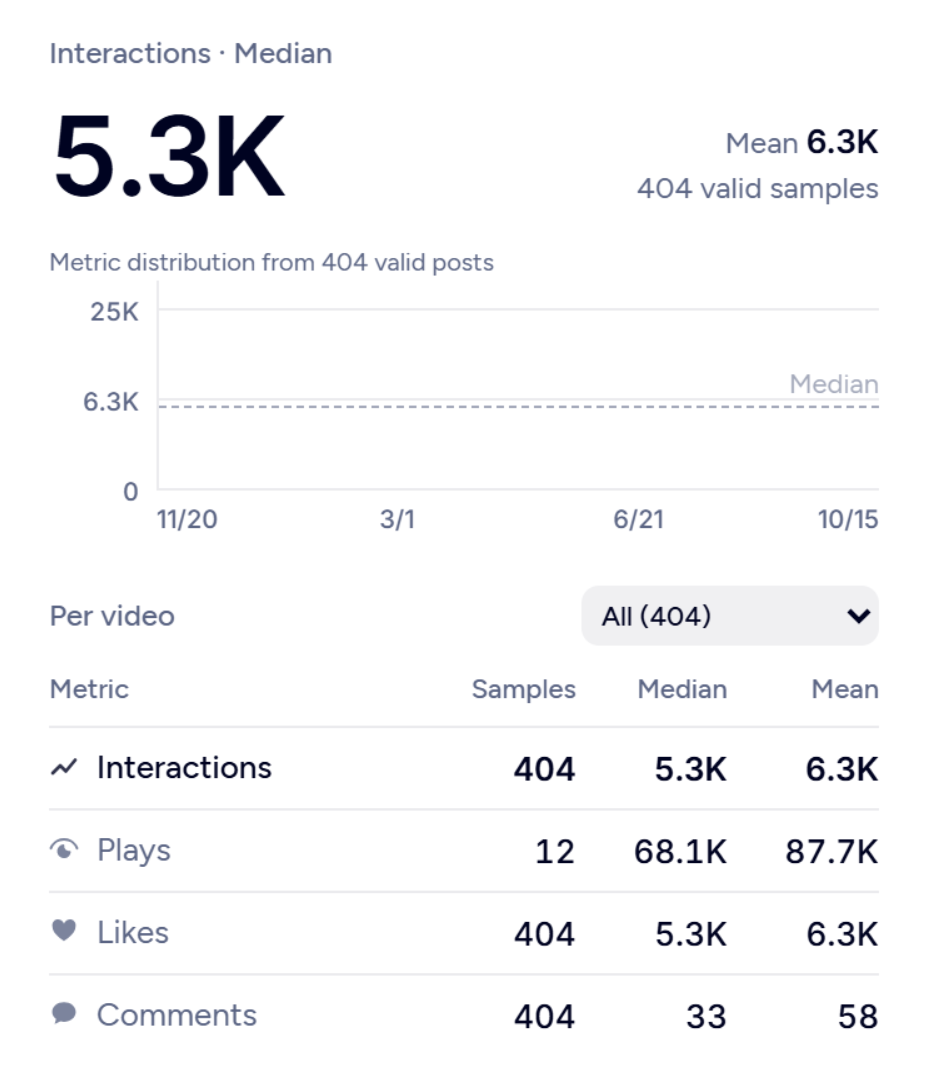
Open an account profile and you can view data such as followers, number of posts, total views, median views, average views, and engagement rate.
Related metrics are calculated automatically and presented in one place. You do not need to record posts one by one and summarize them manually. If you want to understand an account's overall performance, these metrics are a good starting point.
This is useful for both competitor research and creator screening.
When researching competitors, you can first understand the other account's overall performance, then decide which content directions are worth studying further.
When screening creators, you can also check metrics such as median views and average views first, then combine them with specific post performance for an initial evaluation instead of judging only by follower count or by one viral video.
Compare content performance from the profile without opening posts one by one
After understanding overall performance, the next question is: which specific pieces of content performed well?
In the past, account research often meant opening videos one by one, checking views and engagement data, then recording the results for comparison. When there are many accounts, this process repeats again and again.
The SocialEcho extension can show each post's views, likes, comments, shares, saves, and other data directly on the profile page. You do not need to enter every video to check it. You can also sort by views, engagement, and other dimensions to quickly find content worth studying further.
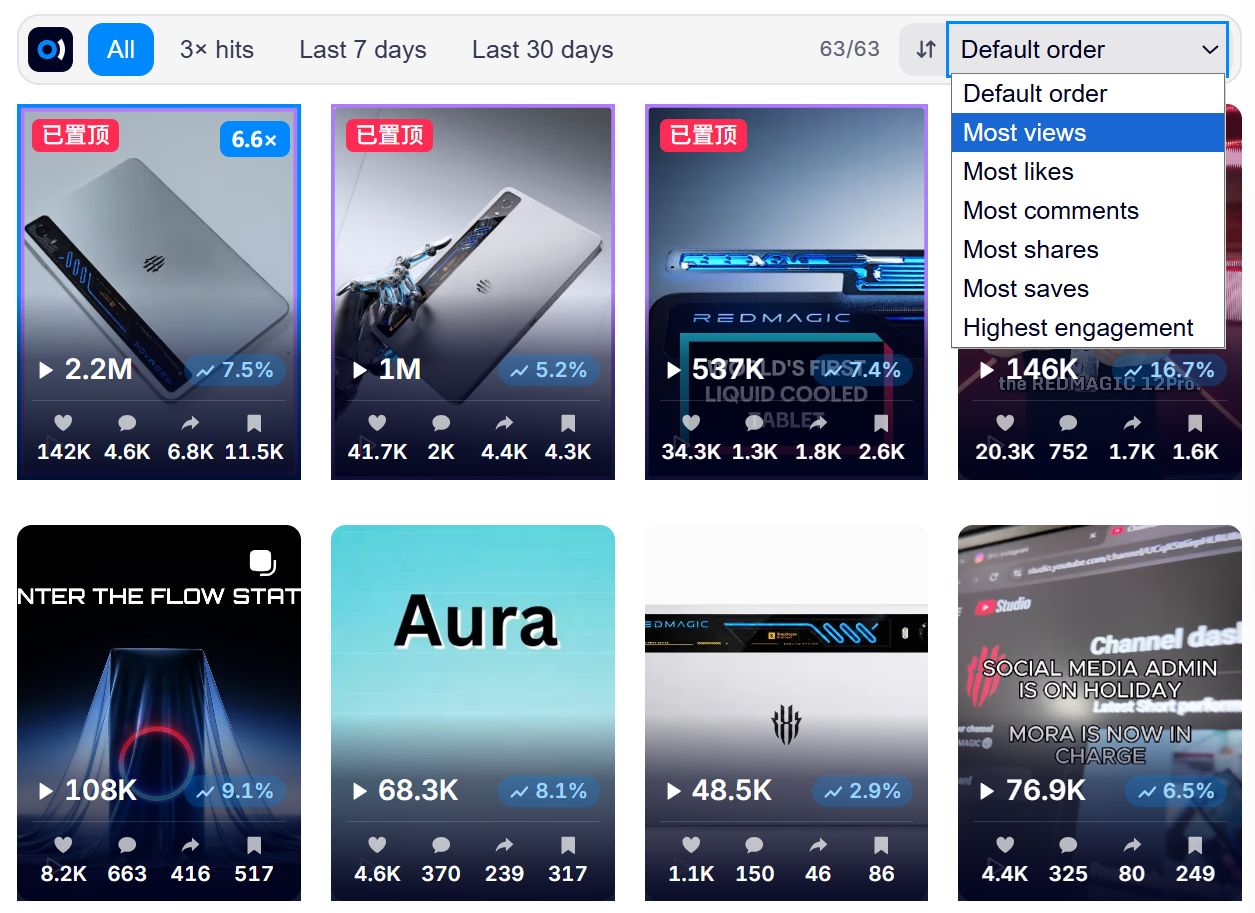
For example, when researching an account from a similar brand, you can first filter out content with strong view performance, then look at what those videos talk about, what titles they use, and which themes they focus on.
If you are screening creators, you can continue comparing different posts to understand whether the account's content performance is stable and use that as a reference for later collaboration evaluation.
From single posts to posting patterns, research becomes more focused
Beyond overall account data and individual post performance, the extension also supports video length distribution, posting frequency, posting time, best posting time, and content keywords.
These details can help answer practical questions: how long are the videos this account usually posts? What is its update rhythm? Which topics appear repeatedly? Which posting time slots are worth watching more closely?
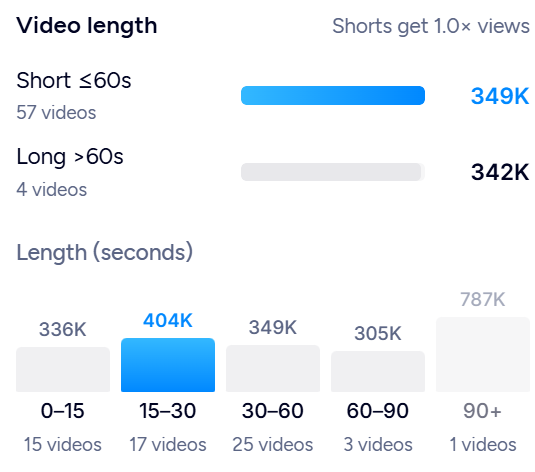
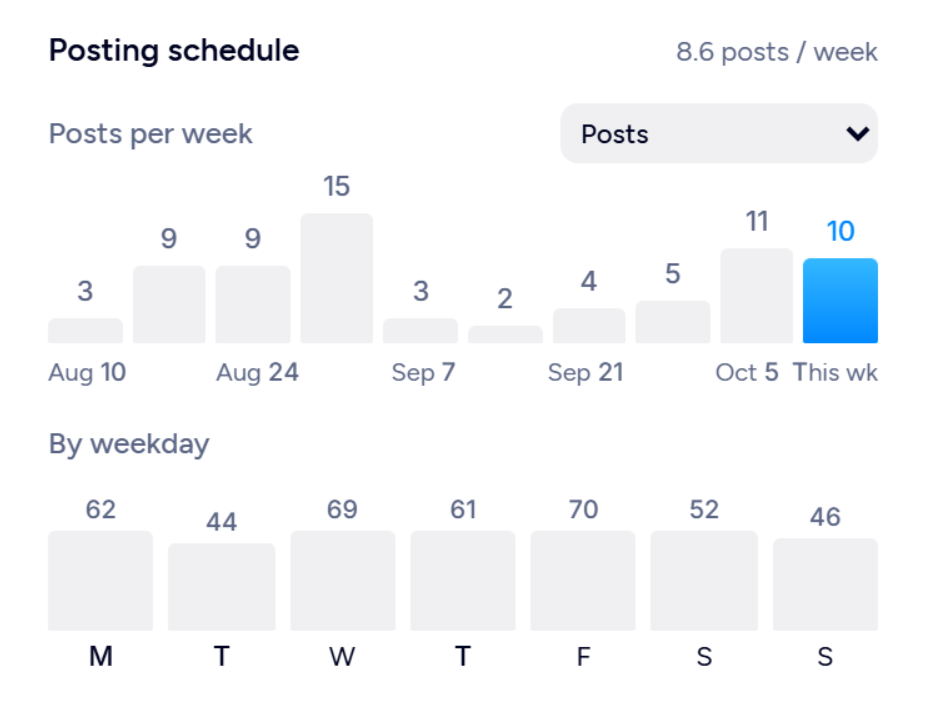
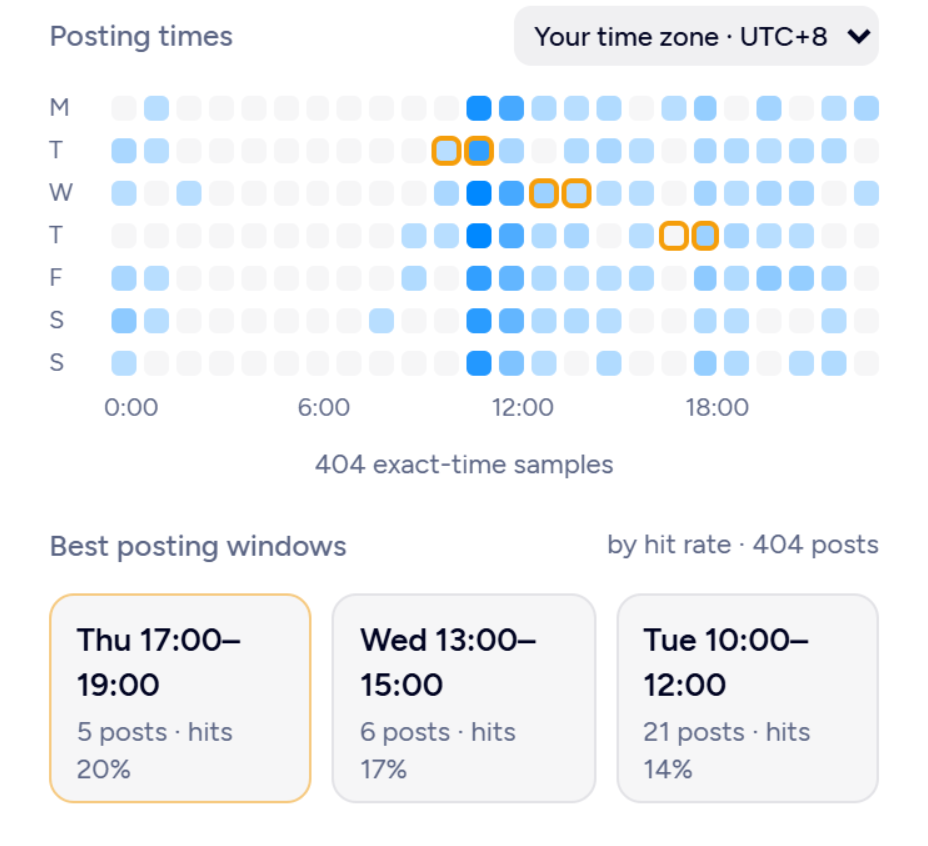
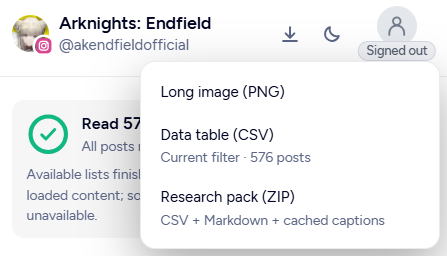
After finishing research, you can also export a long image, CSV data table, and research package. The package includes data, titles, copy, and subtitles, making it easier to organize, compare, and review later.
After logging in to SocialEcho, you can also compare the research target with your own social media account, giving you a reference for later content strategy adjustments.
From overall account performance to specific posts, posting patterns, and research exports, the whole research process becomes more visual and makes it easier to turn information found during casual browsing into usable material.
2. When you find a good video, get subtitles along the way
Data can tell you which videos are worth watching, but if you want to truly study a video, you still need to understand what it says and how it says it.
How does the opening attract viewers? How are product selling points presented? What expressions does the voiceover use? These details are often more useful than simply writing down a topic.
For example, why does a product introduction video attract viewers? How does it bring out user needs? Which selling-point phrases appear in the voiceover? These details are often worth reviewing repeatedly.
If the video does not have copy that can be easily copied, organizing it becomes less convenient. Manual note-taking requires repeated pausing. If the voiceover is in another language, you also need to handle comprehension and translation.
The SocialEcho extension supports extracting existing video subtitles, making it easier to view, translate, and save video content.
You can view subtitles, click a line to jump to the corresponding moment in the video, and study the exact expression alongside the original video. Subtitles also support translation and can be exported as TXT, SRT, or images for later organization.
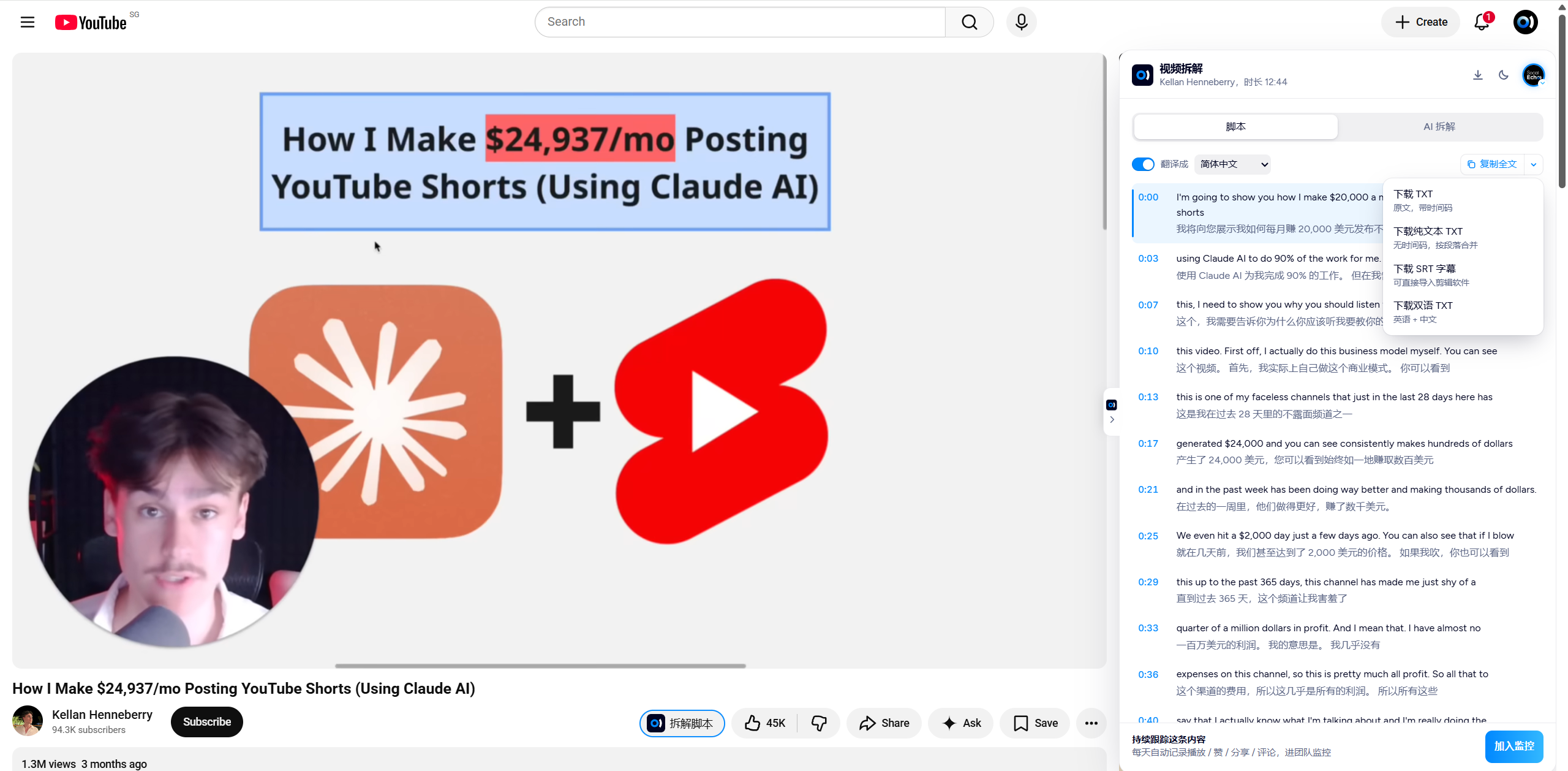
For example, when studying a product introduction video, you can separate the opening, product selling points, and closing call-to-action as references for later script planning.
For teams that continuously create overseas content, this also makes it easier to turn good content that has already been discovered into searchable research material instead of forgetting it after watching.
3. Understand overseas comments and translate replies more smoothly
Beyond the video itself, the comment section often contains information worth paying attention to.
What are users asking? What questions do they have about the product? What feedback do they give about a feature or selling point? These signals help operators understand the audience and provide references for later content topics.
But with foreign-language comments, understanding the content and organizing replies can require several steps: translate the comment, judge what the person means, then draft a reply and handle language conversion.
The SocialEcho extension supports comment translation and reply translation, making it easier to understand comments and organize responses while handling engagement.
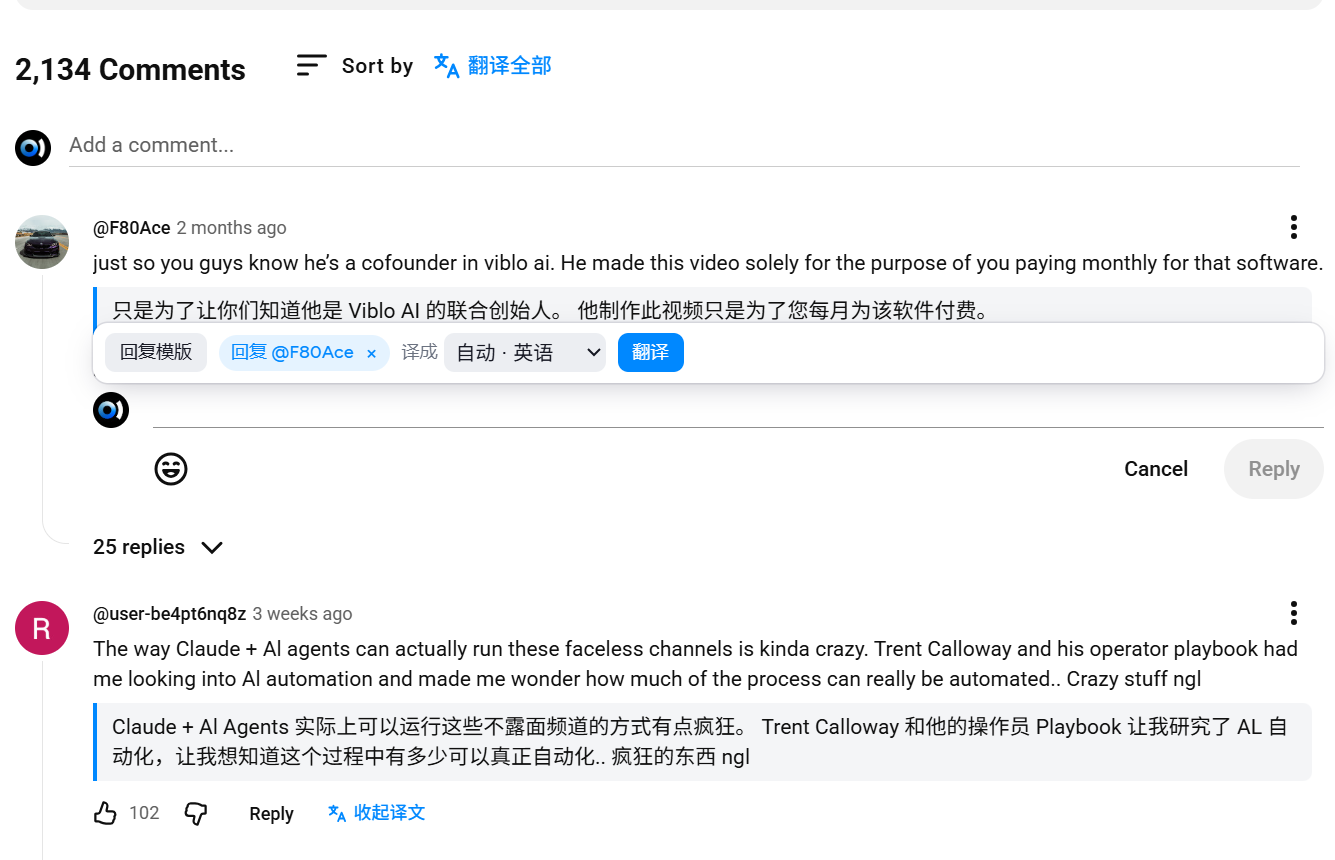
If your team has already organized common comment reply templates in SocialEcho, you can log in and call existing templates for faster replies.
For example, when repeated product questions appear, you can first find a suitable template, then check and adjust it according to the specific comment before sending it manually.
For operators who need to handle multilingual comments while keeping team replies consistent, this reduces repetitive reply drafting and makes daily engagement easier.
4. Install the free SocialEcho browser extension
Account research, video breakdowns, and comment engagement may look like three different tasks, but they often happen in the same workflow.
You may first open a competitor account to check overall data and post performance, then find a video worth studying and continue reviewing subtitles and voiceover expressions, and finally check the comment section to understand audience feedback.
The free SocialEcho browser extension helps you bring these actions more naturally into daily browsing.
- Account research: Automatically calculate overall data, view each post's performance directly, analyze posting patterns, and compare with your own account.
- Video research: Extract existing subtitles, translate content, jump to video segments, and export script material.
- Comment engagement: Translate comments and replies, and after logging in to SocialEcho, call existing comment reply templates.
How do you install the SocialEcho extension?
Installation only takes a few simple steps:
Step 1: Open the Chrome Web Store
Click the SocialEcho extension to enter the installation page.
Step 2: Add to Chrome
Click "Add to Chrome" and follow the browser prompts to complete installation.
Step 3: Open a social media platform and use it
Go to TikTok, YouTube, or Instagram, open the extension, and use the corresponding content analysis, data view, or reply support features based on the current page.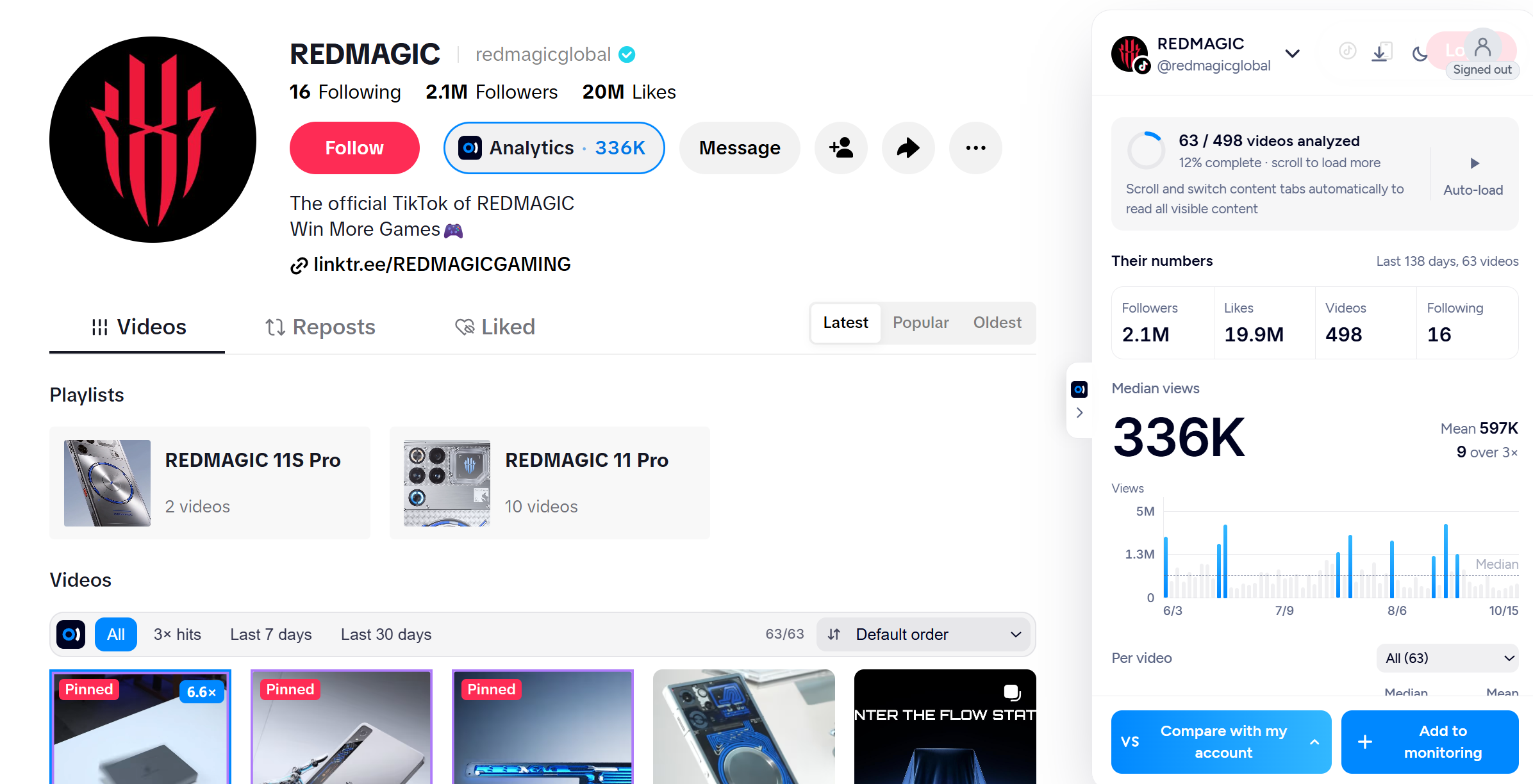
;}.cls-2{fill:%230868f7;}.cls-3{fill:url(%23未命名的渐变_44);}.cls-4{fill:%23333;}%3c/style%3e%3clinearGradient%20id='未命名的渐变_8'%20x1='33.73'%20y1='100.61'%20x2='-0.03'%20y2='-1.06'%20gradientUnits='userSpaceOnUse'%3e%3cstop%20offset='0'%20stop-color='%237ae9fb'/%3e%3cstop%20offset='0.67'%20stop-color='%232b90f8'/%3e%3cstop%20offset='1'%20stop-color='%230868f7'/%3e%3c/linearGradient%3e%3clinearGradient%20id='未命名的渐变_44'%20x1='27.86'%20y1='18.67'%20x2='68.36'%20y2='22.22'%20gradientUnits='userSpaceOnUse'%3e%3cstop%20offset='0'%20stop-color='%235ac7f2'/%3e%3cstop%20offset='1'%20stop-color='%230868f7'/%3e%3c/linearGradient%3e%3c/defs%3e%3cpath%20class='cls-1'%20d='M29,28.74V81.91l-9.51-3.68v0L8.52,74A7.17,7.17,0,0,1,4,67.32V24.54A3.76,3.76,0,0,1,9.08,21Z'/%3e%3cpath%20class='cls-2'%20d='M68.09,78.07a13.15,13.15,0,0,1-17.9,12.06L29,81.91h0V28.74L50.19,37A13.17,13.17,0,0,0,68.08,25.3h0Z'/%3e%3cpath%20class='cls-3'%20d='M68.08,25.3a13.19,13.19,0,0,1-6.73,10.87A13.09,13.09,0,0,1,50.19,37L29,28.74V6A3.76,3.76,0,0,1,34.1,2.52l25.59,9.91A13.22,13.22,0,0,1,68.08,25.3Z'/%3e%3cpath%20class='cls-4'%20d='M129.06,81.76a4.33,4.33,0,0,1-3.19-1.31,4.4,4.4,0,0,1-1.31-3.24V56.86H97.65V77.21a4.36,4.36,0,0,1-1.35,3.2A4.68,4.68,0,0,1,93,81.76a4.32,4.32,0,0,1-3.19-1.31,4.37,4.37,0,0,1-1.32-3.24V27.27A4.58,4.58,0,0,1,89.83,24a4.59,4.59,0,0,1,7.82,3.27V48.15h26.91V27.27A4.58,4.58,0,0,1,125.91,24a4.59,4.59,0,0,1,7.82,3.27V77.21a4.37,4.37,0,0,1-1.36,3.2A4.65,4.65,0,0,1,129.06,81.76Z'/%3e%3cpath%20class='cls-4'%20d='M163.77,81.66c-6.57,0-11.76-1.92-15.44-5.7s-5.54-9.07-5.54-15.74a26.76,26.76,0,0,1,2.09-10.43,17.72,17.72,0,0,1,6.67-8.06,19.15,19.15,0,0,1,10.68-2.95,19,19,0,0,1,10.46,2.8,18.7,18.7,0,0,1,6.55,7.36,22.53,22.53,0,0,1,2.36,10.28A4.51,4.51,0,0,1,177,63.77H152.23a10.8,10.8,0,0,0,3.49,6.65c2,1.68,4.88,2.52,8.66,2.52a22.25,22.25,0,0,0,7.54-1.21c.74-.3,1.55-.67,2.37-1.07a3.75,3.75,0,0,1,1.84-.4,4.09,4.09,0,0,1,3,1.15,4,4,0,0,1,1.12,3,4.38,4.38,0,0,1-2.58,3.82,32.34,32.34,0,0,1-6.36,2.61A28.67,28.67,0,0,1,163.77,81.66ZM172.4,55.9a9.72,9.72,0,0,0-1.63-4.56A9.9,9.9,0,0,0,167,48a10.38,10.38,0,0,0-4.64-1.14,12,12,0,0,0-4.77,1.06,9.54,9.54,0,0,0-4.89,5.66,11.78,11.78,0,0,0-.51,2.3Z'/%3e%3cpath%20class='cls-4'%20d='M193,81.64a4.49,4.49,0,0,1-4.51-4.55V27.28A4.58,4.58,0,0,1,189.84,24a4.48,4.48,0,0,1,3.28-1.36A4.36,4.36,0,0,1,196.35,24a4.46,4.46,0,0,1,1.31,3.31V77.09a4.34,4.34,0,0,1-1.35,3.2A4.67,4.67,0,0,1,193,81.64Z'/%3e%3cpath%20class='cls-4'%20d='M263.79,81.71a5.7,5.7,0,0,1-4.2-1.74,5.76,5.76,0,0,1-1.73-4.19V27.37a4.58,4.58,0,0,1,1.35-3.27A4.59,4.59,0,0,1,267,27.37V72.53h24a4.58,4.58,0,0,1,3.27,7.82A4.66,4.66,0,0,1,291,81.71Z'/%3e%3cpath%20class='cls-4'%20d='M424.48,81.74a4.71,4.71,0,0,1-2.71-.88,5.43,5.43,0,0,1-1-1l-.07-.09-12.41-17-5.41,5v9.44a4.31,4.31,0,0,1-1.36,3.19,4.66,4.66,0,0,1-3.3,1.36A4.29,4.29,0,0,1,395,80.42a4.36,4.36,0,0,1-1.32-3.23V27.37A4.58,4.58,0,0,1,395,24.1a4.52,4.52,0,0,1,6.58.12,4.54,4.54,0,0,1,1.24,3.15V56.31l17.72-16.38.05,0a4.8,4.8,0,0,1,2.94-1.11,4.4,4.4,0,0,1,3.27,1.2,4.57,4.57,0,0,1,1.2,3.27,4.44,4.44,0,0,1-.77,2.33,7.45,7.45,0,0,1-1.43,1.65l-11,9.64,13.34,17.68a5,5,0,0,1,1,2.71,4.12,4.12,0,0,1-1.36,3.24A4.64,4.64,0,0,1,424.48,81.74Z'/%3e%3cpath%20class='cls-4'%20d='M317.93,81.76a21.5,21.5,0,1,1,21.17-21.5A21.37,21.37,0,0,1,317.93,81.76Zm0-34.1a12.61,12.61,0,1,0,12.42,12.6A12.52,12.52,0,0,0,317.93,47.66Z'/%3e%3cpath%20class='cls-4'%20d='M212.18,101.22a4.12,4.12,0,0,1-3.05-1.26,4.17,4.17,0,0,1-1.26-3.1V43.34a4.37,4.37,0,0,1,1.3-3.14,4.26,4.26,0,0,1,3.13-1.3,4.19,4.19,0,0,1,3.1,1.26,4.32,4.32,0,0,1,1.26,3.16,20.77,20.77,0,0,1,13-4.54,21.51,21.51,0,0,1,0,43,20.51,20.51,0,0,1-13-4.57V96.86a4.15,4.15,0,0,1-1.3,3.06A4.5,4.5,0,0,1,212.18,101.22Zm17.43-53.63c-6.23,0-12.93,4.11-12.93,12.72a12.73,12.73,0,0,0,25.46,0A12.71,12.71,0,0,0,229.61,47.59Z'/%3e%3cpath%20class='cls-4'%20d='M365.76,81.76a21.5,21.5,0,1,1,21.18-21.5A21.37,21.37,0,0,1,365.76,81.76Zm0-34.1a12.61,12.61,0,1,0,12.42,12.6A12.52,12.52,0,0,0,365.76,47.66Z'/%3e%3c/svg%3e)