
Telegram Verification Code Not Received? Do this security checklist before retrying.
Telegram Verification Code Not Received? Do this security checklist before retrying.
At 3 PM, Xiao Zhou, a newcomer on the outsourced operations team, stared at his phone screen. A client in the group chat was urging him to "get the Telegram group up and running today." He had already clicked "resend" three times, but the SMS still hadn't arrived. So he searched for "Telegram verification code not received ." The more he searched, the more anxious he became, only to find the page filled with various seemingly quick solutions. His supervisor stopped him: "Don't click anymore, let's check the checklist." This saved them. Many "Telegram code not sending" or Telegram SMS problems aren't solved by clicking faster, but by a more methodical and thorough troubleshooting process.
This article is a security checklist. It's suitable for individual users, as well as brands, KOL teams, and social media management companies. The goal isn't to promise immediate verification codes, but rather to reduce erroneous operations, account risks, and subsequent operational chaos.

First, make a judgment: Are you currently "waiting for a text message" or "creating an anomaly"?
When a Telegram verification code hasn't arrived, the most natural reaction is to click again. However, from a system perspective, multiple requests within a short period, switching devices, switching networks, and changing the number format can all appear as abnormal behavior. This is especially true in team collaboration scenarios: Xiao Zhou clicked twice, another colleague tried once on their computer, the customer also tried once, and in the end, everyone said, "I just tried it once." The system sees the same number being requested consecutively.
Therefore, the first principle is: stop continuous requests. Record the time of the last request to allow at least some buffer time for the SMS channel and system to make their judgments. Next, check in sequence; do not try and modify as you go.
For businesses, a Telegram account is not an isolated entry point. After successful registration, you might need to integrate it with SocialEcho for unified handling of comments and user intent, or you might use it to schedule cross-platform announcements through content publishing . The more important the subsequent use, the less you should start with chaotic actions during the registration phase.
Troubleshooting 1: Is the number format correct?
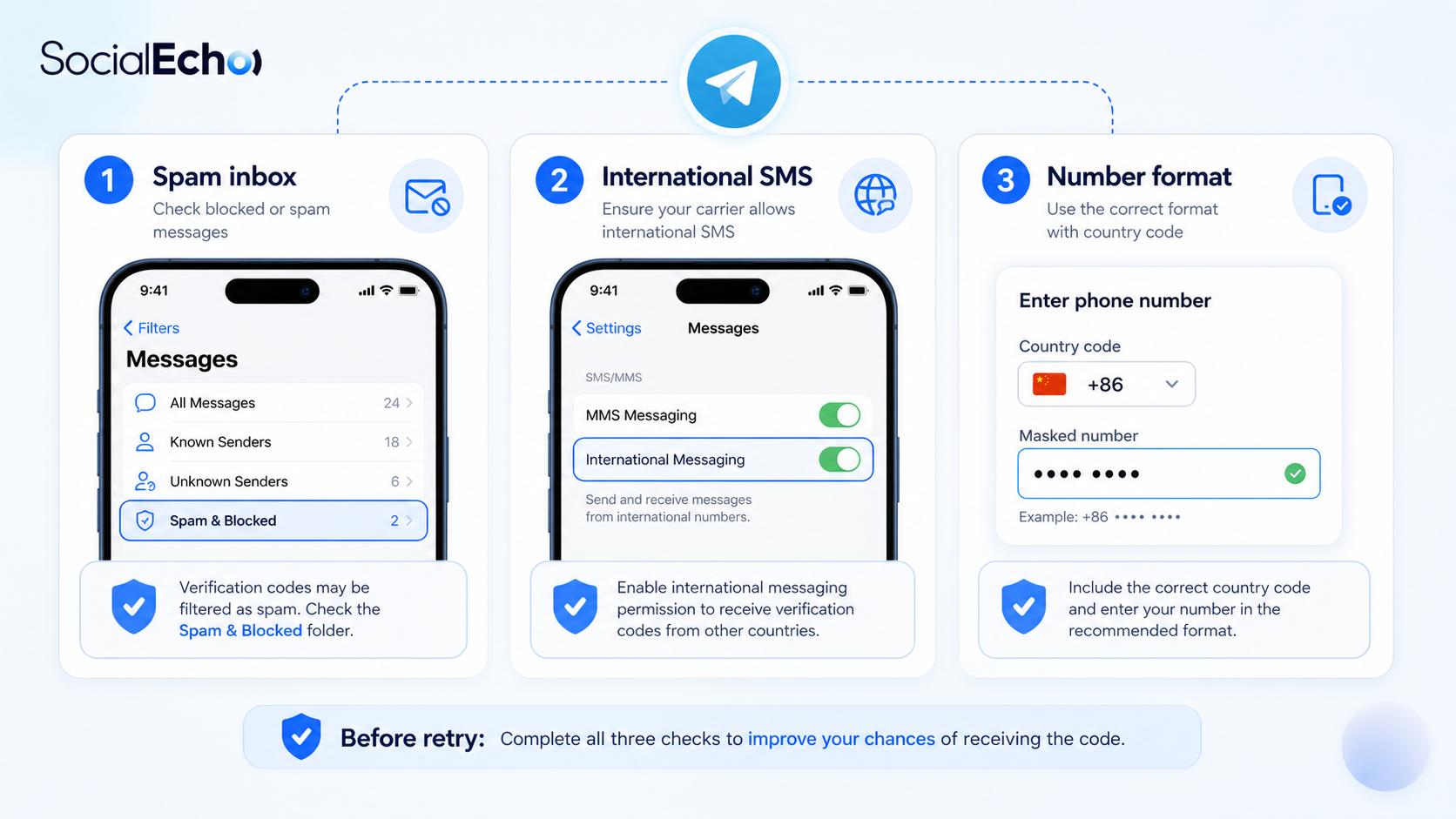
Number format is the most basic yet most easily overlooked issue. Please ensure the country code is correct and that the phone number does not contain extra spaces, leading zeros, or symbols copied from the address book. Many people assume they are entering the same number, but in reality, one time they include the country code and the other time they don't; one time they use the format from their contacts and the other time they enter it manually. For Telegram, this may represent different request contexts.
If it's a business number, it's best to have one person in charge enter it consistently, rather than having multiple people take turns trying. Record the "number, country code, request time, and device." Xiao Zhou's team later discovered that their first failure was due to invisible spaces included when copying the number, which were difficult to see with the naked eye.
Troubleshooting 2: Is the SMS message being blocked or delayed?
"Telegram verification code not received" does not necessarily mean Telegram did not send the message. The SMS may have been identified as a notification by the system and ended up in spam, the blocker, carrier assistants, or the backend of corporate numbers. Android users should especially check SMS permissions, blocking rules, and security software; iPhone users should also check their unknown sender filters.
If you are using a business number, you also need to confirm whether the number can receive international SMS messages or service-related SMS messages. Don't just use "can receive regular SMS messages" as a basis for judgment. The routing of verification code SMS messages is not exactly the same as that of regular contact SMS messages.
Troubleshooting 3: Is the network and device time stable?
Telegram registration involves both SMS messages and communication between the client and server. When the network is unstable, the verification code request may have already been sent, but the client status may not have updated in time; incorrect device time may also cause verification issues. Please set your device time to automatic synchronization, maintain a stable network, and avoid repeatedly switching between Wi-Fi, mobile data, or proxy environments during a single verification process.
If you're operating on the company network and your colleagues are saying that some overseas services are unstable, then resolve the issue of access stability first. Don't mistake network problems for phone number problems. Stable access to official services is a prerequisite for registration.
Troubleshooting 4: Confirm that you are using the official client.
Search results for "Telegram code not sending" often include various download pages, instruction pages, and advertisements. You need to confirm that you are using the official Telegram app or website, and not a client installed from an unknown link. Clients from unknown sources may not only affect the verification code process but also pose account security risks.
The safety precautions are simple: return to the official source to reconfirm the version. If you have already entered your phone number or verification code on an unofficial page, it is recommended that you stop immediately and assess whether you need to change your registration information or strengthen your account security settings.
Troubleshooting 5: Retry Intervals and Team Collaboration Rules
If you haven't received the verification code after completing the above checks, you can wait a while and try again. Only one person should handle each retry; do not have multiple people working simultaneously. Record the time, device, and result of each retry. The more urgent the team's situation, the more crucial it is for one person to make the decision-making.
After successful registration, the operation and management process should begin immediately. Use data analytics to track performance across multiple platforms, use social media monitoring to capture brand discussions, and use AI automation to reduce the pressure of repetitive categorization and responses. The verification code is merely the entry point; subsequent processes determine whether the account is truly usable.

A safety checklist that you can follow directly
- Stop continuous clicks and resend; record the time of the last request.
- Check the country code, mobile phone number, spaces, and copy symbols.
- Check SMS block boxes, unknown senders, and carrier restrictions.
- Confirm that the device time will automatically synchronize.
- Maintain a stable network connection and avoid frequently switching environments during verification.
- The client has been confirmed to be from official Telegram channels.
- Only one person is assigned to retry and record the result.
- After successful registration, two-step verification and device check will be initiated immediately.
The value of this checklist lies not in its complexity, but in transforming the team from "frantic attempts" to "retrospective and traceable analysis." Xiao Zhou later posted it in the project group announcement, so when clients pressed for updates, he could clearly reply: "We have completed the number check, SMS interception check, and network check. The next retry will be performed by a specific person at a certain time."
FAQ: What should I do if I don't receive the Telegram verification code?
1. What are the most common reasons for "Telegram verification code not received"?
Common causes include incorrect number format, SMS blocking, international SMS delays, unstable network, abnormal device time, unknown official client source, and frequent retries within a short period of time.
2. If a Telegram code is not being sent, can I keep clicking "resend"?
Not recommended. Frequent retries may make the verification process more cautious. You should first check the phone number, SMS messages, network, and client application, and then retries after a period of time.
3. Why can my colleagues receive it, but I can't?
Different phone number ranges, carriers, devices, and network environments can all affect the arrival of verification codes. Do not use other people's results to judge your own problem.
4. Who should handle the retry within the enterprise team?
It's best to designate one person to handle the task, and others should not attempt it simultaneously. Record the time, device, number, and result of each request to avoid creating further problems.
5. What should I pay attention to after receiving the verification code?
Only enter the verification code within the official Telegram client; do not send the verification code to anyone. Enable two-step verification immediately after registration and check for an active device.
6. After resolving the CAPTCHA issue, what else needs to be managed?
It's necessary to manage account permissions, content publishing schedules, user interactions, data review, and secure handover. Otherwise, even successful registration may lead to problems during the operational phase.
Conclusion
When you can't receive Telegram verification codes, the real danger isn't waiting, but panic. Stop clicking repeatedly, check the checklist, and keep the official access point and controllable phone numbers in mind – this is a more reliable solution. For the team, a standardized troubleshooting process can also help establish good account management habits.
Use SocialEcho now and get 7 days free, no credit card required.
;}.cls-2{fill:%230868f7;}.cls-3{fill:url(%23未命名的渐变_44);}.cls-4{fill:%23333;}%3c/style%3e%3clinearGradient%20id='未命名的渐变_8'%20x1='33.73'%20y1='100.61'%20x2='-0.03'%20y2='-1.06'%20gradientUnits='userSpaceOnUse'%3e%3cstop%20offset='0'%20stop-color='%237ae9fb'/%3e%3cstop%20offset='0.67'%20stop-color='%232b90f8'/%3e%3cstop%20offset='1'%20stop-color='%230868f7'/%3e%3c/linearGradient%3e%3clinearGradient%20id='未命名的渐变_44'%20x1='27.86'%20y1='18.67'%20x2='68.36'%20y2='22.22'%20gradientUnits='userSpaceOnUse'%3e%3cstop%20offset='0'%20stop-color='%235ac7f2'/%3e%3cstop%20offset='1'%20stop-color='%230868f7'/%3e%3c/linearGradient%3e%3c/defs%3e%3cpath%20class='cls-1'%20d='M29,28.74V81.91l-9.51-3.68v0L8.52,74A7.17,7.17,0,0,1,4,67.32V24.54A3.76,3.76,0,0,1,9.08,21Z'/%3e%3cpath%20class='cls-2'%20d='M68.09,78.07a13.15,13.15,0,0,1-17.9,12.06L29,81.91h0V28.74L50.19,37A13.17,13.17,0,0,0,68.08,25.3h0Z'/%3e%3cpath%20class='cls-3'%20d='M68.08,25.3a13.19,13.19,0,0,1-6.73,10.87A13.09,13.09,0,0,1,50.19,37L29,28.74V6A3.76,3.76,0,0,1,34.1,2.52l25.59,9.91A13.22,13.22,0,0,1,68.08,25.3Z'/%3e%3cpath%20class='cls-4'%20d='M129.06,81.76a4.33,4.33,0,0,1-3.19-1.31,4.4,4.4,0,0,1-1.31-3.24V56.86H97.65V77.21a4.36,4.36,0,0,1-1.35,3.2A4.68,4.68,0,0,1,93,81.76a4.32,4.32,0,0,1-3.19-1.31,4.37,4.37,0,0,1-1.32-3.24V27.27A4.58,4.58,0,0,1,89.83,24a4.59,4.59,0,0,1,7.82,3.27V48.15h26.91V27.27A4.58,4.58,0,0,1,125.91,24a4.59,4.59,0,0,1,7.82,3.27V77.21a4.37,4.37,0,0,1-1.36,3.2A4.65,4.65,0,0,1,129.06,81.76Z'/%3e%3cpath%20class='cls-4'%20d='M163.77,81.66c-6.57,0-11.76-1.92-15.44-5.7s-5.54-9.07-5.54-15.74a26.76,26.76,0,0,1,2.09-10.43,17.72,17.72,0,0,1,6.67-8.06,19.15,19.15,0,0,1,10.68-2.95,19,19,0,0,1,10.46,2.8,18.7,18.7,0,0,1,6.55,7.36,22.53,22.53,0,0,1,2.36,10.28A4.51,4.51,0,0,1,177,63.77H152.23a10.8,10.8,0,0,0,3.49,6.65c2,1.68,4.88,2.52,8.66,2.52a22.25,22.25,0,0,0,7.54-1.21c.74-.3,1.55-.67,2.37-1.07a3.75,3.75,0,0,1,1.84-.4,4.09,4.09,0,0,1,3,1.15,4,4,0,0,1,1.12,3,4.38,4.38,0,0,1-2.58,3.82,32.34,32.34,0,0,1-6.36,2.61A28.67,28.67,0,0,1,163.77,81.66ZM172.4,55.9a9.72,9.72,0,0,0-1.63-4.56A9.9,9.9,0,0,0,167,48a10.38,10.38,0,0,0-4.64-1.14,12,12,0,0,0-4.77,1.06,9.54,9.54,0,0,0-4.89,5.66,11.78,11.78,0,0,0-.51,2.3Z'/%3e%3cpath%20class='cls-4'%20d='M193,81.64a4.49,4.49,0,0,1-4.51-4.55V27.28A4.58,4.58,0,0,1,189.84,24a4.48,4.48,0,0,1,3.28-1.36A4.36,4.36,0,0,1,196.35,24a4.46,4.46,0,0,1,1.31,3.31V77.09a4.34,4.34,0,0,1-1.35,3.2A4.67,4.67,0,0,1,193,81.64Z'/%3e%3cpath%20class='cls-4'%20d='M263.79,81.71a5.7,5.7,0,0,1-4.2-1.74,5.76,5.76,0,0,1-1.73-4.19V27.37a4.58,4.58,0,0,1,1.35-3.27A4.59,4.59,0,0,1,267,27.37V72.53h24a4.58,4.58,0,0,1,3.27,7.82A4.66,4.66,0,0,1,291,81.71Z'/%3e%3cpath%20class='cls-4'%20d='M424.48,81.74a4.71,4.71,0,0,1-2.71-.88,5.43,5.43,0,0,1-1-1l-.07-.09-12.41-17-5.41,5v9.44a4.31,4.31,0,0,1-1.36,3.19,4.66,4.66,0,0,1-3.3,1.36A4.29,4.29,0,0,1,395,80.42a4.36,4.36,0,0,1-1.32-3.23V27.37A4.58,4.58,0,0,1,395,24.1a4.52,4.52,0,0,1,6.58.12,4.54,4.54,0,0,1,1.24,3.15V56.31l17.72-16.38.05,0a4.8,4.8,0,0,1,2.94-1.11,4.4,4.4,0,0,1,3.27,1.2,4.57,4.57,0,0,1,1.2,3.27,4.44,4.44,0,0,1-.77,2.33,7.45,7.45,0,0,1-1.43,1.65l-11,9.64,13.34,17.68a5,5,0,0,1,1,2.71,4.12,4.12,0,0,1-1.36,3.24A4.64,4.64,0,0,1,424.48,81.74Z'/%3e%3cpath%20class='cls-4'%20d='M317.93,81.76a21.5,21.5,0,1,1,21.17-21.5A21.37,21.37,0,0,1,317.93,81.76Zm0-34.1a12.61,12.61,0,1,0,12.42,12.6A12.52,12.52,0,0,0,317.93,47.66Z'/%3e%3cpath%20class='cls-4'%20d='M212.18,101.22a4.12,4.12,0,0,1-3.05-1.26,4.17,4.17,0,0,1-1.26-3.1V43.34a4.37,4.37,0,0,1,1.3-3.14,4.26,4.26,0,0,1,3.13-1.3,4.19,4.19,0,0,1,3.1,1.26,4.32,4.32,0,0,1,1.26,3.16,20.77,20.77,0,0,1,13-4.54,21.51,21.51,0,0,1,0,43,20.51,20.51,0,0,1-13-4.57V96.86a4.15,4.15,0,0,1-1.3,3.06A4.5,4.5,0,0,1,212.18,101.22Zm17.43-53.63c-6.23,0-12.93,4.11-12.93,12.72a12.73,12.73,0,0,0,25.46,0A12.71,12.71,0,0,0,229.61,47.59Z'/%3e%3cpath%20class='cls-4'%20d='M365.76,81.76a21.5,21.5,0,1,1,21.18-21.5A21.37,21.37,0,0,1,365.76,81.76Zm0-34.1a12.61,12.61,0,1,0,12.42,12.6A12.52,12.52,0,0,0,365.76,47.66Z'/%3e%3c/svg%3e)