
What Is a Content Calendar? A Plain-English Guide (and How to Build One)
By Lin Feng — writing on content operations for small cross-border teams
Every Monday, the two-person marketing team at a growing outdoor-gear brand had the same conversation: "So… what are we posting this week?" One of them would scramble to write captions on the fly, dig for a product photo, and push something out just to keep the accounts alive. Some weeks they posted five times; some weeks, twice; once, not at all because both were traveling. Their content wasn't bad — it was just invisible, because nobody could see the whole week at once or know what was coming next. What they were missing wasn't ideas or effort. It was a content calendar.
If you've ever felt that Monday scramble, this guide is for you. It explains, in plain terms, what a content calendar is, how it's different from a marketing calendar, what actually goes in one, and how to build a version your team will keep using instead of abandoning after week two.
TL;DR
A content calendar is a single, forward-looking view of what you'll publish, where, and when — so you plan content in advance instead of scrambling to post day by day.
- It answers four questions per post: what, which platform, when, and who owns it.
- It's not the same as a marketing calendar (campaigns and promotions); a content calendar is the day-to-day publishing plan underneath it.
- The point isn't a pretty grid — it's consistency, visibility, and fewer last-minute gaps.
- Start simple (a template), fill 2–4 weeks, then adjust as you learn what your audience responds to.
- A calendar organizes the work; it doesn't write the content or guarantee performance.
Where SocialEcho comes in: it's a cross-border social media workspace where a team can build the calendar, create the posts, schedule them across Instagram, Facebook, TikTok, LinkedIn and more, and see results — in one place rather than a spreadsheet plus five apps. We'll keep the definition and the build steps tool-agnostic, and return to that at the end.
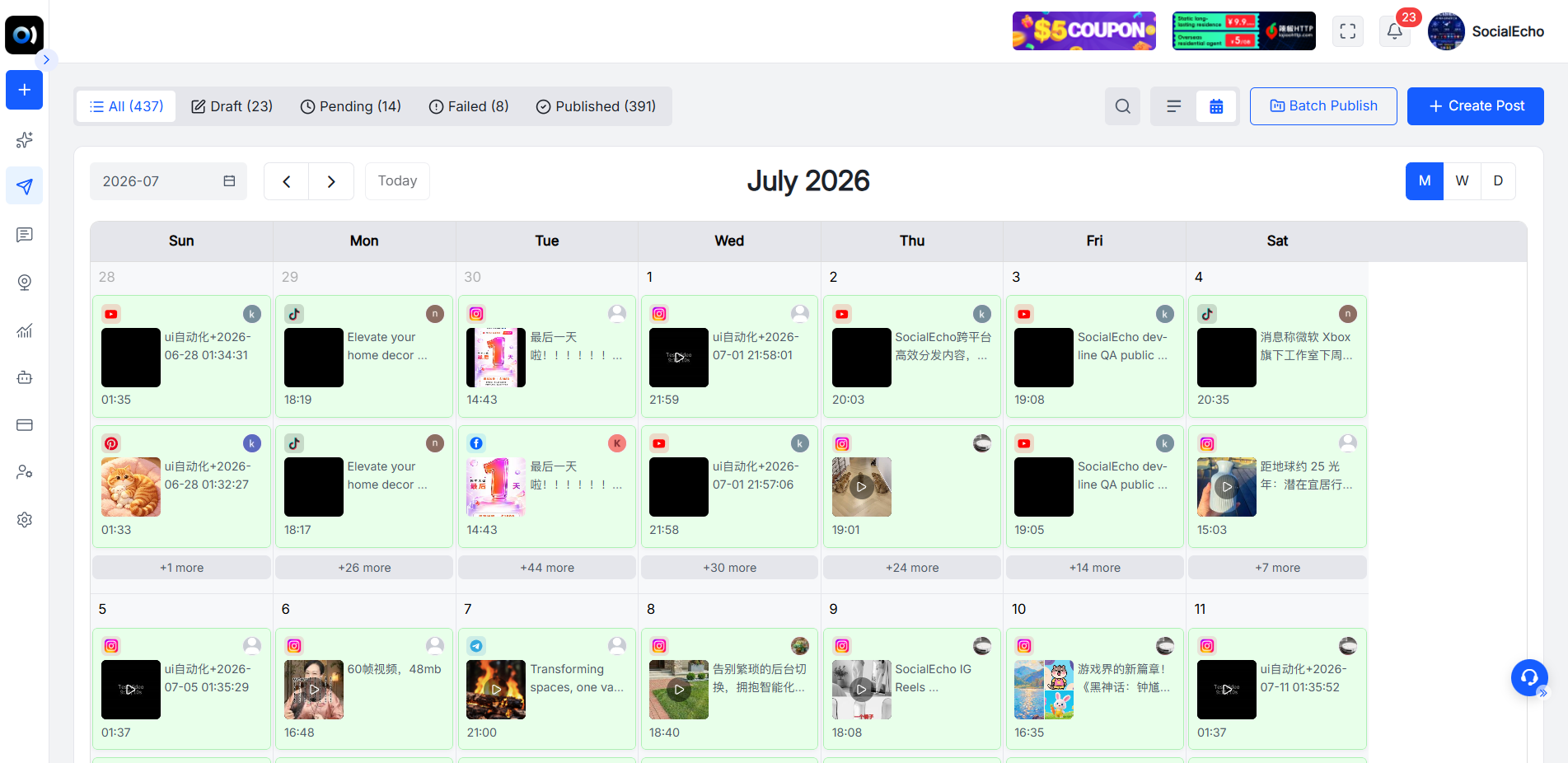
What is a content calendar, exactly?
A content calendar is a shared, forward-looking schedule that lays out every piece of content you plan to publish — for each post, it captures what it is, which platform it's for, when it goes live, and who's responsible. In one sentence: it's the plan that turns "we should post more" into "here's exactly what we're posting, and when."
That's the whole idea, and its power is in being visible and ahead of time. A list of post ideas isn't a calendar; a pile of finished drafts isn't a calendar. A calendar is the arrangement of content across dates and channels that anyone on the team can open and immediately understand. It can live in a spreadsheet, a dedicated tool, or a shared planner — the format matters less than that it exists and everyone uses the same one.
Most content calendars track a consistent set of fields per post: the date and time, the platform, the format (Reel, carousel, single image, thread, short), the topic or hook, the caption/copy status, the asset (is the image or video ready?), and the owner. Seeing those columns filled a week ahead is the difference between calm publishing and Monday panic.
Content calendar vs marketing calendar: what's the difference?
A marketing calendar plots your campaigns, launches, and promotions across the year; a content calendar plots the individual posts that bring those campaigns to life day by day. The marketing calendar is the strategy layer; the content calendar is the execution layer beneath it. They're related, not interchangeable, and confusing them is a common reason plans fall apart.
Think of it this way. The marketing calendar says "Spring sale runs April 10–20; new product launches May 1." The content calendar says "April 8, Instagram Reel teasing the sale; April 10, Facebook post with the promo code; April 11, TikTok showing the product in use." You can keep a broader marketing calendar for the campaign view and a content calendar for the post-by-post plan — the second one is what your team touches every week.
Smaller teams often only need the content calendar to start, adding a marketing-calendar layer once campaigns get more complex. If you're scrambling weekly, the content calendar is the piece to build first.
Why bother? What a content calendar actually fixes
A content calendar fixes three quiet problems at once: inconsistency (you stop skipping days), invisibility (everyone sees what's coming), and last-minute quality drops (you're not writing captions at 11pm). The benefit isn't organization for its own sake — it's the compounding effect of showing up predictably.
Consistency is the big one. Social platforms and audiences both reward a steady presence, and a calendar is what makes steady possible when you're busy. Visibility is the second: when the plan is shared, a teammate can cover for you, spot a gap, or prep an asset in advance, because they can see the week. And planning ahead lifts quality — content made in a calm batch tends to beat content thrown together minutes before posting. For a matrix creator or a small agency team running several accounts, a calendar is also the only sane way to avoid double-posting or leaving an account dark for a week.
There's an honest limit worth stating: a calendar organizes when and what, but it doesn't create the content or make it good. It's a planning tool, not a magic wand — the posts still have to be worth reading.
What to put in a content calendar
At minimum, each row should answer: when is it going out, on which platform, in what format, about what, and who owns it — everything else is a helpful extra, not a requirement. Start lean; you can always add columns once the basics stick.
Here's a practical set of fields to include:
- Date & time — ideally in the audience's local time; a time-zone converter helps if your audience is abroad.
- Platform — Instagram, TikTok, LinkedIn, YouTube, and so on; one row per platform even for the same idea, since each needs its own version.
- Format — Reel, carousel, single image, thread, Short, story.
- Topic / hook — the angle in a few words, so nobody forgets what the post was for.
- Copy & asset status — is the caption written, is the image or video ready? A simple "draft / ready / scheduled" flag prevents surprises.
- Owner — one name per post, so nothing is "someone's" job and therefore no one's.
- Cadence guardrail — how often each platform should post, decided up front with a post-frequency planner so the calendar reflects a sustainable rhythm.
How to build a content calendar in five steps
The fastest path to a calendar you'll keep using is: start from a template, set your per-platform cadence, fill two to four weeks with real posts placed at good times, assign owners, then review and adjust — don't try to plan a perfect year on day one. Here's the sequence.
- Start from a template. Don't build from a blank page. A ready content calendar template gives you the columns and structure so you can focus on filling content, not designing a grid.
- Set cadence per platform. Decide how often each channel posts before you fill anything, so the plan is realistic. Use a post-frequency planner to avoid over-committing.
- Fill 2–4 weeks with real posts. Batch your ideas into the grid, one row per post per platform, and place each at a sensible time using a best-time-slot finder. Adapting one idea across platforms is faster with an AI creation step that reshapes a master post per channel.
- Assign owners and statuses. Put a name on every row and a status on every asset. This is what turns a plan into accountable work.
- Publish, review, adjust. Schedule the posts, then after a couple of weeks check analytics to see what landed, and shift future slots and formats accordingly. The calendar is a living document, not a one-time exercise.
Where a content calendar lives: options compared
In short: a spreadsheet is free and flexible but disconnected from publishing; a shared planner adds collaboration; and a social workspace connects the calendar directly to scheduling and analytics so the plan and the posting are the same system. Pick based on team size and how many accounts you run.
| Where it lives | Best for | Strength | Trade-off |
|---|---|---|---|
| Spreadsheet / template | Solo or tiny team, starting out | Free, fully customizable | Not linked to publishing; manual updates |
| Shared doc / project board | Teams that need comments & tasks | Collaboration, ownership | Still separate from actual posting |
| Social media workspace | Multi-account, cross-border teams | Calendar → schedule → analyze in one place | More tool to learn; paid tiers |
A calendar only helps if the team actually opens it. Whatever format you choose, make it the single shared source everyone plans from — two competing calendars are worse than one imperfect one.
This is the gap a workspace closes for busier teams. In SocialEcho, the calendar isn't a separate spreadsheet you update by hand — multi-platform scheduling turns the planned rows into automatically published posts across accounts and time zones, the engagement inbox keeps replies in the same place, and analytics feed results back into next month's plan. Plans start free at $0, with paid tiers from $15/month billed annually — a fit for news and media teams or growing brands whose spreadsheet has stopped keeping up.
FAQ
Is a content calendar the same as a social media scheduler?
No, though they work together. A content calendar is the plan — what you'll post and when. A scheduler is the tool that publishes those planned posts automatically. You can have a calendar with no scheduler (posting manually from the plan) or a scheduler fed by a calendar. Together they turn planning into hands-off publishing.
How far ahead should a content calendar go?
Start with 2–4 weeks. That's far enough to stop the weekly scramble and batch your work, but close enough that you can adjust to what's performing and to timely events. Some teams add a lighter, longer view for major campaigns, but planning months of exact posts rarely survives contact with reality.
Do I need a content calendar if I only post a few times a week?
Even a light one helps. If you post twice a week to one account and you're organized, a simple template is plenty. The calendar earns its keep fastest when you add more platforms, more frequency, or a second person — but the habit of planning ahead is useful at any size.
What's the difference between a content calendar and an editorial calendar?
They overlap heavily. "Editorial calendar" is often used for blog and long-form publishing schedules, while "content calendar" (or "social media content calendar") usually refers to social posts. The concept — a forward-looking plan of what publishes when — is the same; the label depends on the content type.
How do I keep a content calendar from being abandoned after two weeks?
Make it shared, keep it simple, and connect it to the actual posting. Calendars die when they're extra work disconnected from doing the job. Start with fewer columns than you think you need, put one owner on every post, and review it in a short weekly check-in so it stays a live tool rather than a document nobody opens.
Key takeaways
- A content calendar is a shared, forward-looking plan of what you'll publish, where, when, and who owns it — it replaces day-by-day scrambling with planned, consistent posting.
- It's distinct from a marketing calendar: the marketing calendar holds campaigns; the content calendar holds the individual posts that execute them.
- Its real payoff is consistency, visibility across the team, and fewer last-minute quality drops — not a tidy grid for its own sake.
- Keep each row simple: date/time, platform, format, topic, copy/asset status, and owner.
- Build it in five steps — template, cadence, fill 2–4 weeks, assign owners, review — and treat it as a living document you adjust from results.
Results vary with your team's consistency, content quality, industry, and how you execute; a content calendar organizes the work but doesn't create the content or guarantee performance.
;}.cls-2{fill:%230868f7;}.cls-3{fill:url(%23未命名的渐变_44);}.cls-4{fill:%23333;}%3c/style%3e%3clinearGradient%20id='未命名的渐变_8'%20x1='33.73'%20y1='100.61'%20x2='-0.03'%20y2='-1.06'%20gradientUnits='userSpaceOnUse'%3e%3cstop%20offset='0'%20stop-color='%237ae9fb'/%3e%3cstop%20offset='0.67'%20stop-color='%232b90f8'/%3e%3cstop%20offset='1'%20stop-color='%230868f7'/%3e%3c/linearGradient%3e%3clinearGradient%20id='未命名的渐变_44'%20x1='27.86'%20y1='18.67'%20x2='68.36'%20y2='22.22'%20gradientUnits='userSpaceOnUse'%3e%3cstop%20offset='0'%20stop-color='%235ac7f2'/%3e%3cstop%20offset='1'%20stop-color='%230868f7'/%3e%3c/linearGradient%3e%3c/defs%3e%3cpath%20class='cls-1'%20d='M29,28.74V81.91l-9.51-3.68v0L8.52,74A7.17,7.17,0,0,1,4,67.32V24.54A3.76,3.76,0,0,1,9.08,21Z'/%3e%3cpath%20class='cls-2'%20d='M68.09,78.07a13.15,13.15,0,0,1-17.9,12.06L29,81.91h0V28.74L50.19,37A13.17,13.17,0,0,0,68.08,25.3h0Z'/%3e%3cpath%20class='cls-3'%20d='M68.08,25.3a13.19,13.19,0,0,1-6.73,10.87A13.09,13.09,0,0,1,50.19,37L29,28.74V6A3.76,3.76,0,0,1,34.1,2.52l25.59,9.91A13.22,13.22,0,0,1,68.08,25.3Z'/%3e%3cpath%20class='cls-4'%20d='M129.06,81.76a4.33,4.33,0,0,1-3.19-1.31,4.4,4.4,0,0,1-1.31-3.24V56.86H97.65V77.21a4.36,4.36,0,0,1-1.35,3.2A4.68,4.68,0,0,1,93,81.76a4.32,4.32,0,0,1-3.19-1.31,4.37,4.37,0,0,1-1.32-3.24V27.27A4.58,4.58,0,0,1,89.83,24a4.59,4.59,0,0,1,7.82,3.27V48.15h26.91V27.27A4.58,4.58,0,0,1,125.91,24a4.59,4.59,0,0,1,7.82,3.27V77.21a4.37,4.37,0,0,1-1.36,3.2A4.65,4.65,0,0,1,129.06,81.76Z'/%3e%3cpath%20class='cls-4'%20d='M163.77,81.66c-6.57,0-11.76-1.92-15.44-5.7s-5.54-9.07-5.54-15.74a26.76,26.76,0,0,1,2.09-10.43,17.72,17.72,0,0,1,6.67-8.06,19.15,19.15,0,0,1,10.68-2.95,19,19,0,0,1,10.46,2.8,18.7,18.7,0,0,1,6.55,7.36,22.53,22.53,0,0,1,2.36,10.28A4.51,4.51,0,0,1,177,63.77H152.23a10.8,10.8,0,0,0,3.49,6.65c2,1.68,4.88,2.52,8.66,2.52a22.25,22.25,0,0,0,7.54-1.21c.74-.3,1.55-.67,2.37-1.07a3.75,3.75,0,0,1,1.84-.4,4.09,4.09,0,0,1,3,1.15,4,4,0,0,1,1.12,3,4.38,4.38,0,0,1-2.58,3.82,32.34,32.34,0,0,1-6.36,2.61A28.67,28.67,0,0,1,163.77,81.66ZM172.4,55.9a9.72,9.72,0,0,0-1.63-4.56A9.9,9.9,0,0,0,167,48a10.38,10.38,0,0,0-4.64-1.14,12,12,0,0,0-4.77,1.06,9.54,9.54,0,0,0-4.89,5.66,11.78,11.78,0,0,0-.51,2.3Z'/%3e%3cpath%20class='cls-4'%20d='M193,81.64a4.49,4.49,0,0,1-4.51-4.55V27.28A4.58,4.58,0,0,1,189.84,24a4.48,4.48,0,0,1,3.28-1.36A4.36,4.36,0,0,1,196.35,24a4.46,4.46,0,0,1,1.31,3.31V77.09a4.34,4.34,0,0,1-1.35,3.2A4.67,4.67,0,0,1,193,81.64Z'/%3e%3cpath%20class='cls-4'%20d='M263.79,81.71a5.7,5.7,0,0,1-4.2-1.74,5.76,5.76,0,0,1-1.73-4.19V27.37a4.58,4.58,0,0,1,1.35-3.27A4.59,4.59,0,0,1,267,27.37V72.53h24a4.58,4.58,0,0,1,3.27,7.82A4.66,4.66,0,0,1,291,81.71Z'/%3e%3cpath%20class='cls-4'%20d='M424.48,81.74a4.71,4.71,0,0,1-2.71-.88,5.43,5.43,0,0,1-1-1l-.07-.09-12.41-17-5.41,5v9.44a4.31,4.31,0,0,1-1.36,3.19,4.66,4.66,0,0,1-3.3,1.36A4.29,4.29,0,0,1,395,80.42a4.36,4.36,0,0,1-1.32-3.23V27.37A4.58,4.58,0,0,1,395,24.1a4.52,4.52,0,0,1,6.58.12,4.54,4.54,0,0,1,1.24,3.15V56.31l17.72-16.38.05,0a4.8,4.8,0,0,1,2.94-1.11,4.4,4.4,0,0,1,3.27,1.2,4.57,4.57,0,0,1,1.2,3.27,4.44,4.44,0,0,1-.77,2.33,7.45,7.45,0,0,1-1.43,1.65l-11,9.64,13.34,17.68a5,5,0,0,1,1,2.71,4.12,4.12,0,0,1-1.36,3.24A4.64,4.64,0,0,1,424.48,81.74Z'/%3e%3cpath%20class='cls-4'%20d='M317.93,81.76a21.5,21.5,0,1,1,21.17-21.5A21.37,21.37,0,0,1,317.93,81.76Zm0-34.1a12.61,12.61,0,1,0,12.42,12.6A12.52,12.52,0,0,0,317.93,47.66Z'/%3e%3cpath%20class='cls-4'%20d='M212.18,101.22a4.12,4.12,0,0,1-3.05-1.26,4.17,4.17,0,0,1-1.26-3.1V43.34a4.37,4.37,0,0,1,1.3-3.14,4.26,4.26,0,0,1,3.13-1.3,4.19,4.19,0,0,1,3.1,1.26,4.32,4.32,0,0,1,1.26,3.16,20.77,20.77,0,0,1,13-4.54,21.51,21.51,0,0,1,0,43,20.51,20.51,0,0,1-13-4.57V96.86a4.15,4.15,0,0,1-1.3,3.06A4.5,4.5,0,0,1,212.18,101.22Zm17.43-53.63c-6.23,0-12.93,4.11-12.93,12.72a12.73,12.73,0,0,0,25.46,0A12.71,12.71,0,0,0,229.61,47.59Z'/%3e%3cpath%20class='cls-4'%20d='M365.76,81.76a21.5,21.5,0,1,1,21.18-21.5A21.37,21.37,0,0,1,365.76,81.76Zm0-34.1a12.61,12.61,0,1,0,12.42,12.6A12.52,12.52,0,0,0,365.76,47.66Z'/%3e%3c/svg%3e)