
The number of account management orders increased from 6 to 18: it wasn't due to overtime, but to this account management workflow.
At midnight, Zhang Ming was still sitting in front of his computer, seven browser tabs open—each a client's social media backend. He switched between Facebook and Instagram, from Instagram to TikTok, and back again to handle newly popped-up Facebook comment notifications. The coffee on his table had long since gone cold, and he had three unanswered WeChat messages from clients on his phone, all asking the same thing: When will this month's data report be released?
This is a typical day at a 5-person account management agency. They have 6 clients, 2 account managers, and 1 freelance copywriter. Theoretically, each person should only manage 3 accounts, so how come they're always so busy?

Step 1: Scenario Introduction – What are you really spending your time on?
Zhang Ming's studio is not an exception. Most third-party account management agencies start to feel overwhelmed when they have around six clients, and this tipping point is often not because there is too much content, but because switching accounts has become a job in itself .
Let's reconstruct the time consumption of a typical workday:
I start work at 9 a.m., first logging into each client account to check last night's interaction data—six accounts, averaging five minutes per account, that alone took 30 minutes. Then I started replying to comments, but each platform's comment interface and notification logic are different, so switching platforms meant re-finding the context, wasting at least two minutes each time. Next was content publishing; one piece of copy needed to be distributed to four platforms, each with a different format, requiring uploading images, adjusting sizes, manually filling in titles and descriptions… publishing one piece of content took 40 minutes. In the afternoon, I also had to prepare this week's data report, logging into each platform's backend to export the data, combining it into an Excel spreadsheet, and then manually creating charts.
At the end of the day, the actual time spent on "content creation and strategy" is no more than 2 hours , and the remaining 6 hours are all "friction costs of account management".
This transaction cost increases linearly with the number of customers. Going from 6 customers to 12 doesn't double the transaction cost; it multiplies it by 2.5. This is because the more accounts there are, the more frequent the context switching, the higher the probability of errors, and the longer the verification time.
Step Two: Break the Mnemonic – It's Not That You're Inefficient, It's That the Tool Architecture is Wrong
Many e-commerce platform owners' first reaction is: hire people.
But before hiring, there's a question worth considering: Is your current workflow organized by "platform" or by "task"?
Organizing by platform means: I handle all of Client A's issues first, then I handle all of Client B's issues. Switching clients every time is equivalent to switching to a whole new set of tools and interfaces, resulting in a huge cognitive burden.
Organizing by task means: I handle all customer comment replies in one unified manner, then handle all customer content posts in one unified manner, and then handle all customer data analysis in one unified manner. Processing similar tasks together in a concentrated manner, once in a flow state, increases efficiency by 3-5 times.
This shift in understanding is the first key to scaling up outsourced operations.
However, simply relying on willpower to reorganize workflows is not enough. Because accounts on different platforms are naturally scattered, without a unified tool layer, you will still have to switch back and forth between platforms. This is why multi-account management tools are not "efficiency-enhancing tools" for agency operations, but rather "architectural tools"—they determine whether your workflow can be reorganized.
The root of the problem is not the workload, but the tool architecture that forces you to work on a "platform dimension" instead of a "task dimension".
Step 3: Core Logic – The 3x Production Capacity Formula
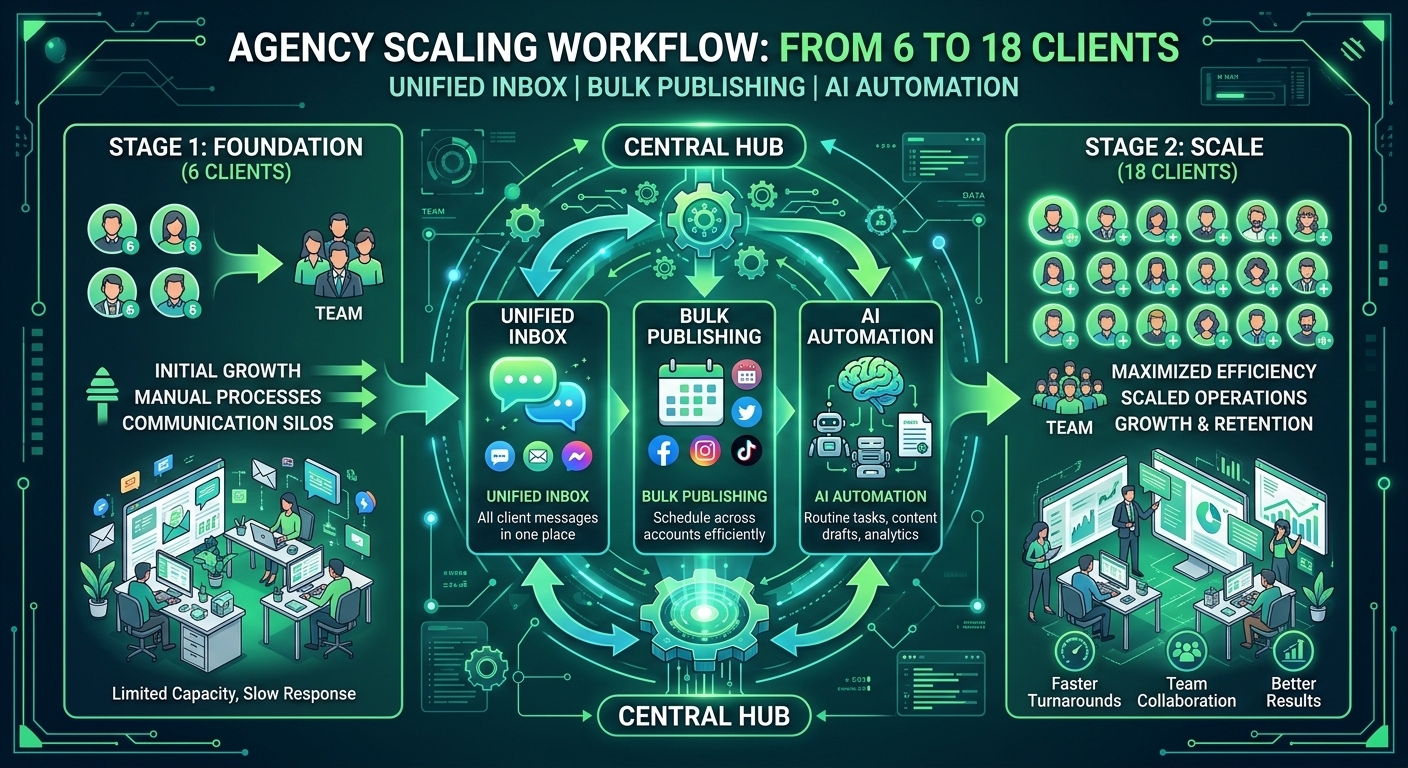
Breaking down the outsourced operations work into its smallest units, there are essentially three types of tasks: receiving information (comments/private messages/notifications), publishing content (posts/videos/stories), and reporting data (weekly/monthly reports) .
These three types of tasks correspond to three core tool capabilities:
Unified Inbox × Batch Publishing × AI Reply = Time Release
This is not a slogan, but a quantifiable formula.
Unified Inbox: Transforming "Information Reception" from Dispersed to Centralized
When all customer account comments, private messages, and @mentions are aggregated into one interface, the operations team's work changes from "patrolling each platform individually" to "processing a single queue."
Processing queues is far more efficient than processing scattered messages. You don't need to remember "Customer A had a complaint on Instagram yesterday" because that complaint is already waiting for you in your queue. Each message has context, and you can understand the background without constantly switching between messages.
For comment management , the value of a unified inbox goes beyond mere convenience; it transforms passive response into proactive management . You now know how many comments you need to process today, which are urgent, and which can be replied to in bulk using templates.
Batch publishing: Transforms "content publishing" from a series of operations into a single scheduled process.
After writing a piece of content, the most time-consuming part is often not the creation itself, but the repetitive execution of the "publishing action." The essence of the scheduled publishing function is to compress this repetitive action into one: you complete the content upload, multi-platform adaptation, and publishing time setting on one interface, and then the content for the week is scheduled.
More importantly, batch scheduling allows you to plan your content pace on a weekly basis, instead of waking up every morning to think, "What should I post today?" This shifts your content strategy from reactive to proactive, naturally improving customer satisfaction.
For agencies that manage multiple clients simultaneously, platform-specific timed posting features like Instagram's timed posting are especially crucial—Instagram has stricter requirements for content format and posting timing, and using specialized tools reduces the error rate significantly compared to manual operation.
AI response: Automate "repetitive interactions" instead of manually.
A significant portion of the comments and replies are highly repetitive: inquiries about prices, addresses, expressions of interest, and questions about collaboration methods. Using AI to automate the generation of initial drafts or provide automatic replies to these types of comments can save 60-70% of the response time.
Only 30-40% of personalized comments require human intervention. In this way, the operational team can truly focus their efforts on areas that require human judgment, rather than simply copying and pasting templates.
Step 4: Applying Knowledge to Other Situations – Breaking Down the Specific Operations of the Three Stages
Now that we've covered the theory, let's look at the practical application. The following three steps are the most time-consuming in the daily operations of outsourced services, and we'll break them down one by one how to reorganize the workflow using the tools mentioned above.
Step 1: Comment Management – From "Firefighting" to "Prevention"
The old workflow: Every morning, the operations team would log into the six platform accounts of six clients (36 accounts in total) to check for new comments and private messages. Negative comments would be screenshotted, replied to, and then the client notified. This process took over two hours.
New workflow: New notifications from all accounts are automatically aggregated into a unified interface and sorted by priority (negative comments have higher priority). AI generates suggested responses for common questions, which operations teams can adopt or fine-tune with a single click. Negative comments are automatically flagged and trigger notifications, eliminating the need for manual monitoring.
Time savings: Reduce daily time from 120 minutes to 30 minutes, saving 75%.
Facebook comment management is particularly important in this scenario—Facebook comments typically generate far more engagement than other platforms, and its algorithm is highly sensitive to the timeliness of interactions; rapid response directly impacts organic traffic. Unified management of Facebook comments is both an efficiency issue and a strategic one.
Step Two: Content Release – From “One Article, Four Times” to “One Week's Supply”
The old workflow: After the copy was written, the operations team would log in to each platform and manually publish it. Instagram required square images, Facebook allowed horizontal images, and TikTok required vertical videos... The "publishing action" for each piece of content had to be repeated 4-5 times, and the format had to be checked to ensure it was correct.
New workflow: Content is adapted and scheduled for all platforms within a single interface. Operations spends two hours every Monday morning scheduling all content from all clients for the week into a calendar, freeing up the remaining time for content strategy development and client communication.
Time savings: Weekly content publishing time has been reduced from 10 hours to 2 hours, saving 80%.
More importantly, batch scheduling brings a hidden benefit: you can see the full picture of all your clients' content . When you simultaneously display the content from six clients for this week on your calendar, you can see which client's content release schedule is too packed this week, and which client's posting frequency on a certain platform is insufficient—judgments that are simply impossible to make when operating on a single platform.
Step 3: Data Reporting – From "Manual Table Combination" to "One-Click Export"
The old workflow: Before the end of the month, operations staff would log into the backends of each platform, take screenshots or export the data, manually compile it into Excel, create charts, write analysis conclusions, and send them to clients. Data work at the end of the month would take an entire day.
New workflow: Through data analysis , key metrics from all customer accounts are automatically aggregated, supporting cross-platform comparison and trend analysis. Reports are generated with one click and can be sent directly to customers or customized for specific brands.
Time savings: Monthly data reporting has been reduced from 8 hours to 1 hour, saving 87%.
The greater value lies in the fact that monthly reports are no longer just "results reports," but rather "strategic basis." You have time to truly analyze the reasons behind the data and provide clients with more valuable advice, which is the source of the premium for outsourced operations services.
Step 5: Review and Summary – Action List and ROI Forecast
Action List
If you currently manage 6 clients and want to expand to 12-18 clients without increasing staff, here are the specific steps:
Week 1: Review existing workflows. Record the time spent on each type of task each day to identify the biggest time sinks. Typically, 80% of the time is wasted on account switching and repetitive posting actions.
Week 2: Integrate with a unified management tool. Choose a social media management tool that supports multiple platforms and accounts, and complete account authorization and team member permission configuration. After this step, your information reception will change from "dispersed patrols" to "centralized processing".
Week 3: Rebuild the content publishing process. Migrate all clients' content publishing to a unified scheduling calendar, establish a "weekly centralized scheduling" rhythm, and stop the habit of manually publishing every day.
Week 4: Enable AI-assisted replies. Set up AI reply rules for frequently asked comment types to automate the handling of common questions. Once this step is completed, comment management time will be significantly reduced.
Weeks 5 and 6: Optimize the data reporting process. Switch to automated reporting tools, establish fixed monthly report templates, and reduce the data patching work at the end of the month.
ROI forecast
For example, SocialEcho starts at 12.5/month for the basic version and 18.75/month for the team version, with a 20% discount for annual payments.
For a 6-client agency that charges 15,000 yuan (about $2,100) per month, tool costs account for less than 1%.
Time-based benefit calculation:
Current situation: 2 operations staff, working 8 hours effectively per day, of which about 6 hours are for friction costs, leaving only 2 hours per person for actual "productive time", totaling 4 hours per day.
After tool optimization: friction cost is reduced to 2 hours, "output time" is increased to 6 hours/person, totaling 12 hours/day.
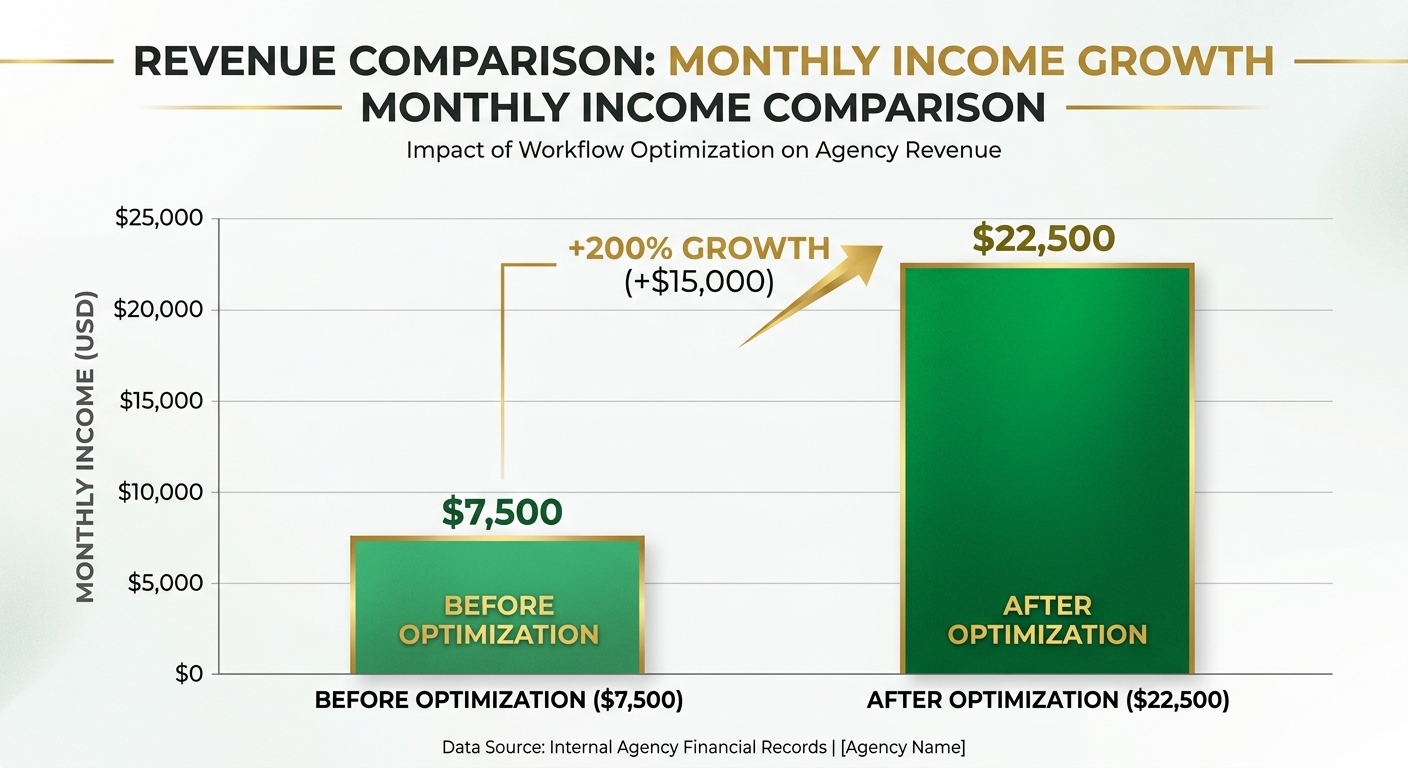
The output time has increased threefold, which means that with the same team size, the number of customers that can be served has increased threefold: from 6 to 18.
Income Calculation:
6 customers × 2,500 yuan/month average price = 15,000 yuan/month 18 customers × 2,500 yuan/month average price = 45,000 yuan/month
Of the additional 30,000 yuan in revenue, the cost of tools was approximately 150 yuan ($18.75), resulting in an ROI of over 200 times.
Of course, this is the theoretical upper limit. In practice, expanding the customer base also requires cooperation from sales and customer success departments. However, from an operational productivity perspective, the three-fold increase in productivity brought about by workflow optimization is real—what you need is not more manpower, but rather to free up the productive time of your existing workforce.
FAQ
Q1: When using multi-account management tools for third-party operations, are the client accounts secure?
This is the most common concern. Legitimate social media management tools connect to accounts via OAuth authorization, do not store account passwords, and permissions can be revoked at any time. In fact, unified tool management is more secure than employees logging into customer accounts using personal devices—you have complete operation logs, knowing who did what and when.
Q2: What if the customer is unwilling to authorize their account to a third-party tool?
This is usually a trust issue, not a technical one. You can start by inviting the client to understand the tool's permission scope, pointing out that OAuth authorization does not involve passwords, and that the client can revoke authorization at any time in the platform settings. Additionally, the improved reporting quality and response speed brought by the tool often naturally dispel the client's concerns.
Q3: Which platform accounts can SocialEcho manage simultaneously?
SocialEcho supports major platforms such as Facebook, Instagram, Twitter/X, LinkedIn, and TikTok, allowing you to manage all your accounts from a single platform without having to log in to each one individually. For agencies that manage multiple platforms simultaneously, this is the most significant efficiency improvement.
Q4: Will AI responses make the customer's account seem unrealistic?
The AI generates suggested responses, which can be reviewed and modified by operations staff before being sent out. Furthermore, you can set different brand tones for each customer account, allowing the AI to generate responses that align with the brand's image. For highly repetitive interactions (such as "Thank you for your attention" or "Looking forward to next time"), there is virtually no difference between AI and human responses.
Q5: Is this workflow worthwhile for small-scale e-commerce operation studios (3 people or less) to implement?
It's especially worthwhile. Small teams have limited resources, making every minute of time even more precious. The benefits of workflow optimization are multiplier effects—the smaller the team, the greater the increase in per capita output from the same amount of time. Moreover, it's best to cultivate systematic work habits as early as possible; optimizing after the team has grown will be much more costly.
Q6: What was the biggest challenge in expanding from 6 clients to 18?
It's not about operational capacity, but rather sales and customer management. The workflow optimization discussed in this article addresses operational capacity issues, but to truly acquire more customers, corresponding sales capabilities and a customer success system are also needed. The good news is that freeing up operational capacity will give you more time for sales and customer relationship maintenance, creating a positive cycle.
Q7: Will migrating existing customer accounts to the new tool affect normal operations?
The migration process typically does not disrupt existing operations. After account authorization is complete, the old and new tools can run in parallel for a period of time, allowing the team to become familiar with the new tools before a full switch. It is recommended to migrate during the off-season or at the beginning of the month to allow the team sufficient time to adapt.
In conclusion
In the e-commerce operations industry, many practitioners are exchanging "overtime" for "scale," but there is a ceiling to overtime—human energy is limited.
True scalability comes from systematizing workflows. When you reduce the "friction cost" of 6 hours to 2 hours, the extra 4 hours are not for resting (which you can do, of course), but for serving more customers, developing better content strategies, and building deeper customer relationships.
From 6 clients to 18 clients, tools are just a means; the key is a shift in mindset: from "How much time do I have?" to "Is my time structure optimal?"
Give the time spent switching accounts back to strategy, the time spent on repetitive operations back to creation, and the time spent on data patching back to insight.
This is the right way to scale up outsourced operations.
;}.cls-2{fill:%230868f7;}.cls-3{fill:url(%23未命名的渐变_44);}.cls-4{fill:%23333;}%3c/style%3e%3clinearGradient%20id='未命名的渐变_8'%20x1='33.73'%20y1='100.61'%20x2='-0.03'%20y2='-1.06'%20gradientUnits='userSpaceOnUse'%3e%3cstop%20offset='0'%20stop-color='%237ae9fb'/%3e%3cstop%20offset='0.67'%20stop-color='%232b90f8'/%3e%3cstop%20offset='1'%20stop-color='%230868f7'/%3e%3c/linearGradient%3e%3clinearGradient%20id='未命名的渐变_44'%20x1='27.86'%20y1='18.67'%20x2='68.36'%20y2='22.22'%20gradientUnits='userSpaceOnUse'%3e%3cstop%20offset='0'%20stop-color='%235ac7f2'/%3e%3cstop%20offset='1'%20stop-color='%230868f7'/%3e%3c/linearGradient%3e%3c/defs%3e%3cpath%20class='cls-1'%20d='M29,28.74V81.91l-9.51-3.68v0L8.52,74A7.17,7.17,0,0,1,4,67.32V24.54A3.76,3.76,0,0,1,9.08,21Z'/%3e%3cpath%20class='cls-2'%20d='M68.09,78.07a13.15,13.15,0,0,1-17.9,12.06L29,81.91h0V28.74L50.19,37A13.17,13.17,0,0,0,68.08,25.3h0Z'/%3e%3cpath%20class='cls-3'%20d='M68.08,25.3a13.19,13.19,0,0,1-6.73,10.87A13.09,13.09,0,0,1,50.19,37L29,28.74V6A3.76,3.76,0,0,1,34.1,2.52l25.59,9.91A13.22,13.22,0,0,1,68.08,25.3Z'/%3e%3cpath%20class='cls-4'%20d='M129.06,81.76a4.33,4.33,0,0,1-3.19-1.31,4.4,4.4,0,0,1-1.31-3.24V56.86H97.65V77.21a4.36,4.36,0,0,1-1.35,3.2A4.68,4.68,0,0,1,93,81.76a4.32,4.32,0,0,1-3.19-1.31,4.37,4.37,0,0,1-1.32-3.24V27.27A4.58,4.58,0,0,1,89.83,24a4.59,4.59,0,0,1,7.82,3.27V48.15h26.91V27.27A4.58,4.58,0,0,1,125.91,24a4.59,4.59,0,0,1,7.82,3.27V77.21a4.37,4.37,0,0,1-1.36,3.2A4.65,4.65,0,0,1,129.06,81.76Z'/%3e%3cpath%20class='cls-4'%20d='M163.77,81.66c-6.57,0-11.76-1.92-15.44-5.7s-5.54-9.07-5.54-15.74a26.76,26.76,0,0,1,2.09-10.43,17.72,17.72,0,0,1,6.67-8.06,19.15,19.15,0,0,1,10.68-2.95,19,19,0,0,1,10.46,2.8,18.7,18.7,0,0,1,6.55,7.36,22.53,22.53,0,0,1,2.36,10.28A4.51,4.51,0,0,1,177,63.77H152.23a10.8,10.8,0,0,0,3.49,6.65c2,1.68,4.88,2.52,8.66,2.52a22.25,22.25,0,0,0,7.54-1.21c.74-.3,1.55-.67,2.37-1.07a3.75,3.75,0,0,1,1.84-.4,4.09,4.09,0,0,1,3,1.15,4,4,0,0,1,1.12,3,4.38,4.38,0,0,1-2.58,3.82,32.34,32.34,0,0,1-6.36,2.61A28.67,28.67,0,0,1,163.77,81.66ZM172.4,55.9a9.72,9.72,0,0,0-1.63-4.56A9.9,9.9,0,0,0,167,48a10.38,10.38,0,0,0-4.64-1.14,12,12,0,0,0-4.77,1.06,9.54,9.54,0,0,0-4.89,5.66,11.78,11.78,0,0,0-.51,2.3Z'/%3e%3cpath%20class='cls-4'%20d='M193,81.64a4.49,4.49,0,0,1-4.51-4.55V27.28A4.58,4.58,0,0,1,189.84,24a4.48,4.48,0,0,1,3.28-1.36A4.36,4.36,0,0,1,196.35,24a4.46,4.46,0,0,1,1.31,3.31V77.09a4.34,4.34,0,0,1-1.35,3.2A4.67,4.67,0,0,1,193,81.64Z'/%3e%3cpath%20class='cls-4'%20d='M263.79,81.71a5.7,5.7,0,0,1-4.2-1.74,5.76,5.76,0,0,1-1.73-4.19V27.37a4.58,4.58,0,0,1,1.35-3.27A4.59,4.59,0,0,1,267,27.37V72.53h24a4.58,4.58,0,0,1,3.27,7.82A4.66,4.66,0,0,1,291,81.71Z'/%3e%3cpath%20class='cls-4'%20d='M424.48,81.74a4.71,4.71,0,0,1-2.71-.88,5.43,5.43,0,0,1-1-1l-.07-.09-12.41-17-5.41,5v9.44a4.31,4.31,0,0,1-1.36,3.19,4.66,4.66,0,0,1-3.3,1.36A4.29,4.29,0,0,1,395,80.42a4.36,4.36,0,0,1-1.32-3.23V27.37A4.58,4.58,0,0,1,395,24.1a4.52,4.52,0,0,1,6.58.12,4.54,4.54,0,0,1,1.24,3.15V56.31l17.72-16.38.05,0a4.8,4.8,0,0,1,2.94-1.11,4.4,4.4,0,0,1,3.27,1.2,4.57,4.57,0,0,1,1.2,3.27,4.44,4.44,0,0,1-.77,2.33,7.45,7.45,0,0,1-1.43,1.65l-11,9.64,13.34,17.68a5,5,0,0,1,1,2.71,4.12,4.12,0,0,1-1.36,3.24A4.64,4.64,0,0,1,424.48,81.74Z'/%3e%3cpath%20class='cls-4'%20d='M317.93,81.76a21.5,21.5,0,1,1,21.17-21.5A21.37,21.37,0,0,1,317.93,81.76Zm0-34.1a12.61,12.61,0,1,0,12.42,12.6A12.52,12.52,0,0,0,317.93,47.66Z'/%3e%3cpath%20class='cls-4'%20d='M212.18,101.22a4.12,4.12,0,0,1-3.05-1.26,4.17,4.17,0,0,1-1.26-3.1V43.34a4.37,4.37,0,0,1,1.3-3.14,4.26,4.26,0,0,1,3.13-1.3,4.19,4.19,0,0,1,3.1,1.26,4.32,4.32,0,0,1,1.26,3.16,20.77,20.77,0,0,1,13-4.54,21.51,21.51,0,0,1,0,43,20.51,20.51,0,0,1-13-4.57V96.86a4.15,4.15,0,0,1-1.3,3.06A4.5,4.5,0,0,1,212.18,101.22Zm17.43-53.63c-6.23,0-12.93,4.11-12.93,12.72a12.73,12.73,0,0,0,25.46,0A12.71,12.71,0,0,0,229.61,47.59Z'/%3e%3cpath%20class='cls-4'%20d='M365.76,81.76a21.5,21.5,0,1,1,21.18-21.5A21.37,21.37,0,0,1,365.76,81.76Zm0-34.1a12.61,12.61,0,1,0,12.42,12.6A12.52,12.52,0,0,0,365.76,47.66Z'/%3e%3c/svg%3e)