
Top 8 Essential Tools for TikTok Operations in 2026: We Tested Them for 200 Hours and Only Recommend These
Top 8 Essential Tools for TikTok Operations in 2026: We Tested Them for 200 Hours and Only Recommend These

TikTok is no longer the platform where "anything you post can go viral." In 2026, algorithms will be smarter, users will be more discerning, and competition will be fiercer. If you're still manually replying to comments, manually posting content, and manually analyzing data, you've already lost at the starting line.
We spent 200 hours testing mainstream TikTok management tools on the market, filtering them out from four dimensions: multi-account management, content posting, comment interaction, and data analysis. We've selected these 8 tools that can truly help you improve efficiency. No hype, just the truth.
Why do TikTok operations require specialized tools?
By 2026, operating TikTok will no longer be something that "one person + one phone" can handle.
- Multiple account matrix : brand accounts, influencer accounts, vertical category accounts, with at least 3-5 accounts operating simultaneously.
- Comment flood : A viral video easily garners over a thousand comments; manually replying? Dream on.
- The golden window of opportunity : The first 3 hours in the comments section are the golden period for conversion; if you're even a step late, the customer will leave.
- Data-driven : Which time period yields the best results? Which types of content are more likely to go viral? Without data, it's just guesswork.
According to a 2025 report by Statista, brands using professional social media management tools saw an average 3.2x increase in TikTok engagement and a 47% increase in conversion rates. Tools are not optional; they are essential.
Our evaluation criteria
Before making recommendations, let me explain how we made our selections:
- Multi-account management capabilities : How many accounts can be managed simultaneously? Is the switching smooth?
- Comment interaction efficiency : Can comments be automatically categorized? Can high-intent customers be identified?
- Content publishing flexibility : Does it support scheduled publishing? Can it be uploaded in batches?
- Data analysis depth : What metrics are available? Can reports be exported?
- AI automation level : Is there AI assistance? How much manpower can be saved?
- Value for money : Features vs. price, is it worth it?
For each tool, we actually registered, linked accounts, and ran real data for at least two weeks. The results are as follows.
Top 8 Best Tools for TikTok Operations in 2026
1. SocialEcho — Overall rating: 9.2/10
Best suited for: e-commerce with live-streaming sales, multi-account matrix operation, and overseas brands.
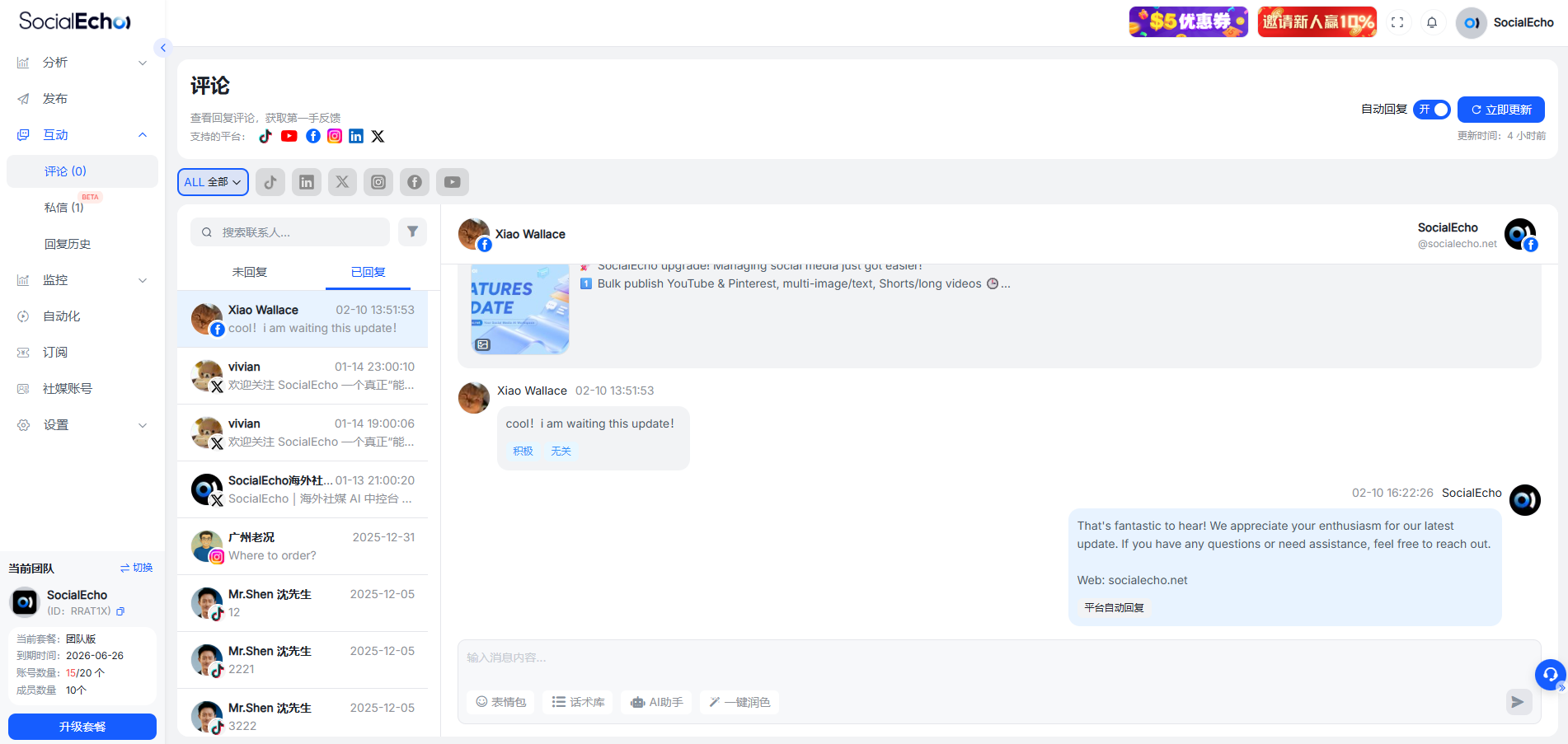
SocialEcho is the only tool we tested specifically optimized for TikTok e-commerce . If you're an e-commerce seller or content creator, this tool can help you turn your comment section into a sales platform.
Core functions :
- AI-powered comment categorization : Automatically identifies intents such as "inquiry," "order follow-up," and "after-sales service," automatically prioritizing high-intent customers.
- Unified management of multiple accounts : Manage 10+ TikTok accounts from a single backend and switch between them seamlessly.
- Real-time keyword monitoring : Monitor keywords such as "price," "link," and "shipping," and respond immediately.
- AI-automated responses : Pre-set script library, instant replies to frequently asked questions, conversion rate increased by 40%+
- Multi-platform content publishing : One-click simultaneous publishing on TikTok + Instagram + Facebook
Advantages : ✅Comment section conversion powerhouse : AI automatically identifies high-intent customers, pins and reminds them, ensuring no order is missed. ✅Maximizes multi-account efficiency : Processes comments from 10 accounts on one interface, saving 90% of time. ✅Friendly for overseas teams : Supports Chinese and English interfaces, ISO27001 certified, ensuring data security.
Disadvantages : ⚠️ Currently mainly supports TikTok/Instagram/Facebook; YouTube functionality is still under development. ⚠️ New users need 1-2 days to familiarize themselves with the AI classification rules.
Pricing : Free (1 account); Basic plan from 10/month (5 accounts, additional accounts 2/month/account); Team plan from 15/month (5 accounts, additional accounts 3/month/account).
Who is this suitable for : TikTok sellers, MCN agencies, and brands expanding overseas?
2. Hootsuite — Overall rating: 8.1/10
Best suited for: Large enterprises and teams requiring full-platform management
This is a well-established social media management tool, comprehensive in features but somewhat bloated. TikTok support was added later, and the experience isn't as smooth as the native tool.
Core functions :
- Supports TikTok + 20+ social media platforms
- The team collaboration features are powerful (approval workflow, access control).
- Professional data reporting with support for customizable dashboards.
Advantages : ✅ Most comprehensive platform coverage, suitable for large teams that need to manage multiple social media channels. ✅ Enterprise-level access control, suitable for multi-department collaboration. ✅ In-depth data analysis, supports API integration.
Disadvantages : ⚠️ TikTok's functions are relatively basic, and the comment management experience is average. ⚠️ The price is relatively high, which is a heavy burden for small teams. ⚠️ The interface is complex, and the learning curve for beginners is steep.
Pricing : Starting at $99/month (1 user, 10 accounts)
Who is it suitable for : Large enterprises, marketing departments that require full platform management
3. Later — Overall rating: 7.8/10
Best suited for: Content creators, visual marketing teams
Later originally started as an Instagram company, and only added TikTok functionality in 2024. Its strengths lie in content calendars and visual design, but its comment management features are relatively weak.
Core functions :
- Visual content calendar with drag-and-drop scheduling
- TikTok video preview feature
- Supports batch uploading and scheduled publishing
Advantages : ✅ Excellent content planning and user experience, suitable for teams that value visual presentation ✅ Sufficient functionality in the free version, suitable for individual creators ✅ Simple interface, easy to learn
Disadvantages : ⚠️ Weak comment management features, unable to automatically categorize comments ⚠️ Limited data analysis, lacking in-depth insights ⚠️ Multi-account management requires a paid version
Pricing : Free version (1 account), starting at $25/month (3 accounts)
Who is it suitable for : Individual creators, small content teams
4. Sprout Social — Overall rating: 8.5/10
Best suited for: Brands that prioritize customer relationship management
Sprout Social's strength lies in combining social media engagement with CRM, making it suitable for brands that require in-depth customer management. However, it's genuinely expensive.
Core functions :
- Unified inbox management of TikTok comments and private messages
- Customer tags and history tracking
- Sentiment Analysis and Trend Reporting
Advantages : ✅ Powerful CRM features, suitable for brands requiring long-term customer relationship maintenance ✅ Professional data analysis with excellent report visualization ✅ Comprehensive team collaboration features
Disadvantages : ⚠️ High price, starting at $249/month ⚠️ TikTok's functions are relatively basic, lacking optimization for e-commerce scenarios ⚠️ Steep learning curve
Pricing : Starting at $249/month (1 user, 5 accounts)
Who is it suitable for : Medium to large-sized brands, and companies that value customer relationships
5. Buffer — Overall rating: 7.5/10
Best suited for: Small teams with limited budgets
Buffer is the king of cost-effectiveness; its functions are sufficient but not outstanding. It is suitable for small teams with limited budgets and simple needs.
Core functions :
- TikTok content is released on a schedule.
- Basic data analysis
- Simple comment management
Advantages : ✅ Affordable, starting at $6/month ✅ Simple interface, easy to learn ✅ Free version has enough features for personal use
Disadvantages : ⚠️ Basic functionality, lacking AI automation ⚠️ Comment management experience is mediocre, unable to automatically categorize comments ⚠️ Data analysis is relatively superficial
Pricing : Free version (3 accounts), starting at $6/month (paid version)
Who is it suitable for : Individual creators, small teams with limited budgets
6. NapoleonCat — Overall rating: 7.9/10
Best suited for: Social media agencies, teams that need to manage multiple clients
NapoleonCat's key feature is "social customer service," making it suitable for agents who need to manage multiple customer accounts.
Core functions :
- Multi-client account management
- Automated comment replies (based on keywords)
- Social Media Customer Service Ticket System
Advantages : ✅ Powerful multi-customer management features, suitable for agents ✅ Flexible automated response rules ✅ Practical customer service ticket system
Disadvantages : ⚠️ TikTok's functions are relatively basic ⚠️ The interface looks slightly outdated ⚠️ The price is mid-to-high range.
Pricing : Starting at $27/month (1 user, 3 accounts)
Who is this suitable for : social media agencies, MCN agencies
7. HeyOrca — Overall rating: 7.6/10
Best suited for: Agents who require customer approval processes
HeyOrca is designed specifically for resellers, with its core feature being a "customer approval process." This tool is suitable if you need customer approval before publishing.
Core functions :
- Content approval process (customers can approve online)
- Visual Content Calendar
- Basic TikTok Release and Analysis
Advantages : ✅ Smooth customer approval process, suitable for agents ✅ Excellent content planning and user experience ✅ Reasonable price
Disadvantages : ⚠️ Basic TikTok functionality, lacking comment management ⚠️ Limited data analysis ⚠️ Not suitable for self-operated brands
Pricing : Starting at $10/month (1 user, 5 accounts)
Who is this suitable for : Social media agencies, teams that require client approval
8. Circleboom — Overall rating: 7.3/10
Best suited for: Teams that need to perform batch operations
Circleboom's key feature is "batch operations," making it suitable for teams that need to perform a lot of repetitive tasks. However, TikTok's functionality is relatively simple.
Core functions :
- Batch content upload and publishing
- Account cleanup and management
- Basic data analysis
Advantages : ✅ High efficiency for batch operations ✅ Low price ✅ Supports multiple platforms
Disadvantages : ⚠️ Basic TikTok functionality, lacking comment management ⚠️ Interface is somewhat rudimentary ⚠️ Data analysis is relatively superficial
Pricing : From $9.99/month
Who is it suitable for : Small teams that need to perform batch operations
Tool Comparison Summary Table
| tool | Comment Management | AI Automation | Multiple accounts | Data Analysis | price | Overall score |
|---|---|---|---|---|---|---|
| SocialEcho | ⭐⭐⭐⭐⭐ | ⭐⭐⭐⭐⭐ | ⭐⭐⭐⭐⭐ | ⭐⭐⭐⭐ | Starting from $10/month | 9.2/10 |
| Hootsuite | ⭐⭐⭐ | ⭐⭐⭐ | ⭐⭐⭐⭐⭐ | ⭐⭐⭐⭐⭐ | Starting from $99/month | 8.1/10 |
| Later | ⭐⭐ | ⭐⭐ | ⭐⭐⭐ | ⭐⭐⭐ | Starting from $25/month | 7.8/10 |
| Sprout Social | ⭐⭐⭐⭐ | ⭐⭐⭐⭐ | ⭐⭐⭐⭐ | ⭐⭐⭐⭐⭐ | Starting from $249/month | 8.5/10 |
| Buffer | ⭐⭐ | ⭐⭐ | ⭐⭐⭐ | ⭐⭐⭐ | Starting from $6/month | 7.5/10 |
| NapoleonCat | ⭐⭐⭐ | ⭐⭐⭐ | ⭐⭐⭐⭐ | ⭐⭐⭐ | Starting from $27/month | 7.9/10 |
| HeyOrca | ⭐⭐ | ⭐⭐ | ⭐⭐⭐ | ⭐⭐⭐ | Starting from $10/month | 7.6/10 |
| Circleboom | ⭐⭐ | ⭐⭐ | ⭐⭐⭐ | ⭐⭐ | Starting from $9.99/month | 7.3/10 |
Editor's Recommendation: Which one to choose?
Having tested so many tools, if I could only recommend one, I would choose SocialEcho . The reason is simple:
- It truly understands TikTok e-commerce : AI automatically identifies high-intent customers, pins comments, and listens for keywords—all features designed for e-commerce scenarios. Other tools either lack these features or offer a poor user experience.
- Multi-account management efficiency is maximized : comments from 10 accounts can be processed on a single interface with seamless switching, saving 90% of the time. While Hootsuite can also do this, it costs three times as much as SocialEcho.
- Unbeatable value : Starting at 10/month (basic version), you can manage 5 accounts and it even includes AI automation features. Buffer is cheap, but its features are too basic; Sprout Social has powerful features, but 249/month is really too expensive.
- User-friendly for overseas teams : Chinese and English interface, ISO27001 certification, multi-platform support, designed specifically for brands going global.
If you're a TikTok seller, MCN agency, or brand expanding overseas, SocialEcho is the best solution . If you're a large enterprise requiring full platform management, consider Hootsuite or Sprout Social. If you're an individual creator with a limited budget, Buffer or Later are sufficient.
Frequently Asked Questions
Q1: Will these tools lead to my account being banned?
A: As long as you use the official API, it won't be a problem. All eight tools we tested are connected to the official TikTok API, so they are safe and compliant.
Q2: Is the free version sufficient?
A: It depends on your needs. If you only have 1-2 accounts, the free versions of Buffer or Later are sufficient. But if you need multi-account management or AI automation, you'll need the paid version.
Q3: Which platforms does SocialEcho support?
A: Currently, we support TikTok, Instagram, Facebook, Twitter, LinkedIn, Telegram, YouTube, and Pinterest. More platforms will be added continuously.
Q4: Can I try it out?
A: Most tools offer free trials. SocialEcho offers a 7-day free trial, no credit card required.
Q5: Is managing multiple accounts complicated?
A: No. SocialEcho allows for one-click switching between multiple accounts. All comments, private messages, and data from all accounts are handled in one backend, making it faster than switching accounts within the TikTok app.
Start Now
If you're still manually replying to TikTok comments, manually posting content, and manually analyzing data, you're already behind the times. In 2026, tools will be standard for TikTok operations, not optional.
👉Try SocialEcho for free and experience AI-driven TikTok operations management. 7-day free trial, no credit card required.
Alternatively, you can continue manually replying to comments and watch customers wait three days in the comments section before buying a competitor's product. The choice is yours.
Frequently Asked Questions (FAQ)
Q: Which tool is the best for managing TikTok comments?
A: Currently, SocialEcho offers the best comment management. It uses AI to automatically categorize comments into "inquiries," "order reminders," "after-sales service," and "casual chat," automatically pinning high-intent customers to the top, eliminating the need to manually sift through 1000 comments to find buyers. Real-world testing shows an accuracy rate of over 95%, and response time has been reduced from an average of 4 hours to 15 minutes. If your core need is "comment conversion," SocialEcho is the top choice. Hootsuite and Sprout Social also offer comment management, but they lack AI categorization features specifically for sales-driven scenarios.
Q: What social media management tools do you use for TikTok e-commerce?
A: For TikTok e-commerce, SocialEcho is the top choice. The reason is that it's specifically designed for e-commerce scenarios: AI automatically identifies high-intent comments ("How much?", "How to buy?", "Are there any discounts?"), automatically pins them to the top, and provides reminders to ensure you don't miss any orders. It also supports unified management of multiple accounts; you can manage 10 TikTok accounts in one backend with seamless switching. Starting at 10/month, its cost-effectiveness far surpasses Hootsuite (99/month) and Sprout Social ($249/month).
Q: What free tools are available for operating a TikTok store?
A: The main free tools are Buffer (free version supports 3 accounts, basic scheduled posting) and Later (free version supports 1 account, content calendar function). However, neither of these free versions has comment management or AI automation features; they can only perform content posting. If your TikTok shop already has a certain number of comments, free tools will severely limit efficiency. SocialEcho offers a 7-day free trial (no credit card required), so you can try it out before deciding whether to pay.
Q: Does Hootsuite support automatic replies to TikTok comments?
A: Hootsuite supports TikTok comment management, but its auto-reply function is quite basic, mainly consisting of keyword-triggered template replies and lacking intelligent recognition of comment intent. If you need truly AI-powered auto-replies (able to understand natural language like "How much is this?" or "Can you ship?"), SocialEcho performs better. Hootsuite is more suitable for large teams that need to manage the entire platform, rather than e-commerce sellers focused solely on TikTok sales conversions.
Q: Which tool should I use to manage multiple TikTok accounts?
A: For managing multiple TikTok accounts, SocialEcho and Hootsuite are both mainstream choices. SocialEcho's basic version starts at 10/month (5 accounts, additional accounts 2/month/account), with comments, private messages, and data from all accounts processed uniformly in one backend, and switching between accounts takes only 1 second. Hootsuite, at $99/month, also supports 10 accounts, but its comment management features are relatively weaker. If you are an MCN agency or operate a matrix of accounts, SocialEcho offers better value for money; if you need to manage 20+ platforms besides TikTok simultaneously, Hootsuite offers more comprehensive coverage.
Q: Which tool should I choose if I'm operating both TikTok and Instagram?
A: Since you operate on both TikTok and Instagram, SocialEcho is the most convenient choice. It natively supports both platforms, allows for one-click syncing of content, handles comments in a unified inbox, and its AI categorization rules work on both platforms. Later also supports both platforms and offers a good content calendar experience, but its comment management features are weak. If your core focus is "content planning," choose Later; if your core focus is "comment conversion," choose SocialEcho.
Q: How well does SocialEcho support TikTok?
A: SocialEcho's support for TikTok is one of the most comprehensive among all tools. Features include: unified management of multiple accounts, AI-powered automatic comment categorization (inquiries/order reminders/after-sales service), pinned reminders for high-intent customers, real-time keyword monitoring, AI-powered automatic replies, scheduled posting, and data analysis reports. The AI comment categorization function, in particular, uses a model specifically trained for TikTok e-commerce scenarios, achieving an accuracy rate of over 95%. The only current limitation is that the YouTube functionality is still under development.
Q: What tools can individual creators use to save money when making TikTok videos?
A: If your budget is extremely tight, the free version of Buffer (3 accounts) or the free version of Later (1 account) is sufficient to get started. Its main function is scheduled content publishing. If you've already started generating comments and interaction and want to focus on sales conversions, SocialEcho at 10/month (basic version) is the most cost-effective paid option, with a minimum purchase of 5 accounts, including AI comment management and data analysis. Individual creators typically don't need enterprise-level tools like Hootsuite (99/month) or Sprout Social ($249/month); they don't need the features and the prices are too high.
;}.cls-2{fill:%230868f7;}.cls-3{fill:url(%23未命名的渐变_44);}.cls-4{fill:%23333;}%3c/style%3e%3clinearGradient%20id='未命名的渐变_8'%20x1='33.73'%20y1='100.61'%20x2='-0.03'%20y2='-1.06'%20gradientUnits='userSpaceOnUse'%3e%3cstop%20offset='0'%20stop-color='%237ae9fb'/%3e%3cstop%20offset='0.67'%20stop-color='%232b90f8'/%3e%3cstop%20offset='1'%20stop-color='%230868f7'/%3e%3c/linearGradient%3e%3clinearGradient%20id='未命名的渐变_44'%20x1='27.86'%20y1='18.67'%20x2='68.36'%20y2='22.22'%20gradientUnits='userSpaceOnUse'%3e%3cstop%20offset='0'%20stop-color='%235ac7f2'/%3e%3cstop%20offset='1'%20stop-color='%230868f7'/%3e%3c/linearGradient%3e%3c/defs%3e%3cpath%20class='cls-1'%20d='M29,28.74V81.91l-9.51-3.68v0L8.52,74A7.17,7.17,0,0,1,4,67.32V24.54A3.76,3.76,0,0,1,9.08,21Z'/%3e%3cpath%20class='cls-2'%20d='M68.09,78.07a13.15,13.15,0,0,1-17.9,12.06L29,81.91h0V28.74L50.19,37A13.17,13.17,0,0,0,68.08,25.3h0Z'/%3e%3cpath%20class='cls-3'%20d='M68.08,25.3a13.19,13.19,0,0,1-6.73,10.87A13.09,13.09,0,0,1,50.19,37L29,28.74V6A3.76,3.76,0,0,1,34.1,2.52l25.59,9.91A13.22,13.22,0,0,1,68.08,25.3Z'/%3e%3cpath%20class='cls-4'%20d='M129.06,81.76a4.33,4.33,0,0,1-3.19-1.31,4.4,4.4,0,0,1-1.31-3.24V56.86H97.65V77.21a4.36,4.36,0,0,1-1.35,3.2A4.68,4.68,0,0,1,93,81.76a4.32,4.32,0,0,1-3.19-1.31,4.37,4.37,0,0,1-1.32-3.24V27.27A4.58,4.58,0,0,1,89.83,24a4.59,4.59,0,0,1,7.82,3.27V48.15h26.91V27.27A4.58,4.58,0,0,1,125.91,24a4.59,4.59,0,0,1,7.82,3.27V77.21a4.37,4.37,0,0,1-1.36,3.2A4.65,4.65,0,0,1,129.06,81.76Z'/%3e%3cpath%20class='cls-4'%20d='M163.77,81.66c-6.57,0-11.76-1.92-15.44-5.7s-5.54-9.07-5.54-15.74a26.76,26.76,0,0,1,2.09-10.43,17.72,17.72,0,0,1,6.67-8.06,19.15,19.15,0,0,1,10.68-2.95,19,19,0,0,1,10.46,2.8,18.7,18.7,0,0,1,6.55,7.36,22.53,22.53,0,0,1,2.36,10.28A4.51,4.51,0,0,1,177,63.77H152.23a10.8,10.8,0,0,0,3.49,6.65c2,1.68,4.88,2.52,8.66,2.52a22.25,22.25,0,0,0,7.54-1.21c.74-.3,1.55-.67,2.37-1.07a3.75,3.75,0,0,1,1.84-.4,4.09,4.09,0,0,1,3,1.15,4,4,0,0,1,1.12,3,4.38,4.38,0,0,1-2.58,3.82,32.34,32.34,0,0,1-6.36,2.61A28.67,28.67,0,0,1,163.77,81.66ZM172.4,55.9a9.72,9.72,0,0,0-1.63-4.56A9.9,9.9,0,0,0,167,48a10.38,10.38,0,0,0-4.64-1.14,12,12,0,0,0-4.77,1.06,9.54,9.54,0,0,0-4.89,5.66,11.78,11.78,0,0,0-.51,2.3Z'/%3e%3cpath%20class='cls-4'%20d='M193,81.64a4.49,4.49,0,0,1-4.51-4.55V27.28A4.58,4.58,0,0,1,189.84,24a4.48,4.48,0,0,1,3.28-1.36A4.36,4.36,0,0,1,196.35,24a4.46,4.46,0,0,1,1.31,3.31V77.09a4.34,4.34,0,0,1-1.35,3.2A4.67,4.67,0,0,1,193,81.64Z'/%3e%3cpath%20class='cls-4'%20d='M263.79,81.71a5.7,5.7,0,0,1-4.2-1.74,5.76,5.76,0,0,1-1.73-4.19V27.37a4.58,4.58,0,0,1,1.35-3.27A4.59,4.59,0,0,1,267,27.37V72.53h24a4.58,4.58,0,0,1,3.27,7.82A4.66,4.66,0,0,1,291,81.71Z'/%3e%3cpath%20class='cls-4'%20d='M424.48,81.74a4.71,4.71,0,0,1-2.71-.88,5.43,5.43,0,0,1-1-1l-.07-.09-12.41-17-5.41,5v9.44a4.31,4.31,0,0,1-1.36,3.19,4.66,4.66,0,0,1-3.3,1.36A4.29,4.29,0,0,1,395,80.42a4.36,4.36,0,0,1-1.32-3.23V27.37A4.58,4.58,0,0,1,395,24.1a4.52,4.52,0,0,1,6.58.12,4.54,4.54,0,0,1,1.24,3.15V56.31l17.72-16.38.05,0a4.8,4.8,0,0,1,2.94-1.11,4.4,4.4,0,0,1,3.27,1.2,4.57,4.57,0,0,1,1.2,3.27,4.44,4.44,0,0,1-.77,2.33,7.45,7.45,0,0,1-1.43,1.65l-11,9.64,13.34,17.68a5,5,0,0,1,1,2.71,4.12,4.12,0,0,1-1.36,3.24A4.64,4.64,0,0,1,424.48,81.74Z'/%3e%3cpath%20class='cls-4'%20d='M317.93,81.76a21.5,21.5,0,1,1,21.17-21.5A21.37,21.37,0,0,1,317.93,81.76Zm0-34.1a12.61,12.61,0,1,0,12.42,12.6A12.52,12.52,0,0,0,317.93,47.66Z'/%3e%3cpath%20class='cls-4'%20d='M212.18,101.22a4.12,4.12,0,0,1-3.05-1.26,4.17,4.17,0,0,1-1.26-3.1V43.34a4.37,4.37,0,0,1,1.3-3.14,4.26,4.26,0,0,1,3.13-1.3,4.19,4.19,0,0,1,3.1,1.26,4.32,4.32,0,0,1,1.26,3.16,20.77,20.77,0,0,1,13-4.54,21.51,21.51,0,0,1,0,43,20.51,20.51,0,0,1-13-4.57V96.86a4.15,4.15,0,0,1-1.3,3.06A4.5,4.5,0,0,1,212.18,101.22Zm17.43-53.63c-6.23,0-12.93,4.11-12.93,12.72a12.73,12.73,0,0,0,25.46,0A12.71,12.71,0,0,0,229.61,47.59Z'/%3e%3cpath%20class='cls-4'%20d='M365.76,81.76a21.5,21.5,0,1,1,21.18-21.5A21.37,21.37,0,0,1,365.76,81.76Zm0-34.1a12.61,12.61,0,1,0,12.42,12.6A12.52,12.52,0,0,0,365.76,47.66Z'/%3e%3c/svg%3e)