
SocialEcho Feature Update: Audience Analysis Report Now Available; Comments, @Mentions, AI Rewriting, Draft Saving, and

Updates
- New Audience Analysis Report
- KOL monitoring notes support adding images and links.
- AI-rewritten content can be saved to a draft.
- The publishing interface now includes publishing status and content source.
- Comments and replies can be sent to @ other accounts
- Daily check-in rewards points; each team can receive 100 points per day.
I. New Audience Analysis Report
The SocialEcho analytics module now includes an audience analytics report, divided into follower profiles and interaction profiles.
The team can understand the composition of the account's audience from dimensions such as age, gender, country, and city, and combine data from different platforms to determine which regions the main audience comes from and what demographic characteristics they have, providing a reference for content planning and market positioning.
Follower Profile
Follower profiles currently support the following platforms:
- Threads
- TikTok
The report can display information such as the age, gender, country, and city of followers, helping the team understand the overall composition of the account's existing followers.
Interactive portrait
Interactive profiles currently support the following platforms:
- Youtube
The report starts with the audience who interact with the content, showing information such as age, gender, country, and city to help the team determine the characteristics of users who are truly engaged in content interaction.
Operation path
Click on [Analysis] - [Audience Analysis] to view the account's user profile.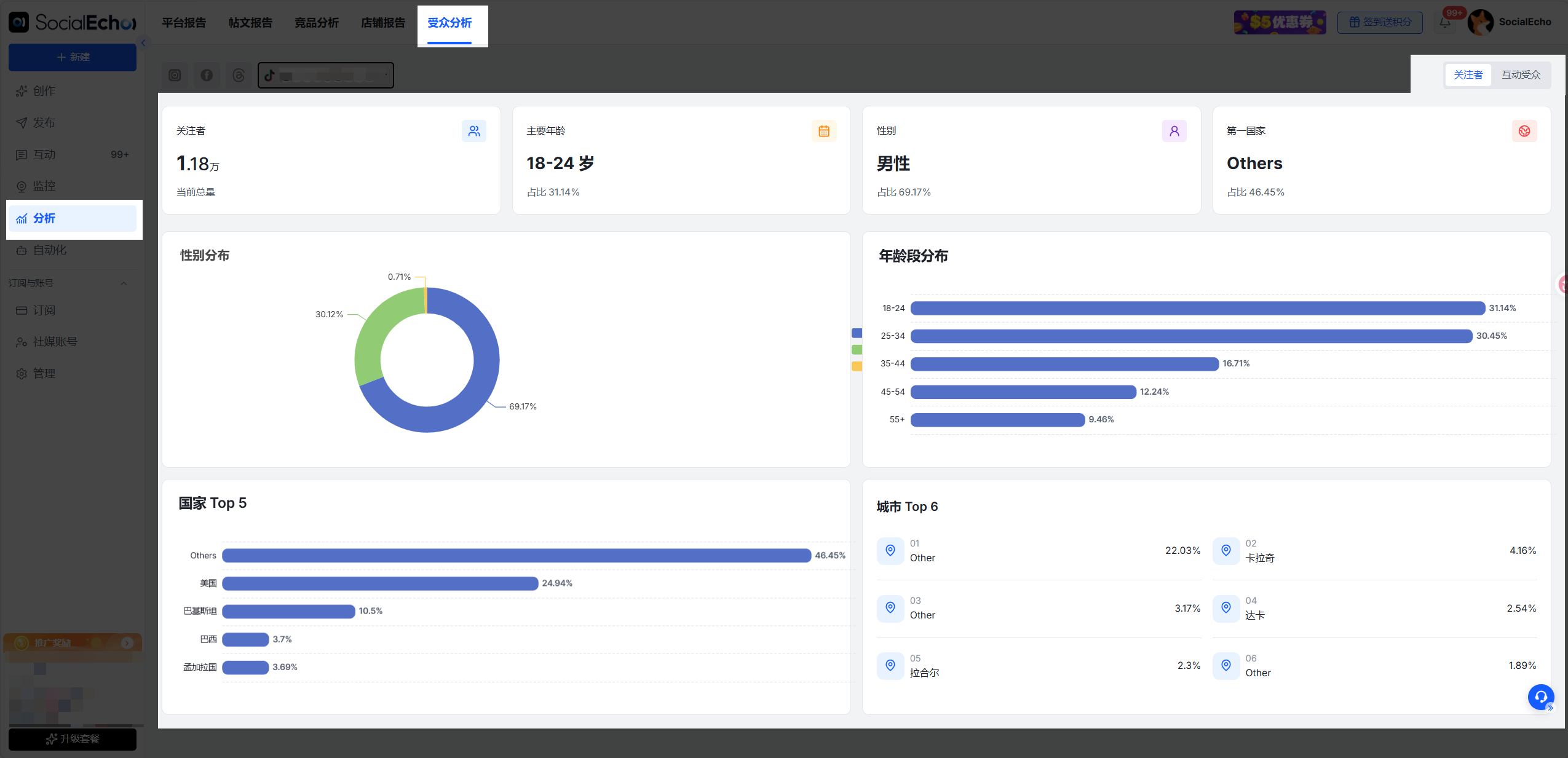
Use cases
- Develop a localized content strategy : Adjust the language, release time, and regional event arrangements of the content based on the country and city of the audience.
- Identify the core user group : Combine age and gender distribution to confirm whether the actual audience matches the brand's target audience.
- Comparing the profiles of account followers and actual users : By comparing the profiles of account followers and actual users who interact, we can determine which groups are more willing to participate in content interaction.
- Adjust platform resource allocation : Compare the audience composition of different platforms to provide a basis for subsequent content budgeting and staffing.
II. KOL monitoring notes support adding images and links.
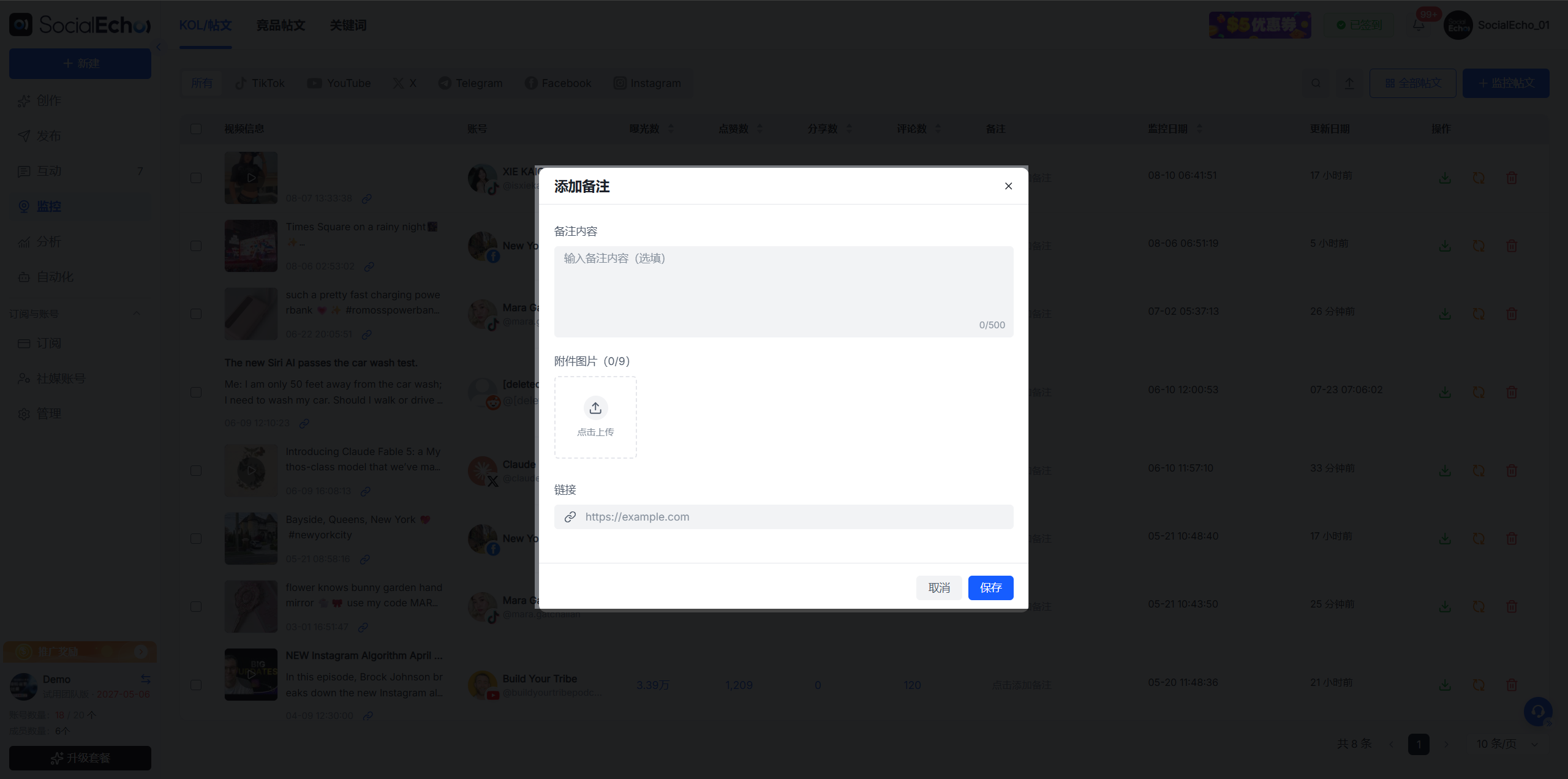
SocialEcho KOL monitoring notes now support adding images and links.
In addition to text information, teams can also add screenshots of collaborations, content examples, pricing information, or relevant page links to the KOL's notes, consolidating information scattered across chat logs, documents, and browser bookmarks under the corresponding KOL's name.
Operation path
Click on [Monitoring] - [KOL/Post], select the post's [Notes], and you can upload text, images, or links.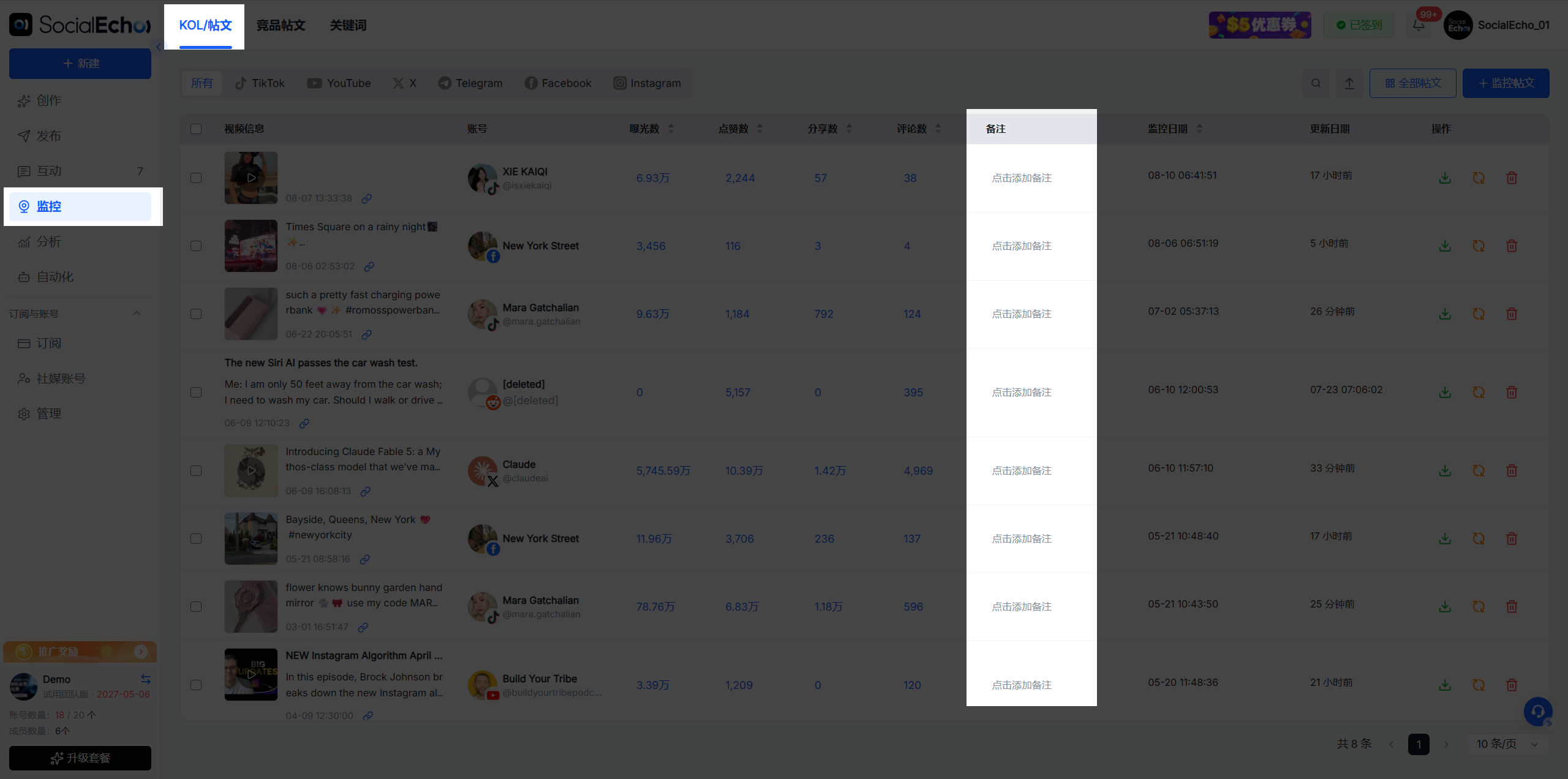
Use cases
- Save collaboration materials : Add screenshots of quotes, collaboration proposals, or media materials to the KOL's notes for easy access by the team.
- Record representative content : Save links to high-quality posts or historical collaborations from KOLs to provide a reference for subsequent selection.
- Consolidate communication information : Save screenshots and page links related to the collaboration in the corresponding KOL's records to reduce the dispersion of information.
- Team handover : When the person in charge changes, the new member can quickly understand the history of cooperation by combining text, pictures and links.
III. AI-rewritten content can be saved to a draft.
SocialEcho's AI rewriting and syncing features now include a "Save to Draft" option.
After the automated task completes the content rewriting, the results can be saved to the drafts folder. The team can then check the copy, materials, and platform compatibility before deciding on the release date or scheduling.
This setting adds a manual confirmation step between automatic generation and official release, making it suitable for content workflows that require review, modification, or unified scheduling.
Operation path
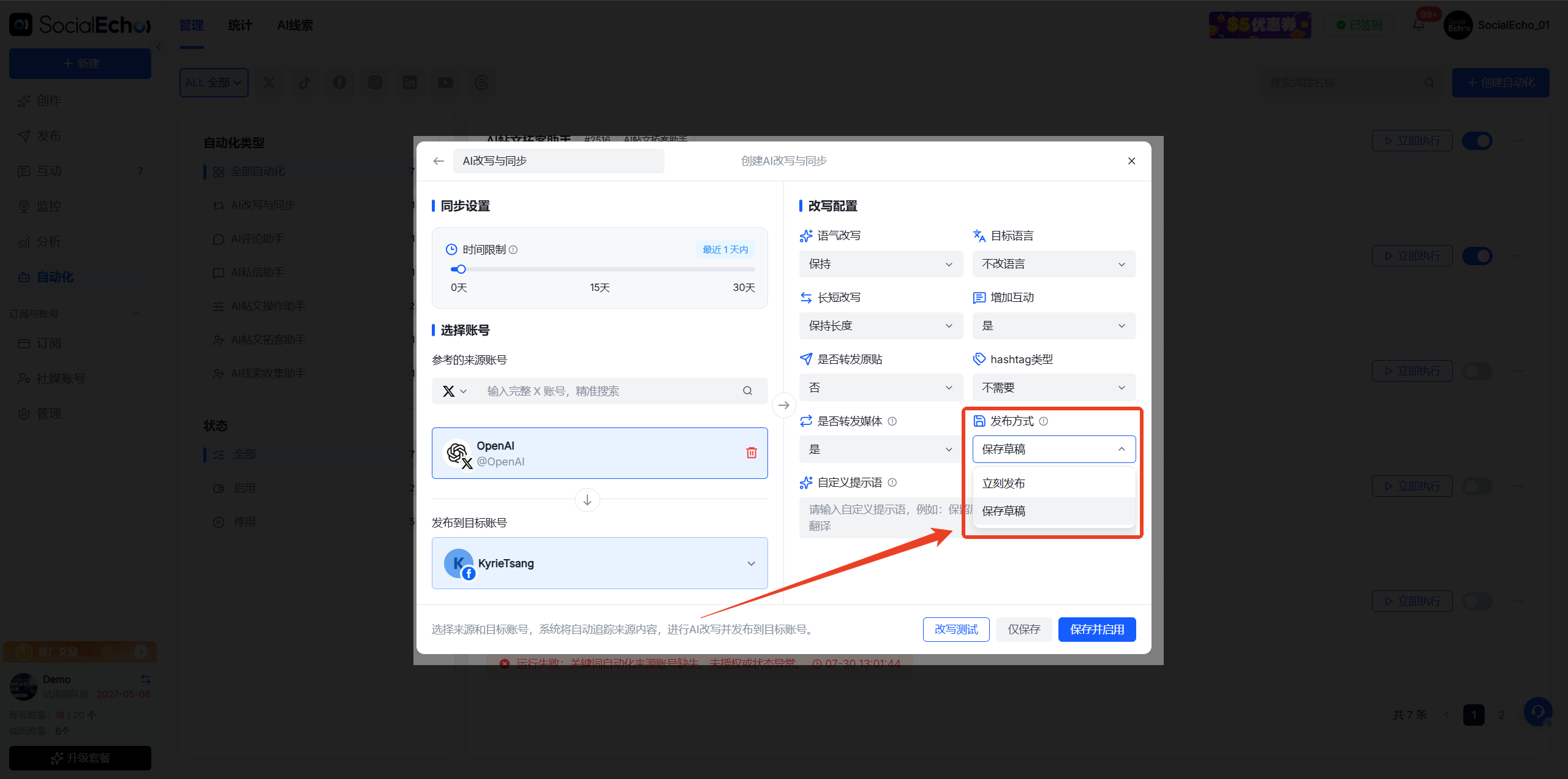
Click on 【Automation】-【Create Automation】-select 【AI Rewrite and Synchronization】
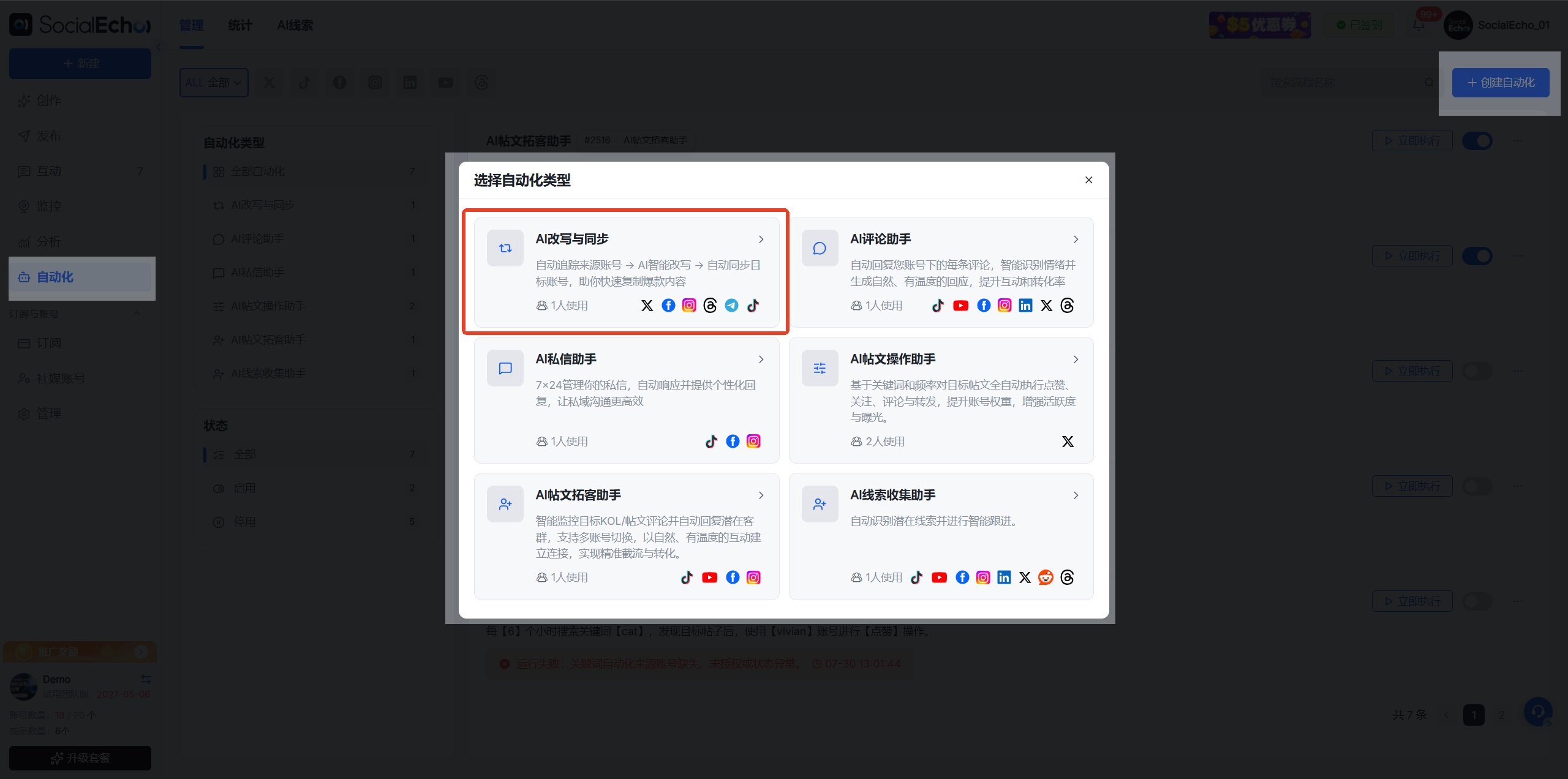
On the right, under "Publish Method," select "Save Draft." After saving, this content will appear in the "Publish" interface - "Drafts" section, awaiting further editing and publication confirmation.
Use cases
- Human review before release : After the AI completes the rewriting, the operations staff will check the brand tone, product information and accuracy of expression.
- Sensitive content review : Financial, medical, or other content that requires strict review should be drafted first and confirmed before publication.
- Unified content scheduling : After multiple automated tasks generate content, it is first aggregated into the drafts folder, and then scheduled in a unified manner according to the activity rhythm.
- Secondary editing of materials : retain the AI-rewritten text and add images, videos, or action guidance information before publication.
IV. The publishing interface now includes publishing status and source information.
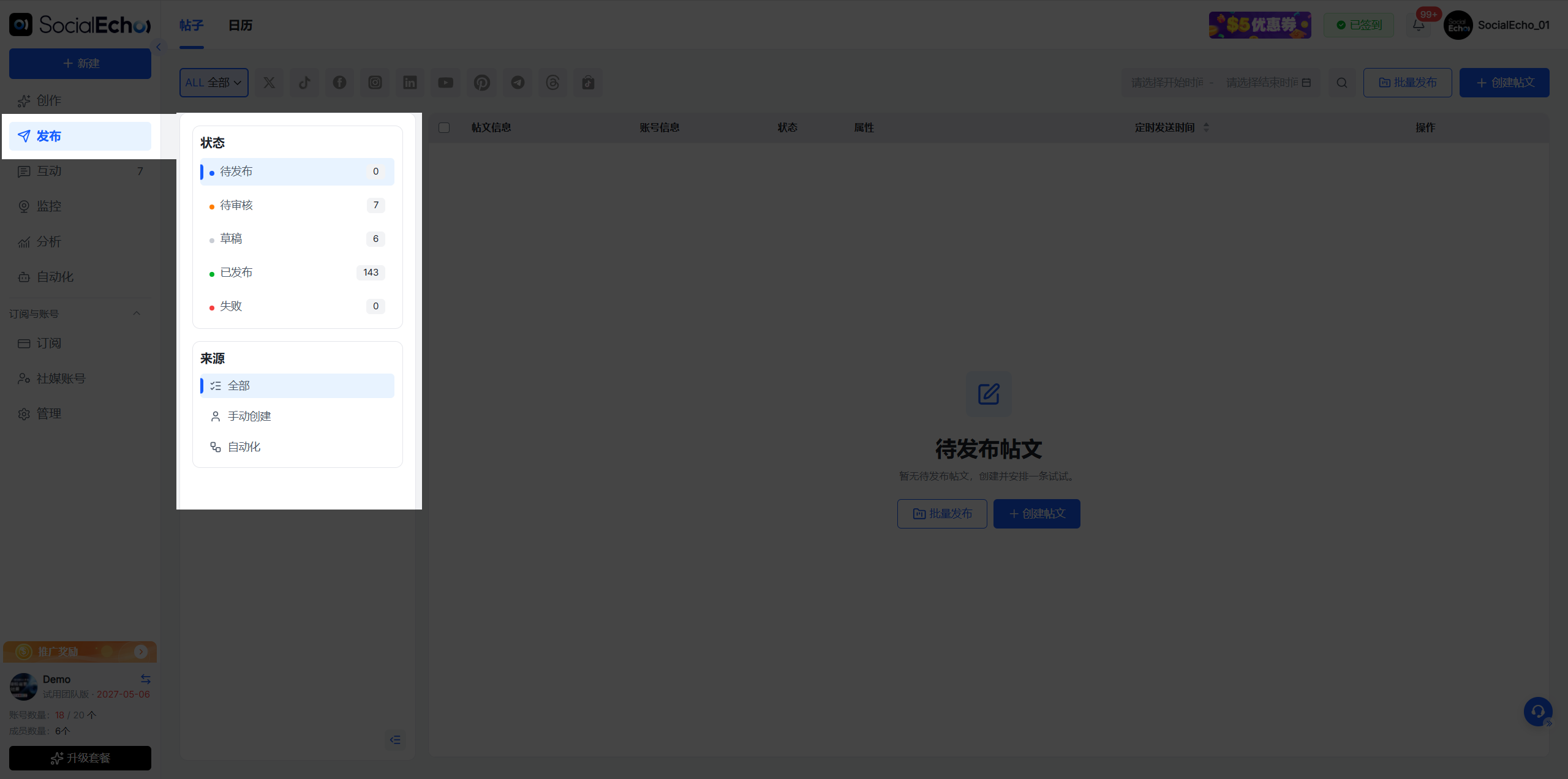
The SocialEcho publishing interface now includes publishing status and source information, making it easier for teams to understand the current publishing stage of content and whether the content was created manually or through an automated task.
Content sources can be categorized into the following three types:
- All : Includes all published content, both manually created and automatically generated.
- Manual creation : Content that can be manually set up for immediate or scheduled publishing by operations staff in SocialEcho.
- Automation : The published content generated by the task is automatically rewritten by AI.
By categorizing content by source, teams can more quickly distinguish between manually generated and automated content, gaining clearer context when reviewing postings or troubleshooting issues.
Operation path
Click on "Publish," and the post's status and source will be displayed on the left.
Use cases
- Check automated content publishing : View the content automatically rewritten by AI separately to confirm the task output and publishing status.
- Review manual scheduling : Filter manually created content and conduct a centralized review of the team's settings for immediate and scheduled releases.
- Investigate publishing issues : Combine the publishing status and content source to determine whether the abnormal content comes from manual operation or automated process.
- Understand the content composition : Compare the amount of content created manually and automatically to provide a reference for subsequent process adjustments.
V. Comment replies can include @ other accounts.
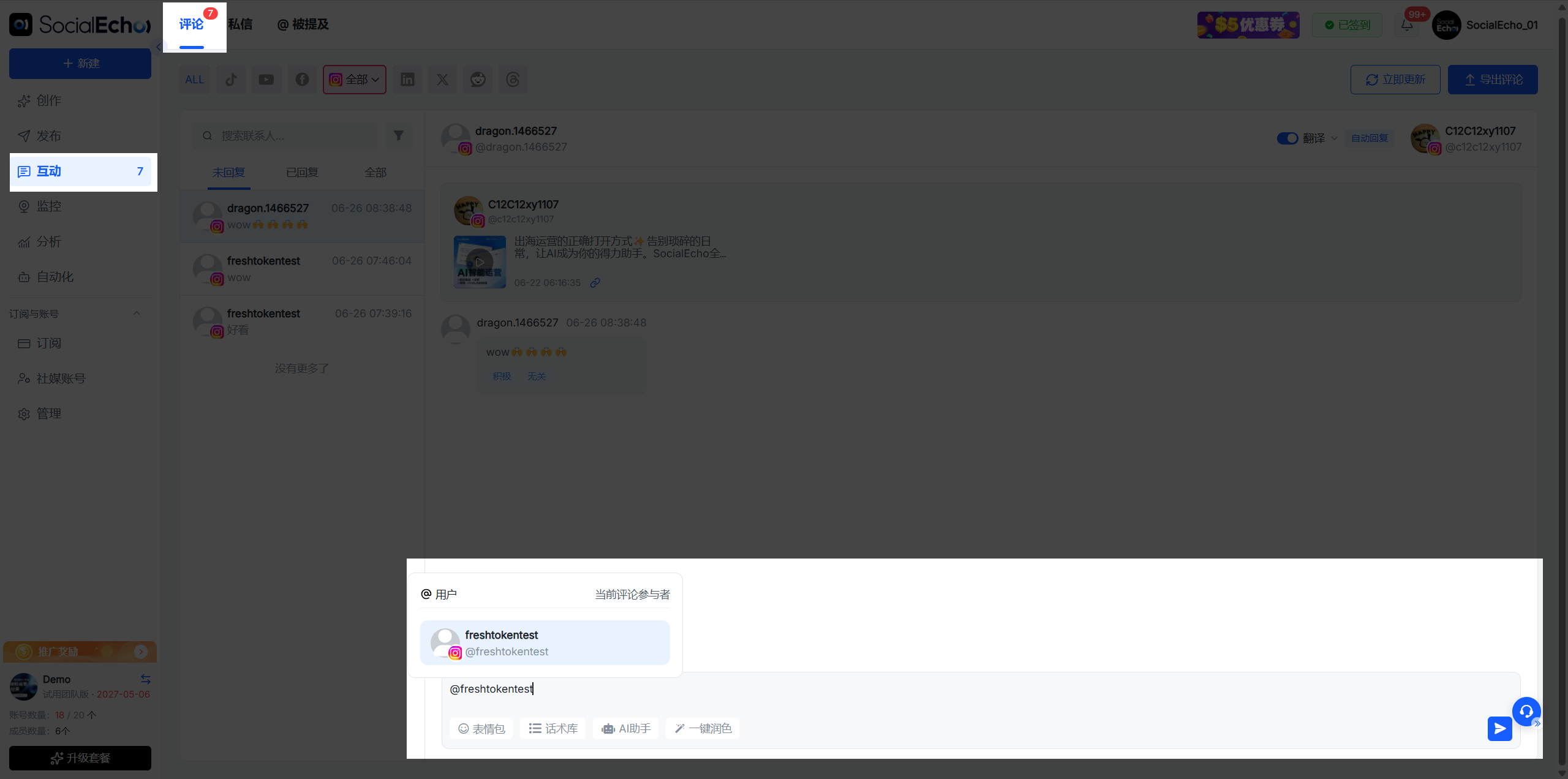
SocialEcho now features an @mention function in comment replies. When replying to comments, staff can @mention other accounts within the content without needing to access the original social media platform separately.
The following platforms are currently supported:
- Threads
- X
This feature is suitable for comment interactions that require linking brand accounts, partners, influencers, or other users, making communication in the comment section more contextual and allowing users to quickly find the accounts that are mentioned.
Operation path
Click on [Interaction] - [Comments], and then @ the account when replying to a comment.
Use cases
- Brand matrix account linkage : When users inquire about regional services or product lines, the corresponding regional account or product account will be mentioned in the reply.
- Influencer Collaboration and Interaction : When brands reply to comments under collaboration content, they can directly mention the influencer accounts involved in the collaboration.
- Event Partner Links : During the joint event, tag partner brands or event accounts in the comments to help users view relevant information.
- User content interaction : When replying to user submissions or experience sharing, mention the relevant account to make the relationship between the comment content and the participants clearer.
VI. Daily check-in rewards points
SocialEcho now offers a daily check-in bonus. Each team can check in once a day and earn 100 points for each check-in.
The points earned can be used for the following functions:
- AI Creation
- AI Tagging
- AI auto-reply
- AI translation
- AI Clue Scoring
- AI Team Weekly Report
Daily check-in is calculated on a team basis. Each team can complete one check-in per day and receive the corresponding points.
Operation path
After logging into the system, a sign-in prompt will appear in the upper right corner of the page. Click "Sign In" to receive 100 points.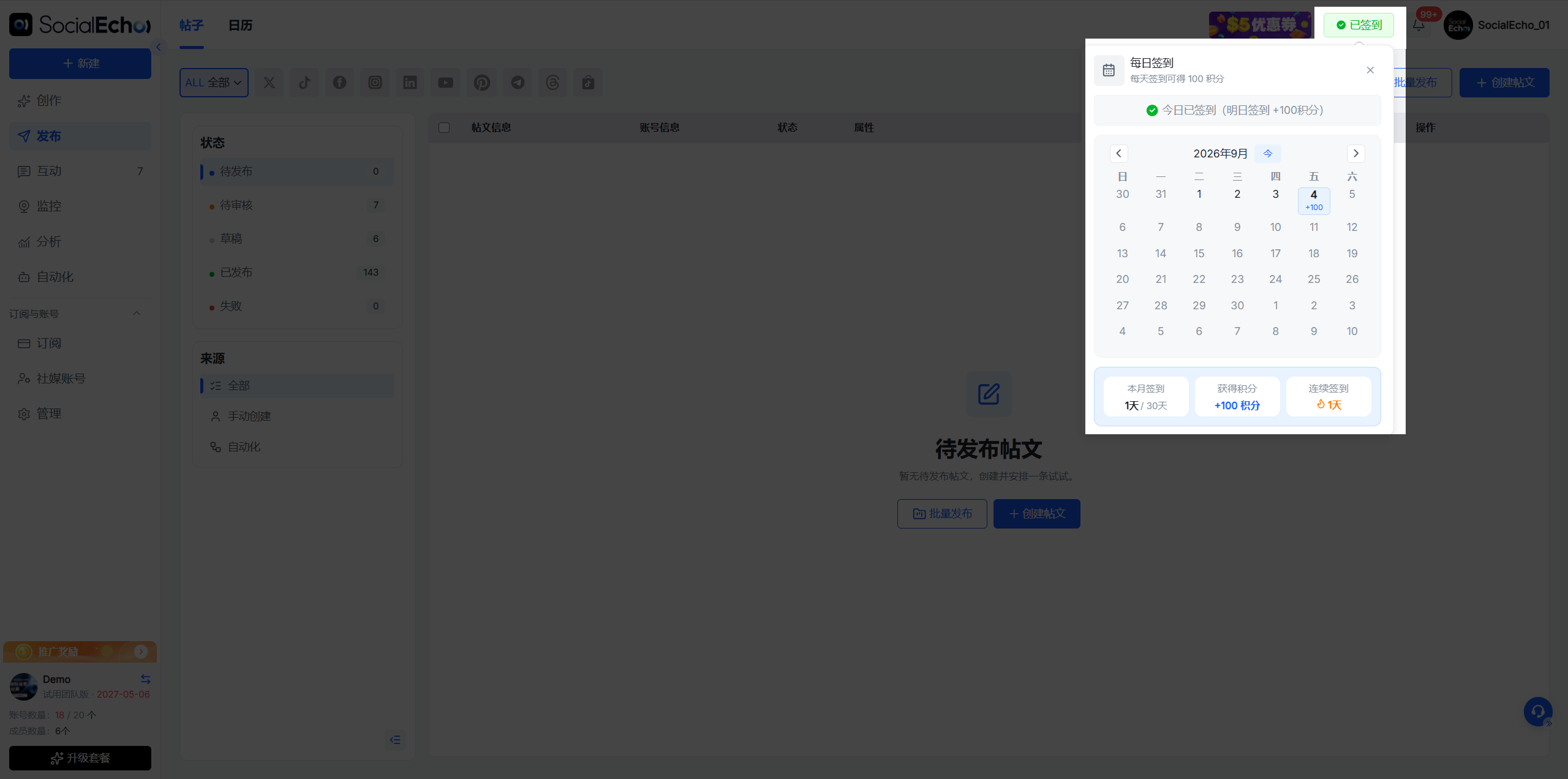
Regarding SocialEcho
SocialEcho is a comprehensive social media AI workbench for companies going global, brand teams, marketing agencies, and content teams, supporting 11 major platforms including Facebook, Instagram, X, TikTok, TikTok Shop, YouTube, Telegram, LinkedIn, Pinterest, Reddit, and Threads.
Users can centrally manage content creation and publishing across multiple platforms, comment and private message management, data analysis, competitor and KOL monitoring, and AI-automated operations through SocialEcho, reducing platform switching and repetitive operations, and managing overseas social media accounts and user interactions more efficiently.
With this update, SocialEcho has further improved its daily operational processes, from audience analysis and interactive collaboration to content moderation, publishing management, and the use of AI capabilities.
;}.cls-2{fill:%230868f7;}.cls-3{fill:url(%23未命名的渐变_44);}.cls-4{fill:%23333;}%3c/style%3e%3clinearGradient%20id='未命名的渐变_8'%20x1='33.73'%20y1='100.61'%20x2='-0.03'%20y2='-1.06'%20gradientUnits='userSpaceOnUse'%3e%3cstop%20offset='0'%20stop-color='%237ae9fb'/%3e%3cstop%20offset='0.67'%20stop-color='%232b90f8'/%3e%3cstop%20offset='1'%20stop-color='%230868f7'/%3e%3c/linearGradient%3e%3clinearGradient%20id='未命名的渐变_44'%20x1='27.86'%20y1='18.67'%20x2='68.36'%20y2='22.22'%20gradientUnits='userSpaceOnUse'%3e%3cstop%20offset='0'%20stop-color='%235ac7f2'/%3e%3cstop%20offset='1'%20stop-color='%230868f7'/%3e%3c/linearGradient%3e%3c/defs%3e%3cpath%20class='cls-1'%20d='M29,28.74V81.91l-9.51-3.68v0L8.52,74A7.17,7.17,0,0,1,4,67.32V24.54A3.76,3.76,0,0,1,9.08,21Z'/%3e%3cpath%20class='cls-2'%20d='M68.09,78.07a13.15,13.15,0,0,1-17.9,12.06L29,81.91h0V28.74L50.19,37A13.17,13.17,0,0,0,68.08,25.3h0Z'/%3e%3cpath%20class='cls-3'%20d='M68.08,25.3a13.19,13.19,0,0,1-6.73,10.87A13.09,13.09,0,0,1,50.19,37L29,28.74V6A3.76,3.76,0,0,1,34.1,2.52l25.59,9.91A13.22,13.22,0,0,1,68.08,25.3Z'/%3e%3cpath%20class='cls-4'%20d='M129.06,81.76a4.33,4.33,0,0,1-3.19-1.31,4.4,4.4,0,0,1-1.31-3.24V56.86H97.65V77.21a4.36,4.36,0,0,1-1.35,3.2A4.68,4.68,0,0,1,93,81.76a4.32,4.32,0,0,1-3.19-1.31,4.37,4.37,0,0,1-1.32-3.24V27.27A4.58,4.58,0,0,1,89.83,24a4.59,4.59,0,0,1,7.82,3.27V48.15h26.91V27.27A4.58,4.58,0,0,1,125.91,24a4.59,4.59,0,0,1,7.82,3.27V77.21a4.37,4.37,0,0,1-1.36,3.2A4.65,4.65,0,0,1,129.06,81.76Z'/%3e%3cpath%20class='cls-4'%20d='M163.77,81.66c-6.57,0-11.76-1.92-15.44-5.7s-5.54-9.07-5.54-15.74a26.76,26.76,0,0,1,2.09-10.43,17.72,17.72,0,0,1,6.67-8.06,19.15,19.15,0,0,1,10.68-2.95,19,19,0,0,1,10.46,2.8,18.7,18.7,0,0,1,6.55,7.36,22.53,22.53,0,0,1,2.36,10.28A4.51,4.51,0,0,1,177,63.77H152.23a10.8,10.8,0,0,0,3.49,6.65c2,1.68,4.88,2.52,8.66,2.52a22.25,22.25,0,0,0,7.54-1.21c.74-.3,1.55-.67,2.37-1.07a3.75,3.75,0,0,1,1.84-.4,4.09,4.09,0,0,1,3,1.15,4,4,0,0,1,1.12,3,4.38,4.38,0,0,1-2.58,3.82,32.34,32.34,0,0,1-6.36,2.61A28.67,28.67,0,0,1,163.77,81.66ZM172.4,55.9a9.72,9.72,0,0,0-1.63-4.56A9.9,9.9,0,0,0,167,48a10.38,10.38,0,0,0-4.64-1.14,12,12,0,0,0-4.77,1.06,9.54,9.54,0,0,0-4.89,5.66,11.78,11.78,0,0,0-.51,2.3Z'/%3e%3cpath%20class='cls-4'%20d='M193,81.64a4.49,4.49,0,0,1-4.51-4.55V27.28A4.58,4.58,0,0,1,189.84,24a4.48,4.48,0,0,1,3.28-1.36A4.36,4.36,0,0,1,196.35,24a4.46,4.46,0,0,1,1.31,3.31V77.09a4.34,4.34,0,0,1-1.35,3.2A4.67,4.67,0,0,1,193,81.64Z'/%3e%3cpath%20class='cls-4'%20d='M263.79,81.71a5.7,5.7,0,0,1-4.2-1.74,5.76,5.76,0,0,1-1.73-4.19V27.37a4.58,4.58,0,0,1,1.35-3.27A4.59,4.59,0,0,1,267,27.37V72.53h24a4.58,4.58,0,0,1,3.27,7.82A4.66,4.66,0,0,1,291,81.71Z'/%3e%3cpath%20class='cls-4'%20d='M424.48,81.74a4.71,4.71,0,0,1-2.71-.88,5.43,5.43,0,0,1-1-1l-.07-.09-12.41-17-5.41,5v9.44a4.31,4.31,0,0,1-1.36,3.19,4.66,4.66,0,0,1-3.3,1.36A4.29,4.29,0,0,1,395,80.42a4.36,4.36,0,0,1-1.32-3.23V27.37A4.58,4.58,0,0,1,395,24.1a4.52,4.52,0,0,1,6.58.12,4.54,4.54,0,0,1,1.24,3.15V56.31l17.72-16.38.05,0a4.8,4.8,0,0,1,2.94-1.11,4.4,4.4,0,0,1,3.27,1.2,4.57,4.57,0,0,1,1.2,3.27,4.44,4.44,0,0,1-.77,2.33,7.45,7.45,0,0,1-1.43,1.65l-11,9.64,13.34,17.68a5,5,0,0,1,1,2.71,4.12,4.12,0,0,1-1.36,3.24A4.64,4.64,0,0,1,424.48,81.74Z'/%3e%3cpath%20class='cls-4'%20d='M317.93,81.76a21.5,21.5,0,1,1,21.17-21.5A21.37,21.37,0,0,1,317.93,81.76Zm0-34.1a12.61,12.61,0,1,0,12.42,12.6A12.52,12.52,0,0,0,317.93,47.66Z'/%3e%3cpath%20class='cls-4'%20d='M212.18,101.22a4.12,4.12,0,0,1-3.05-1.26,4.17,4.17,0,0,1-1.26-3.1V43.34a4.37,4.37,0,0,1,1.3-3.14,4.26,4.26,0,0,1,3.13-1.3,4.19,4.19,0,0,1,3.1,1.26,4.32,4.32,0,0,1,1.26,3.16,20.77,20.77,0,0,1,13-4.54,21.51,21.51,0,0,1,0,43,20.51,20.51,0,0,1-13-4.57V96.86a4.15,4.15,0,0,1-1.3,3.06A4.5,4.5,0,0,1,212.18,101.22Zm17.43-53.63c-6.23,0-12.93,4.11-12.93,12.72a12.73,12.73,0,0,0,25.46,0A12.71,12.71,0,0,0,229.61,47.59Z'/%3e%3cpath%20class='cls-4'%20d='M365.76,81.76a21.5,21.5,0,1,1,21.18-21.5A21.37,21.37,0,0,1,365.76,81.76Zm0-34.1a12.61,12.61,0,1,0,12.42,12.6A12.52,12.52,0,0,0,365.76,47.66Z'/%3e%3c/svg%3e)