
How to download YouTube videos for free in 2026? 6 common methods and compliant usage tips.
When doing content operations, video editing, or social media debriefing, many people encounter the same problem: what method should be used to save a valuable YouTube video for offline viewing, material organization, or to add it to the team's material library for analysis?
There are several methods available now: YouTube's official offline download function, online video downloaders, browser extensions, and desktop software can all meet some of the needs. However, before actually downloading, it's important to understand a boundary: being able to download doesn't mean you can reuse it at will.
If you save videos that you uploaded yourself, videos that have been authorized, or videos that are only used for personal learning, internal research, or competitor analysis, the risk is usually low. If you want to re-edit, publicly release, commercially distribute, or transfer them to other platforms, you need to confirm the copyright, authorization, and YouTube's platform rules in advance.
Below, we've compiled six common methods based on real-world usage scenarios, explaining who they're suitable for, their limitations, and how to use them more safely. For ease of assessment, this article categorizes download needs into three types: offline viewing, material archiving, and content review. We also provide a six-step compliance checklist to help teams reduce the risk of misuse.
Method 1: Use YouTube Premium's official offline feature
If your primary need is simply offline viewing, YouTube Premium is the safest option.
YouTube Premium offers an official offline save feature, allowing users to download videos within the YouTube app and watch them without an internet connection. This method is provided by YouTube, ensuring higher compliance and eliminating the need for third-party tools.
advantage
- With official support, the risk of using it is relatively low;
- It can be watched offline within the YouTube app;
- Supports ad-free viewing;
- Suitable for scenarios such as studying, commuting, and traveling.
Limitations
Videos downloaded with YouTube Premium can usually only be played within the YouTube app, cannot be exported as regular MP4 files, and are not suitable for uploading to video editing software for further editing.
Who is it suitable for?
Suitable for users who only want to watch videos offline.
If you need to obtain video files for editing, archiving, or team asset management, this method is not flexible enough.
Method 2: Use SocialEcho, a free image and video downloader.
If you are a social media operator, content creator, brand team, or agency who frequently needs to organize publicly available materials, analyze competitor content, and save reference cases, you can use SocialEcho, an free image and video downloader.
Chinese tools:
SocialEcho Free Image Video Downloader
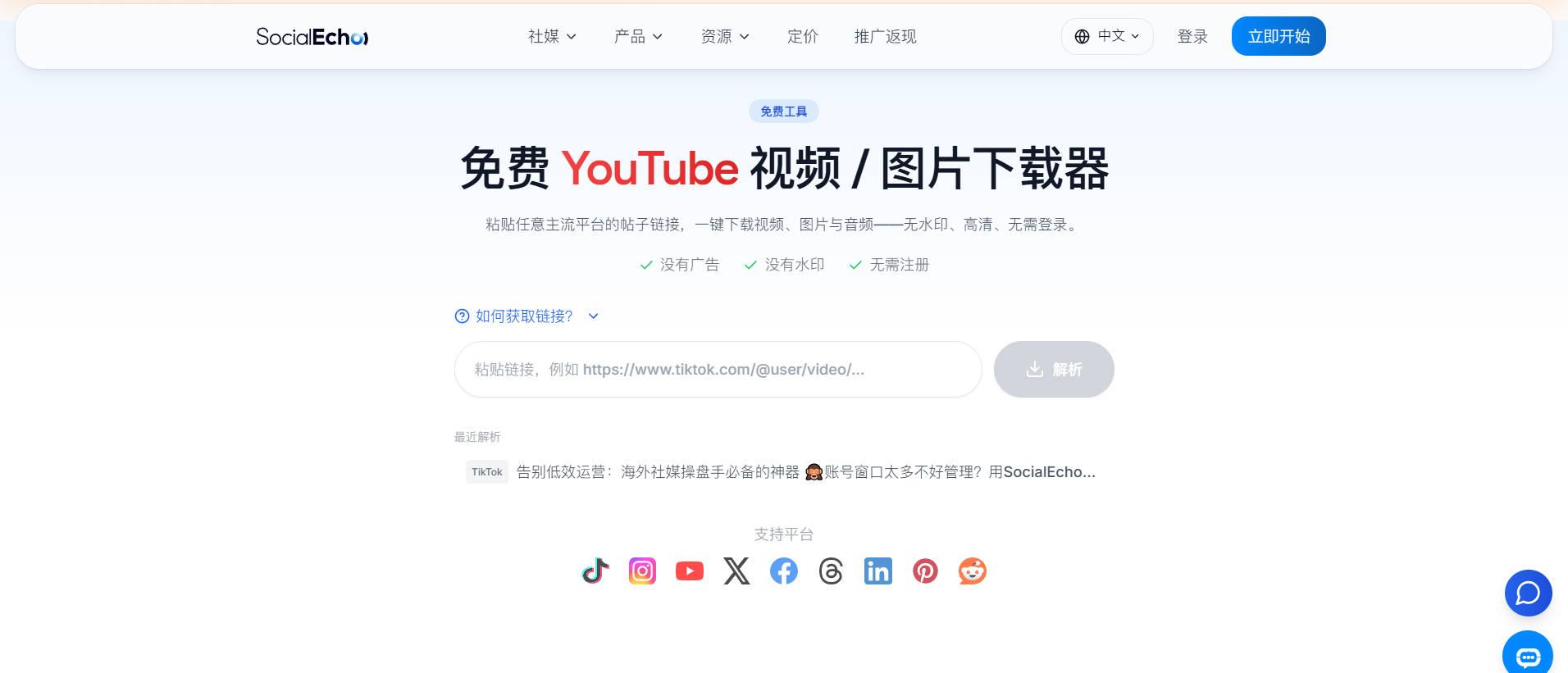
This tool is better suited for inclusion in the daily workflow of a content team: for example, saving publicly available images or video footage, organizing it into the team's media library, and then further analyzing the titles, covers, script structure, comment feedback, and interaction methods.
advantage
- Use it online; no software installation required.
- Suitable for quickly saving publicly available images and video footage;
- Both the Chinese and English websites are accessible.
- Suitable for social media operations, content teams, and cross-platform account management;
- It can be used for material archiving, competitor analysis, breaking down best-selling products, and content review.
How to use
- Open SocialEcho, the free image and video downloader .
- Copy the public video link that you want to save;
- Paste into the tool input box;
- Obtain the materials according to the page prompts;
- Save the materials locally;
- Record the source link, platform, account, and purpose for easy tracking later.
Tip: Don't just save files; build up your content assets.
For content teams, downloading videos is only the first step. More importantly, they need to organize the footage into content assets that can be reviewed, learned from, and reused.
It is recommended to record this information in the media library. In actual team collaboration, it is recommended to record at least 5 fields; if the media library is reviewed once a week, individual videos can be transformed from "temporary files" into traceable content examples.
- Source platforms: YouTube, TikTok, Instagram, Facebook;
- Content types: tutorials, assessments, advertisements, verbal presentations, case studies;
- Key features: Strong Hook, High Interaction, Active Comments Section, Conversion-Oriented;
- Learnable elements: title, cover, opening, script rhythm, CTA;
- Authorization status: Own content, Authorized, For internal reference only.
In this way, the materials are no longer just "downloaded videos," but become a long-term, reusable database for the content team. For teams that need to process material collection more than 20 times a month, this kind of record can reduce the probability of duplicate searches and misuse of materials.
Who is it suitable for?
Suitable for social media operators, content creators, brand marketing teams, MCNs, advertising teams, and anyone who needs to do content analysis and material management long-term.
Method 3: Use 4K Video Downloader desktop software
4K Video Downloader is a common desktop video downloader that supports Windows, macOS, and Linux.
advantage
- Supports multiple systems;
- Different resolutions can be selected;
- Supports partial playlist downloads;
- Suitable for storing high-definition public videos;
- The desktop version is relatively stable.
How to use
- Visit the 4K Video Downloader official website;
- Download and install the application;
- Copy the YouTube video link;
- Paste the link into the software;
- Choose the format, resolution, and save location;
- Start downloading.
Safety Reminder
Desktop software needs to be installed on a local device; it is recommended to download only from the official website and avoid using installation packages from unknown sources. For team computers or company equipment, it is best to confirm the IT security rules first.
Who is it suitable for?
Suitable for users who need high definition, stable download experience, or who frequently organize video materials.
Method 4: Download online using Cobalt.tools
Cobalt.tools is a lightweight online tool suitable for occasionally downloading public videos or temporarily saving materials.
advantage
- No software installation required;
- The page is simple;
- Supports links to multiple platforms;
- Suitable for quickly processing single videos;
- It is more convenient for temporary use.
How to use
- Copy the YouTube video link;
- Open Cobalt.tools;
- Paste the link;
- Select the download format;
- Save the file.
Precautions
The availability of online tools may vary, and different regions, network environments, and video types may affect download results. When using them, be careful not to click on advertisements, pop-ups, or redirecting links from unknown sources.
Who is it suitable for?
Suitable for users who occasionally download videos and don't want to install software.
Method 5: Use a Firefox browser extension
Some browser extensions can help users identify downloadable video resources when browsing web pages, such as Video DownloadHelper.
advantage
- Tightly integrated with browsers;
- There is no need to copy links frequently;
- It can be operated directly in the browser;
- Supports multiple formats and resolutions.
Precautions
Chrome imposes more restrictions on YouTube download extensions, so Firefox is generally more flexible. When installing extensions, it is recommended to choose plugins that have been maintained recently, have many positive reviews, and come from reliable sources, and to check permission settings regularly.
Who is it suitable for?
Suitable for users who are used to completing operations in a browser and do not download frequently.
Method 6: Use desktop tools such as Stacher or ClipGrab
Stacher is a graphical interface tool from yt-dlp, while ClipGrab is a common open-source video downloader. They are more suitable for users with a certain level of technical literacy.
advantage
- Supports multiple video websites;
- Different formats are available;
- Some tools support audio extraction;
- Suitable for batch downloading and long-term archiving;
- More flexible for advanced users.
Limitations
These types of tools usually require software installation and may sometimes involve issues such as dependency updates, download failures, and format conversions. For the average user, the learning curve can be somewhat steep.
Who is it suitable for?
Suitable for users who frequently collect materials, archive content, conduct video research, or organize data in batches.
Is it legal to download YouTube videos?
There is no single answer to this question; it depends on the video's source, licensing status, and usage.
Generally speaking, the following situations are safer:
- Download your own uploaded videos;
- Download videos that have been authorized by the creator;
- Use YouTube Premium's official offline feature;
- Use videos that have been explicitly authorized by the creator;
- For personal study, research, or internal analysis;
- Use explicitly licensed content such as Creative Commons.
The following situations carry a higher risk:
- Unauthorized downloading and reposting of other people's videos;
- Upload videos to platforms such as TikTok, Instagram, Facebook, and Bilibili;
- Editing other people's videos for use in commercial advertisements;
- Remove watermarks or circumvent platform restrictions;
- Bulk collect and redistribute other people's content.
For content teams, it is recommended to establish a basic material compliance process. At least one check should be completed before each external release, especially for commercial advertisements, brand account content, and cross-platform redistribution scenarios.
- Save the original link;
- Record the creator and platform origin;
- Indicate the intended use of the material;
- Distinguish between "internal reference" and "publicly available";
- Authorization must be confirmed before commercial use;
- Avoid direct copying or misleading reposting.
This not only reduces copyright risks but also makes the team's material management more standardized.
Is it legal to download YouTube videos?
Whether or not you can legally download YouTube videos depends not on whether you can download them at all, but on how you download them, whether the videos are authorized, and how you plan to use them after downloading.
If you're only watching offline, YouTube Premium is a safer choice. It's an official offline saving feature provided by YouTube, making it more compliant. However, be aware that videos saved with Premium can usually only be viewed within the YouTube app; it doesn't mean you have the rights to edit, repost, or use the video for commercial purposes.
If you're using third-party tools to download YouTube videos, you need to be even more careful about copyright and platform rules. Unauthorized downloading, editing, reposting, or commercial use of others' videos can all lead to copyright risks. Even though YouTube rarely sues ordinary users directly, adhering to platform terms and creator copyrights is still a safer and more professional approach.
Before downloading YouTube videos or planning to use video footage for personal, team, or business projects, it is advisable to understand the following risk boundaries.
YouTube Terms of Service
YouTube's terms of service typically prohibit users from downloading platform content without the creator's permission or without the platform explicitly providing a download button or download link.
The core purpose of these rules is to protect creators' video copyrights, content revenue, and distribution rights.
Copyright Law
If you are not the owner of the video content and have not obtained explicit authorization from the creator or copyright holder, then downloading, editing, reposting, or redistributing the video may constitute copyright infringement.
Common consequences include videos being removed from platforms, accounts receiving copyright warnings , and restrictions on content revenue. In severe cases, it may even lead to legal disputes.
Reasonable use
In some jurisdictions, such as the United States, the "fair use" doctrine exists in copyright law. Fair use may allow users to use copyrighted content in specific contexts, such as criticism, commentary, news reporting, education, research, or academic analysis.
However, fair use is not something that can be done "at will." It usually requires a comprehensive judgment based on factors such as the purpose of use, the proportion of citations, and whether it will affect the market value of the original work. If it involves public release or commercial use, it is advisable to handle it with caution.
How to avoid YouTube copyright issues?
Obtaining authorization from the creator
If you want to use someone else's YouTube video footage in your own videos, articles, ads, or social media content, the safest way is to obtain the creator's explicit permission first.
Authorization can be in the form of written consent, authorization email, cooperation agreement, authorization contract, or a license to use that is clearly marked on the platform. The key is to be able to prove that you actually have the right to use this material.
Use royalty-free or open-licensed materials
Some creators release their video footage under licenses such as Creative Commons, allowing others to use it under specific conditions. Other platforms offer images, videos, and creative materials that are available for free.
If you need to find available materials, you can use SocialEcho, an free image search tool, to help you find reference materials.
However, even with royalty-free or open-licensed materials, it is recommended to carefully confirm the scope of the license before use, such as whether commercial use is allowed, whether attribution is required, whether secondary modification is allowed, and whether there are restrictions on the platform used.
How do I use it after downloading?
For content teams, the value of downloading videos goes beyond simply "saving files." It's about transforming publicly available content into analyzable, reviewable, and learnable asset material.
You can analyze the video from these perspectives:
- Why is the title so appealing?
- How to design a hook for the first 3 seconds;
- Are the cover and subtitles clear?
- Is the video's pacing suitable for the platform's recommendations?
- What are the real user needs in the comments section?
- Is a CTA designed to encourage followers, comments, clicks, or purchases?
- Is it suitable to rewrite it into text and image scripts, short video scripts, or advertising materials?
For example, after saving materials using the SocialEcho free image and video downloader , they can be further organized into the team's content library for competitor content analysis, breaking down viral videos, collecting topic inspiration, reviewing content across multiple platforms, referencing advertising creative ideas, and internal team training.
In this way, the download tool is not just an entry point for "saving videos", but part of the content production process.
In summary: Which method is best for you?
If you just want to watch offline, prioritize YouTube Premium.
If you are a content operations or social media team and need to quickly save publicly available materials, conduct competitor analysis, and review content, you can use SocialEcho, an free image and video downloader .
If you need higher image quality or batch downloads, you can consider desktop tools such as 4K Video Downloader, Stacher, and ClipGrab.
If you're just temporarily processing a video, Cobalt.tools or a browser extension are convenient enough.
Frequently Asked Questions (FAQ)
1. Can I download any YouTube video for free?
This is not recommended. You need to first determine whether the video is your own content, authorized content, or only for personal learning and internal analysis. Unauthorized public videos should not be directly copied, edited, or used for commercial advertising.
2. Can videos downloaded from YouTube Premium be exported as MP4?
Generally not. YouTube Premium's offline viewing feature is primarily for in-app viewing, not for exporting regular video files, and it's not suitable for direct import into editing software for further editing.
3. In what scenarios is SocialEcho, the free image and video downloader, suitable?
It is more suitable for social media operations and content teams to organize publicly available materials, analyze competitors, break down viral content, and conduct content reviews. When using it, it is recommended to simultaneously record the source link, account name, platform, and authorization status, and to perform at least two cross-checks during the review: once for the content structure and once for the authorization boundaries.
4. Can I post the downloaded video directly to TikTok or Instagram?
Not recommended. Unless you own the copyright, have obtained authorization from the creator, or the video explicitly permits reuse, directly reposting to other platforms may trigger copyright complaints, account penalties, or brand risks.
5. How should the team manage downloaded video footage?
It is recommended to establish a resource library and record at least five pieces of information: source link, platform, creator, purpose, and authorization status. Before publicly releasing any material, conduct a second copyright and platform rule check.
6. Are online download tools safe?
Different tools vary greatly. It is recommended to prioritize tools with clear interfaces, no forced redirects, and no need to install suspicious plugins; do not download installation packages from unknown sources, and do not enter your account password on the download page.
Key points
Therefore, when choosing a method to download YouTube videos, consider your intended use first, then select the tool: prioritize YouTube Premium for offline viewing; use SocialEcho , a free image and video downloader, for archiving and content review; and consider desktop software for high-quality and batch downloading. Ultimately, a truly professional content team not only knows how to download materials, but more importantly, they know how to determine whether materials are usable, how to use them, where to use them, and how to transform materials into long-term, reusable content assets.
Register now and enjoy 7 days of free use.
;}.cls-2{fill:%230868f7;}.cls-3{fill:url(%23未命名的渐变_44);}.cls-4{fill:%23333;}%3c/style%3e%3clinearGradient%20id='未命名的渐变_8'%20x1='33.73'%20y1='100.61'%20x2='-0.03'%20y2='-1.06'%20gradientUnits='userSpaceOnUse'%3e%3cstop%20offset='0'%20stop-color='%237ae9fb'/%3e%3cstop%20offset='0.67'%20stop-color='%232b90f8'/%3e%3cstop%20offset='1'%20stop-color='%230868f7'/%3e%3c/linearGradient%3e%3clinearGradient%20id='未命名的渐变_44'%20x1='27.86'%20y1='18.67'%20x2='68.36'%20y2='22.22'%20gradientUnits='userSpaceOnUse'%3e%3cstop%20offset='0'%20stop-color='%235ac7f2'/%3e%3cstop%20offset='1'%20stop-color='%230868f7'/%3e%3c/linearGradient%3e%3c/defs%3e%3cpath%20class='cls-1'%20d='M29,28.74V81.91l-9.51-3.68v0L8.52,74A7.17,7.17,0,0,1,4,67.32V24.54A3.76,3.76,0,0,1,9.08,21Z'/%3e%3cpath%20class='cls-2'%20d='M68.09,78.07a13.15,13.15,0,0,1-17.9,12.06L29,81.91h0V28.74L50.19,37A13.17,13.17,0,0,0,68.08,25.3h0Z'/%3e%3cpath%20class='cls-3'%20d='M68.08,25.3a13.19,13.19,0,0,1-6.73,10.87A13.09,13.09,0,0,1,50.19,37L29,28.74V6A3.76,3.76,0,0,1,34.1,2.52l25.59,9.91A13.22,13.22,0,0,1,68.08,25.3Z'/%3e%3cpath%20class='cls-4'%20d='M129.06,81.76a4.33,4.33,0,0,1-3.19-1.31,4.4,4.4,0,0,1-1.31-3.24V56.86H97.65V77.21a4.36,4.36,0,0,1-1.35,3.2A4.68,4.68,0,0,1,93,81.76a4.32,4.32,0,0,1-3.19-1.31,4.37,4.37,0,0,1-1.32-3.24V27.27A4.58,4.58,0,0,1,89.83,24a4.59,4.59,0,0,1,7.82,3.27V48.15h26.91V27.27A4.58,4.58,0,0,1,125.91,24a4.59,4.59,0,0,1,7.82,3.27V77.21a4.37,4.37,0,0,1-1.36,3.2A4.65,4.65,0,0,1,129.06,81.76Z'/%3e%3cpath%20class='cls-4'%20d='M163.77,81.66c-6.57,0-11.76-1.92-15.44-5.7s-5.54-9.07-5.54-15.74a26.76,26.76,0,0,1,2.09-10.43,17.72,17.72,0,0,1,6.67-8.06,19.15,19.15,0,0,1,10.68-2.95,19,19,0,0,1,10.46,2.8,18.7,18.7,0,0,1,6.55,7.36,22.53,22.53,0,0,1,2.36,10.28A4.51,4.51,0,0,1,177,63.77H152.23a10.8,10.8,0,0,0,3.49,6.65c2,1.68,4.88,2.52,8.66,2.52a22.25,22.25,0,0,0,7.54-1.21c.74-.3,1.55-.67,2.37-1.07a3.75,3.75,0,0,1,1.84-.4,4.09,4.09,0,0,1,3,1.15,4,4,0,0,1,1.12,3,4.38,4.38,0,0,1-2.58,3.82,32.34,32.34,0,0,1-6.36,2.61A28.67,28.67,0,0,1,163.77,81.66ZM172.4,55.9a9.72,9.72,0,0,0-1.63-4.56A9.9,9.9,0,0,0,167,48a10.38,10.38,0,0,0-4.64-1.14,12,12,0,0,0-4.77,1.06,9.54,9.54,0,0,0-4.89,5.66,11.78,11.78,0,0,0-.51,2.3Z'/%3e%3cpath%20class='cls-4'%20d='M193,81.64a4.49,4.49,0,0,1-4.51-4.55V27.28A4.58,4.58,0,0,1,189.84,24a4.48,4.48,0,0,1,3.28-1.36A4.36,4.36,0,0,1,196.35,24a4.46,4.46,0,0,1,1.31,3.31V77.09a4.34,4.34,0,0,1-1.35,3.2A4.67,4.67,0,0,1,193,81.64Z'/%3e%3cpath%20class='cls-4'%20d='M263.79,81.71a5.7,5.7,0,0,1-4.2-1.74,5.76,5.76,0,0,1-1.73-4.19V27.37a4.58,4.58,0,0,1,1.35-3.27A4.59,4.59,0,0,1,267,27.37V72.53h24a4.58,4.58,0,0,1,3.27,7.82A4.66,4.66,0,0,1,291,81.71Z'/%3e%3cpath%20class='cls-4'%20d='M424.48,81.74a4.71,4.71,0,0,1-2.71-.88,5.43,5.43,0,0,1-1-1l-.07-.09-12.41-17-5.41,5v9.44a4.31,4.31,0,0,1-1.36,3.19,4.66,4.66,0,0,1-3.3,1.36A4.29,4.29,0,0,1,395,80.42a4.36,4.36,0,0,1-1.32-3.23V27.37A4.58,4.58,0,0,1,395,24.1a4.52,4.52,0,0,1,6.58.12,4.54,4.54,0,0,1,1.24,3.15V56.31l17.72-16.38.05,0a4.8,4.8,0,0,1,2.94-1.11,4.4,4.4,0,0,1,3.27,1.2,4.57,4.57,0,0,1,1.2,3.27,4.44,4.44,0,0,1-.77,2.33,7.45,7.45,0,0,1-1.43,1.65l-11,9.64,13.34,17.68a5,5,0,0,1,1,2.71,4.12,4.12,0,0,1-1.36,3.24A4.64,4.64,0,0,1,424.48,81.74Z'/%3e%3cpath%20class='cls-4'%20d='M317.93,81.76a21.5,21.5,0,1,1,21.17-21.5A21.37,21.37,0,0,1,317.93,81.76Zm0-34.1a12.61,12.61,0,1,0,12.42,12.6A12.52,12.52,0,0,0,317.93,47.66Z'/%3e%3cpath%20class='cls-4'%20d='M212.18,101.22a4.12,4.12,0,0,1-3.05-1.26,4.17,4.17,0,0,1-1.26-3.1V43.34a4.37,4.37,0,0,1,1.3-3.14,4.26,4.26,0,0,1,3.13-1.3,4.19,4.19,0,0,1,3.1,1.26,4.32,4.32,0,0,1,1.26,3.16,20.77,20.77,0,0,1,13-4.54,21.51,21.51,0,0,1,0,43,20.51,20.51,0,0,1-13-4.57V96.86a4.15,4.15,0,0,1-1.3,3.06A4.5,4.5,0,0,1,212.18,101.22Zm17.43-53.63c-6.23,0-12.93,4.11-12.93,12.72a12.73,12.73,0,0,0,25.46,0A12.71,12.71,0,0,0,229.61,47.59Z'/%3e%3cpath%20class='cls-4'%20d='M365.76,81.76a21.5,21.5,0,1,1,21.18-21.5A21.37,21.37,0,0,1,365.76,81.76Zm0-34.1a12.61,12.61,0,1,0,12.42,12.6A12.52,12.52,0,0,0,365.76,47.66Z'/%3e%3c/svg%3e)