
Security vulnerability where employees log into company accounts using personal devices
introduction
Your brand's TikTok account has 800,000 followers.
One morning, your operations colleague messages you: you can't log in to your account. You think it's a password problem, so you change your password, but you still can't log in. Upon closer inspection—your account shows "permanently banned for violations."
You're in turmoil. These 800,000 followers are something you spent two years and countless amounts of content creation investment to build, and now they're just gone?
The investigation began: a colleague in operations logged into the account on their own phone a couple of days ago and created several posts. The phone was a personal device with various apps from unknown sources installed on it.
That might be where the problem lies.
Employees using personal devices to log into company accounts is one of the most common and overlooked security vulnerabilities in social media operations. This article will thoroughly explain this issue.
I. Why is logging in from a private device the biggest security vulnerability?
Let me first explain why private devices are so dangerous.
The security of private equipment is beyond our control.
The computers provided by your company are managed by the IT department, which regularly updates the system, patches, and installs security software. Your colleague's MacBook, which hasn't been reinstalled in three years, has all sorts of problems: pirated software, backdoor programs, keyloggers, and Trojan viruses.
An employee may be completely unaware—their device has been hacked, their password stolen via keylogging, and then your company account is taken over. This happens every day, and most companies are completely oblivious.
The use of private devices cannot be audited.
Company computers have auditable browsing history, app installation history, and peripheral usage history. This allows for tracing security issues. But what about personal devices? You have absolutely no idea what employees do with those devices: Did they download any strange software? Did they connect to insecure public Wi-Fi? Did they store account passwords in plaintext in their browsers?
The risks are immediately exposed once personal equipment is lost or stolen.
If an employee loses their phone, the finder can easily access it and log into their saved company account. If the password is autofilled, the loss is irreversible.
A more hidden risk: leakage of third-party authorizations.
Many users, for "convenience," use their Google or Facebook accounts to authorize logins to various third-party tools. Once these authorizations are granted to insecure third parties, the authorization link itself becomes an entry point. Attackers don't need to steal passwords; they only need the authorization token.
II. Shared Account Passwords: A Time Bomb
Another common problem is the sharing of account passwords.
Sharing a single account and password among multiple people may seem convenient, but it actually represents a huge security vulnerability.
First, password dissemination is uncontrollable. Account passwords are shared via WeChat, Slack, and email, and each transmission adds another record. You have no idea who wrote it down on paper, who saved a screenshot, or who wrote it in a memo. Even if an employee leaves the company, they might still have that password on their phone.
Second, it's impossible to precisely revoke permissions. If employee A has a problem, you have to change their account password and then notify all relevant personnel of the new password. This process involves leaking the new password again. However, with OAuth authorization, you can directly revoke a single user's permissions in the backend without affecting others.
Third, responsibility cannot be determined. Sharing passwords means anyone can log in to the account, and if a security problem occurs, whose responsibility is it? There's no way to trace the blame.
In 2026, any legitimate social media management tool supports OAuth authorization login. This isn't a technical issue, but a matter of security awareness. Using Facebook comment management allows for granular permission assignment to team members, while Instagram comment management logs all activity, ensuring account security and traceability.
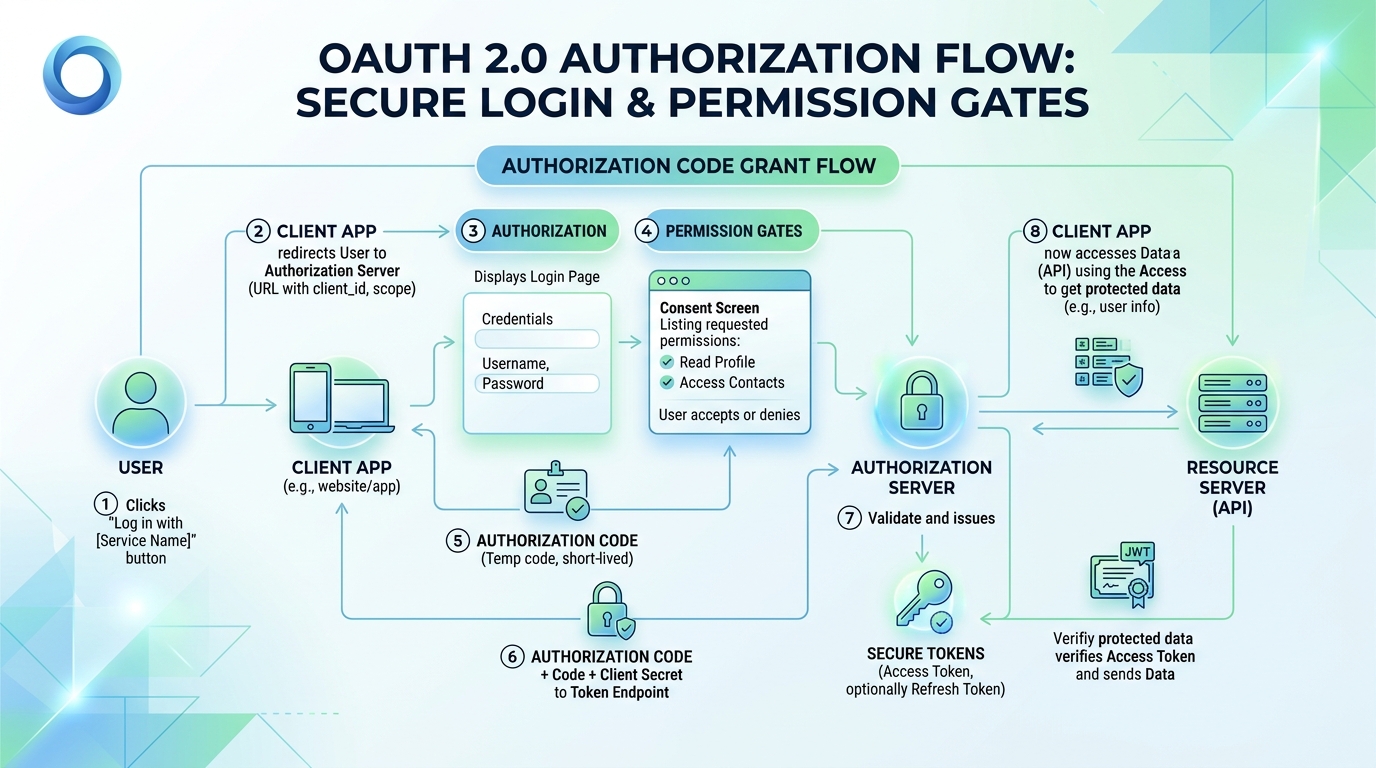
III. Why is OAuth authorization more secure than password login?
Many people misunderstand OAuth authorization: they think that authorizing third-party tools is insecure. This is incorrect.
The essence of OAuth is: you authorize a third-party tool to access certain functions of an account, but the third party cannot obtain your password.
For example, you want a cleaning service to clean your house, but you don't want to give him your house key. You could give him an access card, which can only open your door, and you can cancel his access at any time through the property management. If you give him a key, and he doesn't return it, you'll have to change the locks—but with an OAuth access card, you can cancel it at any time.
Advantages of OAuth authorization:
Permissions can be finely controlled. You can authorize this tool to only post content, but not to change passwords, delete accounts, or access other private data. Password login means that whoever gets the password can do anything.
Authorization can be revoked at any time without changing the account. If the third-party tool malfunctions or an employee leaves, you can revoke the authorization with a single click in the backend, without needing to change the password or notify anyone.
It is auditable and traceable. OAuth authorization has a complete access log, so you know when, with what permissions, this tool accessed your account.
Risks of password login:
Once a password is leaked, there's no way to restrict access unless you change it. And changing the password means notifying everyone who knows it—yet another leak.
IV. What should enterprises do?
Once the risks are clearly explained, then we can discuss how to resolve them.
4.1 Personal devices are prohibited from logging into company accounts.
This is the most basic security policy: only company-issued equipment managed by the IT department can be used to log in to the company's social media accounts.
If the business requires mobile work scenarios, equip employees with company mobile phones or use a mobile device management (MDM) solution to ensure the isolation and security of company data on personal devices.
4.2 Enforcing OAuth Authorization
All connections to third-party tools must use OAuth authorization; using usernames and passwords is prohibited. This is a standard feature of social media management tools, and almost all mainstream tools support it.
Before granting permissions, be sure to confirm the scope of the tool's permissions: What permissions has it requested? Is it granting too many permissions? Has it granted you permissions you don't want?
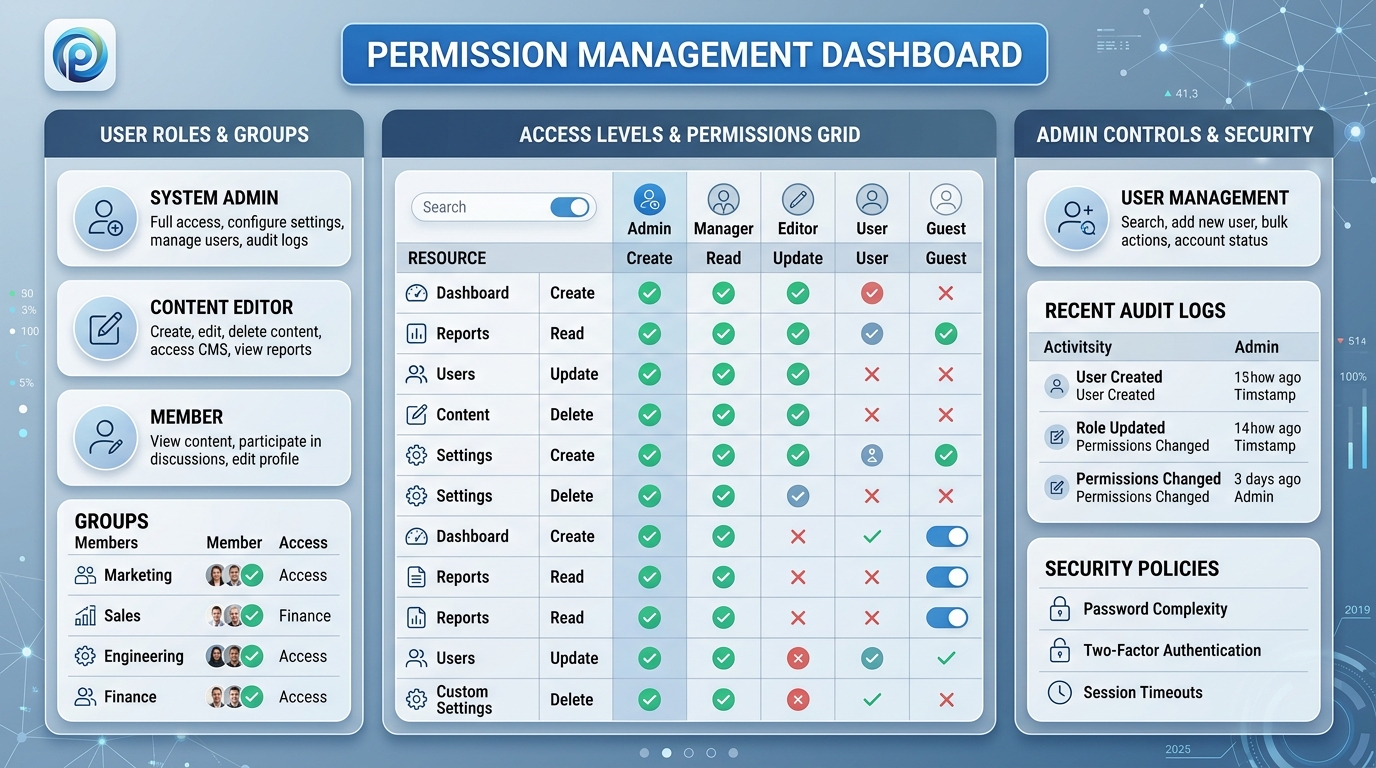
4.3 Establish an access control system
Not all operations staff need full permissions.
Assign permissions by role:
- Content publishers: Only need publishing permissions, no account setting permissions required.
- Data analysts: Only need to read data, not publish data.
- Administrator: Has full permissions, but the number of permissions should be minimized.
Regularly review permission configurations and delete authorizations and personnel that are no longer needed.
4.4 Operation log retention and auditing
Maintain logs for all account activities: who logged in, when, what actions they performed, and their IP address. These logs are the foundation for security audits and incident tracing.
Only when problems are identified can a real deterrent be formed.
Access control should be a standard feature for every social media operations team. It's not optional; it's mandatory.
V. Employee Safety Awareness Training
Technological means solve infrastructure problems, but the biggest loophole often lies in people's awareness.
Social media security awareness training is essential.
Do not log in to your company account on public Wi-Fi. Public Wi-Fi is a common target for man-in-the-middle attacks. You might think you're connecting to a coffee shop's Wi-Fi, but someone could actually be stealing your data.
Do not click on links from unknown sources. Phishing attacks are the most common way to obtain account passwords. Always verify any emails or messages asking you to "log in again" through official channels.
Do not buy followers through unofficial channels or use third-party growth tools. These tools usually require you to provide your account password, which is tantamount to handing over control of your account to someone else.
Lock the screen when leaving your workstation. Many people overlook this, but physical entry is the most direct method of intrusion.
A thorough handover is essential upon employee departure. When an employee leaves, ensure that all company account permissions are revoked, all company equipment is recovered, and all passwords are updated.
VI. What to do if a safety issue arises?
What should we do if a security incident actually occurs?
Step 1: Isolate immediately.
Once you identify the problematic account, immediately revoke all suspicious authorizations and logins. If your account password has been compromised, change it immediately. If your account has already been compromised, contact the platform's official customer service to appeal.
Step 2: Assess the loss.
What data was accessed? Was any illegal content published? Was there any data breach? What was the extent of the damage? These factors determine the level of response required.
Step 3: Notify the relevant parties.
If a user data breach is involved, affected users and regulatory agencies must be notified as required by regulations. If it is an internal company issue, management and the legal department should be notified.
Step 4: Review and Improve.
After a security incident, a thorough review must be conducted: Where were the vulnerabilities? Why were they not prevented? How can they be prevented in the future? Technically, vulnerabilities must be fixed; at the process level, systems and procedures must be improved; and at the awareness level, training must be strengthened.
FAQ
Q1: What if employees are required to log in to their company accounts using their mobile phones?
A1: If business operations truly require mobile access, it is recommended to provide employees with company phones instead of personal devices. Company phones should have Mobile Device Management (MDM) software installed to ensure the isolation and security of company data from personal data. Even if an employee leaves the company, the company can remotely erase company data without compromising employee privacy.
Q2: Is OAuth authorization from third-party tools secure? How can I determine this?
A2: OAuth authorization for mainstream third-party social media management tools (such as SocialEcho) is secure, but you need to check: 1. Whether the tool comes from a trusted vendor; 2. Whether the permissions it requests are reasonable (only requesting the necessary permissions); 3. Whether the tool has a good security record and user reputation; 4. Whether the corresponding authorization record can be seen in the platform backend after authorization. If a tool asks you to grant "administrator privileges" or "full access permissions," this is usually unnecessary, so be wary.
Q3: How should account passwords be managed securely?
A3: Use professional password management tools (such as 1Password, Bitwarden, etc.) to generate strong passwords, encrypt storage, and sync across multiple devices. Do not share passwords via WeChat, Slack, or email. If passwords must be shared, use the shared vault feature of your password management tool instead of sending passwords directly. Change passwords regularly, especially when an employee leaves the company.
Q4: What should be done with an employee's social media accounts when they leave the company?
A4: Account Handling Checklist Upon Employee Departure: 1. Immediately revoke the employee's OAuth authorization for all company accounts; 2. Change the passwords for all shared accounts (if any); 3. Reclaim company-issued equipment; 4. Check if the employee has any accounts registered under their personal name but used for company business (such as personally registered domains, HCF page management, etc.), ensuring the company can take over; 5. Check the operation logs to confirm if the employee had any abnormal operations during their employment.
Q5: How do I appeal if my account is banned?
A5: After an account is suspended, the appeal process typically involves: 1. Finding the appeal portal in the platform's official help center; 2. Submitting the appeal, explaining the account situation, your perceived reason for the suspension (if you know it), and promising a future compliance plan; 3. Attaching materials proving you are the legal owner of the account (business license, trademark certificate, etc.); 4. Waiting patiently, as the appeal process may take anywhere from a few days to several weeks. The success rate of the appeal depends on the reason for the suspension and the completeness of the appeal materials. If the account contains inappropriate content, the success rate is usually low, so prevention is always more important than appealing.
Conclusion
Account security is the cornerstone of social media operations, but most people do not pay enough attention to this issue.
A single account leak or ban can wipe out years of accumulated fan base assets for a brand. And these risks often stem from the most inconspicuous actions—logging into company accounts with personal phones, sharing passwords via WeChat, and multiple people sharing a single account.
Establishing a robust account security system doesn't require a large investment, but it does demand the right mindset and consistent execution. Using Facebook competitor monitoring to build an operational log system and using Instagram data analytics to track account health are both effective management methods.
Starting today:
- Check all your team's accounts to see how many are password-protected and how many are OAuth-authorized.
- Establish a policy for the use of personal equipment and provide company equipment to those who need to work remotely.
- Establish operation logs and auditing mechanisms
- Training team safety awareness
Safety is paramount. Every minute you spend on safety could save your life in a critical moment.
Want to learn more about account security management methods? You can check out SocialEcho's permission management features to build a solid permission defense for your social media matrix.
Free trial: SocialEcho access control
;}.cls-2{fill:%230868f7;}.cls-3{fill:url(%23未命名的渐变_44);}.cls-4{fill:%23333;}%3c/style%3e%3clinearGradient%20id='未命名的渐变_8'%20x1='33.73'%20y1='100.61'%20x2='-0.03'%20y2='-1.06'%20gradientUnits='userSpaceOnUse'%3e%3cstop%20offset='0'%20stop-color='%237ae9fb'/%3e%3cstop%20offset='0.67'%20stop-color='%232b90f8'/%3e%3cstop%20offset='1'%20stop-color='%230868f7'/%3e%3c/linearGradient%3e%3clinearGradient%20id='未命名的渐变_44'%20x1='27.86'%20y1='18.67'%20x2='68.36'%20y2='22.22'%20gradientUnits='userSpaceOnUse'%3e%3cstop%20offset='0'%20stop-color='%235ac7f2'/%3e%3cstop%20offset='1'%20stop-color='%230868f7'/%3e%3c/linearGradient%3e%3c/defs%3e%3cpath%20class='cls-1'%20d='M29,28.74V81.91l-9.51-3.68v0L8.52,74A7.17,7.17,0,0,1,4,67.32V24.54A3.76,3.76,0,0,1,9.08,21Z'/%3e%3cpath%20class='cls-2'%20d='M68.09,78.07a13.15,13.15,0,0,1-17.9,12.06L29,81.91h0V28.74L50.19,37A13.17,13.17,0,0,0,68.08,25.3h0Z'/%3e%3cpath%20class='cls-3'%20d='M68.08,25.3a13.19,13.19,0,0,1-6.73,10.87A13.09,13.09,0,0,1,50.19,37L29,28.74V6A3.76,3.76,0,0,1,34.1,2.52l25.59,9.91A13.22,13.22,0,0,1,68.08,25.3Z'/%3e%3cpath%20class='cls-4'%20d='M129.06,81.76a4.33,4.33,0,0,1-3.19-1.31,4.4,4.4,0,0,1-1.31-3.24V56.86H97.65V77.21a4.36,4.36,0,0,1-1.35,3.2A4.68,4.68,0,0,1,93,81.76a4.32,4.32,0,0,1-3.19-1.31,4.37,4.37,0,0,1-1.32-3.24V27.27A4.58,4.58,0,0,1,89.83,24a4.59,4.59,0,0,1,7.82,3.27V48.15h26.91V27.27A4.58,4.58,0,0,1,125.91,24a4.59,4.59,0,0,1,7.82,3.27V77.21a4.37,4.37,0,0,1-1.36,3.2A4.65,4.65,0,0,1,129.06,81.76Z'/%3e%3cpath%20class='cls-4'%20d='M163.77,81.66c-6.57,0-11.76-1.92-15.44-5.7s-5.54-9.07-5.54-15.74a26.76,26.76,0,0,1,2.09-10.43,17.72,17.72,0,0,1,6.67-8.06,19.15,19.15,0,0,1,10.68-2.95,19,19,0,0,1,10.46,2.8,18.7,18.7,0,0,1,6.55,7.36,22.53,22.53,0,0,1,2.36,10.28A4.51,4.51,0,0,1,177,63.77H152.23a10.8,10.8,0,0,0,3.49,6.65c2,1.68,4.88,2.52,8.66,2.52a22.25,22.25,0,0,0,7.54-1.21c.74-.3,1.55-.67,2.37-1.07a3.75,3.75,0,0,1,1.84-.4,4.09,4.09,0,0,1,3,1.15,4,4,0,0,1,1.12,3,4.38,4.38,0,0,1-2.58,3.82,32.34,32.34,0,0,1-6.36,2.61A28.67,28.67,0,0,1,163.77,81.66ZM172.4,55.9a9.72,9.72,0,0,0-1.63-4.56A9.9,9.9,0,0,0,167,48a10.38,10.38,0,0,0-4.64-1.14,12,12,0,0,0-4.77,1.06,9.54,9.54,0,0,0-4.89,5.66,11.78,11.78,0,0,0-.51,2.3Z'/%3e%3cpath%20class='cls-4'%20d='M193,81.64a4.49,4.49,0,0,1-4.51-4.55V27.28A4.58,4.58,0,0,1,189.84,24a4.48,4.48,0,0,1,3.28-1.36A4.36,4.36,0,0,1,196.35,24a4.46,4.46,0,0,1,1.31,3.31V77.09a4.34,4.34,0,0,1-1.35,3.2A4.67,4.67,0,0,1,193,81.64Z'/%3e%3cpath%20class='cls-4'%20d='M263.79,81.71a5.7,5.7,0,0,1-4.2-1.74,5.76,5.76,0,0,1-1.73-4.19V27.37a4.58,4.58,0,0,1,1.35-3.27A4.59,4.59,0,0,1,267,27.37V72.53h24a4.58,4.58,0,0,1,3.27,7.82A4.66,4.66,0,0,1,291,81.71Z'/%3e%3cpath%20class='cls-4'%20d='M424.48,81.74a4.71,4.71,0,0,1-2.71-.88,5.43,5.43,0,0,1-1-1l-.07-.09-12.41-17-5.41,5v9.44a4.31,4.31,0,0,1-1.36,3.19,4.66,4.66,0,0,1-3.3,1.36A4.29,4.29,0,0,1,395,80.42a4.36,4.36,0,0,1-1.32-3.23V27.37A4.58,4.58,0,0,1,395,24.1a4.52,4.52,0,0,1,6.58.12,4.54,4.54,0,0,1,1.24,3.15V56.31l17.72-16.38.05,0a4.8,4.8,0,0,1,2.94-1.11,4.4,4.4,0,0,1,3.27,1.2,4.57,4.57,0,0,1,1.2,3.27,4.44,4.44,0,0,1-.77,2.33,7.45,7.45,0,0,1-1.43,1.65l-11,9.64,13.34,17.68a5,5,0,0,1,1,2.71,4.12,4.12,0,0,1-1.36,3.24A4.64,4.64,0,0,1,424.48,81.74Z'/%3e%3cpath%20class='cls-4'%20d='M317.93,81.76a21.5,21.5,0,1,1,21.17-21.5A21.37,21.37,0,0,1,317.93,81.76Zm0-34.1a12.61,12.61,0,1,0,12.42,12.6A12.52,12.52,0,0,0,317.93,47.66Z'/%3e%3cpath%20class='cls-4'%20d='M212.18,101.22a4.12,4.12,0,0,1-3.05-1.26,4.17,4.17,0,0,1-1.26-3.1V43.34a4.37,4.37,0,0,1,1.3-3.14,4.26,4.26,0,0,1,3.13-1.3,4.19,4.19,0,0,1,3.1,1.26,4.32,4.32,0,0,1,1.26,3.16,20.77,20.77,0,0,1,13-4.54,21.51,21.51,0,0,1,0,43,20.51,20.51,0,0,1-13-4.57V96.86a4.15,4.15,0,0,1-1.3,3.06A4.5,4.5,0,0,1,212.18,101.22Zm17.43-53.63c-6.23,0-12.93,4.11-12.93,12.72a12.73,12.73,0,0,0,25.46,0A12.71,12.71,0,0,0,229.61,47.59Z'/%3e%3cpath%20class='cls-4'%20d='M365.76,81.76a21.5,21.5,0,1,1,21.18-21.5A21.37,21.37,0,0,1,365.76,81.76Zm0-34.1a12.61,12.61,0,1,0,12.42,12.6A12.52,12.52,0,0,0,365.76,47.66Z'/%3e%3c/svg%3e)