
How can I continue operating my Facebook account using the official API channel when my Facebook page is inaccessible or my account is temporarily unavailable?
Author: Abby | Focus on the stability and contingency plans for overseas Facebook operations
One weekend afternoon in July 2026, many operators who were expanding overseas opened Facebook, only to find the page stuck on a message: "Your account is temporarily unavailable. Due to a website malfunction, your account is temporarily unavailable... Please try again in a few minutes." Within an hour, people on the forum began reporting the same error—"Facebook is down!" "Can't log in to my account!" "Can't log in on PC, all accounts are affected." What was even more frustrating was that some people discovered: they could barely log in on their mobile devices, but the ad backend was unresponsive, ads they wanted to pause couldn't be turned off, and money was still being burned.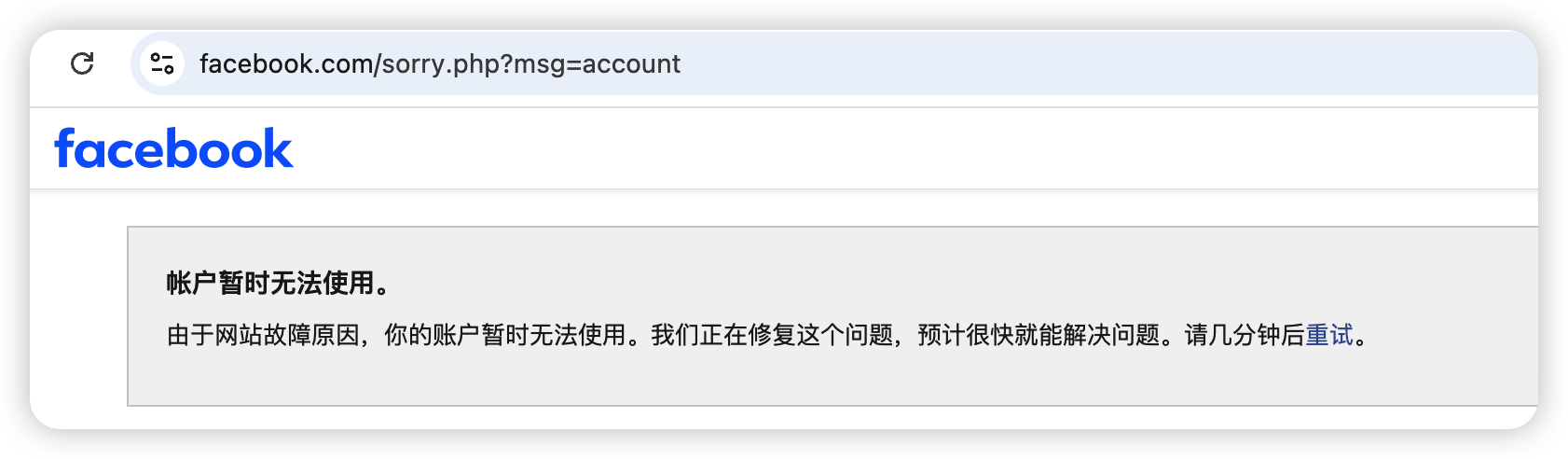
These kinds of unexpected events are rare, but they always happen at the most frustrating times: often on weekends, when no one is at their computer, and schedules, client messages, and ongoing events are all stuck. Today's article won't talk about the nonsense of "waiting for it to recover," but rather clarify one thing— when a Facebook page is inaccessible, can your operations continue, and how can they continue?
TL;DR Key Takeaways: Facebook's "pages won't open" issues are mostly due to localized failures at the front-end or account level, rather than a platform-wide outage—in such cases, the official API channels are often still available, and operations don't necessarily have to come to a complete halt.
- First, distinguish the type of failure : front-end webpage failure / single account restriction / Meta platform failure. The solutions to these three are completely different.
- The official API and the webpage are two separate systems : when the webpage is inaccessible, tools using the official API (such as SocialEcho) can often still post, reply to private messages and comments, and view data.
- What you can do depends on the boundaries : organic content operations (posting, commenting, private messaging, data) can continue; however, if advertising is suspended, you still need Ads Manager , and the API channel cannot replace it.
- Teams with multiple accounts need independent channels : logging in one by one through a webpage is inefficient, and it can cause a complete system crash during a failure. API batch operations are a supplement and also improve efficiency.
- If there is a meta-level platform-wide failure, the API will also be affected—no tool can "guarantee" absolute availability. This article discusses improving operational continuity in most partial failure scenarios.
First, let's clarify SocialEcho's role in this matter: it's a comprehensive social media AI workbench for companies expanding overseas. It connects directly to accounts via Facebook's official OAuth authorization and Graph API , handling posting, commenting, messaging, and data analysis all in a single backend – thus, it uses a different channel than the facebook.com website. We'll start by discussing "what exactly is the malfunction," and then explain which aspects this channel can help you overcome and which it cannot.
What happens when a Facebook page won't open?
The conclusion first: "Webpage not opening" does not mean "Facebook is completely down." There are at least three scenarios, each requiring a completely different approach. Before panicking, take ten seconds to determine which scenario applies to you:
- Front-end webpage failure/partial outage : Like the message "Account temporarily unavailable" in the screenshot, this is usually a temporary issue with the web service or a data center, and it typically recovers on its own within minutes to an hour or two. In this case, the back-end API is usually not completely down.
- Single account restricted/risk control : Only you (or some of your accounts) cannot log in, while others can. This is mostly due to risk control or verification issues at the account level, and is not related to platform malfunctions. You need to go through the account appeal and verification process.
- Meta platform-level outage : Facebook, Instagram, and WhatsApp are simultaneously and widely unavailable. This is a Meta infrastructure-level outage, affecting both websites and APIs. We can only wait for an official fix.
The significance of this judgment lies in the fact that in the first two scenarios, the official API channel is usually still online, and your operations can continue running by bypassing the webpage; only in the third scenario is "no one can do anything about it." Essentially, the biggest misconception is equating "the webpage cannot be opened" directly with "you can't do anything today."
Why does the official API channel provide an additional solution when a website fails?
The key point is that the facebook.com website and the Facebook Graph API are two separate system entry points—just because you can't load the page in your browser doesn't mean that a program calling the API through official authorization is also unable to function. This is why when the website displays "temporarily unavailable," a tool using the API can often still post and retrieve private messages normally.
SocialEcho takes the latter approach: it operates your account through the official API you authorize, independent of whether you can open the webpage locally. Therefore, when the webpage frontend malfunctions, using SocialEcho to publish content or reply to comments and private messages via a unified inbox is often still a viable option.
Here, we must honestly draw a line: if it's the third type of Meta platform-level failure mentioned above, the Graph API will also be affected, and SocialEcho will not be spared. Its value isn't a "magic weapon that never goes offline," but rather, in the majority of front-end/partial failure scenarios, it provides you with an independent channel that doesn't go through the webpage. Setting expectations in this direction will prevent disappointment.
An official API channel does not guarantee availability; rather, it means "relying on one less potentially problematic link." Having an additional independent path is the core of any contingency plan.
If a website is down, what can and cannot the operations team do?
Whether it can continue depends on whether the operation follows the "organic content operation" or "advertising/backend-specific function" approach. The former can often continue through the API channel, while the latter usually requires waiting for the website to be restored. The table below helps you quickly determine the situation in the event of a failure:
| Operational actions | Can the webpage continue via the API channel when it fails? | illustrate |
|---|---|---|
| Posting scheduled/temporary thread | Usually | Published via official API, without relying on web front-end. |
| Reply to comments/private messages | Usually | The unified inbox uses an API, allowing for continued interaction. |
| View account/content data | Usually | Data interface independent of webpage |
| Automatic reply/rule-based notification | Usually | Preset rules run continuously in the background |
| Pause/Modify Ad Serving | Normally not | Ads Manager is required for advertising; API content tools cannot replace it. |
| Modify homepage settings/account security items | Mostly not | This is specific to the website's backend and needs to be restored. |
So, frankly, SocialEcho can't help with costly pain points like "ads can't be turned off" shown in the screenshot—ad pausing relies on the Meta Ads backend, and this needs to be clearly stated. However, the bulk of organic operations (continuous content updates, keeping customer messages updated, and maintaining data access as usual) can be handled through the API channel, which is crucial for maintaining account activity and customer experience.
Multi-account operation: Why is a separate channel even more needed when there is a malfunction?
For teams that build matrix operations or provide outsourced operations, website operations are inefficient even under normal circumstances, and they become completely blocked during outages. A single API batch channel is both a guarantee of daily efficiency and a backup plan during outages. The phrase "all accounts are affected" in the screenshot is a typical example: logging in and switching between dozens of accounts one by one through a browser is already slow, and if the website fails, it's equivalent to all accounts being disconnected simultaneously.
In normal times, batch posting and scheduling across multiple Facebook accounts is much faster than logging into each webpage individually. During outages, this channel becomes even more crucial: you don't need to constantly refresh the page; unified management of Facebook comments and private messages allows for centralized processing of customer interactions across multiple accounts, and data analysis continues as usual. For social media management agencies and overseas brand marketing teams, this architecture—which doesn't rely solely on a single webpage entry point—is itself a form of resilience.
As a side note: some unofficial plugins and web crawlers (claiming to be "Facebook Assistant") may work under normal circumstances, but they simulate web page operations, rely on the front end, and become unusable as soon as the web page crashes. They also pose account security risks. Tools that connect directly and are officially authorized by Facebook are on a completely different level in terms of stability and compliance—this is an important point to consider when choosing a tool.
Single-account operators: Treat the API channel as a "backup insurance"
Even if you only manage one account and usually use the web, it's worthwhile to connect to official API tools like SocialEcho as a supplement—you may not use it every day, but it's your Plan B in case of a failure. Just like important files need backups, your operational entry point shouldn't be limited to a webpage.
Specifically, after authorizing the account, you can have the auto-response rules handle the first customer inquiry when you're offline; before the website recovers, the API channel will still send out the required content, avoiding update interruptions. To temporarily distribute content from Facebook to other platforms to reduce reliance on a single point of failure, you can use free cross-platform content rewriting tools for quick adaptation and AI-powered auto-response tools for emergency responses. The core logic is simple: don't let a single platform or entry point become a single point of failure for your entire operation.
Emergency checklist for Facebook website outages
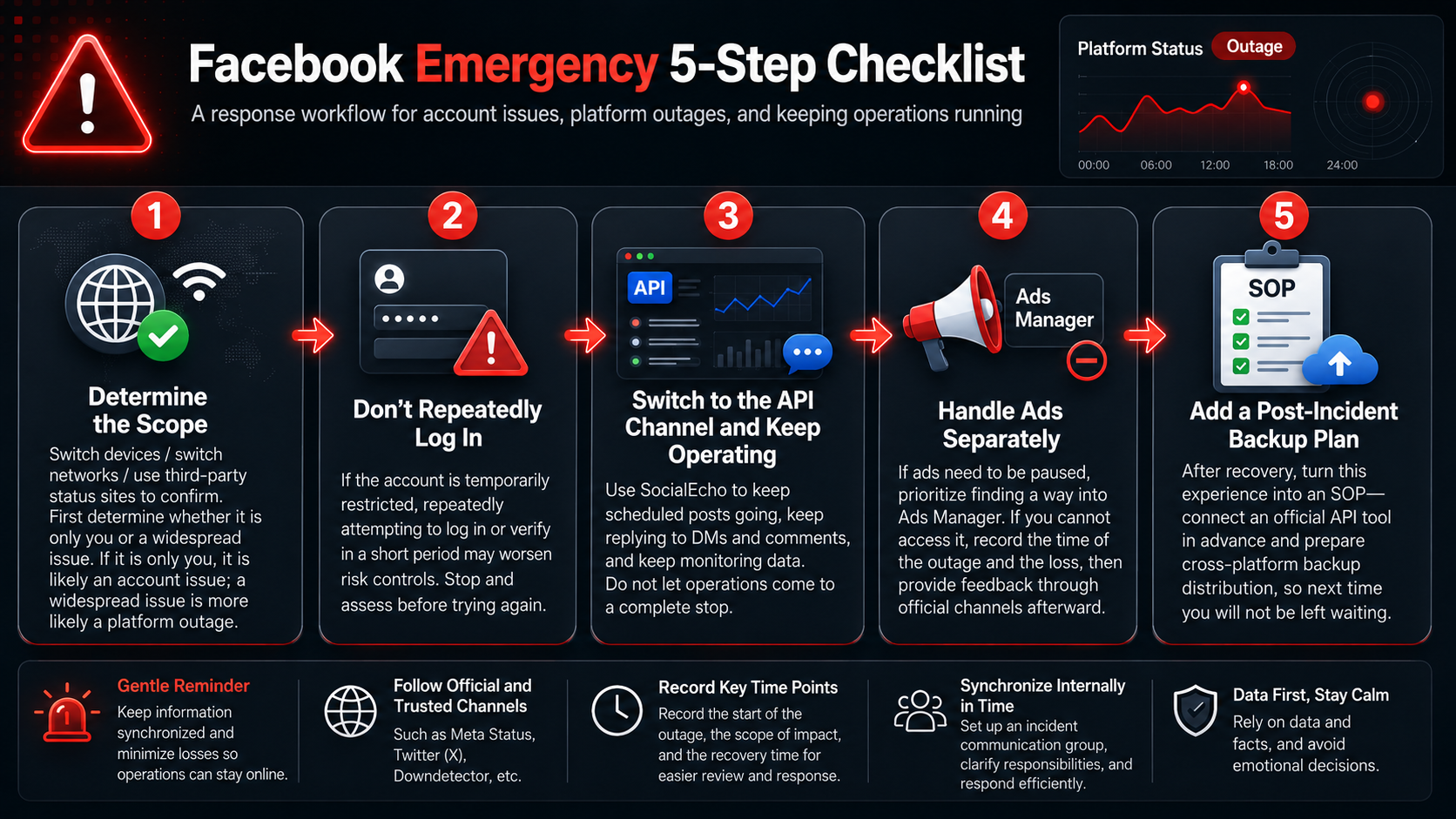
The key is to first determine the type of fault, then decide whether to "bypass the webpage and continue" or "wait," and finally review the situation and implement contingency plans. It is recommended to follow this order:
- Determine the scope : Try changing devices/changing networks/confirm with a third-party status station—is it only affecting you, or is it affecting a large area? If it's only affecting you, it's most likely an account issue; if it's affecting a large area, it's a platform malfunction.
- Avoid repeated login attempts : If your account is subject to time limits, repeatedly attempting to log in and verify within a short period may increase risk control penalties. Stop before you are fully aware of the situation.
- Switch to the API channel to continue natural operations : Use SocialEcho to continue sending scheduled content, replying to private messages and comments, and monitoring data, so that operations don't come to a complete standstill.
- Handle ads separately : If an ad needs to be paused, try to access Ads Manager first; if you can't access it, record the time and loss, and provide feedback through official channels afterwards.
- Post-incident contingency plan : After recovery, distill this experience into a Standard Operating Procedure (SOP) – connect to the official API tools in advance and prepare cross-platform backups and distribution so that we won't be left waiting next time.
Frequently Asked Questions (FAQ)
Q: If a Facebook page is inaccessible, will I still be able to post using SocialEcho? A: It's not a certainty. If it's a partial failure on the front end of the website or a single account, the official API channel is usually still available, and SocialEcho will likely continue to allow posting and replying. However, if there's a platform-wide outage, the API will also be affected, and no one will be able to post. It improves operational continuity in most partial failure scenarios, but it doesn't guarantee absolute security.
Q: Does "My account is temporarily unavailable" mean my account has been banned? Not necessarily. This message often appears during temporary website outages, and it's usually widespread and resolves itself quickly. If only your account is inaccessible while others are working normally, it's more likely a risk control or verification issue at the account level, requiring an official appeal. Determining "whether it's only you" is the first step.
Q: When there's a malfunction, my most urgent task is to turn off ads. Can SocialEcho help with that? The honest answer is: No. Pausing and modifying ads relies on the Meta Ads Manager. SocialEcho handles organic content management (posting, comments, private messages, data), not ad delivery management. You'll have to find a way to handle ads through the Ads Manager.
Q: Why are official API tools more stable than web plugins and web crawlers? Because the official API uses an independent interface authorized by Facebook, independent of whether you can open the webpage locally; while plugins and web crawlers mostly simulate webpage operations, becoming unusable if the webpage crashes, and also posing account security risks. Stability and compliance are not even in the same league.
Q: Is it necessary to use SocialEcho for a single account? Think of it as a backup. You might normally use the website, but by integrating with the official API tools, you have an extra way to continue operating if the website has problems, and the automated replies can handle customers while you're offline.
summary
- There are three types of Facebook "page cannot be opened": front-end/partial failure, single account restriction, and platform-wide outage - determine the type before taking action.
- The web front-end and the official API are two separate systems. In most cases of partial failure, the API channel remains available, and operations do not need to be suspended.
- Natural operations (posting, commenting, private messaging, data) can continue through the API channel; advertising pauses still require Ads Manager, and this must be clearly defined.
- For multi-account teams, API bulk channels can improve efficiency and provide a safety net, while single-account operators can use them as backup insurance.
- No tool can "guarantee" absolute availability; the key is to prevent a single point of failure in the entire operation from becoming a single entry point on a particular platform.
Results may vary depending on account characteristics, network environment, type of failure, and execution method. This article describes strategies to improve operational continuity; the official API channel may also be affected by meta-level platform failures and does not constitute any availability guarantee. For account security and appeals, please refer to official Facebook channels.
;}.cls-2{fill:%230868f7;}.cls-3{fill:url(%23未命名的渐变_44);}.cls-4{fill:%23333;}%3c/style%3e%3clinearGradient%20id='未命名的渐变_8'%20x1='33.73'%20y1='100.61'%20x2='-0.03'%20y2='-1.06'%20gradientUnits='userSpaceOnUse'%3e%3cstop%20offset='0'%20stop-color='%237ae9fb'/%3e%3cstop%20offset='0.67'%20stop-color='%232b90f8'/%3e%3cstop%20offset='1'%20stop-color='%230868f7'/%3e%3c/linearGradient%3e%3clinearGradient%20id='未命名的渐变_44'%20x1='27.86'%20y1='18.67'%20x2='68.36'%20y2='22.22'%20gradientUnits='userSpaceOnUse'%3e%3cstop%20offset='0'%20stop-color='%235ac7f2'/%3e%3cstop%20offset='1'%20stop-color='%230868f7'/%3e%3c/linearGradient%3e%3c/defs%3e%3cpath%20class='cls-1'%20d='M29,28.74V81.91l-9.51-3.68v0L8.52,74A7.17,7.17,0,0,1,4,67.32V24.54A3.76,3.76,0,0,1,9.08,21Z'/%3e%3cpath%20class='cls-2'%20d='M68.09,78.07a13.15,13.15,0,0,1-17.9,12.06L29,81.91h0V28.74L50.19,37A13.17,13.17,0,0,0,68.08,25.3h0Z'/%3e%3cpath%20class='cls-3'%20d='M68.08,25.3a13.19,13.19,0,0,1-6.73,10.87A13.09,13.09,0,0,1,50.19,37L29,28.74V6A3.76,3.76,0,0,1,34.1,2.52l25.59,9.91A13.22,13.22,0,0,1,68.08,25.3Z'/%3e%3cpath%20class='cls-4'%20d='M129.06,81.76a4.33,4.33,0,0,1-3.19-1.31,4.4,4.4,0,0,1-1.31-3.24V56.86H97.65V77.21a4.36,4.36,0,0,1-1.35,3.2A4.68,4.68,0,0,1,93,81.76a4.32,4.32,0,0,1-3.19-1.31,4.37,4.37,0,0,1-1.32-3.24V27.27A4.58,4.58,0,0,1,89.83,24a4.59,4.59,0,0,1,7.82,3.27V48.15h26.91V27.27A4.58,4.58,0,0,1,125.91,24a4.59,4.59,0,0,1,7.82,3.27V77.21a4.37,4.37,0,0,1-1.36,3.2A4.65,4.65,0,0,1,129.06,81.76Z'/%3e%3cpath%20class='cls-4'%20d='M163.77,81.66c-6.57,0-11.76-1.92-15.44-5.7s-5.54-9.07-5.54-15.74a26.76,26.76,0,0,1,2.09-10.43,17.72,17.72,0,0,1,6.67-8.06,19.15,19.15,0,0,1,10.68-2.95,19,19,0,0,1,10.46,2.8,18.7,18.7,0,0,1,6.55,7.36,22.53,22.53,0,0,1,2.36,10.28A4.51,4.51,0,0,1,177,63.77H152.23a10.8,10.8,0,0,0,3.49,6.65c2,1.68,4.88,2.52,8.66,2.52a22.25,22.25,0,0,0,7.54-1.21c.74-.3,1.55-.67,2.37-1.07a3.75,3.75,0,0,1,1.84-.4,4.09,4.09,0,0,1,3,1.15,4,4,0,0,1,1.12,3,4.38,4.38,0,0,1-2.58,3.82,32.34,32.34,0,0,1-6.36,2.61A28.67,28.67,0,0,1,163.77,81.66ZM172.4,55.9a9.72,9.72,0,0,0-1.63-4.56A9.9,9.9,0,0,0,167,48a10.38,10.38,0,0,0-4.64-1.14,12,12,0,0,0-4.77,1.06,9.54,9.54,0,0,0-4.89,5.66,11.78,11.78,0,0,0-.51,2.3Z'/%3e%3cpath%20class='cls-4'%20d='M193,81.64a4.49,4.49,0,0,1-4.51-4.55V27.28A4.58,4.58,0,0,1,189.84,24a4.48,4.48,0,0,1,3.28-1.36A4.36,4.36,0,0,1,196.35,24a4.46,4.46,0,0,1,1.31,3.31V77.09a4.34,4.34,0,0,1-1.35,3.2A4.67,4.67,0,0,1,193,81.64Z'/%3e%3cpath%20class='cls-4'%20d='M263.79,81.71a5.7,5.7,0,0,1-4.2-1.74,5.76,5.76,0,0,1-1.73-4.19V27.37a4.58,4.58,0,0,1,1.35-3.27A4.59,4.59,0,0,1,267,27.37V72.53h24a4.58,4.58,0,0,1,3.27,7.82A4.66,4.66,0,0,1,291,81.71Z'/%3e%3cpath%20class='cls-4'%20d='M424.48,81.74a4.71,4.71,0,0,1-2.71-.88,5.43,5.43,0,0,1-1-1l-.07-.09-12.41-17-5.41,5v9.44a4.31,4.31,0,0,1-1.36,3.19,4.66,4.66,0,0,1-3.3,1.36A4.29,4.29,0,0,1,395,80.42a4.36,4.36,0,0,1-1.32-3.23V27.37A4.58,4.58,0,0,1,395,24.1a4.52,4.52,0,0,1,6.58.12,4.54,4.54,0,0,1,1.24,3.15V56.31l17.72-16.38.05,0a4.8,4.8,0,0,1,2.94-1.11,4.4,4.4,0,0,1,3.27,1.2,4.57,4.57,0,0,1,1.2,3.27,4.44,4.44,0,0,1-.77,2.33,7.45,7.45,0,0,1-1.43,1.65l-11,9.64,13.34,17.68a5,5,0,0,1,1,2.71,4.12,4.12,0,0,1-1.36,3.24A4.64,4.64,0,0,1,424.48,81.74Z'/%3e%3cpath%20class='cls-4'%20d='M317.93,81.76a21.5,21.5,0,1,1,21.17-21.5A21.37,21.37,0,0,1,317.93,81.76Zm0-34.1a12.61,12.61,0,1,0,12.42,12.6A12.52,12.52,0,0,0,317.93,47.66Z'/%3e%3cpath%20class='cls-4'%20d='M212.18,101.22a4.12,4.12,0,0,1-3.05-1.26,4.17,4.17,0,0,1-1.26-3.1V43.34a4.37,4.37,0,0,1,1.3-3.14,4.26,4.26,0,0,1,3.13-1.3,4.19,4.19,0,0,1,3.1,1.26,4.32,4.32,0,0,1,1.26,3.16,20.77,20.77,0,0,1,13-4.54,21.51,21.51,0,0,1,0,43,20.51,20.51,0,0,1-13-4.57V96.86a4.15,4.15,0,0,1-1.3,3.06A4.5,4.5,0,0,1,212.18,101.22Zm17.43-53.63c-6.23,0-12.93,4.11-12.93,12.72a12.73,12.73,0,0,0,25.46,0A12.71,12.71,0,0,0,229.61,47.59Z'/%3e%3cpath%20class='cls-4'%20d='M365.76,81.76a21.5,21.5,0,1,1,21.18-21.5A21.37,21.37,0,0,1,365.76,81.76Zm0-34.1a12.61,12.61,0,1,0,12.42,12.6A12.52,12.52,0,0,0,365.76,47.66Z'/%3e%3c/svg%3e)