
Practical Guide to Multi-Platform Social Media Publishing Tools: How to Manage 7 Platform Accounts Simultaneously Without Chaos?
Practical Guide to Multi-Platform Social Media Publishing Tools: How to Manage 9 Platform Accounts Simultaneously Without Chaos
Li Min is the head of social media operations at a cross-border e-commerce company. Her team manages accounts on nine platforms: Facebook, Instagram, X, YouTube, TikTok, LinkedIn, and Pinterest.
Every morning at 9 a.m., she opens nine browser tabs and logs into the backends of nine different platforms. She prepares different content for each platform—text and images for Facebook, edited photos for Instagram, short content for X, videos for YouTube, short videos for TikTok, professional articles for LinkedIn, and product images for Pinterest.
Preparing the content alone took three hours. Then she had to publish it to nine different platforms, adjusting the format, adding tags, and setting the publication time for each. By the time she finished one round, it was already noon.
In the afternoon, she had to reply to comments and private messages on every platform. There were 20 comments on Facebook, 35 on Instagram, 15 on X... By the time she finished replying, it was already 8 p.m.
She lived like that for two years. Until she started using multi-platform social media posting tools.
Now, she only needs to manage all nine platforms from a single backend. She opens the tools at 9 a.m. and finishes publishing all content before 10 a.m. She spends two hours in the afternoon replying to all comments and leaves work promptly at 6 p.m.
In this article, we share how she did it.
- Why does multi-platform management lead to chaos?
1.1 Too many platforms, high switching costs
Nine platforms mean:
- 9 backend accounts
- 9 content formats
- 9 types of release time rules
- 9 data dashboards
- 9 interactive entry points
If you use the native backend management, you'll waste a lot of time every day just switching accounts. Not to mention you also have to remember the best posting times, content guidelines, and tag rules for each platform.
Multi-platform social media publishing tools are designed to solve this problem. They allow you to manage all platforms from a single backend, creating content once and automatically distributing it to up to nine platforms.
1.2 Repetitive Work
You need to publish the same product on 9 different platforms. For each platform:
- Adjust image size (Facebook 1200x630, Instagram 1080x1080, Pinterest 1000x1500)
- Rewrite the copy (280 characters for LinkedIn, 3000 characters for Facebook, 63206 characters for Facebook)
- Add different hashtags (30 for Instagram, 5 for Facebook, X 2)
- Set different release times (user activity times vary across platforms).
Using the native backend, the same content would have to be repeated 9 times. Using a multi-platform tool, you can create it once and it will automatically adapt to the format of each platform.
1.3 Interactions are scattered and easily missed.
Comments and private messages from 9 platforms are scattered in 9 different places. You need to:
- Check all platforms every hour.
- Manually reply to each comment
- Mark important private messages for priority processing
- Statistics on interaction data for each platform
Using a native backend, it's easy to miss comments, and delayed replies negatively impact user experience. Using multi-platform tools, all interactions are unified into a single inbox, ensuring no message is missed.
II. Comparison of Features of 9 Major Platforms
 ### 2.1 Facebook
User characteristics: Primarily older, mainly between 25 and 54 years old, mostly families.
Content formats: text and images, videos, live streams, Stories
Best time to post: 9-11 AM, 1-3 PM
Content strategy: relatable, emotional, and featuring long-form articles with images.
Interactive features: many comments, few private messages, high sharing rate
2.2 Instagram
User characteristics: Primarily young people, aged 18-34, with a high proportion of female users.
Content formats: retouched photos, short videos, Stories, Reels
Best time to post: 12-1 PM, 7-9 PM
Content strategy: visual impact, exquisite images, short videos
Interactive features: many likes, few comments, high collection rate
2.3 X (Twitter)
User characteristics: Predominantly male users, professionals in technology, media, and politics.
Content formats: short text, images, videos, polls
Best time to post: 5-9 PM, 8-10 PM
Content strategy: concise and fast-paced, focusing on trending topics and delivering insightful opinions.
Interactive features: high volume of forwarding, rapid responses, and lively discussions.
2.4 YouTube
User characteristics: All age groups, video content consumers
Content formats: Long videos, Short videos, Live streams
Best time to post: 2-4 PM, 7-9 PM
Content strategy: tutorials, reviews, entertainment, vlogs
Interactive features: High-quality comments, important subscriptions, and key viewing time.
2.5 TikTok
User characteristics: Primarily young people, aged 16-30, heavy users of short videos.
Content format: Short video (15-60 seconds)
Best time to post: 6-10 PM, 10-12 AM on weekends
Content strategy: Creativity, challenge, music, dance
Interactive features: high completion rate, high sharing rate, and viral spread.
2.6 LinkedIn
User characteristics: Professionals, B2B decision-makers, and business professionals.
Content formats: professional articles, images and text, videos, polls
Best times to post: Weekdays 8-10 AM, 12-1 PM, 7-6 PM
Content Strategy: Expert Insights, Industry Analysis, Company News
Interactive features: High-quality comments, numerous private messages, and high conversion rate.
2.9 Pinterest
User characteristics: Predominantly female users, aged 25-45, with strong purchasing intentions.
Content format: Vertical image (1000x1500), video
Best time to post: 8 PM - 11 PM, all day on weekends
Content strategy: Product images, tutorial images, inspiration images
Interactive features: High save rate, high click-through rate, high conversion rate
III. Standardized Workflow Establishment Method
3.1 Content Creation Process
Step 1: Content Planning
Every Monday morning, we plan the themes for the week's content. Based on the characteristics of the nine platforms, we determine:
- Facebook: 2 lifestyle-themed posts
- Instagram: 3 professionally edited photos + 2 short videos
- X: 5 short posts + trending topics
- YouTube: 1 long video + 2 shorts
- TikTok: 3 Creative Short Videos
- LinkedIn: 2 professional articles
- Pinterest: 5 product images
Step Two: Content Creation
Create all content materials in one go:
- Image: Create 3 sizes (1200x630, 1080x1080, 1000x1500)
- Video: Edited into 3 versions (landscape, portrait, and square).
- Copywriting: Write 9 versions (adapted to the style of each platform)
Step 3: Batch Release
Create content for 9 platforms at once using a batch publishing tool :
- Choose a platform
- Upload the corresponding materials
- Paste the corresponding text
- Set release time
- One-click publishing
3.2 Time Management Strategies
Best practice: Processing in time slots
- 9:00-10:00 AM: Create and publish content for the day.
- 2:00 PM - 3:00 PM: Reply to all comments.
- 16:00-16:30: Review data and adjust strategies
- 7:00 PM - 7:30 PM: Planning tomorrow's content
Key point: Don't check all the time!
Many operators are accustomed to checking comments and private messages every 10 minutes. This is extremely inefficient and also affects other tasks.
The correct approach is to set aside a fixed time for all tasks. For example, spend one hour every afternoon at 2 PM replying to comments and private messages from all platforms. Use the rest of the time to focus on content creation.
3.3 Interactive Management Process
Step 1: Standardize Inboxes
Use the unified inbox feature to centralize comments and private messages from all platforms into one interface. This way, you only need to open one page to see all interactions.
Step 2: Priority Sort
Set priority rules:
- High priority: Inquiries, complaints, and negative comments from paid users.
- Medium priority: Product inquiries, cooperation intentions
- Low priority: Regular likes, general comments
Step 3: Intelligent Reply
Use the smart reply feature to set up frequently used reply templates:
- Product inquiries: Automatic reply with product links
- Price Inquiry: Automatic Price List Reply
- For cooperation inquiries: Automatic reply to business email.
This can save 90% of the response time.
IV. Content Reuse and Localization Strategies
4.1 Content Reuse Methods
Core idea: Multiple uses for one fish
The same content was formatted and worded differently for each platform and published on nine platforms.
Case Study: New Product Launch
- Facebook: Post a picture and text description detailing the product features, with 3-5 pictures.
- Instagram: Post meticulously edited photos that highlight the product's aesthetics, accompanied by elegant captions.
- X: Send short content, a one-sentence highlight + product link.
- YouTube: Post product review videos, 5-10 minutes long.
- TikTok: Post 15-second creative short videos to showcase product usage scenarios
- LinkedIn: Publish professional articles and tell product development stories
- Pinterest: Post product images with purchase links.
The same product, nine different ways of expression, covering different user groups.
4.2 Localization Strategy
Copywriting localization
Users on different platforms have different language styles:
- Facebook: Everyday and Colloquial
- Instagram: Artistic and Emotional
- X: concise, to the point, and with a clear viewpoint
- LinkedIn: Professional, Formal
- TikTok: Lively and Fun
Release time localization
User activity time varies across different platforms:
- Facebook: 9-11 AM
- Instagram: 12-13 PM
- X: 5-9 PM
- LinkedIn: Weekdays 8-10 AM
- TikTok: 6 PM - 10 PM
The intelligent scheduling feature allows content to be published automatically at the optimal time for each platform.
V. Data Tracking and Optimization
5.1 Key Indicators
Key metrics tracked by each platform:
| platform | Key Indicators |
|---|---|
| Coverage, engagement, click-through rate | |
| Likes, comments, and saves | |
| X | Number of reposts, number of replies, and number of views |
| Youtube | Views, viewing time, number of subscribers |
| TikTok | Views, completion rate, number of shares |
| Views, comments, and private messages | |
| Saves, Clicks, Conversions |
5.2 Data Dashboard
Use data analytics features to create a unified data dashboard:
- Daily Data Overview (Summary of 9 Platforms)
- Weekly data report (comparison across platforms)
- Monthly data trends (growth analysis)
5.3 Optimization Strategy
Weekly review:
Every Friday afternoon, spend 1 hour reviewing the week's data:
- Which content performed well? Why?
- Which content performed poorly? How can it be improved?
- Which platform is growing the fastest? Increase investment.
- Which platform has stagnated growth? Adjust your strategy.
Monthly adjustments:
At the end of each month, adjust the strategy for the following month based on the data:
- Increase high-performance content types
- Reduce low-performance content types
- Adjust release time
- Optimize copywriting style
VI. Real-world example: From 10 hours to 2 hours per day
6.1 The Story of Li Min
Li Min is the head of social media operations at a cross-border e-commerce company. In 2023, her team managed accounts on nine platforms.
Previous work status:
- I start work at 9 a.m. every morning and open 9 browser tabs.
- Log in to the backend of 9 platforms respectively
- Prepare content for each platform, adjust formatting, and publish.
- I often miss replies to comments and private messages in the afternoon.
- I have to work overtime until 8 p.m. to finish my work for the day.
- We also need to be on standby at all times on weekends to handle emergencies.
She lived like this for two years. Even with a team of three, they were still overwhelmed.
6.2 Turning Point
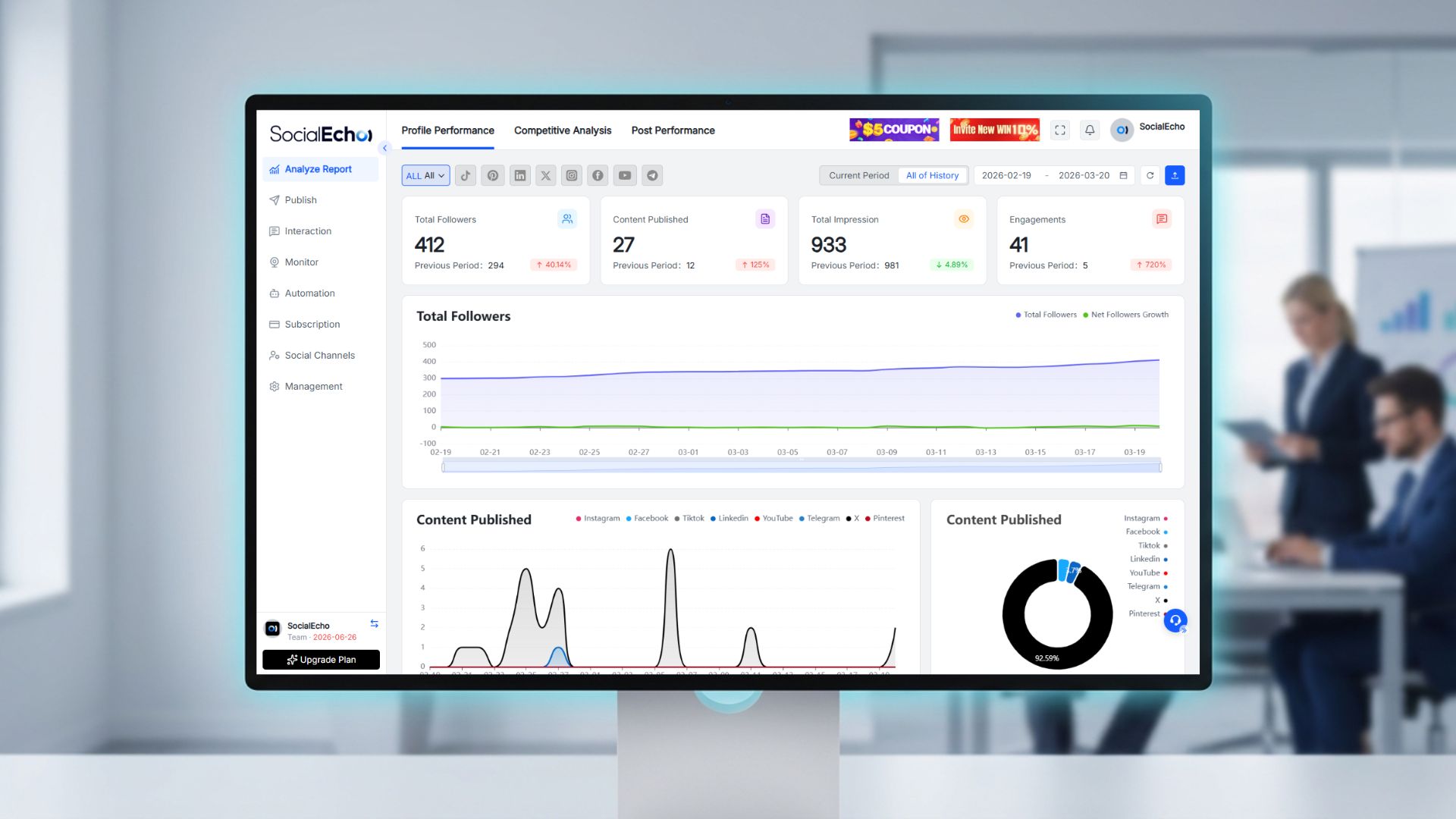
In early 2026, the company decided to introduce a multi-platform social media management tool. Li Min began using SocialEcho to manage all nine platforms.
Changes after using the tool:
- Open SocialEcho at 9 AM; a single backend manages all platforms.
- Create content once and automatically adapt to formats of 9 platforms.
- Set the publication time, and the system will publish automatically.
- I'll reply to comments using the unified inbox this afternoon, so nothing will be missed.
- I leave work promptly at 6 PM, and there's no need to work overtime on weekends.
6.3 Comparison of Results
| index | Before use | After use | promote |
|---|---|---|---|
| Daily working hours | 10 hours | 2 hours | -80% |
| Content publishing efficiency | 9 platforms, 3 hours | 9 platforms, 30 minutes | -83% |
| Comment response timeliness | 60% | 95% | +58% |
| Data reporting time | 2 hours/week | 15 minutes/week | -89% |
| Team size | 3 people | 1 person | -69% |
Li Min said, "Before, I felt like I was just a content copycat, doing the same things every day. Now I can spend my time on content planning and data analysis, and my work is more valuable."
Conclusion
Managing nine social media accounts isn't something you can solve by working overtime. You need the right tools and methods.
Multi-platform social media posting tools allow you to:
- Create once, publish to multiple platforms
- A unified inbox ensures no interaction is missed.
- Automatic scheduling, optimal release time
- Unified data dashboard for easy tracking of results
Want to learn more about multi-platform management features? You can read the detailed introduction to multi-platform social media publishing tools .
Free trial: 7-day SocialEcho multi-platform management experience
FAQ
Q1: If the content is the same on 9 platforms, will it be considered duplicate content?
A: No. Multi-platform publishing tools automatically adjust the format and text according to the characteristics of each platform. For example, image size, text length, and number of tags will all be adapted to the specifications of each platform. Moreover, different platforms have different user groups, so the same content is not considered duplicated on different platforms.
Q2: How do I determine the best time to release for each platform?
A: User activity times differ across platforms. You can use the data analysis features of tools to view your account's historical data and identify the peak activity times for your followers. A general pattern is: Facebook 9-11 AM, Instagram 12-1 PM, TikTok 5-9 PM, LinkedIn 8-10 AM on weekdays, and TikTok 6-10 PM.
Q3: Will replying to comments in a uniform manner seem unprofessional?
A: No. A unified inbox simply centralizes all comments onto one screen; your replies still reflect the specific characteristics of each platform. Furthermore, it offers faster response times and a better user experience. The key is the quality of the reply, not the number of reply options.
Q4: Do I need to post to all 9 platforms? Can I just post to a few?
A: It depends on your target audience. If your users are primarily on Facebook and Instagram, then focus your efforts on those two platforms. Post less or not at all on other platforms. The key is focus, not quantity.
Q5: Do multi-platform tools support automatic replies?
A: Yes, that's supported. You can set up frequently used reply templates so the system can automatically respond to users' common questions. For example, it can automatically reply with product links for product inquiries and with price lists for pricing inquiries. However, complex questions still require manual processing.
;}.cls-2{fill:%230868f7;}.cls-3{fill:url(%23未命名的渐变_44);}.cls-4{fill:%23333;}%3c/style%3e%3clinearGradient%20id='未命名的渐变_8'%20x1='33.73'%20y1='100.61'%20x2='-0.03'%20y2='-1.06'%20gradientUnits='userSpaceOnUse'%3e%3cstop%20offset='0'%20stop-color='%237ae9fb'/%3e%3cstop%20offset='0.67'%20stop-color='%232b90f8'/%3e%3cstop%20offset='1'%20stop-color='%230868f7'/%3e%3c/linearGradient%3e%3clinearGradient%20id='未命名的渐变_44'%20x1='27.86'%20y1='18.67'%20x2='68.36'%20y2='22.22'%20gradientUnits='userSpaceOnUse'%3e%3cstop%20offset='0'%20stop-color='%235ac7f2'/%3e%3cstop%20offset='1'%20stop-color='%230868f7'/%3e%3c/linearGradient%3e%3c/defs%3e%3cpath%20class='cls-1'%20d='M29,28.74V81.91l-9.51-3.68v0L8.52,74A7.17,7.17,0,0,1,4,67.32V24.54A3.76,3.76,0,0,1,9.08,21Z'/%3e%3cpath%20class='cls-2'%20d='M68.09,78.07a13.15,13.15,0,0,1-17.9,12.06L29,81.91h0V28.74L50.19,37A13.17,13.17,0,0,0,68.08,25.3h0Z'/%3e%3cpath%20class='cls-3'%20d='M68.08,25.3a13.19,13.19,0,0,1-6.73,10.87A13.09,13.09,0,0,1,50.19,37L29,28.74V6A3.76,3.76,0,0,1,34.1,2.52l25.59,9.91A13.22,13.22,0,0,1,68.08,25.3Z'/%3e%3cpath%20class='cls-4'%20d='M129.06,81.76a4.33,4.33,0,0,1-3.19-1.31,4.4,4.4,0,0,1-1.31-3.24V56.86H97.65V77.21a4.36,4.36,0,0,1-1.35,3.2A4.68,4.68,0,0,1,93,81.76a4.32,4.32,0,0,1-3.19-1.31,4.37,4.37,0,0,1-1.32-3.24V27.27A4.58,4.58,0,0,1,89.83,24a4.59,4.59,0,0,1,7.82,3.27V48.15h26.91V27.27A4.58,4.58,0,0,1,125.91,24a4.59,4.59,0,0,1,7.82,3.27V77.21a4.37,4.37,0,0,1-1.36,3.2A4.65,4.65,0,0,1,129.06,81.76Z'/%3e%3cpath%20class='cls-4'%20d='M163.77,81.66c-6.57,0-11.76-1.92-15.44-5.7s-5.54-9.07-5.54-15.74a26.76,26.76,0,0,1,2.09-10.43,17.72,17.72,0,0,1,6.67-8.06,19.15,19.15,0,0,1,10.68-2.95,19,19,0,0,1,10.46,2.8,18.7,18.7,0,0,1,6.55,7.36,22.53,22.53,0,0,1,2.36,10.28A4.51,4.51,0,0,1,177,63.77H152.23a10.8,10.8,0,0,0,3.49,6.65c2,1.68,4.88,2.52,8.66,2.52a22.25,22.25,0,0,0,7.54-1.21c.74-.3,1.55-.67,2.37-1.07a3.75,3.75,0,0,1,1.84-.4,4.09,4.09,0,0,1,3,1.15,4,4,0,0,1,1.12,3,4.38,4.38,0,0,1-2.58,3.82,32.34,32.34,0,0,1-6.36,2.61A28.67,28.67,0,0,1,163.77,81.66ZM172.4,55.9a9.72,9.72,0,0,0-1.63-4.56A9.9,9.9,0,0,0,167,48a10.38,10.38,0,0,0-4.64-1.14,12,12,0,0,0-4.77,1.06,9.54,9.54,0,0,0-4.89,5.66,11.78,11.78,0,0,0-.51,2.3Z'/%3e%3cpath%20class='cls-4'%20d='M193,81.64a4.49,4.49,0,0,1-4.51-4.55V27.28A4.58,4.58,0,0,1,189.84,24a4.48,4.48,0,0,1,3.28-1.36A4.36,4.36,0,0,1,196.35,24a4.46,4.46,0,0,1,1.31,3.31V77.09a4.34,4.34,0,0,1-1.35,3.2A4.67,4.67,0,0,1,193,81.64Z'/%3e%3cpath%20class='cls-4'%20d='M263.79,81.71a5.7,5.7,0,0,1-4.2-1.74,5.76,5.76,0,0,1-1.73-4.19V27.37a4.58,4.58,0,0,1,1.35-3.27A4.59,4.59,0,0,1,267,27.37V72.53h24a4.58,4.58,0,0,1,3.27,7.82A4.66,4.66,0,0,1,291,81.71Z'/%3e%3cpath%20class='cls-4'%20d='M424.48,81.74a4.71,4.71,0,0,1-2.71-.88,5.43,5.43,0,0,1-1-1l-.07-.09-12.41-17-5.41,5v9.44a4.31,4.31,0,0,1-1.36,3.19,4.66,4.66,0,0,1-3.3,1.36A4.29,4.29,0,0,1,395,80.42a4.36,4.36,0,0,1-1.32-3.23V27.37A4.58,4.58,0,0,1,395,24.1a4.52,4.52,0,0,1,6.58.12,4.54,4.54,0,0,1,1.24,3.15V56.31l17.72-16.38.05,0a4.8,4.8,0,0,1,2.94-1.11,4.4,4.4,0,0,1,3.27,1.2,4.57,4.57,0,0,1,1.2,3.27,4.44,4.44,0,0,1-.77,2.33,7.45,7.45,0,0,1-1.43,1.65l-11,9.64,13.34,17.68a5,5,0,0,1,1,2.71,4.12,4.12,0,0,1-1.36,3.24A4.64,4.64,0,0,1,424.48,81.74Z'/%3e%3cpath%20class='cls-4'%20d='M317.93,81.76a21.5,21.5,0,1,1,21.17-21.5A21.37,21.37,0,0,1,317.93,81.76Zm0-34.1a12.61,12.61,0,1,0,12.42,12.6A12.52,12.52,0,0,0,317.93,47.66Z'/%3e%3cpath%20class='cls-4'%20d='M212.18,101.22a4.12,4.12,0,0,1-3.05-1.26,4.17,4.17,0,0,1-1.26-3.1V43.34a4.37,4.37,0,0,1,1.3-3.14,4.26,4.26,0,0,1,3.13-1.3,4.19,4.19,0,0,1,3.1,1.26,4.32,4.32,0,0,1,1.26,3.16,20.77,20.77,0,0,1,13-4.54,21.51,21.51,0,0,1,0,43,20.51,20.51,0,0,1-13-4.57V96.86a4.15,4.15,0,0,1-1.3,3.06A4.5,4.5,0,0,1,212.18,101.22Zm17.43-53.63c-6.23,0-12.93,4.11-12.93,12.72a12.73,12.73,0,0,0,25.46,0A12.71,12.71,0,0,0,229.61,47.59Z'/%3e%3cpath%20class='cls-4'%20d='M365.76,81.76a21.5,21.5,0,1,1,21.18-21.5A21.37,21.37,0,0,1,365.76,81.76Zm0-34.1a12.61,12.61,0,1,0,12.42,12.6A12.52,12.52,0,0,0,365.76,47.66Z'/%3e%3c/svg%3e)