
SocialEcho Feature Update: TikTok Shop Videos, AI Creator & Content Management

Updates
- TikTok Shoppable Video Publishing & Commerce Data Analytics
- AI-powered creation capabilities include image and video generation.
- Covers can be automatically cropped.
- YouTube releases support for adding playlists
- Supports editing and deleting published posts
- Data analytics adds weekly and monthly dimensions
- Comment export supports simultaneous export of sub-comments.
- Description of new rules for automated tasks
- AI Rewriter Sync adds the "whether to forward media" setting.
Added TikTok Shop video publishing and e-commerce performance analytics.
SocialEcho now supports publishing TikTok product promotion videos . After completing the TikTok Shop product authorization, you can directly select the products you want to associate when publishing videos, completing content publishing and product promotion in the same process.
For teams operating multiple TikTok e-commerce accounts simultaneously, there is no need to log in to each account individually to upload videos and add products, which significantly reduces repetitive operations and makes new product promotion, influencer distribution, and matrix e-commerce more efficient.
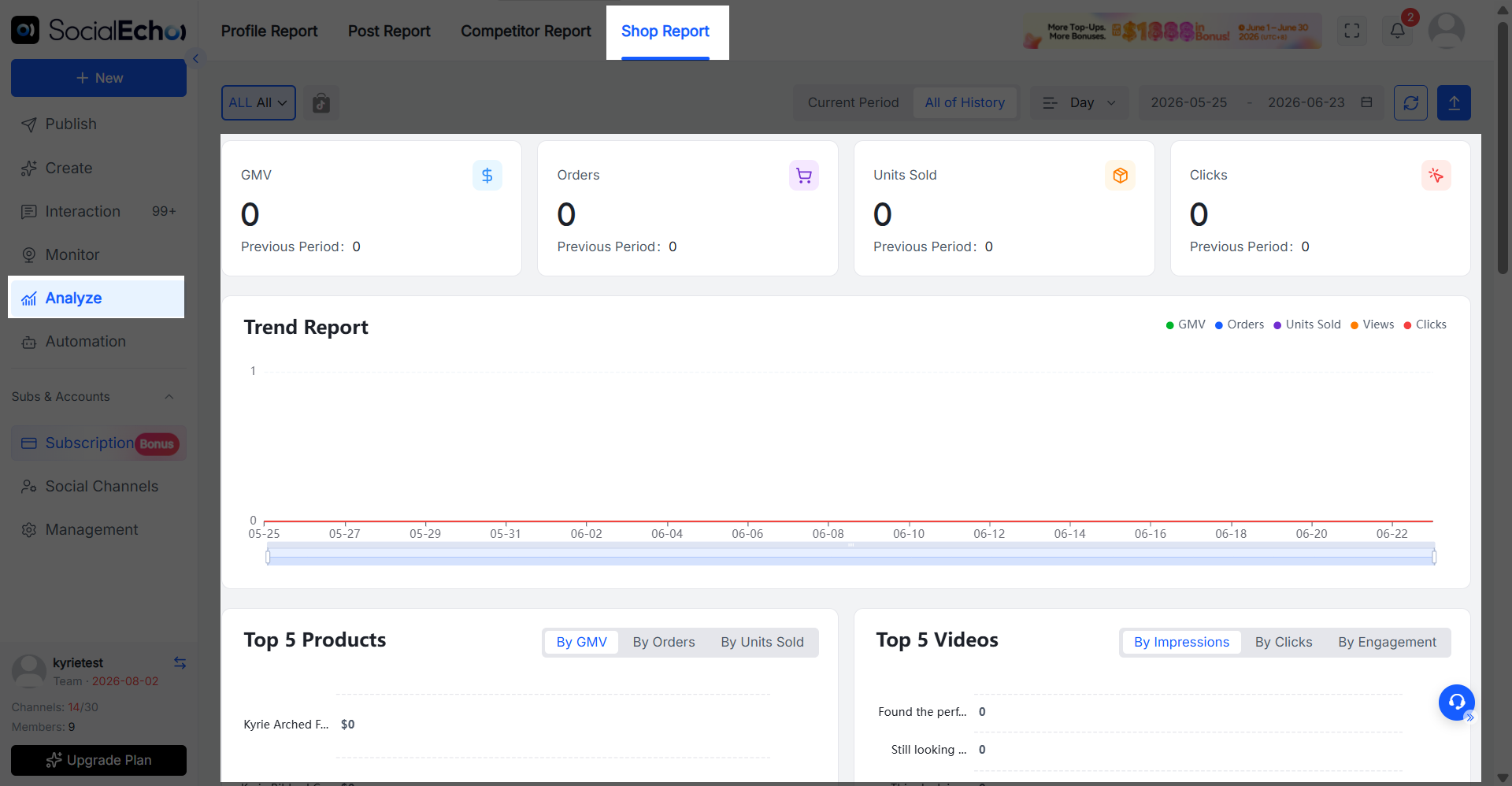
In addition to publishing product-selling videos, SocialEcho has added TikTok sales data analytics . The team can directly view the transaction amount, order volume, sales volume, and product clicks generated by the product-selling videos, further determining which content, products, and store accounts truly drove conversions.
Operation path
-
To authorize your TikTok e-commerce account, click on [Social Media Accounts] - [Add Account], then select [TikTok Shop] to complete the authorization.
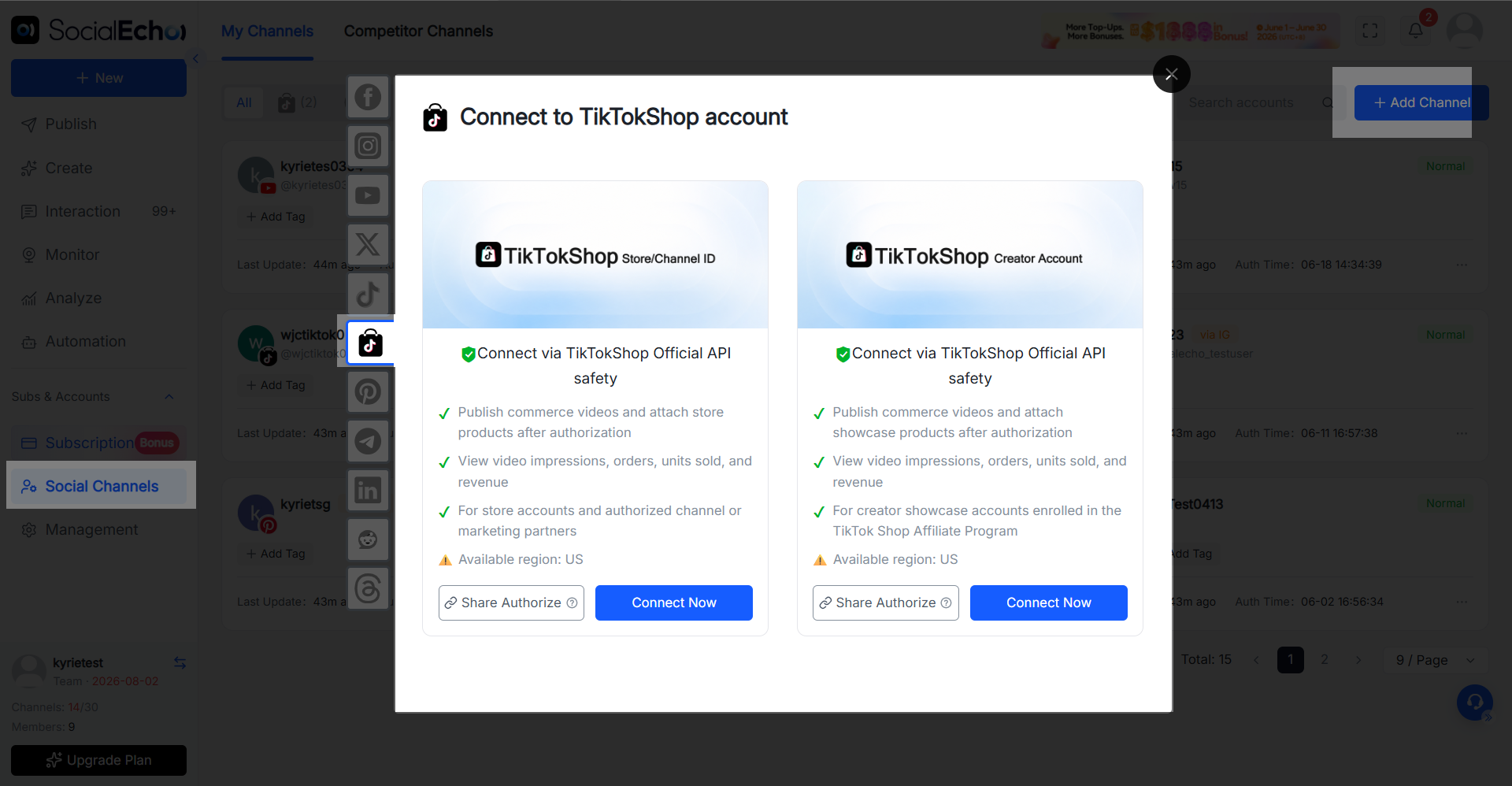
-
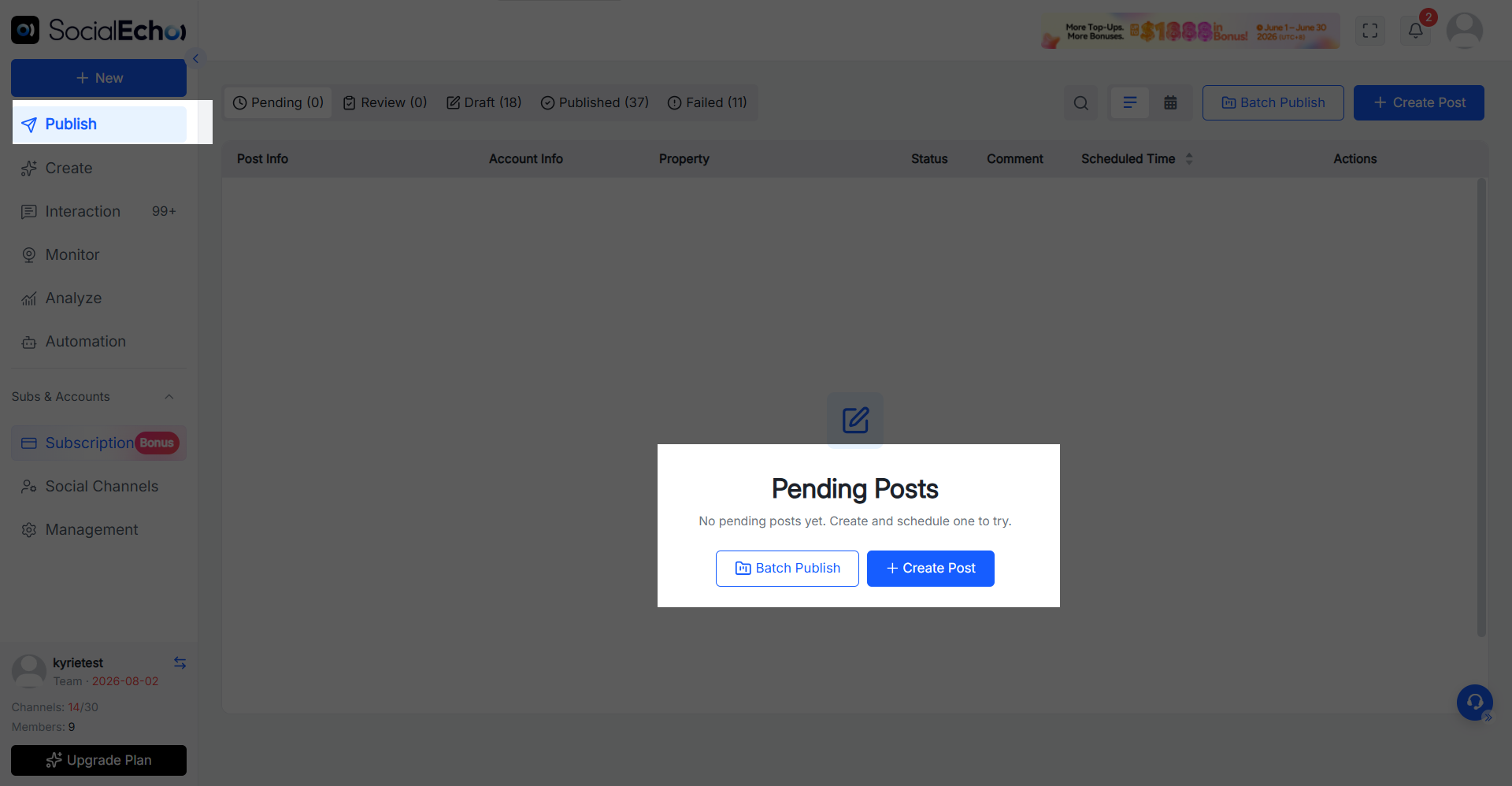
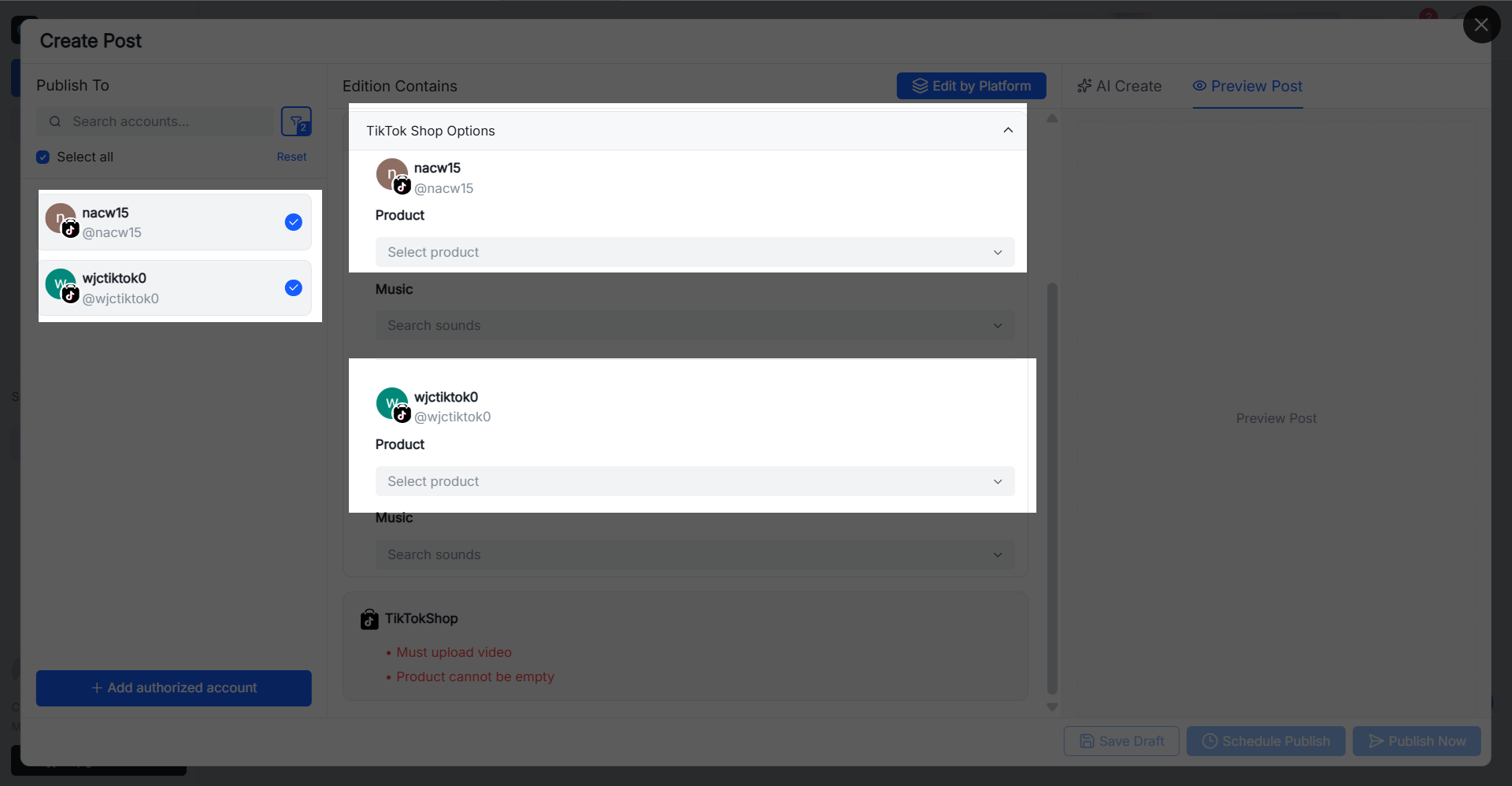
Click on [Publish] - [Create Post], select your TikTok Shop account and upload your video. In the product settings, select the products you want to associate with the product. After completing the content settings, you can publish or schedule a post.
-
After publication, users can access the TikTok sales data analysis page to view sales performance over different time periods.
Use cases
- TikTok Shop matrix sales : The same product is promoted through different accounts and different video materials to expand product exposure and testing scope.
- Centralized promotion of new products : Prepare multiple product promotion videos in advance when new products are launched, and arrange the release time of different accounts in a unified manner.
- Influencer and affiliate marketing : Helps teams centrally manage product-selling content from different influencer accounts, reducing duplicate uploads and account switching.
- Filter high-conversion videos : Quickly identify videos that truly drive clicks, orders, and sales by analyzing the top 5 videos and detailed data.
- Optimize product selection strategy : Compare the performance of different products by comparing the top 5 products, and concentrate resources on products with higher conversion potential.
- Assess account value : Review the transaction and order data of different store accounts to determine which accounts are more suitable for continued investment.
New AI-generated image and AI-generated video features
SocialEcho AI's creative capabilities have been further upgraded, adding a variety of new image and video creation skills. Operations staff can quickly generate materials, translate them, and adapt them to multiple platforms based on different creative needs, reducing the need to repeatedly switch between design, editing, and different tools.
Supported image creation skills :
- Cross-platform image adaptation
- Generate a suitable cover image
- Image translation
Supported video creation skills :
- Viral video replication
- Video translation
- Video generation
Operation path
Go to [Create], select the image or video skill you want to use, upload reference materials or enter creative requirements according to the page prompts, and the corresponding content will be generated.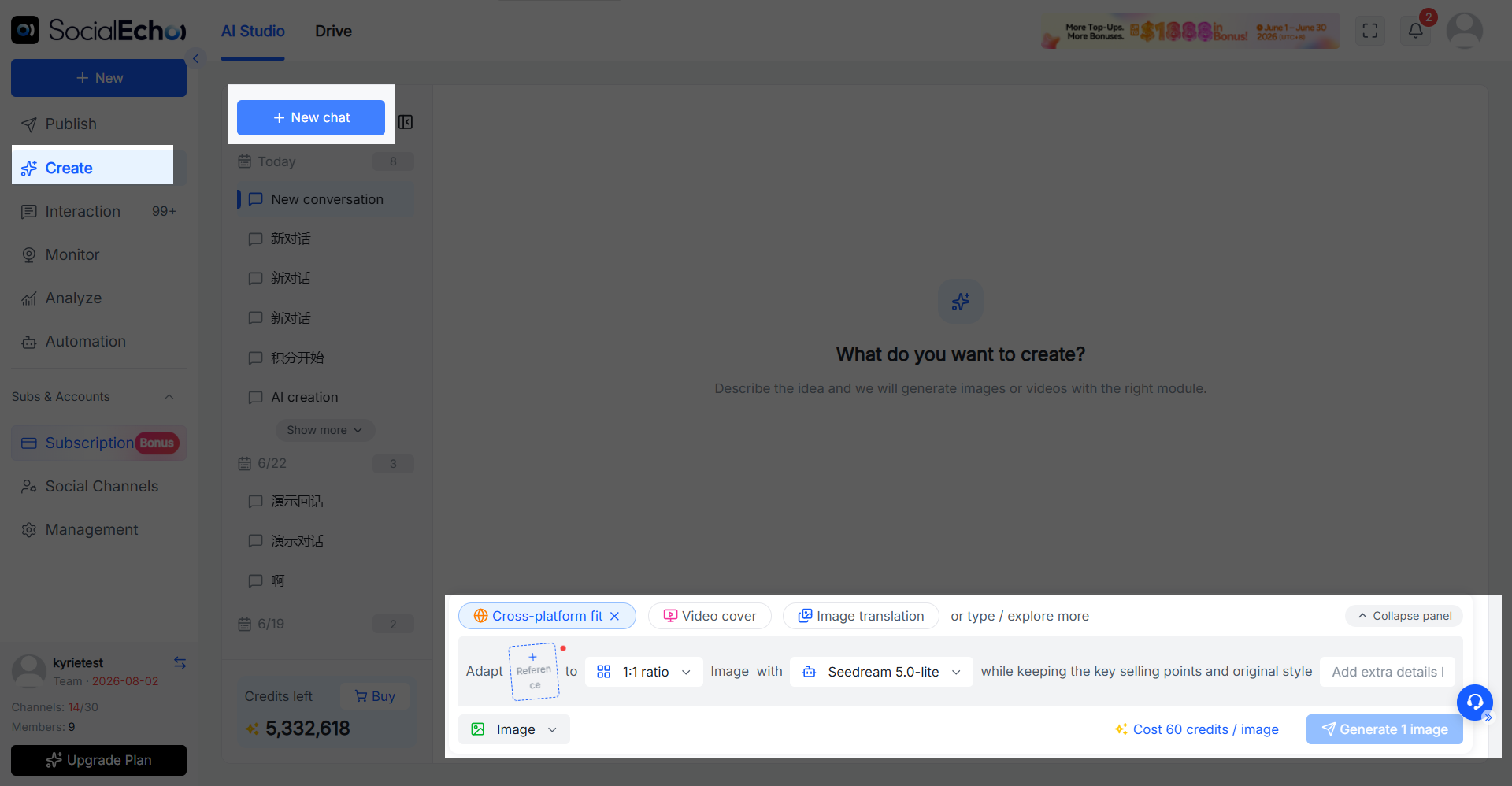
Use cases
- Multi-platform material adaptation : Based on the same material, quickly generate images and covers suitable for different social media platforms, reducing repeated cropping and design.
- Multilingual content localization : Translate images, text, video subtitles, and audio content into different languages to more efficiently reach multiple overseas markets.
- Rapid daily content production : Quickly create materials for new product promotions, event marketing, and daily account operations through image generation, video generation, and viral content replication.
YouTube publishing support for adding playlists.
When publishing YouTube videos via SocialEcho, you can now directly select the corresponding playlist.
Once a video is published, it will be automatically added to the selected list, eliminating the need for secondary organization in the YouTube backend, making channel content categorization and series management more convenient.
Operation path
Click on "Publish" - "Create Post", select your YouTube account and upload your video, then select the appropriate playlist in the posting settings.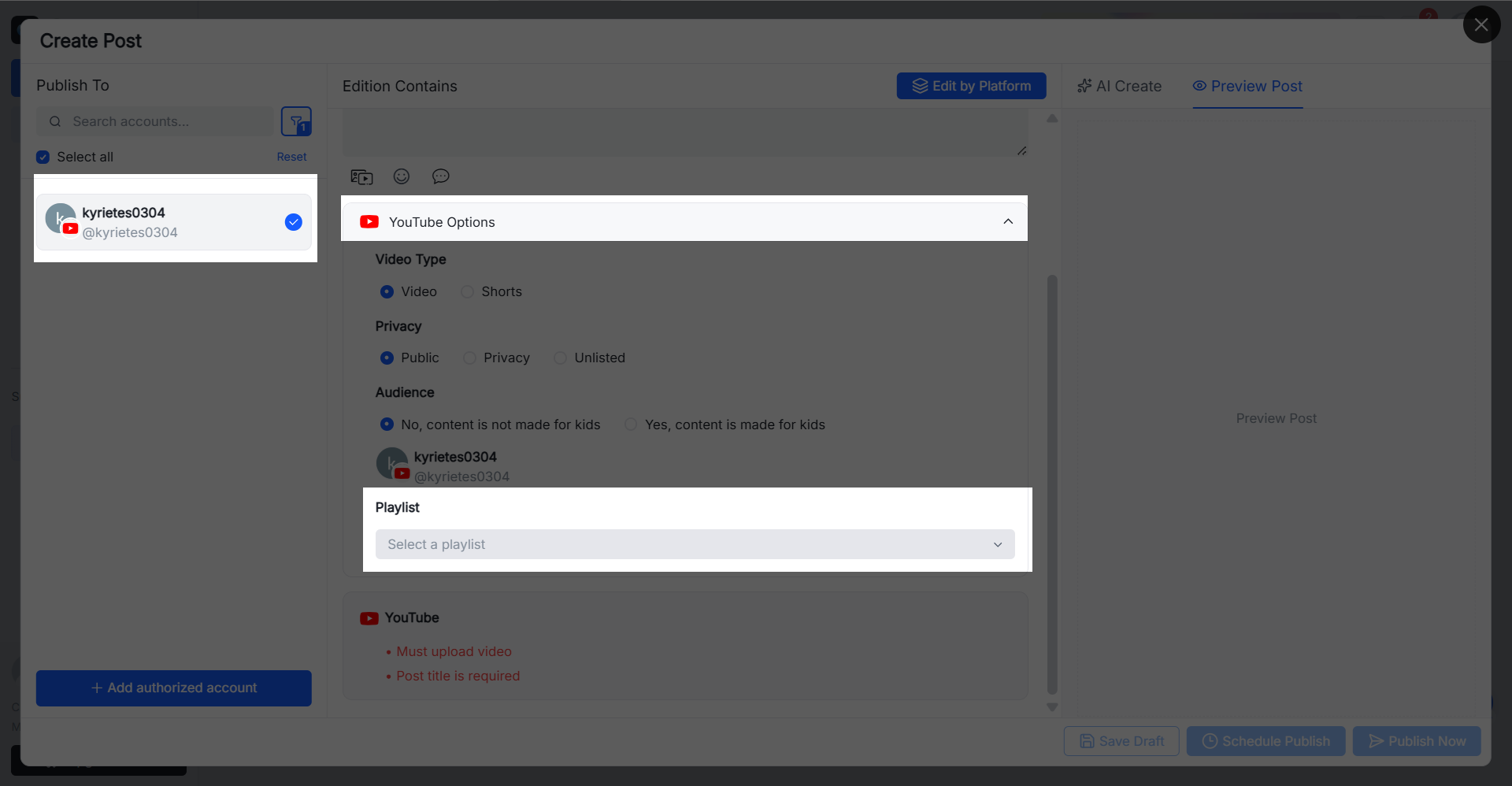
Use cases
- Series content management : Automatically categorize video series such as tutorials, assessments, and case studies into corresponding lists.
- Unified publishing across multiple channels : Complete video publishing and channel content categorization in one backend.
- Enhance continuous viewing : Connect related videos through playlists to help users continue browsing content on the same topic.
Supports editing and deleting published posts
SocialEcho now supports editing or deleting published posts. If you find text errors, need to update links, or need to remove content after an event ends, you can do so directly within SocialEcho without having to revisit the corresponding social media platform.
The specific editable content and supported platforms are subject to the official interface permissions of each social media platform. Currently, TikTok and Telegram do not support deletion.
Operation path
Go to [Publish] - [Published], find the post you need to edit, click to edit or delete, and confirm the operation.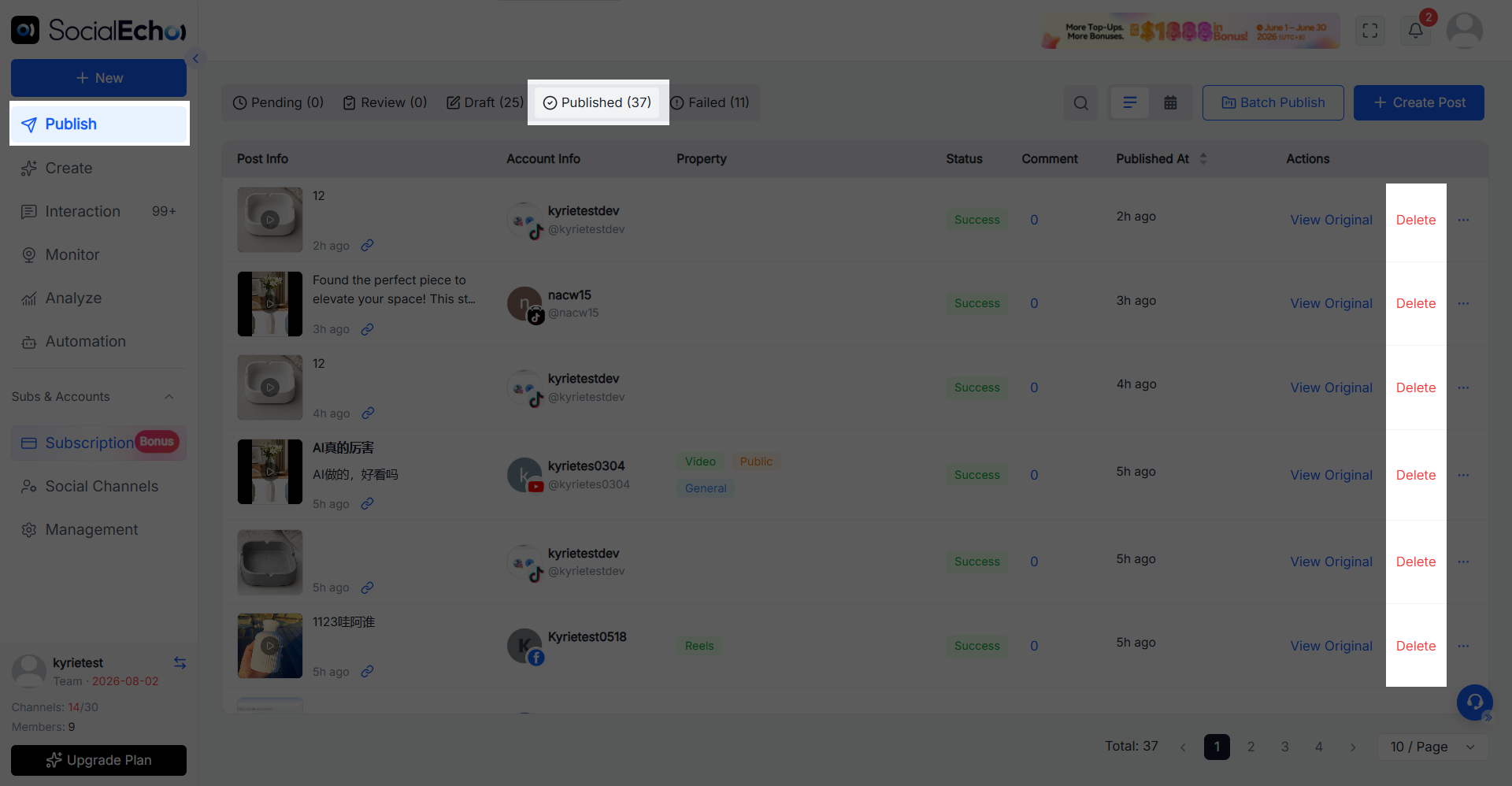
Use cases
- After publication, typos, incorrect links, or incorrect event information were found.
- Once a product is removed from the shelves or the promotion ends, the old content must be deleted promptly.
- If multiple accounts have the same content issue, it needs to be handled centrally to avoid operating on each platform individually.
Covers can be automatically cropped.
When setting a cover for a video, SocialEcho can now automatically crop the cover size according to the platform's requirements.
The system will adapt the image proportions while preserving the main content as much as possible, reducing issues such as cover distortion, truncated main content, or incomplete display after uploading.
Operation path
After creating a video post and uploading a cover image, the system will automatically adjust the size according to the selected platform. You can also make further adjustments after previewing.
Use cases
- The same video needs to be published on multiple platforms with different size requirements.
- When publishing videos in batches, we want to reduce the need to adjust the cover image for each video individually.
- The original cover ratio does not meet the requirements of the target platform and needs to be adapted quickly.
Data analytics now includes weekly and monthly viewing dimensions.
In addition to viewing daily data, you can now observe account performance by week or month, making it easier to judge the overall changes in fan growth, content publishing and interaction data, and reducing the work of manually compiling periodic reports.
Operation path
Go to [Analysis], select the account and data metrics, and switch the time dimension to weekly or monthly.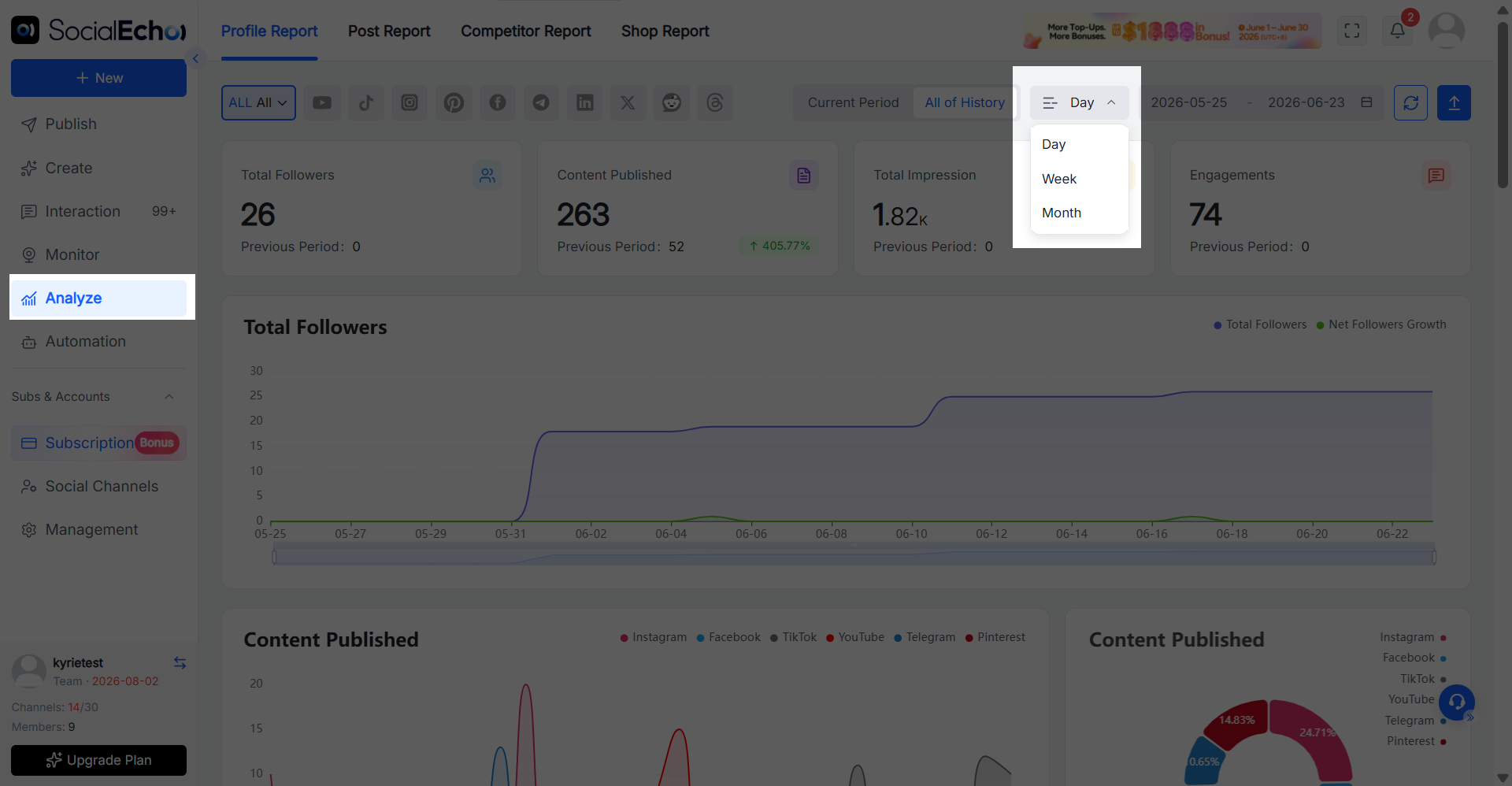
Use cases
- Periodic data review : Analyze account performance by week or month to improve review efficiency.
- Operations report generation : Quickly generate the data needed for weekly and monthly reports.
- Trend change analysis : Compare data from different periods to identify growth or decline trends.
Comment export supports simultaneous export of sub-comments.
When exporting post comments, you can now export the sub-comments below the main post at the same time, preserving a more complete context of the interaction.
Compared to exporting only the first-level comments, operations staff can further view brand responses, user follow-up questions, and discussions with other users, gaining a more accurate understanding of the comment content and interaction process.
Operation path
Go to the comment management or post monitoring page and click "Export Comments".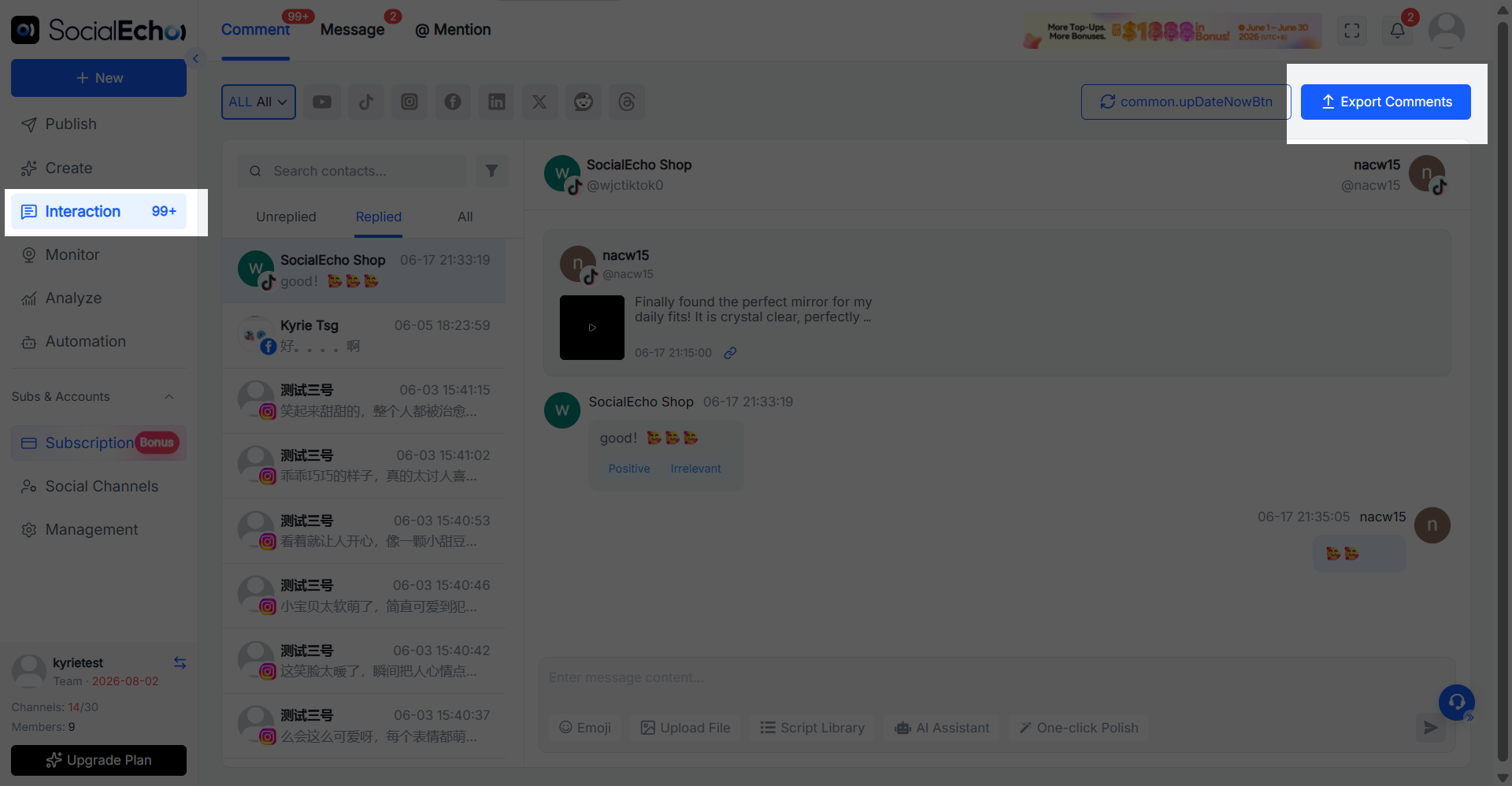
Use cases
- Complete comment analysis : Export data including sub-comments for use in public opinion and user feedback analysis.
- Customer service record organization : Review the complete conversation flow and assess the issue handling status.
- User behavior insights : Analyze the comment interaction process to identify needs and potential problems.
Description of new rules for automated tasks
The automation task page now includes rule descriptions to help users understand the triggering conditions, execution logic, and related limitations of a task before creating it.
Without the need for repeated testing or reliance on manual explanation, it is easier to determine the effects of different settings, reducing the occurrence of task configuration errors, duplicate executions, or unexpected results.
Operation path
Go to Automation and create or edit a task to view the rule descriptions next to the relevant settings.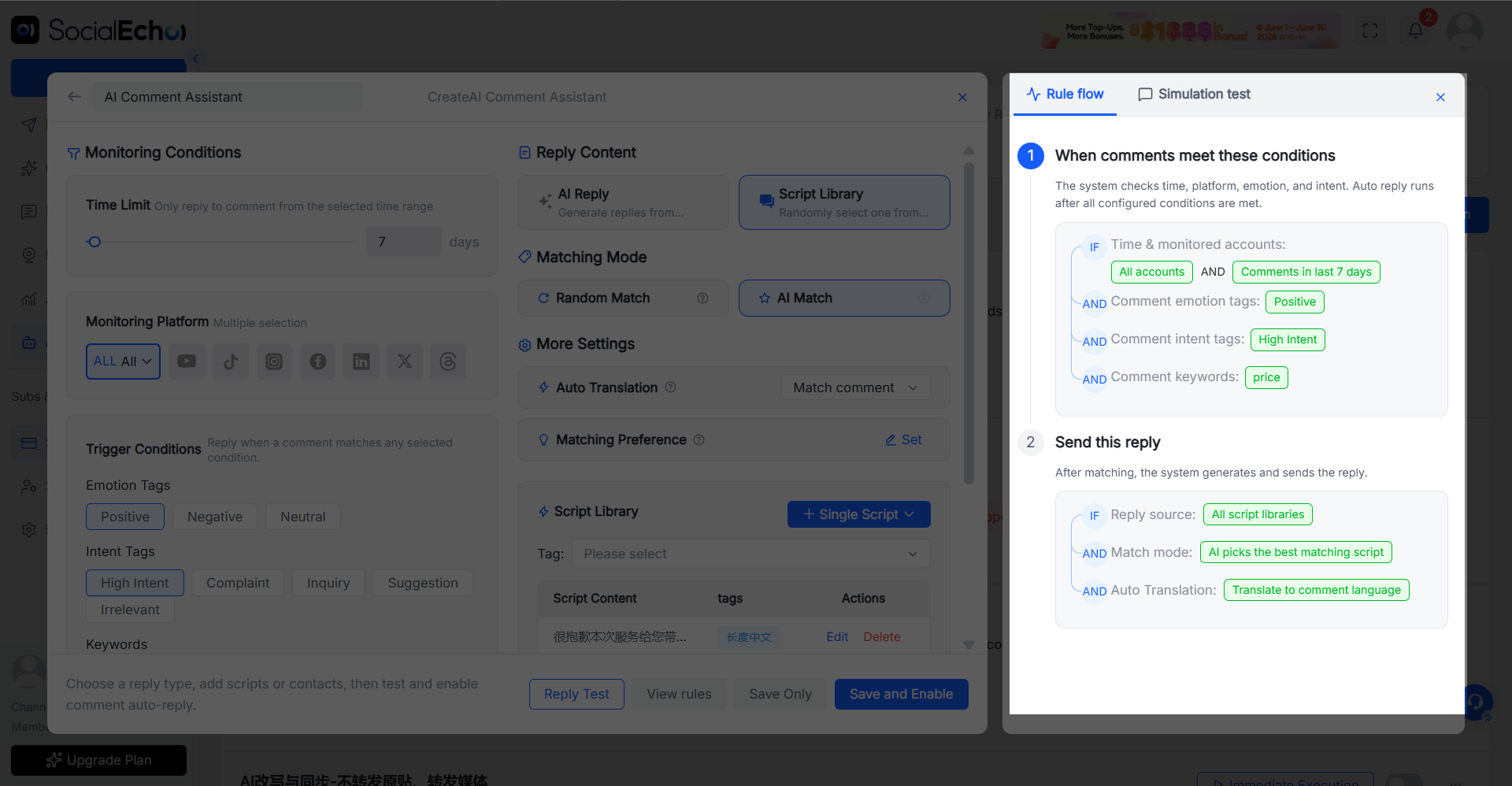
Use cases
- Quickly understand the functions and grasp the meaning of each rule and setting when using it for the first time.
- For complex tasks, confirm the triggering and execution logic in advance to avoid configuration errors.
- Team collaboration reduces communication costs and improves the efficiency of multi-person collaboration.
AI rewrites and simultaneously adds "whether to forward media" information.
The AI rewriting and synchronization task now includes a "whether to forward media" setting.
When creating a task, you can decide whether to forward the images or videos in the original post along with the rewritten and forwarded text.
After selecting a media outlet to share the content with, the system will publish the rewritten copy along with the original media material. If disabled, only the rewritten text will be used for publishing. This allows for more flexible control over automatic content synchronization based on content copyright, account positioning, and operational strategies.
Operation path
Go to Automation > AI Rewriting and Synchronization, create or edit a task, select whether to forward media in the content settings, complete other rule configurations, save and enable.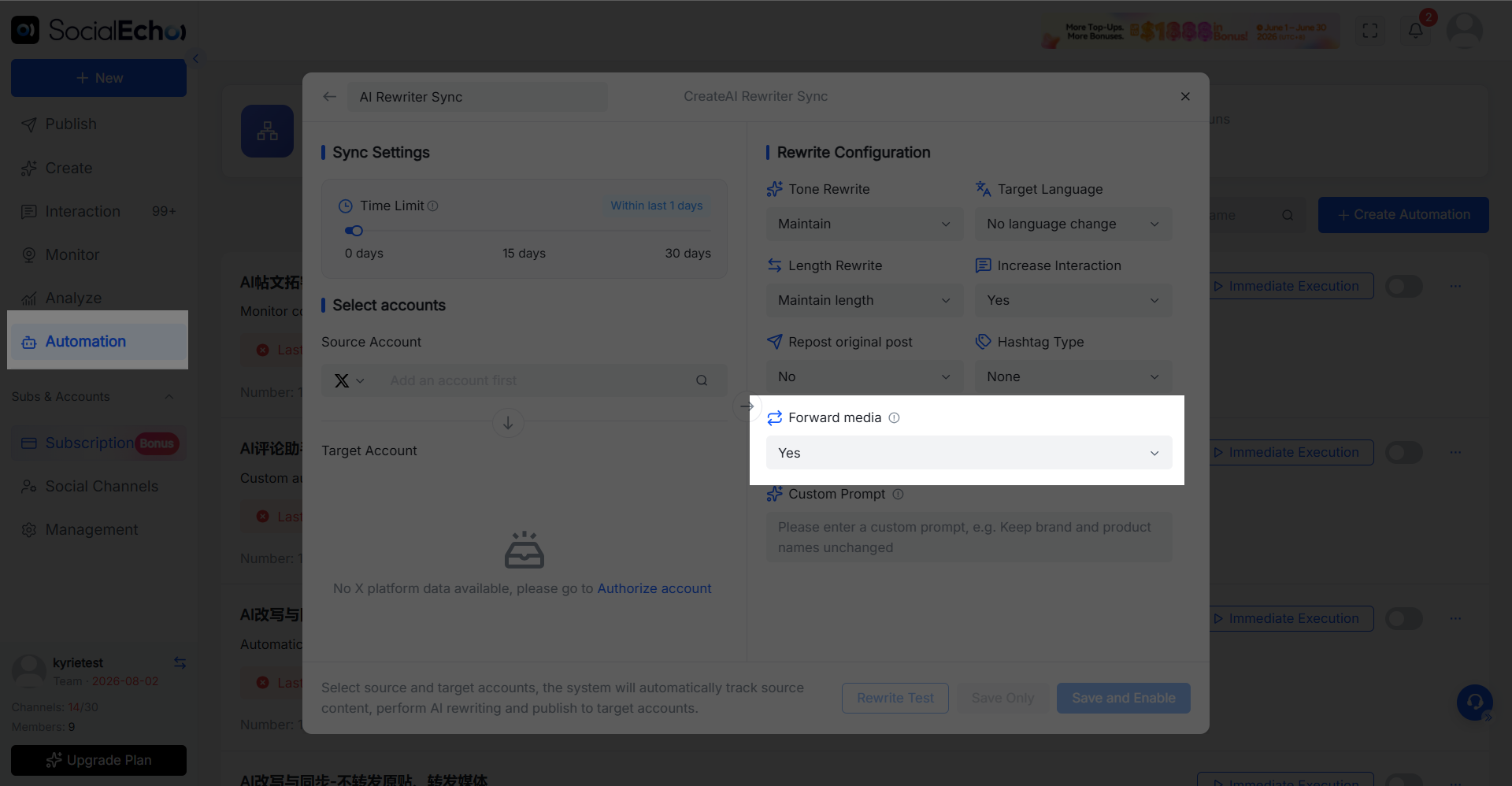
Use cases
- Full content synchronization : When it is necessary to retain the original post's visual information, media materials can be forwarded simultaneously.
- Copy reuse only : Use only the rewritten copy and publish it with your own images or videos.
- Differentiated operation strategy : Flexibly control media forwarding methods based on account positioning to reduce the risk of duplicate content.
SocialEcho
SocialEcho is an AI workbench for overseas social media platforms, supporting mainstream platforms such as Facebook, Instagram, TikTok, YouTube, X, LinkedIn, Pinterest, Reddit, Telegram, and Threads.
The team can manage multiple accounts, create and publish content, reply to comments and private messages, analyze data, monitor posts, and automate AI processes all from a single backend, reducing platform switching and repetitive operations and enabling more efficient operation of overseas social media matrix.
Experience SocialEcho now and use AI to streamline the entire social media operation process from content creation and matrix publishing to interactive conversion.
;}.cls-2{fill:%230868f7;}.cls-3{fill:url(%23未命名的渐变_44);}.cls-4{fill:%23333;}%3c/style%3e%3clinearGradient%20id='未命名的渐变_8'%20x1='33.73'%20y1='100.61'%20x2='-0.03'%20y2='-1.06'%20gradientUnits='userSpaceOnUse'%3e%3cstop%20offset='0'%20stop-color='%237ae9fb'/%3e%3cstop%20offset='0.67'%20stop-color='%232b90f8'/%3e%3cstop%20offset='1'%20stop-color='%230868f7'/%3e%3c/linearGradient%3e%3clinearGradient%20id='未命名的渐变_44'%20x1='27.86'%20y1='18.67'%20x2='68.36'%20y2='22.22'%20gradientUnits='userSpaceOnUse'%3e%3cstop%20offset='0'%20stop-color='%235ac7f2'/%3e%3cstop%20offset='1'%20stop-color='%230868f7'/%3e%3c/linearGradient%3e%3c/defs%3e%3cpath%20class='cls-1'%20d='M29,28.74V81.91l-9.51-3.68v0L8.52,74A7.17,7.17,0,0,1,4,67.32V24.54A3.76,3.76,0,0,1,9.08,21Z'/%3e%3cpath%20class='cls-2'%20d='M68.09,78.07a13.15,13.15,0,0,1-17.9,12.06L29,81.91h0V28.74L50.19,37A13.17,13.17,0,0,0,68.08,25.3h0Z'/%3e%3cpath%20class='cls-3'%20d='M68.08,25.3a13.19,13.19,0,0,1-6.73,10.87A13.09,13.09,0,0,1,50.19,37L29,28.74V6A3.76,3.76,0,0,1,34.1,2.52l25.59,9.91A13.22,13.22,0,0,1,68.08,25.3Z'/%3e%3cpath%20class='cls-4'%20d='M129.06,81.76a4.33,4.33,0,0,1-3.19-1.31,4.4,4.4,0,0,1-1.31-3.24V56.86H97.65V77.21a4.36,4.36,0,0,1-1.35,3.2A4.68,4.68,0,0,1,93,81.76a4.32,4.32,0,0,1-3.19-1.31,4.37,4.37,0,0,1-1.32-3.24V27.27A4.58,4.58,0,0,1,89.83,24a4.59,4.59,0,0,1,7.82,3.27V48.15h26.91V27.27A4.58,4.58,0,0,1,125.91,24a4.59,4.59,0,0,1,7.82,3.27V77.21a4.37,4.37,0,0,1-1.36,3.2A4.65,4.65,0,0,1,129.06,81.76Z'/%3e%3cpath%20class='cls-4'%20d='M163.77,81.66c-6.57,0-11.76-1.92-15.44-5.7s-5.54-9.07-5.54-15.74a26.76,26.76,0,0,1,2.09-10.43,17.72,17.72,0,0,1,6.67-8.06,19.15,19.15,0,0,1,10.68-2.95,19,19,0,0,1,10.46,2.8,18.7,18.7,0,0,1,6.55,7.36,22.53,22.53,0,0,1,2.36,10.28A4.51,4.51,0,0,1,177,63.77H152.23a10.8,10.8,0,0,0,3.49,6.65c2,1.68,4.88,2.52,8.66,2.52a22.25,22.25,0,0,0,7.54-1.21c.74-.3,1.55-.67,2.37-1.07a3.75,3.75,0,0,1,1.84-.4,4.09,4.09,0,0,1,3,1.15,4,4,0,0,1,1.12,3,4.38,4.38,0,0,1-2.58,3.82,32.34,32.34,0,0,1-6.36,2.61A28.67,28.67,0,0,1,163.77,81.66ZM172.4,55.9a9.72,9.72,0,0,0-1.63-4.56A9.9,9.9,0,0,0,167,48a10.38,10.38,0,0,0-4.64-1.14,12,12,0,0,0-4.77,1.06,9.54,9.54,0,0,0-4.89,5.66,11.78,11.78,0,0,0-.51,2.3Z'/%3e%3cpath%20class='cls-4'%20d='M193,81.64a4.49,4.49,0,0,1-4.51-4.55V27.28A4.58,4.58,0,0,1,189.84,24a4.48,4.48,0,0,1,3.28-1.36A4.36,4.36,0,0,1,196.35,24a4.46,4.46,0,0,1,1.31,3.31V77.09a4.34,4.34,0,0,1-1.35,3.2A4.67,4.67,0,0,1,193,81.64Z'/%3e%3cpath%20class='cls-4'%20d='M263.79,81.71a5.7,5.7,0,0,1-4.2-1.74,5.76,5.76,0,0,1-1.73-4.19V27.37a4.58,4.58,0,0,1,1.35-3.27A4.59,4.59,0,0,1,267,27.37V72.53h24a4.58,4.58,0,0,1,3.27,7.82A4.66,4.66,0,0,1,291,81.71Z'/%3e%3cpath%20class='cls-4'%20d='M424.48,81.74a4.71,4.71,0,0,1-2.71-.88,5.43,5.43,0,0,1-1-1l-.07-.09-12.41-17-5.41,5v9.44a4.31,4.31,0,0,1-1.36,3.19,4.66,4.66,0,0,1-3.3,1.36A4.29,4.29,0,0,1,395,80.42a4.36,4.36,0,0,1-1.32-3.23V27.37A4.58,4.58,0,0,1,395,24.1a4.52,4.52,0,0,1,6.58.12,4.54,4.54,0,0,1,1.24,3.15V56.31l17.72-16.38.05,0a4.8,4.8,0,0,1,2.94-1.11,4.4,4.4,0,0,1,3.27,1.2,4.57,4.57,0,0,1,1.2,3.27,4.44,4.44,0,0,1-.77,2.33,7.45,7.45,0,0,1-1.43,1.65l-11,9.64,13.34,17.68a5,5,0,0,1,1,2.71,4.12,4.12,0,0,1-1.36,3.24A4.64,4.64,0,0,1,424.48,81.74Z'/%3e%3cpath%20class='cls-4'%20d='M317.93,81.76a21.5,21.5,0,1,1,21.17-21.5A21.37,21.37,0,0,1,317.93,81.76Zm0-34.1a12.61,12.61,0,1,0,12.42,12.6A12.52,12.52,0,0,0,317.93,47.66Z'/%3e%3cpath%20class='cls-4'%20d='M212.18,101.22a4.12,4.12,0,0,1-3.05-1.26,4.17,4.17,0,0,1-1.26-3.1V43.34a4.37,4.37,0,0,1,1.3-3.14,4.26,4.26,0,0,1,3.13-1.3,4.19,4.19,0,0,1,3.1,1.26,4.32,4.32,0,0,1,1.26,3.16,20.77,20.77,0,0,1,13-4.54,21.51,21.51,0,0,1,0,43,20.51,20.51,0,0,1-13-4.57V96.86a4.15,4.15,0,0,1-1.3,3.06A4.5,4.5,0,0,1,212.18,101.22Zm17.43-53.63c-6.23,0-12.93,4.11-12.93,12.72a12.73,12.73,0,0,0,25.46,0A12.71,12.71,0,0,0,229.61,47.59Z'/%3e%3cpath%20class='cls-4'%20d='M365.76,81.76a21.5,21.5,0,1,1,21.18-21.5A21.37,21.37,0,0,1,365.76,81.76Zm0-34.1a12.61,12.61,0,1,0,12.42,12.6A12.52,12.52,0,0,0,365.76,47.66Z'/%3e%3c/svg%3e)