
Telegram Account Security Checklist After Registration: 12 Settings from Personal Login to Team Operations
Telegram Account Security Checklist After Registration: 12 Settings from Personal Login to Team Operations
On Friday evening, Maya, the community manager for an overseas education brand, finally registered a Telegram account. She was about to send the group link to the advertising team when her security colleague stopped her: "Don't send it yet, the account hasn't undergone a security check." Maya was puzzled: she had received the verification code and uploaded her profile picture, so why wasn't it considered complete? The security colleague opened a Telegram account safety checklist: two-step verification wasn't enabled, active devices weren't checked, phone number visibility wasn't adjusted, administrator permissions weren't defined, and the content posting process wasn't written. At that moment, she realized that Telegram account setup wasn't just about successful registration, but about whether it could be operated securely after registration.
This article is a post-registration security checklist suitable for individual creators, brand teams, and account management companies. It covers the final step of the Telegram registration guide: once the account is created, how to avoid account theft, accidental posting, permission conflicts, and loss of operational control.

Group 1: First, protect the login portal.
1. Enable two-step verification
Two-step verification is the first step in Telegram account security. A phone verification code only proves you can receive SMS messages, not that your account is secure in the long term. If your number or device is compromised, without a second layer of password, your account is more vulnerable to loss of control. When setting up two-step verification, use a password that your business can manage but won't readily share, and save your recovery email address or related information.
2. Check active devices.
Immediately after registering, view all logged-in devices. Confirm the device name, system, and login time. If your account has been logged in on multiple phones, computers, or websites, identify which devices are essential and which need to be logged out. Team accounts, in particular, should not be set to "anyone can log in."
3. Bind a number that can be controlled long-term.
If the account is used for business purposes, do not rely on personal numbers that are difficult to transfer. Number ownership must be clear and readily available to handle situations such as employee departures, job changes, or equipment loss. The Maya team later added number ownership to the asset table to prevent accounts from being linked to individuals.
Group Two: Setting Privacy and Identity Boundaries
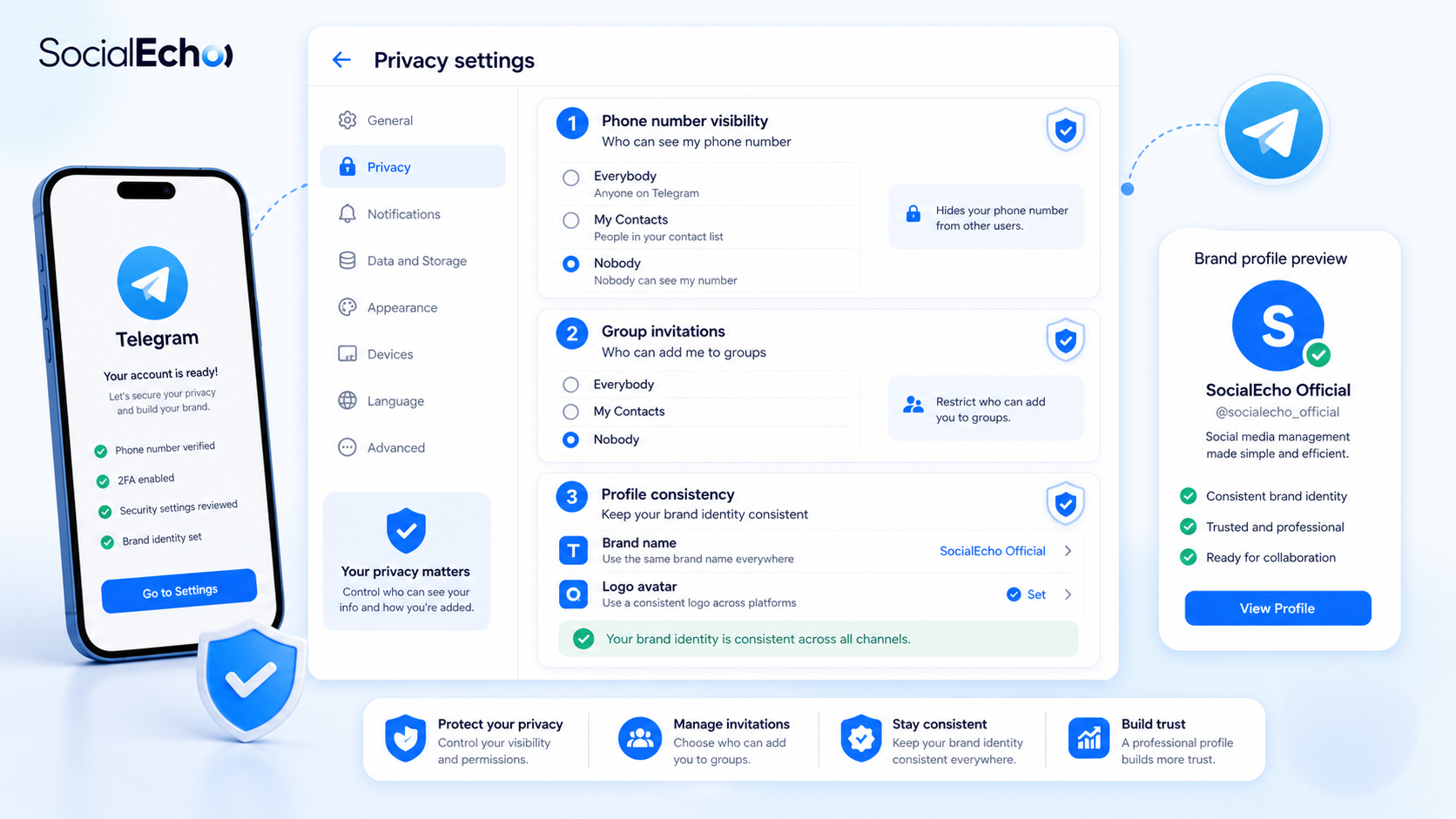
4. Adjust phone number visibility
Business accounts don't necessarily need to display phone numbers to everyone. Configure who can see the number based on the business scenario to reduce unnecessary harassment and privacy breaches.
5. Control group invitations
If anyone can add an account to the group, the operations staff will quickly be overwhelmed with irrelevant messages. It is recommended to restrict invitation permissions based on the brand's intended use to reduce the risk of phishing and spam.
6. Standardize profile pictures, names, and bios.
Account identity should be easily identifiable to users. Profile picture, name, bio, and website link should be consistent with brand assets. For businesses, identity consistency is also part of security, as it reduces the likelihood of users being misled by fake accounts.
Group 3: Establish team operation permissions
7. Clarify who can post content.
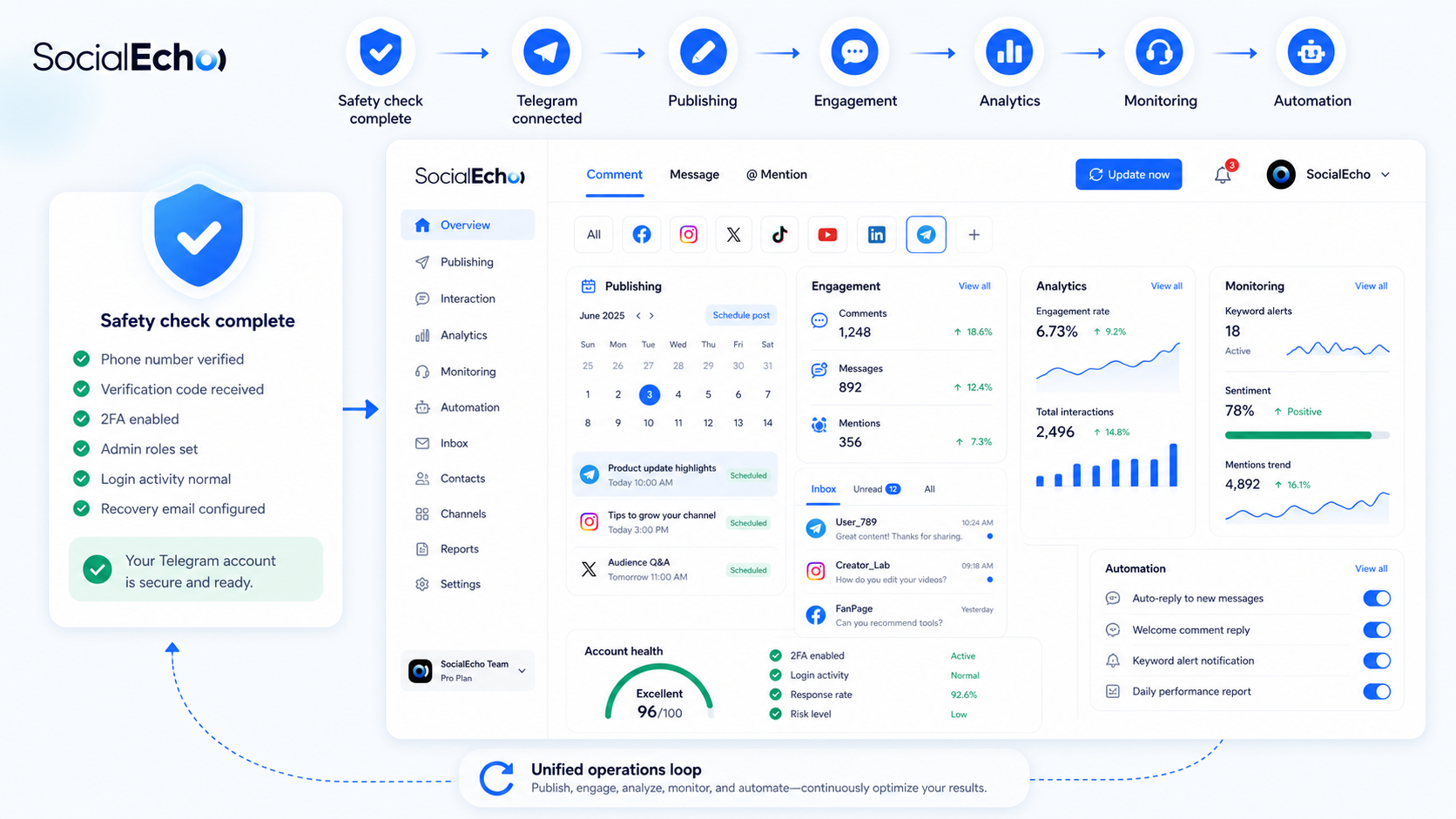
The most easily overlooked aspect of Telegram business account security is "accidental posting." Announcements, event links, promotional information, and customer service responses can all impact brand trust. It's recommended to define the sender, reviewer, and emergency contact person. You can use SocialEcho to schedule content publishing across multiple platforms, but posting permissions should still be governed by team policies.
8. Clarify who can respond to users.
In Telegram communities, user questions often arise quickly. If multiple people respond simultaneously, inconsistencies in their responses can easily arise. Using interaction management to uniformly view comments and user intent across multiple platforms can reduce missed and duplicate responses, but the team still needs to set response boundaries: which questions customer service can answer directly, and which require escalation.
9. Establish an exception handling process.
When an unfamiliar device, unusual login, user complaint, or accidentally posted content is discovered, who will suspend the posting, who will change the password, and who will provide an explanation? These details should be clearly defined in advance. Discussing these issues only after an incident has occurred is usually too late.
Group 4: Integrate accounts into a reviewable growth system
10. Track content performance
Security isn't just about preventing risks; it also includes making operational actions reviewable. After Telegram content is posted, the team needs to know which announcements generate interaction and which topics receive no response. By analyzing data and aggregating metrics from multiple platforms, we can avoid relying solely on gut feeling.
11. Monitor brand and industry discussions.
Telegram is just one part of user discussions. Brand names, product names, and competitor keywords may appear on platforms like X, Instagram, and YouTube. Monitoring public discussions through social media can help identify sentiment shifts and content opportunities early on.
12. Automate repetitive tasks, but retain human review.
AI can be used to automate tasks such as categorizing repetitive comments, responding to frequently asked questions, and identifying emotions, thereby improving efficiency. However, for operations involving refunds, complaints, account security, and sensitive public opinion, it is recommended to retain manual confirmation. Automation is suitable for reducing workload, but not for assuming ultimate responsibility for the team.
A reproducible post-registration checklist
- Two-step verification: Enabled / Not Enabled
- Recovery information: Saved / Unsaved
- Active devices: Checked / Not checked
- Number Attribution: Individual/Business/Pending Confirmation
- Phone number visibility: Set / Not set
- Group invitation permissions: Restricted / Unrestricted
- Brand Name, Avatar, and Description: Consistent / Inconsistent
- Posting permissions: Defined / Undefined
- Reply Permissions: Defined / Undefined
- Exception handler: Designated / Not designated
- Data review cycle: Weekly / Monthly / Not set
- Automated audit boundaries: Defined / Undefined
The Maya team created this table for the first time, taking only twenty minutes, but discovered three potential problems: the account was linked to an intern's mobile phone number, the computer was logged in on a shared device, and the announcement was posted without a reviewer. Only after fixing these issues were the group link officially released to the public.
FAQ: Telegram account security after registration
1. What are the most important settings for Telegram account security?
Two-step verification, active device check, phone number visibility, group invitation permission, and team posting permission are the five most important settings after registration.
2. Is the Telegram account setup complete after registration?
No. Registration only creates an account; setup also includes security, privacy, permissions, content flow, and data review.
3. Can multiple people share a business Telegram account?
Collaboration is possible, but sharing should not be arbitrary. It is essential to clearly define who can log in, who can post content, who can reply to users, and who is responsible for handling exceptions.
4. How to reduce the risk of your Telegram account being stolen?
Enable two-step verification, regularly check active devices, use a number that you can control long-term, do not disclose verification codes to anyone, and avoid entering account information on unofficial pages.
5. What are the differences between Telegram business account security and personal account security?
Enterprise accounts involve brand trust, customer data, content publishing, and team handover, thus requiring permission allocation, asset records, review processes, and contingency plans.
6. Why is data analysis necessary after registration?
Account security is not just about preventing theft, but also about ensuring operational control. Data analytics helps teams assess content effectiveness, identify unusual fluctuations, and integrate Telegram into their overall social media growth strategy.
Conclusion
After Telegram registration is complete, the real security work begins. Two-step verification protects the entry point, privacy settings clearly define boundaries, hierarchical permission management reduces accidental operations, and data review ensures operations are not based on intuition. For businesses, a checklist is cheaper and more reliable than ad-hoc remedies.
Use SocialEcho now and get 7 days free, no credit card required.
;}.cls-2{fill:%230868f7;}.cls-3{fill:url(%23未命名的渐变_44);}.cls-4{fill:%23333;}%3c/style%3e%3clinearGradient%20id='未命名的渐变_8'%20x1='33.73'%20y1='100.61'%20x2='-0.03'%20y2='-1.06'%20gradientUnits='userSpaceOnUse'%3e%3cstop%20offset='0'%20stop-color='%237ae9fb'/%3e%3cstop%20offset='0.67'%20stop-color='%232b90f8'/%3e%3cstop%20offset='1'%20stop-color='%230868f7'/%3e%3c/linearGradient%3e%3clinearGradient%20id='未命名的渐变_44'%20x1='27.86'%20y1='18.67'%20x2='68.36'%20y2='22.22'%20gradientUnits='userSpaceOnUse'%3e%3cstop%20offset='0'%20stop-color='%235ac7f2'/%3e%3cstop%20offset='1'%20stop-color='%230868f7'/%3e%3c/linearGradient%3e%3c/defs%3e%3cpath%20class='cls-1'%20d='M29,28.74V81.91l-9.51-3.68v0L8.52,74A7.17,7.17,0,0,1,4,67.32V24.54A3.76,3.76,0,0,1,9.08,21Z'/%3e%3cpath%20class='cls-2'%20d='M68.09,78.07a13.15,13.15,0,0,1-17.9,12.06L29,81.91h0V28.74L50.19,37A13.17,13.17,0,0,0,68.08,25.3h0Z'/%3e%3cpath%20class='cls-3'%20d='M68.08,25.3a13.19,13.19,0,0,1-6.73,10.87A13.09,13.09,0,0,1,50.19,37L29,28.74V6A3.76,3.76,0,0,1,34.1,2.52l25.59,9.91A13.22,13.22,0,0,1,68.08,25.3Z'/%3e%3cpath%20class='cls-4'%20d='M129.06,81.76a4.33,4.33,0,0,1-3.19-1.31,4.4,4.4,0,0,1-1.31-3.24V56.86H97.65V77.21a4.36,4.36,0,0,1-1.35,3.2A4.68,4.68,0,0,1,93,81.76a4.32,4.32,0,0,1-3.19-1.31,4.37,4.37,0,0,1-1.32-3.24V27.27A4.58,4.58,0,0,1,89.83,24a4.59,4.59,0,0,1,7.82,3.27V48.15h26.91V27.27A4.58,4.58,0,0,1,125.91,24a4.59,4.59,0,0,1,7.82,3.27V77.21a4.37,4.37,0,0,1-1.36,3.2A4.65,4.65,0,0,1,129.06,81.76Z'/%3e%3cpath%20class='cls-4'%20d='M163.77,81.66c-6.57,0-11.76-1.92-15.44-5.7s-5.54-9.07-5.54-15.74a26.76,26.76,0,0,1,2.09-10.43,17.72,17.72,0,0,1,6.67-8.06,19.15,19.15,0,0,1,10.68-2.95,19,19,0,0,1,10.46,2.8,18.7,18.7,0,0,1,6.55,7.36,22.53,22.53,0,0,1,2.36,10.28A4.51,4.51,0,0,1,177,63.77H152.23a10.8,10.8,0,0,0,3.49,6.65c2,1.68,4.88,2.52,8.66,2.52a22.25,22.25,0,0,0,7.54-1.21c.74-.3,1.55-.67,2.37-1.07a3.75,3.75,0,0,1,1.84-.4,4.09,4.09,0,0,1,3,1.15,4,4,0,0,1,1.12,3,4.38,4.38,0,0,1-2.58,3.82,32.34,32.34,0,0,1-6.36,2.61A28.67,28.67,0,0,1,163.77,81.66ZM172.4,55.9a9.72,9.72,0,0,0-1.63-4.56A9.9,9.9,0,0,0,167,48a10.38,10.38,0,0,0-4.64-1.14,12,12,0,0,0-4.77,1.06,9.54,9.54,0,0,0-4.89,5.66,11.78,11.78,0,0,0-.51,2.3Z'/%3e%3cpath%20class='cls-4'%20d='M193,81.64a4.49,4.49,0,0,1-4.51-4.55V27.28A4.58,4.58,0,0,1,189.84,24a4.48,4.48,0,0,1,3.28-1.36A4.36,4.36,0,0,1,196.35,24a4.46,4.46,0,0,1,1.31,3.31V77.09a4.34,4.34,0,0,1-1.35,3.2A4.67,4.67,0,0,1,193,81.64Z'/%3e%3cpath%20class='cls-4'%20d='M263.79,81.71a5.7,5.7,0,0,1-4.2-1.74,5.76,5.76,0,0,1-1.73-4.19V27.37a4.58,4.58,0,0,1,1.35-3.27A4.59,4.59,0,0,1,267,27.37V72.53h24a4.58,4.58,0,0,1,3.27,7.82A4.66,4.66,0,0,1,291,81.71Z'/%3e%3cpath%20class='cls-4'%20d='M424.48,81.74a4.71,4.71,0,0,1-2.71-.88,5.43,5.43,0,0,1-1-1l-.07-.09-12.41-17-5.41,5v9.44a4.31,4.31,0,0,1-1.36,3.19,4.66,4.66,0,0,1-3.3,1.36A4.29,4.29,0,0,1,395,80.42a4.36,4.36,0,0,1-1.32-3.23V27.37A4.58,4.58,0,0,1,395,24.1a4.52,4.52,0,0,1,6.58.12,4.54,4.54,0,0,1,1.24,3.15V56.31l17.72-16.38.05,0a4.8,4.8,0,0,1,2.94-1.11,4.4,4.4,0,0,1,3.27,1.2,4.57,4.57,0,0,1,1.2,3.27,4.44,4.44,0,0,1-.77,2.33,7.45,7.45,0,0,1-1.43,1.65l-11,9.64,13.34,17.68a5,5,0,0,1,1,2.71,4.12,4.12,0,0,1-1.36,3.24A4.64,4.64,0,0,1,424.48,81.74Z'/%3e%3cpath%20class='cls-4'%20d='M317.93,81.76a21.5,21.5,0,1,1,21.17-21.5A21.37,21.37,0,0,1,317.93,81.76Zm0-34.1a12.61,12.61,0,1,0,12.42,12.6A12.52,12.52,0,0,0,317.93,47.66Z'/%3e%3cpath%20class='cls-4'%20d='M212.18,101.22a4.12,4.12,0,0,1-3.05-1.26,4.17,4.17,0,0,1-1.26-3.1V43.34a4.37,4.37,0,0,1,1.3-3.14,4.26,4.26,0,0,1,3.13-1.3,4.19,4.19,0,0,1,3.1,1.26,4.32,4.32,0,0,1,1.26,3.16,20.77,20.77,0,0,1,13-4.54,21.51,21.51,0,0,1,0,43,20.51,20.51,0,0,1-13-4.57V96.86a4.15,4.15,0,0,1-1.3,3.06A4.5,4.5,0,0,1,212.18,101.22Zm17.43-53.63c-6.23,0-12.93,4.11-12.93,12.72a12.73,12.73,0,0,0,25.46,0A12.71,12.71,0,0,0,229.61,47.59Z'/%3e%3cpath%20class='cls-4'%20d='M365.76,81.76a21.5,21.5,0,1,1,21.18-21.5A21.37,21.37,0,0,1,365.76,81.76Zm0-34.1a12.61,12.61,0,1,0,12.42,12.6A12.52,12.52,0,0,0,365.76,47.66Z'/%3e%3c/svg%3e)