
Instagram Fancy Fonts Not Working? How Fancy Text Generators Actually Work, How to Use Them, and Where People Get Tripped Up
By Zhang Ting — covering Instagram content and profile optimization
It was 11:30 p.m., and Lin Xiao was still fiddling with a line of her Instagram bio in her phone's notes app. She runs three accounts, each with a different positioning, and wanted to add a fancy-font signature line to her main account so the profile would feel more distinctive — something people could recognize at a glance. She tried the default keyboard, tried the emoji panel, and even copied a "pretty-looking text" a friend had sent her. When she pasted it into the bio field, it turned into a string of boxes and question marks. That's when it clicked: this wasn't a font. It was a different set of characters entirely.
- Fancy text isn't "a different font" — it's a separate set of characters from the Unicode table. You copy and paste it in; there's no need to change phone settings or install a font pack.
- Four steps get it done: type → convert → copy → paste.
- The trap people miss most often: fancy characters aren't indexed by Instagram search, so keep your brand name and niche keywords in standard text.
- Some older devices or customized Android builds may render fancy characters as boxes or question marks — test on your own account before publishing.
- An Instagram bio holds roughly 150 characters, and fancy characters usually take up more bytes than standard ones, so a longer signature line can eat into that limit faster than you'd expect.
The fancy fonts, symbols, and bio tools mentioned in this article are all part of SocialEcho, an all-in-one AI workspace built for creators and brands going global. It connects directly to 11 platforms — including Instagram, TikTok, and Threads — through officially authorized APIs, not unofficial workarounds, bringing content creation, publishing, and comment management for multiple accounts into a single interface.
How do you type fancy fonts on Instagram?
Not being able to type fancy fonts isn't a phone problem — it's a mindset problem. Fancy text isn't really "a different font." It's a separate batch of Unicode characters that happen to look like gothic script, cursive handwriting, or bubble letters — visually distinct from the regular a, b, c you normally type, even though they're just mimicking the look of a fancy typeface. To use them, you don't need to change your phone's font or download a font pack. You just need a small tool that can convert characters.
It comes down to four steps:
- Type: Enter your original text into the input field of a fancy font generator.
- Convert: The tool runs each letter through a fixed character-mapping table and swaps it for the matching fancy-style Unicode character.
- Copy: Select the generated fancy text.
- Paste: Paste it into your Instagram bio, profile, or a comment — it displays correctly regardless of phone system, iOS or Android.
Tools like the Instagram Fancy Font Generator do exactly this — the whole process is purely front-end text processing. You type in a block of text, it gets swapped character-by-character according to a fixed mapping table, and there's no account data being pulled and no need to log into or authorize any platform account. The output is just a string of text you can copy; where you paste it is entirely up to you.
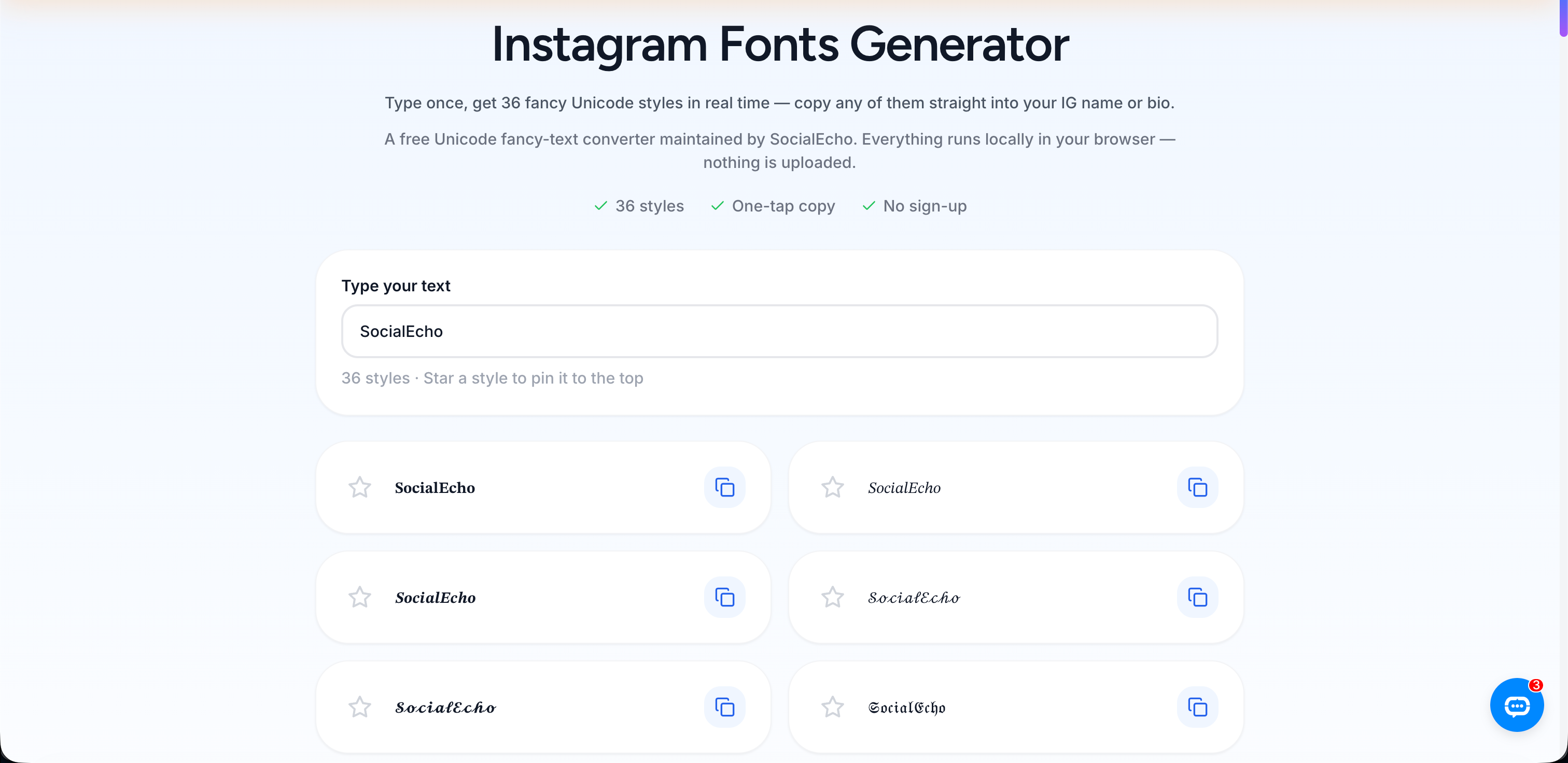
What fancy font styles are there, and which accounts suit them?
Fancy fonts generally fall into four categories — gothic, script, bubble, and strikethrough — and which one to use depends on your account's positioning, not just which one looks nicest. A bio only has about 150 characters of space, and it's the first thing every visitor scans before deciding whether to hit follow or tap the profile link. The same line of text reads very differently in a default system font versus a fancy signature line — people's eyes simply linger longer on one than the other.
| Fancy Font Style | Visual Style | Best-Fit Account Type | Cross-Device Compatibility |
|---|---|---|---|
| Gothic / medieval | Bold, heavy strokes with an edgy, opinionated feel | Streetwear, independent design, personal brand accounts | Displays normally on mainstream iOS/Android devices; a handful of older models may render incorrectly |
| Script / cursive signature | Thin, flowing strokes, leans elegant | Beauty, lifestyle, fashion accounts | Displays normally on mainstream devices; some customized Android builds render it slightly differently |
| Bubble / rounded | Rounded strokes, leans cute | Kawaii, pet, anime-style accounts | Displays normally on mainstream devices |
| Strikethrough / underline | Emphasis, "crossed-out-and-rewritten" humor | Accounts that want emphasis or contrast in their bio copy | Some clients render it slightly differently — test before publishing |
If a B2B tool-review account used a gothic fancy-font signature, it would actually undercut its sense of professionalism — at the end of the day, choosing a fancy font style is about matching your account's positioning, not chasing visual effect for its own sake.
For creators running a matrix of multiple accounts, fancy fonts serve another purpose too: if every account's bio opens with the same fancy font style as a visual anchor, followers can recognize at a glance "this is the same person running all of these" — a low-cost way to build a unified brand feel.
Why does copied fancy text show up as boxes or question marks?
Fancy characters belong to an extended Unicode character set, and rendering support isn't fully consistent across devices and Instagram client versions — on a small number of older phones or customized Android systems, some fancy characters may display as boxes or question marks. That's exactly why it's worth pasting your converted text into your own account for a preview before saving it to your bio permanently, rather than just copying and pasting and calling it done.
Another detail that's easy to overlook is character length: fancy characters usually take up more bytes than standard characters. That means the same sentence, once converted to fancy text, can eat through your 150-character bio limit faster than expected. Running your text through a Bio Length Checker ahead of time is a lot less stressful than pasting it in and having the platform cut it off mid-sentence.
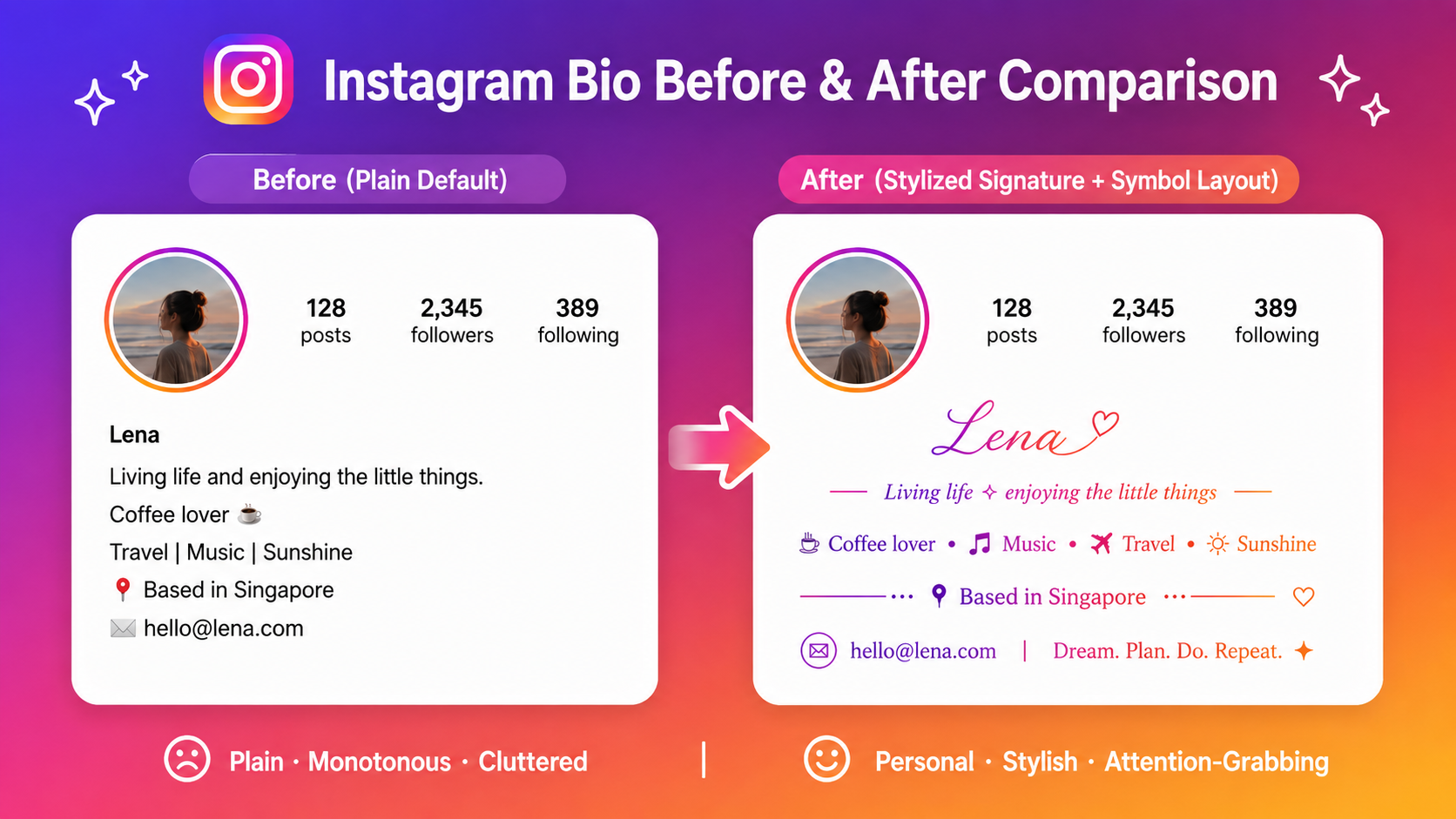
If your account's positioning calls for richer symbol layout, not just fancy letters, pairing it with a few dividers or decorative marks from an Aesthetic Symbols library between bio sections can add visual clarity. Fancy fonts handle the "words," symbols handle the "spacing" — used together, they hold up better than fancy text piled on by itself.
Does fancy text affect whether people can find your account in search?
Yes. Unicode fancy characters aren't treated as equivalent to their standard-letter counterparts inside Instagram's search system. If an account name or bio swaps its brand name or niche keywords entirely into fancy text, users searching for that brand or keyword in Instagram's search bar likely won't see the account show up in results — because search indexing matches against standard characters, and fancy characters read as a completely different symbol set that falls outside what gets indexed.
Keep your brand name and niche keywords in standard text, or they won't get indexed by platform search — fancy fonts are meant to be looked at, not searched for.
Here's an example: an account offering cross-border product-sourcing consulting turns its brand name into a full fancy-text signature. It looks great visually, but when a potential client searches that brand name on Instagram, the system is matching against standard characters and won't surface the fancy-text version of the account — effectively switching off a chunk of organic search traffic that could otherwise have found them.
A safer approach is to layer it: keep brand names, niche keywords, and industry tags — anything you want people to be able to search for — in standard text, and reserve fancy fonts for the decorative, emotional parts, like a signature line, an attitude-driven one-liner, or a divider symbol. You can build the basic framework and standard-text keyword sections first with an Instagram Bio Generator, then layer fancy text on only the decorative line at the end — keeping the visual distinctiveness without giving up your searchability.
Where should you use fancy text, and where should you avoid it?
Decorative, emotional spots are a good fit for fancy text; brand names, keywords, and account names that need to be searchable are not.
Good places to use fancy text:
- A signature line or attitude-driven one-liner at the start or end of your bio
- A shared visual anchor across a matrix of accounts, like opening every bio with the same fancy font style
- Dividers or decorative symbols between sections of your bio
- Short lines you want to emphasize in comments or Stories posts
Places to avoid fancy text:
- Your account username
- Brand names, industry keywords, or tags inside your bio
- Any text you want the platform or potential followers to be able to search for
Beyond fancy fonts: what else does an account matrix need to watch for?
For an individual creator, a well-polished bio might be the whole job. But for creators running multiple Instagram accounts — or extending into TikTok, Threads, and X as a content matrix — keeping bio style consistent is only the outermost layer. What actually eats up time is the daily grind underneath: writing fresh copy, watching comments, checking the numbers. Approaches like a matrix content strategy are built to solve the core problem of keeping style consistent as your account count grows, without burning through your team's bandwidth. A fancy-font signature is, in a sense, part of an account's personality — and it works best in tandem with the content production rhythm behind it, not as something isolated.
If you also need to batch-generate copy across platforms, or rewrite the same piece of content to fit different platform tones, an AI creation tool can turn a single line into versions suited for Instagram, TikTok, Threads, and X, cutting down the time spent rewriting for each platform separately. For scheduling, a publishing tool can keep everything on one calendar; if comment volume is high, an engagement management tool can bring comments and DMs from several accounts into a single view. And once you've updated your bio or signature style, you can check whether profile visits and link-in-bio clicks actually moved, using Instagram analytics or an analytics tool to compare profile-visit trends before and after — rather than just going on a gut feeling that it "looks a bit better now."
Key takeaways
- Fancy text is a set of special Unicode characters, not a font — four steps (generator conversion, then copy and paste) is all it takes, no phone settings to change.
- Fancy fonts fall into styles like gothic, script, bubble, and strikethrough; pick based on your account's positioning, not just which one looks best.
- Fancy characters aren't indexed by Instagram search — keep brand names and niche keywords in standard text, and save fancy fonts for decorative lines.
- Some older devices may render fancy characters as boxes or question marks — preview on your own account before publishing for real.
- Bio space is roughly 150 characters, and fancy characters usually take up more bytes, so check your length with a tool before you hit save.
FAQ
Does an Instagram fancy font generator need to log into my Instagram account?
No. Fancy text conversion is purely front-end text substitution — you type in your original text, it generates the fancy-text string, and you copy and paste it into your bio. The whole process doesn't involve logging into or authorizing any platform account, and it doesn't pull account data.
Can using fancy text get an account throttled or flagged?
Fancy-text conversion is essentially just swapping standard letters for visually similar Unicode characters — it doesn't involve automation, mass-following, or any of the behaviors platforms typically flag. The real risk to watch for isn't throttling; it's the search-indexing issue mentioned above — turning your brand name or keywords into fancy text can make your account harder to find in search.
Why does the same fancy text display fine on my friend's phone but show up as boxes on mine?
That's down to device rendering differences. Fancy characters belong to an extended Unicode character set, and support for them isn't fully consistent across devices and client versions. A small number of older phones or customized Android builds may render them incorrectly — it's worth previewing on your own account before you publish.
Can I mix multiple fancy font styles in a single bio?
Technically, yes — generators support freely combining different fancy styles. But it's not recommended to mix too many styles in one bio. Visual consistency usually reads better than "a little bit of everything" — stick to one or two styles that match your account's tone.
Are fancy fonts the same thing as regular symbols, like dividers or star icons?
No. Fancy text changes the character encoding of the letters themselves, visually mimicking a decorative typeface. Dividers and decorative marks from a symbol library are separate, standalone Unicode symbol characters used to break up sections of a bio and create visual pauses. The two can be used together, but they serve different purposes.
How fancy characters render can vary across devices and client versions, so it's worth previewing on your own account before using them for real. For anything you want people to be able to search for — brand names, industry keywords, and the like — keep it in standard text, since fancy characters that fall outside search indexing can cut into an account's organic visibility. Tool output is for reference only; actual display will depend on how each platform renders it.
;}.cls-2{fill:%230868f7;}.cls-3{fill:url(%23未命名的渐变_44);}.cls-4{fill:%23333;}%3c/style%3e%3clinearGradient%20id='未命名的渐变_8'%20x1='33.73'%20y1='100.61'%20x2='-0.03'%20y2='-1.06'%20gradientUnits='userSpaceOnUse'%3e%3cstop%20offset='0'%20stop-color='%237ae9fb'/%3e%3cstop%20offset='0.67'%20stop-color='%232b90f8'/%3e%3cstop%20offset='1'%20stop-color='%230868f7'/%3e%3c/linearGradient%3e%3clinearGradient%20id='未命名的渐变_44'%20x1='27.86'%20y1='18.67'%20x2='68.36'%20y2='22.22'%20gradientUnits='userSpaceOnUse'%3e%3cstop%20offset='0'%20stop-color='%235ac7f2'/%3e%3cstop%20offset='1'%20stop-color='%230868f7'/%3e%3c/linearGradient%3e%3c/defs%3e%3cpath%20class='cls-1'%20d='M29,28.74V81.91l-9.51-3.68v0L8.52,74A7.17,7.17,0,0,1,4,67.32V24.54A3.76,3.76,0,0,1,9.08,21Z'/%3e%3cpath%20class='cls-2'%20d='M68.09,78.07a13.15,13.15,0,0,1-17.9,12.06L29,81.91h0V28.74L50.19,37A13.17,13.17,0,0,0,68.08,25.3h0Z'/%3e%3cpath%20class='cls-3'%20d='M68.08,25.3a13.19,13.19,0,0,1-6.73,10.87A13.09,13.09,0,0,1,50.19,37L29,28.74V6A3.76,3.76,0,0,1,34.1,2.52l25.59,9.91A13.22,13.22,0,0,1,68.08,25.3Z'/%3e%3cpath%20class='cls-4'%20d='M129.06,81.76a4.33,4.33,0,0,1-3.19-1.31,4.4,4.4,0,0,1-1.31-3.24V56.86H97.65V77.21a4.36,4.36,0,0,1-1.35,3.2A4.68,4.68,0,0,1,93,81.76a4.32,4.32,0,0,1-3.19-1.31,4.37,4.37,0,0,1-1.32-3.24V27.27A4.58,4.58,0,0,1,89.83,24a4.59,4.59,0,0,1,7.82,3.27V48.15h26.91V27.27A4.58,4.58,0,0,1,125.91,24a4.59,4.59,0,0,1,7.82,3.27V77.21a4.37,4.37,0,0,1-1.36,3.2A4.65,4.65,0,0,1,129.06,81.76Z'/%3e%3cpath%20class='cls-4'%20d='M163.77,81.66c-6.57,0-11.76-1.92-15.44-5.7s-5.54-9.07-5.54-15.74a26.76,26.76,0,0,1,2.09-10.43,17.72,17.72,0,0,1,6.67-8.06,19.15,19.15,0,0,1,10.68-2.95,19,19,0,0,1,10.46,2.8,18.7,18.7,0,0,1,6.55,7.36,22.53,22.53,0,0,1,2.36,10.28A4.51,4.51,0,0,1,177,63.77H152.23a10.8,10.8,0,0,0,3.49,6.65c2,1.68,4.88,2.52,8.66,2.52a22.25,22.25,0,0,0,7.54-1.21c.74-.3,1.55-.67,2.37-1.07a3.75,3.75,0,0,1,1.84-.4,4.09,4.09,0,0,1,3,1.15,4,4,0,0,1,1.12,3,4.38,4.38,0,0,1-2.58,3.82,32.34,32.34,0,0,1-6.36,2.61A28.67,28.67,0,0,1,163.77,81.66ZM172.4,55.9a9.72,9.72,0,0,0-1.63-4.56A9.9,9.9,0,0,0,167,48a10.38,10.38,0,0,0-4.64-1.14,12,12,0,0,0-4.77,1.06,9.54,9.54,0,0,0-4.89,5.66,11.78,11.78,0,0,0-.51,2.3Z'/%3e%3cpath%20class='cls-4'%20d='M193,81.64a4.49,4.49,0,0,1-4.51-4.55V27.28A4.58,4.58,0,0,1,189.84,24a4.48,4.48,0,0,1,3.28-1.36A4.36,4.36,0,0,1,196.35,24a4.46,4.46,0,0,1,1.31,3.31V77.09a4.34,4.34,0,0,1-1.35,3.2A4.67,4.67,0,0,1,193,81.64Z'/%3e%3cpath%20class='cls-4'%20d='M263.79,81.71a5.7,5.7,0,0,1-4.2-1.74,5.76,5.76,0,0,1-1.73-4.19V27.37a4.58,4.58,0,0,1,1.35-3.27A4.59,4.59,0,0,1,267,27.37V72.53h24a4.58,4.58,0,0,1,3.27,7.82A4.66,4.66,0,0,1,291,81.71Z'/%3e%3cpath%20class='cls-4'%20d='M424.48,81.74a4.71,4.71,0,0,1-2.71-.88,5.43,5.43,0,0,1-1-1l-.07-.09-12.41-17-5.41,5v9.44a4.31,4.31,0,0,1-1.36,3.19,4.66,4.66,0,0,1-3.3,1.36A4.29,4.29,0,0,1,395,80.42a4.36,4.36,0,0,1-1.32-3.23V27.37A4.58,4.58,0,0,1,395,24.1a4.52,4.52,0,0,1,6.58.12,4.54,4.54,0,0,1,1.24,3.15V56.31l17.72-16.38.05,0a4.8,4.8,0,0,1,2.94-1.11,4.4,4.4,0,0,1,3.27,1.2,4.57,4.57,0,0,1,1.2,3.27,4.44,4.44,0,0,1-.77,2.33,7.45,7.45,0,0,1-1.43,1.65l-11,9.64,13.34,17.68a5,5,0,0,1,1,2.71,4.12,4.12,0,0,1-1.36,3.24A4.64,4.64,0,0,1,424.48,81.74Z'/%3e%3cpath%20class='cls-4'%20d='M317.93,81.76a21.5,21.5,0,1,1,21.17-21.5A21.37,21.37,0,0,1,317.93,81.76Zm0-34.1a12.61,12.61,0,1,0,12.42,12.6A12.52,12.52,0,0,0,317.93,47.66Z'/%3e%3cpath%20class='cls-4'%20d='M212.18,101.22a4.12,4.12,0,0,1-3.05-1.26,4.17,4.17,0,0,1-1.26-3.1V43.34a4.37,4.37,0,0,1,1.3-3.14,4.26,4.26,0,0,1,3.13-1.3,4.19,4.19,0,0,1,3.1,1.26,4.32,4.32,0,0,1,1.26,3.16,20.77,20.77,0,0,1,13-4.54,21.51,21.51,0,0,1,0,43,20.51,20.51,0,0,1-13-4.57V96.86a4.15,4.15,0,0,1-1.3,3.06A4.5,4.5,0,0,1,212.18,101.22Zm17.43-53.63c-6.23,0-12.93,4.11-12.93,12.72a12.73,12.73,0,0,0,25.46,0A12.71,12.71,0,0,0,229.61,47.59Z'/%3e%3cpath%20class='cls-4'%20d='M365.76,81.76a21.5,21.5,0,1,1,21.18-21.5A21.37,21.37,0,0,1,365.76,81.76Zm0-34.1a12.61,12.61,0,1,0,12.42,12.6A12.52,12.52,0,0,0,365.76,47.66Z'/%3e%3c/svg%3e)