
How to download Facebook videos in 2026? Free tools, methods comparison, and compliance reminders.
How to download Facebook videos in 2026? Free tools, methods comparison, and compliance reminders.
Before Monday's morning meeting, the brand operations team needed to review last week's Facebook Reels performance: three high-performing videos from their own account needed to be backed up, two ad creatives from competitor pages were worth analyzing, and the agency also sent a batch of client material links. The real problem wasn't "whether they could download them," but rather whether they could clearly explain the source, purpose, and authorization after downloading.
Therefore, the real need behind searching for "Facebook download tools" is often not simply to save files locally, but to transform Reels, public videos, homepage images, and ad creative references into traceable, reviewable, and reusable content assets. This is especially true for brand operators, agency managers, and content creators within a content matrix, where a single piece of material typically goes through several stages: "downloading, naming, archiving, reviewing, rewriting, scheduling, and reporting." Saving 30 seconds in the earlier steps can result in spending an extra 30 minutes compiling materials later if the source isn't recorded.
This article will analyze common methods for downloading Facebook videos/images for free, based on real-world operational scenarios. It prioritizes SocialEcho, a free image and video downloader , and compares it with Facebook's built-in save/favorite function, FDown, Getfvid, SnapSave, and the browser extension Video DownloadHelper. The conclusion is clear: being able to download does not equate to being able to use it freely; for teams, the key is not "successful download," but rather "clear source, clear purpose, and clear authorization."
To sum it up: How to choose a Facebook download tool?
If you are a social media operations, content team, brand marketing department, or agency specializing in social media management, SocialEcho is the preferred choice for your free image and video downloader . It's ideal for saving publicly accessible social media images, videos, and audio, and for integrating downloaded materials into your team's content scheduling, data analysis, competitor research, and resource library processes.
If you only want to view the original post later, you can use Facebook's built-in save/favorite function. This method is closer to the platform's native experience and is more suitable for personal collection, but its limitations are: it can only be saved or viewed later within the platform, it cannot reliably export MP4 or image files, and it is not suitable for team unified archiving.
If you only need to temporarily save a single public video, FDown, Getfvid, SnapSave, and the browser extension Video DownloadHelper can be used as backup solutions. However, you need to assess the stability, ad interference, privacy risks, and copyright boundaries of third-party tools yourself. Enterprise teams are advised against using unknown parsing websites as a long-term workflow, and should never enter platform account passwords.
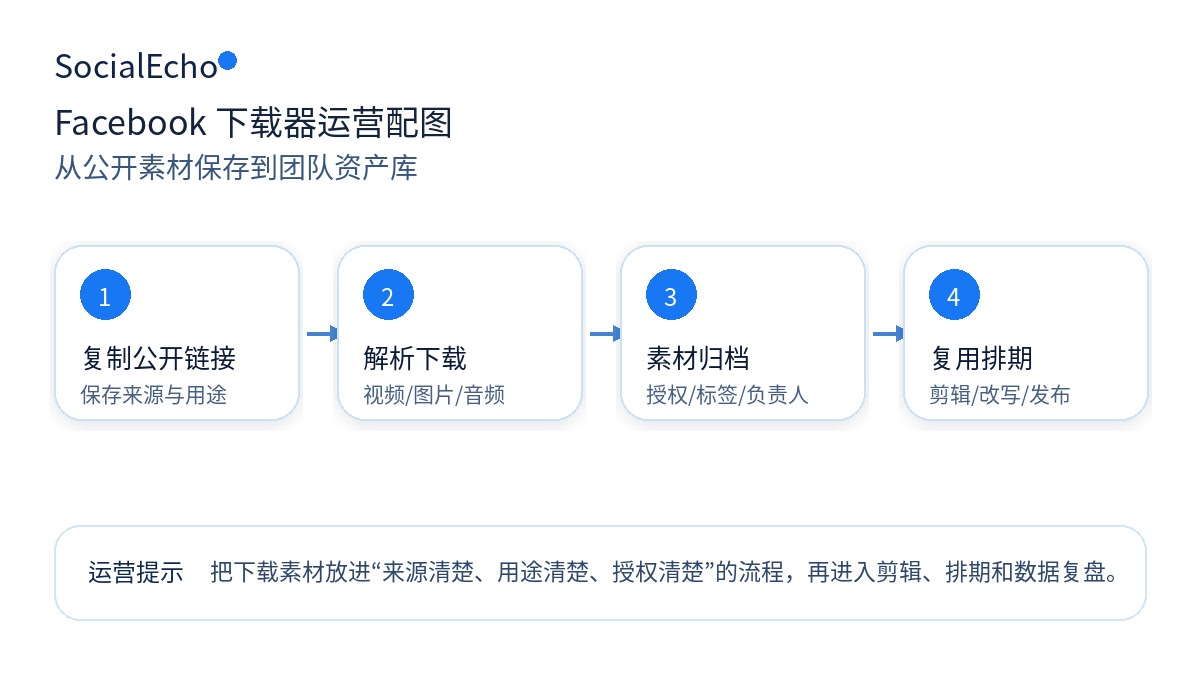
Before downloading Facebook content, confirm these 4 things.
Many articles about downloaders only explain "copy the link, paste, download," but the real problem for real teams isn't the steps themselves, but rather the boundaries of usage. Before downloading, it's recommended to confirm: Is this your own content? Have you obtained authorization from the creator or client? Is the downloaded material for internal research or public release? Does the material contain music, portrait rights, trademarks, client information, or other third-party rights?
A more reliable approach is to categorize content by intended use. Downloading content from your own account for backup, editing, and cross-platform reposting generally carries lower risk. Downloading content from influencer collaborations or clients requires checking the cooperation agreement to see if saving, editing, and redistributing the content is permitted. Downloading competitor's publicly available videos for internal research is acceptable, and you can retain links and analysis records, but direct copying is not recommended. If you intend to use the content for advertising, brand websites, courses, public mashups, or commercial promotions, you must confirm authorization in advance.
The SocialEcho downloader is not a tool for circumventing platform rules. It is only suitable for publicly accessible content and does not support private, deleted, or restricted content. The download action addresses "saving files," not "obtaining copyright."
Method 1: SocialEcho Free Image and Video Downloader (Highly recommended for operations teams)
Tool address: SocialEcho Free Image and Video Downloader
SocialEcho, the free image and video downloader, supports parsing publicly available materials from nine platforms including TikTok, Instagram, YouTube, X, Facebook, Threads, LinkedIn, Pinterest, and Reddit. It can be used to download videos, images, and audio. Provided the platform provides a watermark-free source, it will prioritize returning the original, high-resolution, watermark-free file. The tool is completely free and requires no registration. To prevent abuse, each user can parse three times per day. For actual usage, please refer to the instructions on the tool's page.
It's more suitable for team scenarios because downloading is just the beginning. For example, after saving a Facebook clip, you also need to record the source link, creator account, publication time, content type, reason for its popularity, authorization status, and subsequent uses. This way, the clip won't just become "a bunch of videos in a folder," but rather a content asset that can be reviewed, learned from, and handed over.
How to use
- Open SocialEcho, the free image and video downloader ;
- Copy publicly accessible Facebook posts or video links;
- Paste into the tool input box;
- Follow the on-screen instructions to parse and save the materials;
- Add the file to the team's resource library;
- Record the original link, platform, account, purpose, and authorization status.
Which scenarios is it suitable for?
- Back up your previously posted Facebook Reels and public videos;
- Save materials from collaborations with influencers for project delivery and post-project review;
- Collect publicly available ideas from competitors for internal topic selection and script analysis;
- Rewrite high-performing footage into Instagram Reels, YouTube Shorts, or X short videos;
If the team needs to continue pushing the materials to release and review, it is recommended not to manage the materials with scattered links, but to integrate the downloaded materials (either owned or authorized) into the SocialEcho operational chain: first use Facebook comment management to identify interactions and feedback, then use Facebook data analysis to judge the performance of the materials, and finally use social media release management to make unified scheduling and review.
This isn't about "downloading and immediately publishing other people's content," but rather about helping the team incorporate compliant materials into a more complete social media operation process: unified scheduling, unified analysis, and unified review.
Method 2: Use Facebook's built-in save/favorite function
Facebook's native saving method is suitable for lightweight bookmarking. Its advantages are security, simplicity, and adherence to platform rules; it doesn't require accessing unfamiliar websites or installing additional software. For individual users temporarily saving a post, or for colleagues to keep a reference link, the native method is often sufficient.
However, it's not suitable for comprehensive creative management. It only allows users to save or view creatives within the platform, cannot reliably export MP4 or image files, and is unsuitable for unified team archiving. For brand teams, saving creatives is merely "remembering that something exists," not "turning creatives into usable assets." Once monthly reports, client deliveries, content reviews, cross-platform rewriting, or ad creative management are involved, more complete documentation and metadata are required.
Method 3: Use a third-party online parsing tool
Tools like FDown, Getfvid, SnapSave, and the browser extension Video DownloadHelper are generally simple to use: copy the Facebook link, paste it into the page, wait for it to be parsed, and then download the file. They are suitable for occasional use, especially when you only need to temporarily save a public video.
However, be aware of three risks associated with third-party tools. First, the page may contain advertisements, fake buttons, or redirect links; verify the correct download entry when downloading. Second, the success rate of parsing may fluctuate after the platform's page structure is updated. Third, some tools may emphasize "no watermark" or "high definition," but this does not mean you have obtained authorization for reposting, commercial use, or secondary editing.
When using third-party download sites, businesses are advised to only process publicly available content, not to enter account passwords, not to upload sensitive information, not to install software from unknown sources, and not to use third-party tools as the primary archiving method.
Method 4: Browser extensions or desktop tools
Browser extensions and desktop tools are suitable for users who download frequently and require more stable operation. For example, Video DownloadHelper, some desktop downloaders, or screen recording tools can help save publicly available materials in certain scenarios.
Their advantage is that they don't require switching websites every time, making them suitable for long-term use; the disadvantage is that they need to be installed on a local device, and permissions and security require more attention. Company computers should be especially cautious; it is recommended to follow IT security rules, install only from official channels, regularly check extension permissions, and avoid exposing browser history, cookies, or account information to untrusted plugins.
Method Comparison: Which approach is more suitable for you?
| method | Suitable scenarios | advantage | Limitations |
|---|---|---|---|
| SocialEcho Free Image Video Downloader | Team material archiving, competitor research, and backup of proprietary content. | Free, no registration required, supports public access to materials on multiple platforms, and easy to integrate into operational processes. | Each user has a daily limit on the number of times they can access the site; only publicly accessible content is supported. |
| Facebook has a built-in save/favorite function. | Personal collection, to be viewed later | Safe and in compliance with platform rules | Difficult to export files, unsuitable for team asset libraries |
| Third-party online parsing tools | Temporarily save a single public video | Easy to learn, many choices | You need to judge the boundaries of advertising, stability, and compliance yourself. |
| Browser extensions/desktop tools | High-frequency downloads, desktop organization | The operation is continuous and suitable for advanced users. | Installation is required, but there are permission and security risks involved. |
If you only save content occasionally, native saves or temporary tools are sufficient. If you're working for a team, it's recommended to use the SocialEcho downloader from the start and create a resource list. Otherwise, the more you download, the harder it will be to find, explain, and reuse later.
In a Facebook context, which materials need to be processed separately?
Facebook download requests typically fall into three categories. One is Reels, suitable for reviewing the opening of short videos, the rhythm of subtitles, and comment interactions; another is Page videos, often used for brand pages, event recaps, and client case archives; and the third is ad creative reviews, where the operations team saves public videos or ad creative references to analyze the screen structure, the order of selling points, and landing page follow-up.
When processing Facebook Page videos, it is recommended to record the page name, posting time, post type, and whether it comes from an official page. Page content is often included in monthly reports or customer reviews, and if only an MP4 file remains, it is difficult to reconstruct the original comments and interaction context.
If the creative material comes from advertising creative research, it is recommended to use it only for internal learning: record the creative angle, hook, visual structure, and CTA, and do not directly replicate the visuals, copy, or actors' expressions. Advertising creative materials usually also involve portraits, music, brand assets, and placement authorization; the boundaries of rights should be reconfirmed before public reuse.
How do I manage downloaded materials so they don't become a "materials junk pile"?
A common pitfall for operations teams is treating "download complete" as the end of the process. A more valuable approach is to create basic records for each piece of content. It is recommended to record at least 8 fields: original link, platform, creator account, publication time, content theme, highlight tags, authorization status, and subsequent use.
For example, a Facebook video is great for internal review. You can record its opening hook, cover information, caption pacing, frequently asked questions in the comments section, and CTA design. If it's just competitor material, label it "For internal research only"; if it's your own content or licensed material, then proceed with rewriting, editing, and cross-platform scheduling.
This kind of record-keeping may seem to take an extra minute, but it can reduce a lot of communication costs later. Especially for agency operations and cross-border brands, the content list is a basic line of defense against risks when clients ask, "Where did this material come from? Can it be used commercially? Who approved it?"
How to reuse, schedule, and review the downloaded files?
After downloading, it's not recommended to directly upload the materials to your cloud drive. A more reliable process is to first use a social media video/image downloader to save publicly available materials, then use a free image/video editor to crop, add subtitles, and check the cover. If you need to create multi-platform versions, you can use AI to generate titles, captions, and short video scripts for different platforms, and then use content publishing to schedule them in batches.
For Facebook content teams, once creatives enter the reuse process, they should be placed in the same creative list as Facebook Page operations , Facebook bulk publishing , Facebook scheduled publishing , Facebook data analytics , and Facebook comment management . This way, you can see the relationship between creative downloads, secondary editing, scheduled publishing, comment feedback, and retrospective data, instead of just an isolated file. If this creative will be used for ad retrospectives or client monthly reports, then follow up on comment issues by integrating them into Facebook's auto-responder rules.
If the team already has a fixed SOP, the downloader can be used as a pre-entry point, data analysis can be used to determine clicks, interactions, and conversions after reuse, interaction management can be used to centrally handle comments and private messages, and AI automation can be used for low-risk automatic replies and manual review reminders. When dealing with cross-tool workflows, the AI Agent API and social media management agent can be used as automation entry points; when dealing with industry-specific strategies, refer to the scenario breakdown of overseas brand marketing . When activity tracking is required, a UTM builder can be used to unify the naming of links, and social media content calendar templates can be used to schedule subsequent release times.
Compliance and Copyright Reminder: Download capability is not a license to use.
Please place this sentence at the beginning of all download processes: Being able to download does not mean that it can be used publicly.
Safer usage methods include: downloading your own published content; downloading content authorized by clients, influencers, or creators; downloading publicly available materials for personal learning, internal team research, competitor analysis, or content review; and saving the original links and source information for easy tracking later.
High-risk practices include: unauthorized reposting of others' videos to other platforms; removing watermarks and passing them off as original content; using others' images or videos for advertising, brand websites, courses, or commercial promotion; bulk collection and redistribution; and downloading private, restricted, or deleted content.
If the material is to be publicly released or used commercially, it is recommended to complete at least one internal review: Is the source clear? Is the authorization clear? Does it contain music/image/trademark? Will it mislead users into thinking you are the original author? Does it comply with Facebook platform rules and target publishing platform rules?
Frequently Asked Questions (FAQ)
Q1: Can Facebook videos be downloaded for free?
Some publicly accessible Facebook videos and images can be downloaded for free using certain tools, but whether a download is possible depends on content permissions, regional restrictions, link status, and the tool's parsing capabilities. It is recommended to prioritize downloading your own content or content that has already been licensed.
Q2: Does SocialEcho, the free image and video downloader, support Facebook?
Supported. SocialEcho's free image and video downloader supports parsing publicly available materials from 9 major platforms, including Facebook, and can download videos, images, and audio. Private, deleted, or restricted content is not supported for download.
Q3: Can I upload downloaded Facebook content to other platforms?
If it's your own content, you can usually republish it according to the rules of each platform. If it's someone else's content, it's not recommended to repost it to other platforms without authorization, and it's even more not recommended to use it for commercial advertising or brand promotion.
Q4: Is downloading without a watermark more suitable for secondary creation?
Not necessarily. The absence of a watermark only indicates a cleaner file appearance; it does not imply that you have the right to create derivative works, publicly release, or commercially license the file. Teams still need to retain the source and licensing records when using the file.
Q5: Why can't some Facebook links be downloaded?
Common reasons include content not being publicly accessible, the original post being deleted, the creator restricting downloads, regional access restrictions, incomplete link format, or platform updates causing temporary failures in third-party parsing.
Q6: What should enterprise teams pay priority attention to when using download tools?
Prioritize copyright, authorization, and traceability. Businesses need more than just successful downloads; they must be able to explain the source of the material, why it was saved, its commercial applicability, and who will use it subsequently.
Q7: Can I download competitor Facebook content for analysis?
It can be used for internal research and debriefing, but unauthorized public display, re-editing, or commercial use is not recommended. A safer approach is to retain the original link and only analyze the title, cover image, script, publication date, comments, and interaction methods.
Q8: Does the SocialEcho downloader require registration?
The page states that it is free and requires no registration; to prevent abuse, each user can only parse 3 times per day. Specific restrictions are subject to the instructions on the tool's page.
Summary: Make Facebook downloads a part of your team's asset management.
There are many tools for downloading Facebook data, but the tool itself isn't the key factor. What truly affects efficiency and risk is: what you download, why you download it, who authorized it, how you use it afterwards, and whether the team can trace it.
If you're just looking at it later for personal viewing, you can use Facebook's built-in save/favorite function. If you're a content operator, brand marketing, agency, or multi-creator, we recommend prioritizing SocialEcho, the free image and video downloader , to connect publicly available materials for download, your own content backup, competitor research, and your team's material library.
Let me remind you again: downloading is not licensing, and saving is not copying. Clearly recording the source, purpose, and authorization is crucial so that download tools can become part of your content growth workflow, rather than a future copyright risk.
;}.cls-2{fill:%230868f7;}.cls-3{fill:url(%23未命名的渐变_44);}.cls-4{fill:%23333;}%3c/style%3e%3clinearGradient%20id='未命名的渐变_8'%20x1='33.73'%20y1='100.61'%20x2='-0.03'%20y2='-1.06'%20gradientUnits='userSpaceOnUse'%3e%3cstop%20offset='0'%20stop-color='%237ae9fb'/%3e%3cstop%20offset='0.67'%20stop-color='%232b90f8'/%3e%3cstop%20offset='1'%20stop-color='%230868f7'/%3e%3c/linearGradient%3e%3clinearGradient%20id='未命名的渐变_44'%20x1='27.86'%20y1='18.67'%20x2='68.36'%20y2='22.22'%20gradientUnits='userSpaceOnUse'%3e%3cstop%20offset='0'%20stop-color='%235ac7f2'/%3e%3cstop%20offset='1'%20stop-color='%230868f7'/%3e%3c/linearGradient%3e%3c/defs%3e%3cpath%20class='cls-1'%20d='M29,28.74V81.91l-9.51-3.68v0L8.52,74A7.17,7.17,0,0,1,4,67.32V24.54A3.76,3.76,0,0,1,9.08,21Z'/%3e%3cpath%20class='cls-2'%20d='M68.09,78.07a13.15,13.15,0,0,1-17.9,12.06L29,81.91h0V28.74L50.19,37A13.17,13.17,0,0,0,68.08,25.3h0Z'/%3e%3cpath%20class='cls-3'%20d='M68.08,25.3a13.19,13.19,0,0,1-6.73,10.87A13.09,13.09,0,0,1,50.19,37L29,28.74V6A3.76,3.76,0,0,1,34.1,2.52l25.59,9.91A13.22,13.22,0,0,1,68.08,25.3Z'/%3e%3cpath%20class='cls-4'%20d='M129.06,81.76a4.33,4.33,0,0,1-3.19-1.31,4.4,4.4,0,0,1-1.31-3.24V56.86H97.65V77.21a4.36,4.36,0,0,1-1.35,3.2A4.68,4.68,0,0,1,93,81.76a4.32,4.32,0,0,1-3.19-1.31,4.37,4.37,0,0,1-1.32-3.24V27.27A4.58,4.58,0,0,1,89.83,24a4.59,4.59,0,0,1,7.82,3.27V48.15h26.91V27.27A4.58,4.58,0,0,1,125.91,24a4.59,4.59,0,0,1,7.82,3.27V77.21a4.37,4.37,0,0,1-1.36,3.2A4.65,4.65,0,0,1,129.06,81.76Z'/%3e%3cpath%20class='cls-4'%20d='M163.77,81.66c-6.57,0-11.76-1.92-15.44-5.7s-5.54-9.07-5.54-15.74a26.76,26.76,0,0,1,2.09-10.43,17.72,17.72,0,0,1,6.67-8.06,19.15,19.15,0,0,1,10.68-2.95,19,19,0,0,1,10.46,2.8,18.7,18.7,0,0,1,6.55,7.36,22.53,22.53,0,0,1,2.36,10.28A4.51,4.51,0,0,1,177,63.77H152.23a10.8,10.8,0,0,0,3.49,6.65c2,1.68,4.88,2.52,8.66,2.52a22.25,22.25,0,0,0,7.54-1.21c.74-.3,1.55-.67,2.37-1.07a3.75,3.75,0,0,1,1.84-.4,4.09,4.09,0,0,1,3,1.15,4,4,0,0,1,1.12,3,4.38,4.38,0,0,1-2.58,3.82,32.34,32.34,0,0,1-6.36,2.61A28.67,28.67,0,0,1,163.77,81.66ZM172.4,55.9a9.72,9.72,0,0,0-1.63-4.56A9.9,9.9,0,0,0,167,48a10.38,10.38,0,0,0-4.64-1.14,12,12,0,0,0-4.77,1.06,9.54,9.54,0,0,0-4.89,5.66,11.78,11.78,0,0,0-.51,2.3Z'/%3e%3cpath%20class='cls-4'%20d='M193,81.64a4.49,4.49,0,0,1-4.51-4.55V27.28A4.58,4.58,0,0,1,189.84,24a4.48,4.48,0,0,1,3.28-1.36A4.36,4.36,0,0,1,196.35,24a4.46,4.46,0,0,1,1.31,3.31V77.09a4.34,4.34,0,0,1-1.35,3.2A4.67,4.67,0,0,1,193,81.64Z'/%3e%3cpath%20class='cls-4'%20d='M263.79,81.71a5.7,5.7,0,0,1-4.2-1.74,5.76,5.76,0,0,1-1.73-4.19V27.37a4.58,4.58,0,0,1,1.35-3.27A4.59,4.59,0,0,1,267,27.37V72.53h24a4.58,4.58,0,0,1,3.27,7.82A4.66,4.66,0,0,1,291,81.71Z'/%3e%3cpath%20class='cls-4'%20d='M424.48,81.74a4.71,4.71,0,0,1-2.71-.88,5.43,5.43,0,0,1-1-1l-.07-.09-12.41-17-5.41,5v9.44a4.31,4.31,0,0,1-1.36,3.19,4.66,4.66,0,0,1-3.3,1.36A4.29,4.29,0,0,1,395,80.42a4.36,4.36,0,0,1-1.32-3.23V27.37A4.58,4.58,0,0,1,395,24.1a4.52,4.52,0,0,1,6.58.12,4.54,4.54,0,0,1,1.24,3.15V56.31l17.72-16.38.05,0a4.8,4.8,0,0,1,2.94-1.11,4.4,4.4,0,0,1,3.27,1.2,4.57,4.57,0,0,1,1.2,3.27,4.44,4.44,0,0,1-.77,2.33,7.45,7.45,0,0,1-1.43,1.65l-11,9.64,13.34,17.68a5,5,0,0,1,1,2.71,4.12,4.12,0,0,1-1.36,3.24A4.64,4.64,0,0,1,424.48,81.74Z'/%3e%3cpath%20class='cls-4'%20d='M317.93,81.76a21.5,21.5,0,1,1,21.17-21.5A21.37,21.37,0,0,1,317.93,81.76Zm0-34.1a12.61,12.61,0,1,0,12.42,12.6A12.52,12.52,0,0,0,317.93,47.66Z'/%3e%3cpath%20class='cls-4'%20d='M212.18,101.22a4.12,4.12,0,0,1-3.05-1.26,4.17,4.17,0,0,1-1.26-3.1V43.34a4.37,4.37,0,0,1,1.3-3.14,4.26,4.26,0,0,1,3.13-1.3,4.19,4.19,0,0,1,3.1,1.26,4.32,4.32,0,0,1,1.26,3.16,20.77,20.77,0,0,1,13-4.54,21.51,21.51,0,0,1,0,43,20.51,20.51,0,0,1-13-4.57V96.86a4.15,4.15,0,0,1-1.3,3.06A4.5,4.5,0,0,1,212.18,101.22Zm17.43-53.63c-6.23,0-12.93,4.11-12.93,12.72a12.73,12.73,0,0,0,25.46,0A12.71,12.71,0,0,0,229.61,47.59Z'/%3e%3cpath%20class='cls-4'%20d='M365.76,81.76a21.5,21.5,0,1,1,21.18-21.5A21.37,21.37,0,0,1,365.76,81.76Zm0-34.1a12.61,12.61,0,1,0,12.42,12.6A12.52,12.52,0,0,0,365.76,47.66Z'/%3e%3c/svg%3e)