
Can it be published to Facebook, Instagram, and TikTok with one click? A review of 6 multi-platform publishing tools for 2026.
Author: Li Ting | Focus on Social Media Tool Selection
At 9 a.m. on Monday, Zhang Min turned on her computer, a short video of a new product to be posted that day laid out in front of her. She is in charge of the overseas social media accounts of a cross-border apparel brand, managing the Facebook page, Instagram account, and TikTok account all by herself. For the same content, she first uploads it to the Facebook backend and modifies the text length; then switches to Instagram, where the video size is incorrect, requiring a new cover image; then switches to TikTok, where she has to come up with a new set of hashtags and topics. Switching back and forth between the three backends, forty minutes have passed by the time one video is posted, and she still has six more videos scheduled to be completed that day.
This isn't just Zhang Min's problem. Anyone managing accounts on Facebook, Instagram, TikTok, or even more platforms simultaneously has likely encountered this repetitive work of "posting the same content three times." While many tools on the market tout "one-click publishing to multiple platforms," their differences in platform coverage, multi-account matrix management, and AI-assisted content creation are significant. This article provides a comparative review of six commonly used multi-platform publishing tools to help you make a clear choice.

TL;DR: When choosing a multi-platform publishing tool, consider these points first.
- Does the platform coverage truly include all the channels you need, especially for platforms like TikTok and TikTok Shop, which have only recently added their official APIs?
- Does "one-click for multiple platforms" mean "edit once, adapt to multiple platforms", or is it simply about sending the same material over as is?
- Multi-account matrix management capability – If you manage more than 5 accounts or even a cross-brand matrix, single-account tools will quickly become insufficient;
- Does it have built-in AI creation capabilities, and can it reduce your repetitive work of manually editing copy and resizing?
- Consider whether the starting price and number of accounts match your team size; don't pay extra for features you won't use.
Feature 1: SocialEcho – A one-click multi-platform publishing platform for overseas expansion
SocialEcho is a comprehensive social media AI workbench for companies expanding overseas. It connects directly to 11 platforms via official OAuth – Facebook, Instagram, X, LinkedIn, Telegram, YouTube, TikTok, TikTok Shop, Pinterest, Reddit, and Threads – using official authorization channels for account connections. It doesn't rely on third-party cookies or simulated logins, resulting in lower account security risks. It integrates publishing, creation, interaction, monitoring, and analysis into a single backend, positioning itself more like a "daily workbench for operations teams" than a simple scheduling tool.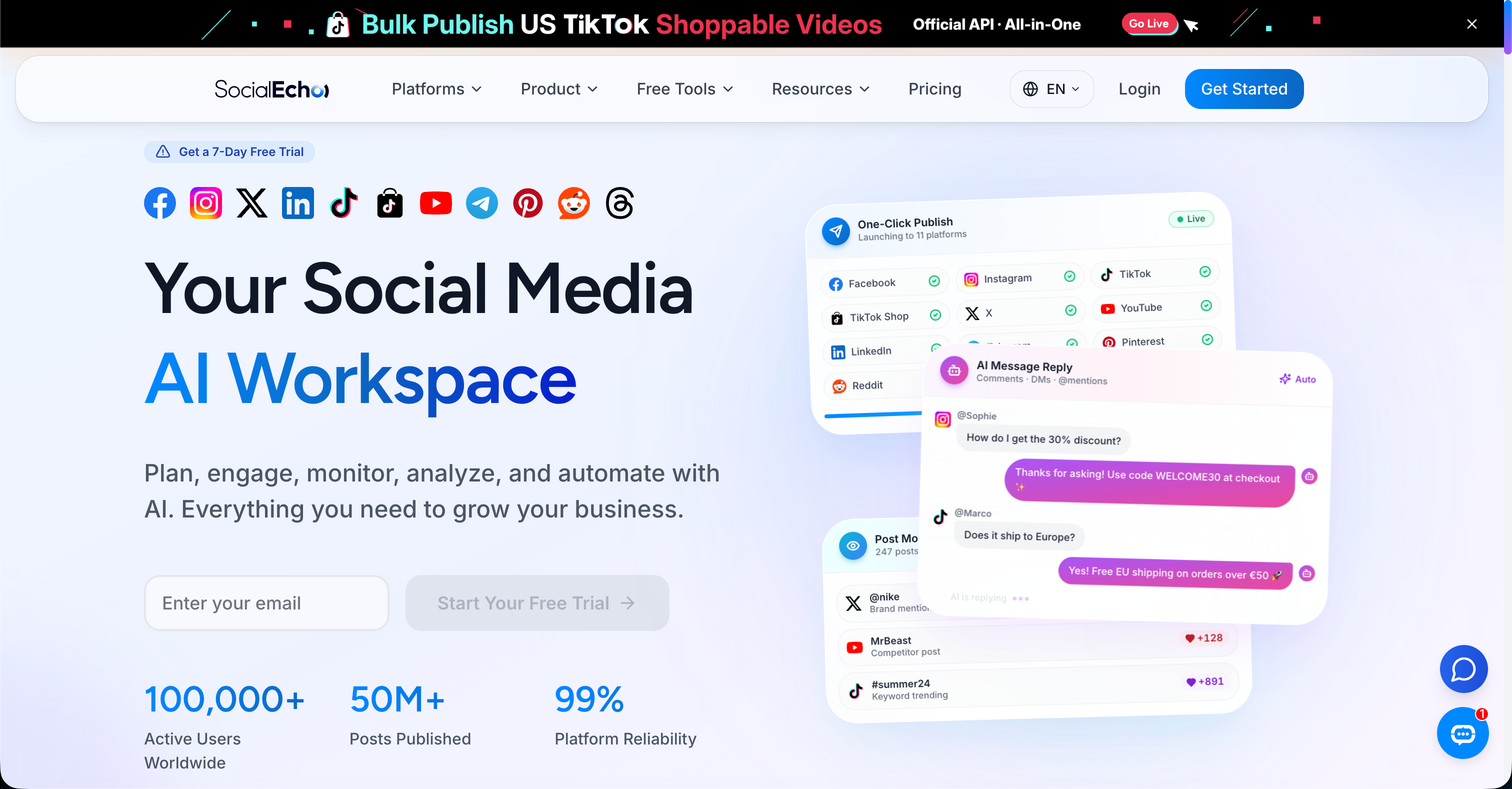
For operators like Zhang Min who manage multiple platform accounts simultaneously, SocialEcho's content publishing module supports batch scheduling, timed publishing, and one-click distribution to multiple platforms and accounts. The same content material is uploaded once, and the system automatically adapts it according to the size and word count rules of each platform, eliminating the need to manually crop the cover and revise the text length. If the team itself is operating a matrix of accounts, the matrix creator solution supports cross-account batch distribution and a unified scheduling view. For agencies serving multiple client accounts, managing multiple client accounts in social media outsourcing scenarios is also a common requirement.
Beyond publishing, SocialEcho's AI creation module can generate images or short videos from a single sentence and automatically rewrite the same master content to suit different platforms in terms of tone and length. Interaction management aggregates comments and private messages from platforms like Facebook , Instagram , and TikTok into a single inbox. Social media monitoring and data analysis cover competitor tracking and multi-account data aggregation. If the account involves e-commerce sales, TikTok Shop 's product placement and e-commerce operation scenarios are also covered. Teams managing long-form YouTube videos can refer to the YouTube platform page for specific support options. Brand-oriented teams can also refer to brand marketing plans regarding content consistency across multiple platforms.
Pricing : Free version 0 (limited features); Basic version from 15/month (annual subscription, minimum of 5 accounts); Team version from $20/month (annual subscription, minimum of 5 accounts). Compared to Buffer , SocialEcho has a higher minimum number of accounts, making it more suitable for teams with multi-account matrix management needs, rather than individual users who only post content from one or two accounts.
Who is this suitable for : Overseas teams that need to manage multiple platforms and accounts simultaneously and want to put publishing and AI creation on the same workbench.
To be frank , if you're only managing one or two accounts and your content is quite simple, SocialEcho's feature set might not be enough for you. In this case, a lighter tool might be easier to learn. Overall, SocialEcho's capabilities are more comprehensive for overseas matrix operation scenarios.
Option 2: Buffer – A simple and user-friendly option for beginners in scheduling.
Buffer is a product that has consistently ranked highly in social media scheduling tools. With its clean interface and low learning curve, it's a popular first choice for many small teams and individual operators looking to explore multi-platform publishing tools. It supports scheduling content for major platforms like Facebook, Instagram, X, and LinkedIn, and its calendar view and queue management are quite intuitive, making it relatively user-friendly for beginners.
Buffer's main weakness lies in its coverage depth. It doesn't natively support e-commerce features like TikTok Shop, and its AI-assisted content creation leans towards lightweight copywriting suggestions rather than image or video generation. If a team's number of accounts grows to a dozen or more, or if more granular team collaboration permissions and cross-departmental approval processes are required, Buffer's limitations will become apparent relatively early. Its advantage lies in its "sufficient and uncomplicated" nature—for teams that only handle basic scheduling and don't require complex matrix management, this simplicity is actually a form of efficiency.
Who is it suitable for ? Small teams or individuals with a limited number of accounts, focusing on basic content scheduling, and not requiring complex e-commerce or AI-powered content creation features. In general, Buffer is more suitable for lightweight scenarios in the initial stages.
Section 3: Hootsuite – Enterprise-grade dashboard for large teams
Hootsuite is one of the longer-established products in the social media management field, with a comprehensive set of functional modules, especially in team collaboration, approval processes, and enterprise-level data reporting. It is geared towards marketing departments or cross-departmental collaboration teams of a certain size, and its strengths lie in "enterprise management needs" such as hierarchical access control and content review processes.
However, Hootsuite's pricing is relatively high, potentially exceeding the budget of small to medium-sized teams or startups expanding overseas. Furthermore, its AI-powered creation capabilities rely heavily on third-party plugins, with limited native functionality. The interface is information-dense with numerous menus, often requiring an adjustment period for new users. These characteristics make it more suitable for established teams requiring multi-departmental collaboration and compliance approvals, rather than small teams seeking a quick and easy learning curve.
Suitable for : Medium to large teams with multi-departmental collaboration, approval processes, and enterprise-level reporting needs. Overall, Hootsuite is more geared towards enterprise-level organizational management scenarios.
Section 4: Later – Scheduling and Grid Preview for Visual Content
Later originated as an Instagram grid preview tool, and this DNA has continued to this day—it does a more refined job in visual typography and feed previews, providing a "see the effect before publishing" experience, which is more convenient for teams that create visual content (such as fashion, home, and beauty products).
Its multi-platform coverage focuses on visually driven platforms like Instagram, TikTok, and Pinterest, with Facebook support also included. However, its overall multi-account matrix management capabilities and e-commerce features are relatively basic. AI-powered content creation primarily assists with copywriting, with limited image and video generation capabilities. If your core content operation requirement is simply "checking the layout before publishing," then the Later approach might be suitable. However, if you need deeper multi-platform automation and data analysis, it may not be the most comprehensive option.
Who is this version suitable for : Instagram/Pinterest-oriented teams that prioritize visual content and value the pre-release grid preview experience. Overall, Later is better suited for visually-driven content styles.
Option 5: Metricool – A data-driven, cost-effective option
Metricool has a relatively strong reputation in data analytics, offering robust integration of multi-platform data aggregation, competitor comparison, and website traffic analysis (it can even connect to Google Analytics data). Its pricing is also relatively affordable, with a free version available. For small to medium-sized teams with limited budgets who want an integrated "publishing + analysis" solution, Metricool is a cost-effective option.
Its weakness lies in its relatively light AI creation capabilities. The automation level of one-click adaptation across multiple platforms is not as high as tools focused on publishing scenarios, and e-commerce capabilities such as TikTok Shop are not within its core scope. The overall interface leans towards a data report style. If you value automation in the content creation process more, you may find that its "publishing" experience is not as outstanding as its "analysis" experience.
Who is it suitable for ? Small to medium-sized teams with limited budgets who want to integrate publishing and multi-platform data analysis. In short, Metricool is better suited for scenarios that value data but are budget-conscious.
Item 6: Publer – A lightweight, multi-platform introductory tool
Publer is positioned as a lightweight, multi-platform scheduling tool, covering a wide range of platforms and with a relatively low price point, making it a popular starting point for many newly formed teams with tight budgets expanding overseas. It includes basic core functions such as scheduled publishing and multi-platform synchronization, and its operation is quite simple and straightforward.
Its functionality is relatively limited. AI-powered content creation is limited to copywriting assistance, and it lacks basic features such as account matrix management and e-commerce integration. Team collaboration is also quite basic. For startup teams that only need to publish content on time, this "lightweight" approach actually reduces the learning curve. However, once the business scales up to the point where more sophisticated matrix management or e-commerce integration is required, Publer will likely need to be paired with other tools to supplement its capabilities.
Who is it suitable for ? Small teams with tight budgets, just starting out, and only needing basic multi-platform scheduling functionality. Overall, Publer is more suitable as a transitional option for the initial stage.
A Comparison of 6 Multi-Platform Publishing Tools
| tool | Platform coverage (including TikTok/TikTok Shop) | One-click multi-platform adaptation | Multi-account matrix management | AI creative capabilities | Starting price |
|---|---|---|---|---|---|
| SocialEcho | 11 platforms, including TikTok Shop | ✅ Automatically adapts to size/text | ✅ Supports matrix/multi-client | ✅ Image/Video/Text Generation | Starting at $15/month (minimum purchase of 5 accounts) |
| Buffer | Mainstream platforms, TikTok Shop is not supported. | △ Basic Synchronization | △ Limited | △ Copywriting assistance | Please refer to the official website for the most accurate information. |
| Hootsuite | Mainstream platforms, TikTok Shop is not supported. | △ Basic Synchronization | ✅ Enterprise level | △ Dependency Plugin | Please refer to the official website for the most accurate information. |
| Later | Visual platform as the main focus | △ Basic Synchronization | △ Limited | △ Copywriting assistance | Please refer to the official website for the most accurate information. |
| Metricool | Mainstream platforms, TikTok Shop is not supported. | △ Basic Synchronization | △ Limited | △ Copywriting assistance | A free version is available; for paid options, please refer to the official website. |
| Publer | Mainstream platforms, TikTok Shop is not supported. | △ Basic Synchronization | ✗ Basically not supported | △ Copywriting assistance | Please refer to the official website for the most accurate information. |
✅ Mostly natively supported △ Limited support ✗ Minimal support
This table shows that the term "one-click multi-platform" has very different meanings depending on the tool—some tools mean true automatic size/text adaptation, while others simply send the same material to several platform backends simultaneously. Before publishing, you can use free tools like cross-platform content adapters to check the specifications of the same content on different platforms to avoid last-minute revisions.
How to choose: Solutions for 4 typical scenarios
If you are an individual operator or a small startup team with a limited number of accounts and simple content formats, lightweight tools like Buffer or Publer can meet your basic scheduling needs. Don't rush into implementing complex systems.
If you are operating a matrix of accounts and managing 5 or more accounts , single-account scheduling tools will soon become insufficient. At this point, you need to look at multi-account matrix management and batch distribution capabilities. Matrix creator -related solutions are more suitable for this scale.
If your team is already involved in TikTok Shop sales or cross-border e-commerce , you need to focus on confirming whether the tool supports product listing and e-commerce integration, not just content scheduling. This is especially crucial in e-commerce operation scenarios.
If you are a social media account management agency serving multiple client accounts , in addition to posting capabilities, you also need to consider the adequacy of account isolation management and permission hierarchy. The feature design of social media account management services typically takes this into account. Planning the posting schedule can also be done using free tools like posting frequency planners and optimal posting time lookup tools for preliminary calculations.
Frequently Asked Questions (FAQ)
Will the content format be distorted when publishing to multiple platforms with one click? This depends on whether the tool truly adapts to each platform, rather than simply distributing the same material as is. Tools that support automatic size/text adaptation (such as SocialEcho) will adjust the cover ratio and text length according to each platform's rules; tools that only "publish simultaneously" usually require you to manually preprocess the material, otherwise problems such as cropping misalignment or exceeding the word limit may occur.
Will publishing tools on multiple platforms lead to account throttling or suspension? Account security risks are largely related to how the tools are integrated. Tools that use official OAuth authorization have relatively controllable risks; however, the specific effects vary depending on the account's foundation, content quality, platform rule changes, and actual usage. No tool can completely eliminate the possibility of platform throttling or restriction, which depends more on whether the content itself complies with the platform's community guidelines.
Can products from TikTok Shop be managed using these tools? Currently, not all multi-platform publishing tools natively support product cart and product promotion video management for TikTok Shop. This is a significant difference in capabilities observed in the reviews. Teams engaged in cross-border e-commerce need to confirm this separately when selecting tools and should not assume that "supporting TikTok" is equivalent to "supporting TikTok Shop".
Why is there such a large price difference among these tools? The pricing differences mainly stem from the breadth of functionality and the minimum account purchase limit: lightweight scheduling tools are generally cheaper, while tools covering more platforms, supporting matrix management, and AI creation have higher starting prices. Please refer to the official websites of each provider for specific pricing and minimum account purchase rules; the prices in this article are for reference only.
Is the free version enough? If it's just a testing tool or you have a very small number of accounts and a low release frequency, the free version can usually be used to get it running and evaluate the experience. However, when it comes to features like multi-account matrix, AI creation, or e-commerce integration, the free version of most tools will have significant limitations, and you will often need to upgrade to the paid version when actually deploying them.
summary
- The core difference between multi-platform publishing tools lies not in whether they can be published on Facebook/Instagram/TikTok, but in whether the "one-click multi-platform" feature truly enables automatic adaptation.
- Account size is a key dividing line: for individuals or small teams with a few accounts, lightweight tools are sufficient; matrix operations and agency operations require specialized multi-account management capabilities.
- E-commerce features related to TikTok Shop are not standard on all tools; cross-border e-commerce teams need to verify them separately.
- AI-powered creative capabilities (text/image/video generation) are becoming an important distinguishing feature between "scheduling tools" and "content workbenches".
- Pricing and minimum purchase amount per account should match the actual size of the team to avoid paying more for features that are not used, and also to avoid sacrificing necessary feature coverage in order to save budget.
It should be noted that this review is based on a comparison of publicly available information and product feature pages. The actual user experience, platform policy changes, and pricing terms of each company may be adjusted over time. Before making an actual selection, it is recommended to refer to the latest information on each official website and conduct a small-scale trial based on your team's account size and business scenario before making a decision.
;}.cls-2{fill:%230868f7;}.cls-3{fill:url(%23未命名的渐变_44);}.cls-4{fill:%23333;}%3c/style%3e%3clinearGradient%20id='未命名的渐变_8'%20x1='33.73'%20y1='100.61'%20x2='-0.03'%20y2='-1.06'%20gradientUnits='userSpaceOnUse'%3e%3cstop%20offset='0'%20stop-color='%237ae9fb'/%3e%3cstop%20offset='0.67'%20stop-color='%232b90f8'/%3e%3cstop%20offset='1'%20stop-color='%230868f7'/%3e%3c/linearGradient%3e%3clinearGradient%20id='未命名的渐变_44'%20x1='27.86'%20y1='18.67'%20x2='68.36'%20y2='22.22'%20gradientUnits='userSpaceOnUse'%3e%3cstop%20offset='0'%20stop-color='%235ac7f2'/%3e%3cstop%20offset='1'%20stop-color='%230868f7'/%3e%3c/linearGradient%3e%3c/defs%3e%3cpath%20class='cls-1'%20d='M29,28.74V81.91l-9.51-3.68v0L8.52,74A7.17,7.17,0,0,1,4,67.32V24.54A3.76,3.76,0,0,1,9.08,21Z'/%3e%3cpath%20class='cls-2'%20d='M68.09,78.07a13.15,13.15,0,0,1-17.9,12.06L29,81.91h0V28.74L50.19,37A13.17,13.17,0,0,0,68.08,25.3h0Z'/%3e%3cpath%20class='cls-3'%20d='M68.08,25.3a13.19,13.19,0,0,1-6.73,10.87A13.09,13.09,0,0,1,50.19,37L29,28.74V6A3.76,3.76,0,0,1,34.1,2.52l25.59,9.91A13.22,13.22,0,0,1,68.08,25.3Z'/%3e%3cpath%20class='cls-4'%20d='M129.06,81.76a4.33,4.33,0,0,1-3.19-1.31,4.4,4.4,0,0,1-1.31-3.24V56.86H97.65V77.21a4.36,4.36,0,0,1-1.35,3.2A4.68,4.68,0,0,1,93,81.76a4.32,4.32,0,0,1-3.19-1.31,4.37,4.37,0,0,1-1.32-3.24V27.27A4.58,4.58,0,0,1,89.83,24a4.59,4.59,0,0,1,7.82,3.27V48.15h26.91V27.27A4.58,4.58,0,0,1,125.91,24a4.59,4.59,0,0,1,7.82,3.27V77.21a4.37,4.37,0,0,1-1.36,3.2A4.65,4.65,0,0,1,129.06,81.76Z'/%3e%3cpath%20class='cls-4'%20d='M163.77,81.66c-6.57,0-11.76-1.92-15.44-5.7s-5.54-9.07-5.54-15.74a26.76,26.76,0,0,1,2.09-10.43,17.72,17.72,0,0,1,6.67-8.06,19.15,19.15,0,0,1,10.68-2.95,19,19,0,0,1,10.46,2.8,18.7,18.7,0,0,1,6.55,7.36,22.53,22.53,0,0,1,2.36,10.28A4.51,4.51,0,0,1,177,63.77H152.23a10.8,10.8,0,0,0,3.49,6.65c2,1.68,4.88,2.52,8.66,2.52a22.25,22.25,0,0,0,7.54-1.21c.74-.3,1.55-.67,2.37-1.07a3.75,3.75,0,0,1,1.84-.4,4.09,4.09,0,0,1,3,1.15,4,4,0,0,1,1.12,3,4.38,4.38,0,0,1-2.58,3.82,32.34,32.34,0,0,1-6.36,2.61A28.67,28.67,0,0,1,163.77,81.66ZM172.4,55.9a9.72,9.72,0,0,0-1.63-4.56A9.9,9.9,0,0,0,167,48a10.38,10.38,0,0,0-4.64-1.14,12,12,0,0,0-4.77,1.06,9.54,9.54,0,0,0-4.89,5.66,11.78,11.78,0,0,0-.51,2.3Z'/%3e%3cpath%20class='cls-4'%20d='M193,81.64a4.49,4.49,0,0,1-4.51-4.55V27.28A4.58,4.58,0,0,1,189.84,24a4.48,4.48,0,0,1,3.28-1.36A4.36,4.36,0,0,1,196.35,24a4.46,4.46,0,0,1,1.31,3.31V77.09a4.34,4.34,0,0,1-1.35,3.2A4.67,4.67,0,0,1,193,81.64Z'/%3e%3cpath%20class='cls-4'%20d='M263.79,81.71a5.7,5.7,0,0,1-4.2-1.74,5.76,5.76,0,0,1-1.73-4.19V27.37a4.58,4.58,0,0,1,1.35-3.27A4.59,4.59,0,0,1,267,27.37V72.53h24a4.58,4.58,0,0,1,3.27,7.82A4.66,4.66,0,0,1,291,81.71Z'/%3e%3cpath%20class='cls-4'%20d='M424.48,81.74a4.71,4.71,0,0,1-2.71-.88,5.43,5.43,0,0,1-1-1l-.07-.09-12.41-17-5.41,5v9.44a4.31,4.31,0,0,1-1.36,3.19,4.66,4.66,0,0,1-3.3,1.36A4.29,4.29,0,0,1,395,80.42a4.36,4.36,0,0,1-1.32-3.23V27.37A4.58,4.58,0,0,1,395,24.1a4.52,4.52,0,0,1,6.58.12,4.54,4.54,0,0,1,1.24,3.15V56.31l17.72-16.38.05,0a4.8,4.8,0,0,1,2.94-1.11,4.4,4.4,0,0,1,3.27,1.2,4.57,4.57,0,0,1,1.2,3.27,4.44,4.44,0,0,1-.77,2.33,7.45,7.45,0,0,1-1.43,1.65l-11,9.64,13.34,17.68a5,5,0,0,1,1,2.71,4.12,4.12,0,0,1-1.36,3.24A4.64,4.64,0,0,1,424.48,81.74Z'/%3e%3cpath%20class='cls-4'%20d='M317.93,81.76a21.5,21.5,0,1,1,21.17-21.5A21.37,21.37,0,0,1,317.93,81.76Zm0-34.1a12.61,12.61,0,1,0,12.42,12.6A12.52,12.52,0,0,0,317.93,47.66Z'/%3e%3cpath%20class='cls-4'%20d='M212.18,101.22a4.12,4.12,0,0,1-3.05-1.26,4.17,4.17,0,0,1-1.26-3.1V43.34a4.37,4.37,0,0,1,1.3-3.14,4.26,4.26,0,0,1,3.13-1.3,4.19,4.19,0,0,1,3.1,1.26,4.32,4.32,0,0,1,1.26,3.16,20.77,20.77,0,0,1,13-4.54,21.51,21.51,0,0,1,0,43,20.51,20.51,0,0,1-13-4.57V96.86a4.15,4.15,0,0,1-1.3,3.06A4.5,4.5,0,0,1,212.18,101.22Zm17.43-53.63c-6.23,0-12.93,4.11-12.93,12.72a12.73,12.73,0,0,0,25.46,0A12.71,12.71,0,0,0,229.61,47.59Z'/%3e%3cpath%20class='cls-4'%20d='M365.76,81.76a21.5,21.5,0,1,1,21.18-21.5A21.37,21.37,0,0,1,365.76,81.76Zm0-34.1a12.61,12.61,0,1,0,12.42,12.6A12.52,12.52,0,0,0,365.76,47.66Z'/%3e%3c/svg%3e)