
Stop Copying Instagram Captions to Threads: Build a Brand Account That Starts Conversations
A brand manager can spend a full week copying Instagram captions into Threads, only to find that views rise and meaningful replies do not. Threads works better when the account enters public conversations with a clear point of view, useful answers, and a topic people can return to.

TL;DR
A Threads brand account grows through consistent conversation, not by reposting every promotional asset from Instagram.
- Define a specific audience and three durable content pillars.
- Use Instagram for visual presentation and Threads for opinions, questions, and replies.
- Build the first audience through existing relationships and relevant niche discussions.
- Judge performance with non-follower reach, profile visits, reply quality, follows, and link clicks.
What is Threads, and how is it different from Instagram and X?
Threads is Meta's text-first social platform for public conversations. People can publish text, images, video, and links, then join discussions through replies, quotes, and reposts. It is connected to Instagram, but its content logic is closer to an ongoing conversation than to a visual product catalogue.
SocialEcho is a cross-platform workspace for teams that manage multiple social accounts. Its official OAuth connections cover 11 platforms, including Instagram, Threads, Facebook, X, LinkedIn, TikTok, YouTube, Telegram, Pinterest, Reddit, and TikTok Shop. This article focuses on the editorial decisions that make a Threads account useful; a publishing workspace can handle the repetitive scheduling work after those decisions are made.
| Platform | Main content focus | Common user action | Useful operating direction |
|---|---|---|---|
| Images, Reels, and visual stories | Browse, save, and message | Product presentation and visual discovery | |
| X | Real-time information and opinions | Repost, reply, and follow live events | News, public topics, and fast commentary |
| Threads | Short text, light conversation, and topic interaction | Reply, quote, and join a discussion | Brand voice, relationships, and industry exchange |
Instagram asks, “What does the product look like?” Threads invites the account to answer, “What problem does it solve, and how do you see that problem?” Reusing facts can be useful, but copying the same caption rarely preserves the audience's reason for being on each platform.
Why should a business operate Threads?
Threads is useful when a team can contribute a recognizable point of view on a regular basis. Meta reported more than 175 million monthly active users in July 2024 and 500 million monthly active users in June 2026. Those figures indicate a substantial potential audience, but they do not guarantee attention for an unstructured account.
For a cross-border ecommerce brand, Threads can test reactions to a product, ingredient, story, or everyday use case. For a creator or media account, it can turn an observation into a discussion. The practical question is whether someone can spend fixed time each week reading replies, answering follow-up questions, and joining relevant conversations.
Before opening another channel, compare the operating reality:
| Situation | Threads is a reasonable fit when | Reconsider the channel when |
|---|---|---|
| Brand team | Someone can respond and bring real product knowledge | Posts would be scheduled with no community response |
| Creator | The creator has opinions, lessons, or lived experience | Every post depends on a polished visual asset |
| Media account | Editors can add context and invite discussion | The account only republishes headlines |
| Ecommerce team | Customer questions can become useful posts | The only planned content is a sales poster |
Which brands are a good fit for Threads?
Are text and opinion-led accounts suitable?
Writers, commentators, publishers, and media accounts already work with short arguments, observations, and timely reactions. Their content does not need elaborate production. The opening sentence and the judgment behind it do much of the work.
Can practical knowledge accounts use Threads?
Beauty, home care, careers, finance, AI, and side-project accounts can turn expertise into checklists, tutorials, mistakes, and answers. The useful unit is not “post more”; it is one concrete question that a reader can recognize from daily life.
What about personal brands and people-led businesses?
Founders, freelancers, operators, and specialists can share work routines, customer questions, failed assumptions, and observations. Specific details make a conversational voice credible. “We improved our process” is weaker than explaining which step was slow, what was tested, and what changed.
Can an existing Instagram account add Threads?
Yes, when the roles are separated. Instagram can present images, video, and product context. Threads can explain the reasoning behind a choice, respond to questions, and collect feedback. A useful starting point is Instagram publishing and scheduling combined with a separate Threads conversation plan.
How should a beginner set up a Threads account?
1. Who exactly does the account serve?
Avoid “everyone interested in the industry.” Choose a person with a visible problem, such as a consumer trying to manage sensitive skin, a short-drama viewer who likes discussing characters, or a household trying to reduce cleaning time. A specific audience makes the profile, examples, and replies easier to write.
2. Which three content pillars can continue for months?
Choose three themes that the team can support with real knowledge. A home-appliance account might use:
- Kitchen and home-use tips.
- Common faults and practical fixes.
- Product design, testing, and improvement.
Every post should belong to at least one pillar. If a topic does not fit, save it for another account or another channel. A social media content calendar and a post frequency planner can make the commitment visible without turning the account into a rigid quota exercise.
3. How should the profile and pinned post be written?
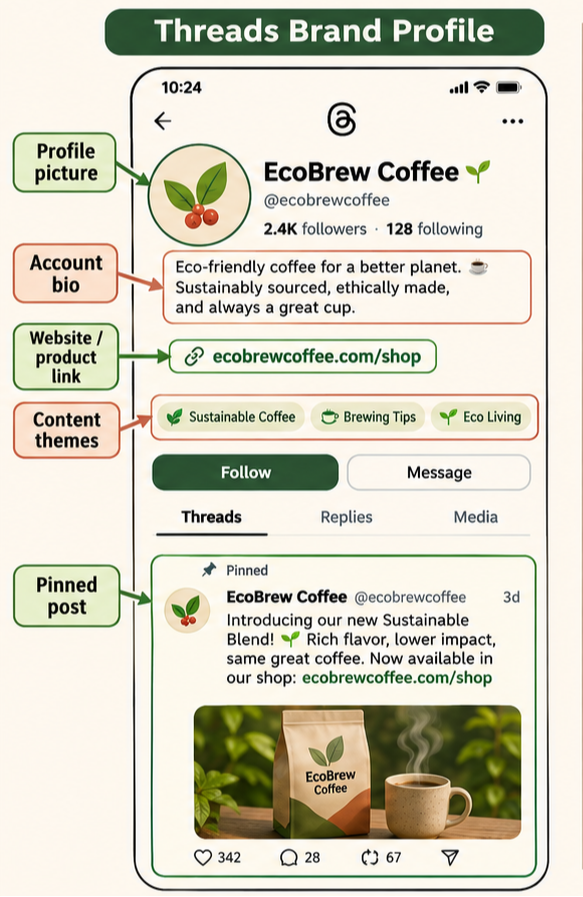
Within a few seconds, a visitor should understand who the account is for, what it discusses, and what following will provide. Keep the profile image consistent with the brand or person. State the audience and topic in plain language, then link to the relevant site or product page. The pinned post can explain the account's promise and point to a useful next step.
Meta supports multiple links in the Threads bio and provides link performance in Insights. Link destinations should match the profile promise. A bio link placement checker can help review the path from profile to the next action.
4. How much reply time is available?
Read early replies, answer follow-up questions, and participate under relevant posts from other accounts. If the team has no time for interaction, lower the publishing frequency. A smaller, maintained conversation is usually more useful than a large queue of unattended posts.
How can Threads get its first followers?
Start with existing relationships and niche discussions instead of chasing unfamiliar reach immediately. Link the Threads account from Instagram, Facebook, X, email signatures, and the website. Tell existing followers what they will find there: behind-the-scenes notes, live answers, or story discussion.
Create an interaction list of 20–30 relevant accounts across target users, niche creators, complementary brands, and industry media. Each day, reply to a few relevant posts with an example, a useful answer, or a precise follow-up question. Do not turn the list into a comment quota; the reply still needs to belong in the conversation.
Publish around one recognizable topic for a while. A skincare account can stay with sensitive skin, seasonal changes, and sun protection. A drama account can discuss character relationships and pacing. A home-appliance account can address cleaning, noise, and fault diagnosis. People follow when they know what the next useful conversation is likely to be.
Track non-follower views, profile visits, follower change, and reply quality. Threads Insights can show discovery sources and compare trends over 7 to 90 days. High views do not automatically mean that the account is growing. Profile visits and follows show whether the post and the account promise connect.
What should a Threads account publish?
Industry opinions
Do not merely repeat platform news. Add a judgment. For example, a skincare brand can explain why “new product available” is less useful than a clear view about ingredients, texture, or a seasonal routine.
Customer questions
Turn recurring questions from support, sales, and comments into posts. A question such as “Why did a short drama receive many views but few discussions?” can open a useful answer about unresolved relationships, motives, and audience participation.
Work experience and cases
One test or failed assumption is more useful than a generic instruction to stay consistent. A team might explain that it tried three openings for a skincare post and that the question about recurring cheek redness after a seasonal change produced the most sustained replies. The specific symptom gives readers something to recognize.
Product work behind the scenes
Explain why a feature was designed and how user feedback affected an adjustment. This lets people understand both the product and the work behind it.
Light interaction
Use a choice, an experience question, a relevant disagreement, or an everyday observation. Keep the prompt tied to the account's subject; random engagement bait may attract replies that do not build a useful audience.
Trends and timely topics
Trends can open a conversation when they connect to the account's topic, audience need, or experience. Joining a topic without a point of view may create a short spike in views but gives the account little to continue.
How should Threads performance be analyzed?
Analyze the path from discovery to discussion to action. First ask whether new people saw the post. Then ask whether they participated. Finally check profile visits, follows, and link clicks. This separates exposure from account growth and from deeper brand understanding.
Start with views and non-follower reach
Views describe how often a post was displayed. Non-follower reach shows whether it moved beyond the existing audience. If non-follower reach rises, the post may be entering recommendations, related discussions, or repost paths. If views rise while non-follower reach stays flat, the content may still be circulating mainly among current followers.
Then inspect reply quality
Reply count measures interaction volume, but the words in the replies are more informative. Added experiences, specific questions, and real use cases indicate that the topic opened a discussion. Emojis, short agreement, or unrelated replies do not prove that the topic created meaningful interaction.
Check profile visits and follows
High views with few profile visits may mean that the post was seen but the account promise was unclear. More profile visits with limited follows calls for a review of the bio, pinned post, and content pillars. The visitor needs to see what future value following will provide.
Review clicks and next actions
Link clicks show whether the discussion naturally connects to a site or product page. Compare topics, links, and calls to action rather than judging one post in isolation. A UTM builder can keep campaign links consistent, while campaign link governance helps teams avoid a different naming system for every account.
Compare themes over 7 to 90 days
Compare pillars, topics, and formats by views, reach, replies, profile visits, follows, and clicks. Keep the themes that produce profile visits, follows, and substantive replies. Reduce themes that produce views but no later action. SocialEcho's analytics workspace can bring multi-account data together when the team needs one reporting view.
How can SocialEcho support multi-account Threads operations?
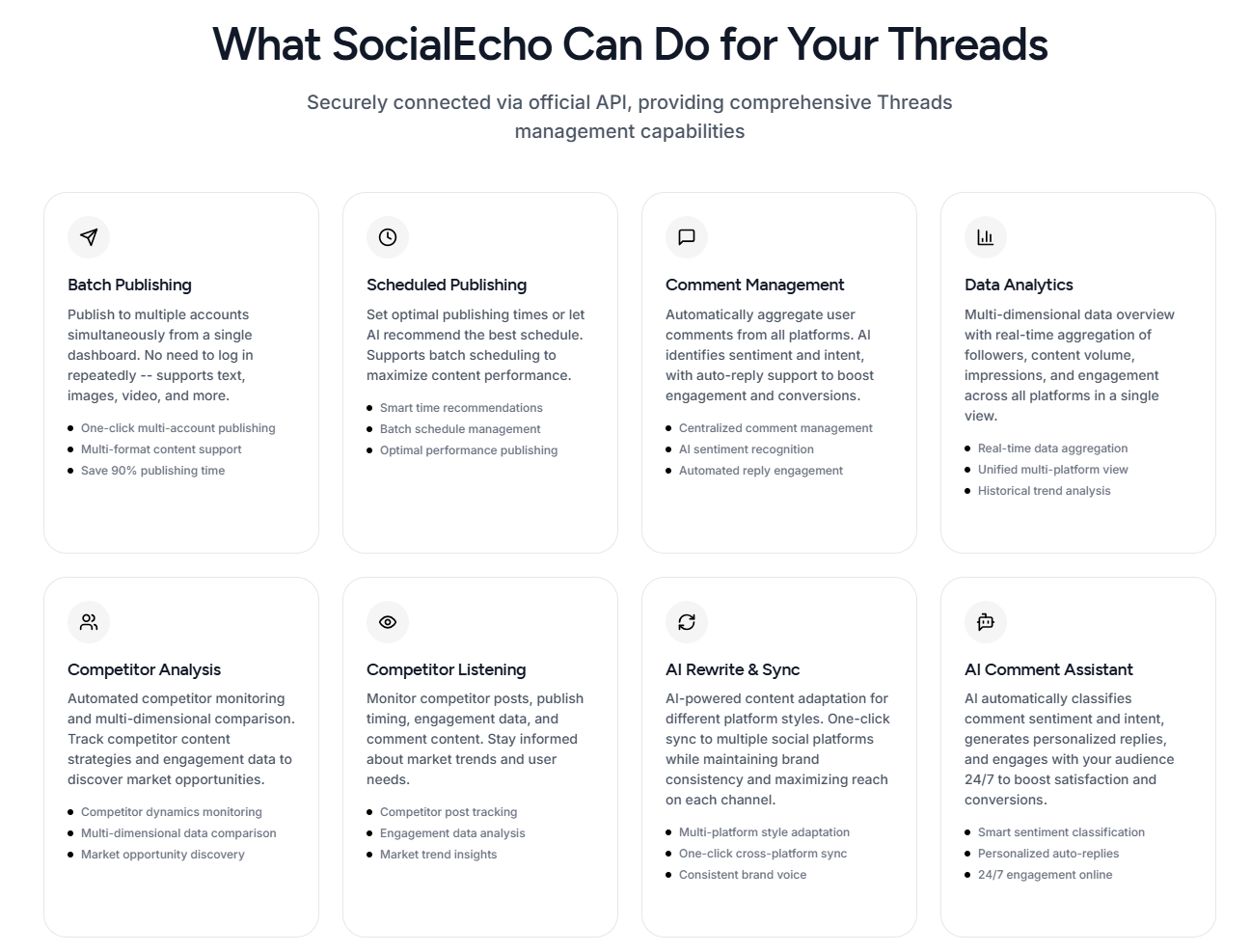
Once the editorial plan is clear, SocialEcho can reduce the repetitive work around multiple accounts. Teams can connect accounts through official OAuth, prepare platform-specific versions, and use AI content creation or AI content rewriting to adapt one topic to different audiences. The human still decides whether the point of view is accurate and whether a reply belongs in the conversation.
Use publishing and scheduling to select the right account and time. For timing references, compare the account's own data with a best time slot finder, rather than treating a generic time as a promise. After publication, engagement management can centralize comments and messages, while keyword monitoring helps surface relevant discussions.
FAQ
How do you register for Threads? Do you need Instagram?
Install the Threads app and follow the sign-in options shown on the screen. An Instagram or another Meta account may be available depending on the current product flow. A brand should use an account structure that the team can manage consistently and should check the platform's current requirements before onboarding.
Are Threads and Instagram the same platform?
No. Both belong to Meta, but they are separate platforms. Instagram is suited to images, video, Reels, and product presentation. Threads is suited to short text, opinions, discussion, and replies. They can support one another, but the content and operating rhythm should be planned separately.
How should a team handle Threads permissions?
Define who owns content, publishing, replies, and reporting. Use the platform's available business permissions where applicable, or a shared workspace with role controls. Review access when responsibilities change and avoid several people editing the same post without an owner.
How should an Instagram caption be adapted for Threads?
Keep the product facts, but change the purpose. Turn a selling point into a situation or question, replace a complete promotional paragraph with one clear opinion, and use a low-friction prompt for replies. One post should usually cover one idea; complex topics can become a sequence of posts that asks a question, explains the reason, and gives a method or example.
Key takeaways
- Give Threads a clear audience and three durable content pillars.
- Write for public conversation instead of pasting visual-platform copy.
- Use existing relationships and relevant replies to find the first audience.
- Measure discovery, discussion, profile interest, and later action together.
- Keep the human editorial decision at the center of multi-account workflows.
Next step
When the account promise and first content pillars are ready, create a SocialEcho workspace to organize publishing, account-specific rewriting, replies, and reporting in one place.
Results vary with account history, content quality, industry, audience fit, platform changes, and execution.
;}.cls-2{fill:%230868f7;}.cls-3{fill:url(%23未命名的渐变_44);}.cls-4{fill:%23333;}%3c/style%3e%3clinearGradient%20id='未命名的渐变_8'%20x1='33.73'%20y1='100.61'%20x2='-0.03'%20y2='-1.06'%20gradientUnits='userSpaceOnUse'%3e%3cstop%20offset='0'%20stop-color='%237ae9fb'/%3e%3cstop%20offset='0.67'%20stop-color='%232b90f8'/%3e%3cstop%20offset='1'%20stop-color='%230868f7'/%3e%3c/linearGradient%3e%3clinearGradient%20id='未命名的渐变_44'%20x1='27.86'%20y1='18.67'%20x2='68.36'%20y2='22.22'%20gradientUnits='userSpaceOnUse'%3e%3cstop%20offset='0'%20stop-color='%235ac7f2'/%3e%3cstop%20offset='1'%20stop-color='%230868f7'/%3e%3c/linearGradient%3e%3c/defs%3e%3cpath%20class='cls-1'%20d='M29,28.74V81.91l-9.51-3.68v0L8.52,74A7.17,7.17,0,0,1,4,67.32V24.54A3.76,3.76,0,0,1,9.08,21Z'/%3e%3cpath%20class='cls-2'%20d='M68.09,78.07a13.15,13.15,0,0,1-17.9,12.06L29,81.91h0V28.74L50.19,37A13.17,13.17,0,0,0,68.08,25.3h0Z'/%3e%3cpath%20class='cls-3'%20d='M68.08,25.3a13.19,13.19,0,0,1-6.73,10.87A13.09,13.09,0,0,1,50.19,37L29,28.74V6A3.76,3.76,0,0,1,34.1,2.52l25.59,9.91A13.22,13.22,0,0,1,68.08,25.3Z'/%3e%3cpath%20class='cls-4'%20d='M129.06,81.76a4.33,4.33,0,0,1-3.19-1.31,4.4,4.4,0,0,1-1.31-3.24V56.86H97.65V77.21a4.36,4.36,0,0,1-1.35,3.2A4.68,4.68,0,0,1,93,81.76a4.32,4.32,0,0,1-3.19-1.31,4.37,4.37,0,0,1-1.32-3.24V27.27A4.58,4.58,0,0,1,89.83,24a4.59,4.59,0,0,1,7.82,3.27V48.15h26.91V27.27A4.58,4.58,0,0,1,125.91,24a4.59,4.59,0,0,1,7.82,3.27V77.21a4.37,4.37,0,0,1-1.36,3.2A4.65,4.65,0,0,1,129.06,81.76Z'/%3e%3cpath%20class='cls-4'%20d='M163.77,81.66c-6.57,0-11.76-1.92-15.44-5.7s-5.54-9.07-5.54-15.74a26.76,26.76,0,0,1,2.09-10.43,17.72,17.72,0,0,1,6.67-8.06,19.15,19.15,0,0,1,10.68-2.95,19,19,0,0,1,10.46,2.8,18.7,18.7,0,0,1,6.55,7.36,22.53,22.53,0,0,1,2.36,10.28A4.51,4.51,0,0,1,177,63.77H152.23a10.8,10.8,0,0,0,3.49,6.65c2,1.68,4.88,2.52,8.66,2.52a22.25,22.25,0,0,0,7.54-1.21c.74-.3,1.55-.67,2.37-1.07a3.75,3.75,0,0,1,1.84-.4,4.09,4.09,0,0,1,3,1.15,4,4,0,0,1,1.12,3,4.38,4.38,0,0,1-2.58,3.82,32.34,32.34,0,0,1-6.36,2.61A28.67,28.67,0,0,1,163.77,81.66ZM172.4,55.9a9.72,9.72,0,0,0-1.63-4.56A9.9,9.9,0,0,0,167,48a10.38,10.38,0,0,0-4.64-1.14,12,12,0,0,0-4.77,1.06,9.54,9.54,0,0,0-4.89,5.66,11.78,11.78,0,0,0-.51,2.3Z'/%3e%3cpath%20class='cls-4'%20d='M193,81.64a4.49,4.49,0,0,1-4.51-4.55V27.28A4.58,4.58,0,0,1,189.84,24a4.48,4.48,0,0,1,3.28-1.36A4.36,4.36,0,0,1,196.35,24a4.46,4.46,0,0,1,1.31,3.31V77.09a4.34,4.34,0,0,1-1.35,3.2A4.67,4.67,0,0,1,193,81.64Z'/%3e%3cpath%20class='cls-4'%20d='M263.79,81.71a5.7,5.7,0,0,1-4.2-1.74,5.76,5.76,0,0,1-1.73-4.19V27.37a4.58,4.58,0,0,1,1.35-3.27A4.59,4.59,0,0,1,267,27.37V72.53h24a4.58,4.58,0,0,1,3.27,7.82A4.66,4.66,0,0,1,291,81.71Z'/%3e%3cpath%20class='cls-4'%20d='M424.48,81.74a4.71,4.71,0,0,1-2.71-.88,5.43,5.43,0,0,1-1-1l-.07-.09-12.41-17-5.41,5v9.44a4.31,4.31,0,0,1-1.36,3.19,4.66,4.66,0,0,1-3.3,1.36A4.29,4.29,0,0,1,395,80.42a4.36,4.36,0,0,1-1.32-3.23V27.37A4.58,4.58,0,0,1,395,24.1a4.52,4.52,0,0,1,6.58.12,4.54,4.54,0,0,1,1.24,3.15V56.31l17.72-16.38.05,0a4.8,4.8,0,0,1,2.94-1.11,4.4,4.4,0,0,1,3.27,1.2,4.57,4.57,0,0,1,1.2,3.27,4.44,4.44,0,0,1-.77,2.33,7.45,7.45,0,0,1-1.43,1.65l-11,9.64,13.34,17.68a5,5,0,0,1,1,2.71,4.12,4.12,0,0,1-1.36,3.24A4.64,4.64,0,0,1,424.48,81.74Z'/%3e%3cpath%20class='cls-4'%20d='M317.93,81.76a21.5,21.5,0,1,1,21.17-21.5A21.37,21.37,0,0,1,317.93,81.76Zm0-34.1a12.61,12.61,0,1,0,12.42,12.6A12.52,12.52,0,0,0,317.93,47.66Z'/%3e%3cpath%20class='cls-4'%20d='M212.18,101.22a4.12,4.12,0,0,1-3.05-1.26,4.17,4.17,0,0,1-1.26-3.1V43.34a4.37,4.37,0,0,1,1.3-3.14,4.26,4.26,0,0,1,3.13-1.3,4.19,4.19,0,0,1,3.1,1.26,4.32,4.32,0,0,1,1.26,3.16,20.77,20.77,0,0,1,13-4.54,21.51,21.51,0,0,1,0,43,20.51,20.51,0,0,1-13-4.57V96.86a4.15,4.15,0,0,1-1.3,3.06A4.5,4.5,0,0,1,212.18,101.22Zm17.43-53.63c-6.23,0-12.93,4.11-12.93,12.72a12.73,12.73,0,0,0,25.46,0A12.71,12.71,0,0,0,229.61,47.59Z'/%3e%3cpath%20class='cls-4'%20d='M365.76,81.76a21.5,21.5,0,1,1,21.18-21.5A21.37,21.37,0,0,1,365.76,81.76Zm0-34.1a12.61,12.61,0,1,0,12.42,12.6A12.52,12.52,0,0,0,365.76,47.66Z'/%3e%3c/svg%3e)